02: Values and Types
Audience: All Time: 90 minutes Prerequisites: 01-Getting-Started You'll learn: Zebra's type system, declaring variables, type inference, value vs. reference semantics
The Big Picture
Every value in Zebra has a type. The type tells you: - What kind of data it holds - What operations you can perform on it - How much memory it uses - Whether it can be nil
Zebra's type system is your best friend—it catches mistakes at compile time instead of in production.
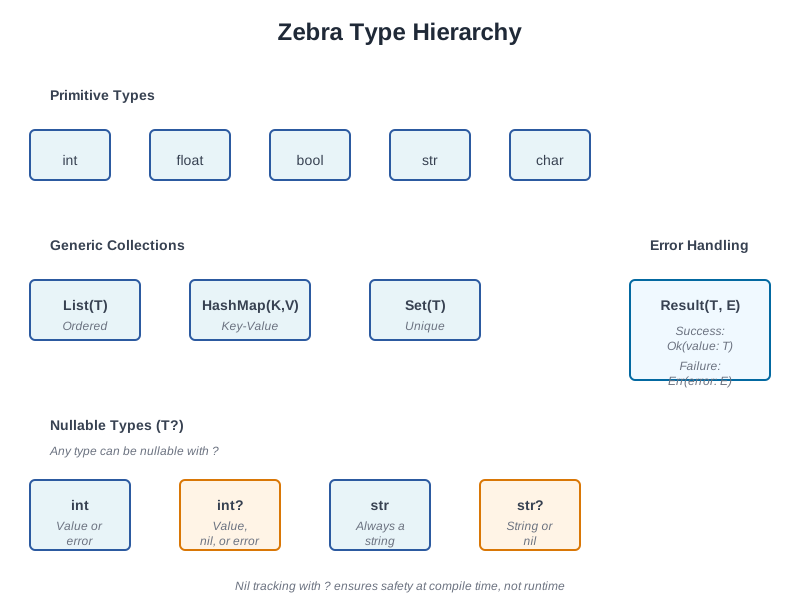
Basic Types
Integers
// file: 02_integers.zbr
// teaches: integer types, arithmetic // chapter: 02-Values-and-Types
class Main     shared         def main             var age as int = 25             var population as int = 8_000_000_000  // Underscores for readability             var tiny as int8 = 100             var huge as int64 = 9_223_372_036_854_775_807
            print age             print population             print tiny             print huge
Integer types: - int — Default integer (usually 64-bit) - int8, int16, int32, int64 — Specific sizes - uint, uint8, etc. — Unsigned (non-negative) integers
Arithmetic:
var x as int = 10
var y as int = 3 print x + y    // 13 print x - y    // 7 print x * y    // 30 print x / y    // 3 (integer division) print x % y    // 1 (remainder)
Floating Point
// file: 02_floats.zbr
// teaches: float types, precision // chapter: 02-Values-and-Types
class Main     shared         def main             var pi as float = 3.14159             var precise as float64 = 3.141592653589793
            print pi             print precise
            // Arithmetic             var result = pi * 2.0             print result
Float types: - float — Default floating point (usually 64-bit) - float32, float64 — Specific precision
Booleans
// file: 02_bools.zbr
// teaches: boolean values, logic // chapter: 02-Values-and-Types
class Main     shared         def main             var is_ready as bool = true             var is_finished as bool = false
            print is_ready             print is_finished
            // Logic             print true and false   // false             print true or false    // true             print not true         // false
Strings
// file: 02_strings.zbr
// teaches: string type, string operations // chapter: 02-Values-and-Types
class Main     shared         def main             var greeting as str = "Hello"             var name as str = "World"
            print greeting             print greeting.len      // 5             print greeting.upper()  // HELLO             print name.lower()      // world
            // Concatenation             var message = greeting.concat(" ").concat(name)             print message           // Hello World
String methods (we'll cover these fully in Chapter 06): - .len — Length - .upper() — Uppercase - .lower() — Lowercase - .concat() — Concatenate - .contains() — Check for substring - .split() — Split by delimiter
Declaring Variables
Explicit Types
var age as int = 25          // age must be int
var name as str = "Alice"    // name must be str var active as bool = true    // active must be bool
Type Inference
Zebra can figure out the type from the value:
var age = 25          // Inferred as int
var name = "Alice"    // Inferred as str var active = true     // Inferred as bool var pi = 3.14         // Inferred as float
When to use which: - Use inference — When the type is obvious (var count = 5) - Use explicit types — When clarity matters or to prevent mistakes
// This is confusing:
var x = compute_something()  // What type is x?
// This is clear: var payment_amount as float = compute_something()
Naming Conventions
Use snake_case for variables:
var user_id as int = 42           // ✅ Good
var UserID as int = 42            // ❌ Avoid (that's for classes) var user_id_number as int = 42    // ✅ Clear but verbose var uid as int = 42               // ❌ Too abbreviated
Comparison and Equality
// file: 02_comparisons.zbr
// teaches: comparison operators // chapter: 02-Values-and-Types
class Main     shared         def main             var x as int = 10             var y as int = 20
            print x == y    // false (equal)             print x != y    // true (not equal)             print x < y     // true (less than)             print x > y     // false (greater than)             print x <= y    // true (less or equal)             print x >= y    // false (greater or equal)
            var name = "Alice"             print name == "Alice"   // true             print name == "Bob"     // false
Type Conversions
Implicit Conversion (When Safe)
var small as int8 = 100
var big as int = small  // ✅ Fine: int8 → int is always safe
Explicit Conversion
// file: 02_conversions.zbr
// teaches: type conversion // chapter: 02-Values-and-Types
class Main     shared         def main             var x as int = 42             var s = x.toString()      // int → str             print s
            var pi as float = 3.14             var i = pi.toInt()        // float → int (loses decimal)             print i                   // 3
            var flag = true             var b = flag.toString()   // bool → str             print b                   // true
Nullable Types (Introduction)
Sometimes a value might not exist. Zebra uses ? to mark this:
// file: 02_nullables.zbr
// teaches: nullable types introduction // chapter: 02-Values-and-Types
class Main     shared         def main             var name as str? = "Alice"    // Can hold str or nil             var empty as str? = nil       // Explicitly nil
            // You must check before using             if name != nil                 print name                // Safe to use
            if empty != nil                 print empty             else                 print "Name is empty"
Key point: str? means "string or nil". We'll explore nil tracking fully in Chapter 11.
If you're new to programming
> A nullable type is like an optional value. Sometimes you have it, sometimes you don't. > Instead of errors when it's missing, Zebra lets you check first.
Type Mismatch Errors
Zebra prevents mixing types unsafely:
var x as int = "hello"  // ❌ Error: can't assign str to int
var y as str = 42       // ❌ Error: can't assign int to str var z as int = 3.14     // ❌ Error: can't assign float to int
Why? Type safety catches bugs before they happen. You can't accidentally treat a string as a number.
Real World: Processing User Data
// file: 02_user_data.zbr
// teaches: realistic variable use // chapter: 02-Values-and-Types
class User     var id as int     var name as str     var email as str     var age as int     var is_active as bool
class Main     shared         def main             // Create a user             var user = User()             user.id = 1             user.name = "Alice"             user.email = "alice@example.com"             user.age = 30             user.is_active = true
            // Display             print "User: ${user.name}"             print "Email: ${user.email}"             print "Age: ${user.age}"             print "Active: ${user.is_active}"
Common Mistakes
> ❌ Mistake: Forgetting as type when the type isn't obvious > >
> var result = compute() // What's the type? > result is. > > ✅ Better: > > var result as int = compute() // Clear: it's an int > > ❌ Mistake: Mixing types in arithmetic > >
> var x as int = 10 > var y as float = 3.14 > print x + y // ❌ Can't add int + float > > var x as float = 10.0 > var y as float = 3.14 > print x + y // ✅ Both float > > ❌ Mistake: Using a nullable type without checking > >
> var name as str? = nil > print name.upper() // ❌ Error: nil doesn't have .upper() > > var name as str? = nil > if name != nil > print name.upper() // Safe > Exercises
Exercise 1: Type Conversion
Write a program that: 1. Creates an integer variable 2. Creates a float variable 3. Converts both to strings 4. Prints them
Solution
class Main
    shared         def main             var count as int = 42             var price as float = 19.99
            var count_str = count.toString()             var price_str = price.toString()
            print "Count: ${count_str}"             print "Price: ${price_str}"
Output:
Count: 42
Price: 19.99
Exercise 2: Comparisons
Write a program that compares two numbers and prints which is larger:
Solution
class Main
    shared         def main             var x as int = 100             var y as int = 75
            if x > y                 print "${x} is larger than ${y}"             else                 print "${y} is larger than ${x}"
Output:
100 is larger than 75
Exercise 3: User Profile
Create a data structure to hold user information (name, age, email) and print a profile:
Solution
class Person
    var name as str     var age as int     var email as str
class Main     shared         def main             var person = Person()             person.name = "Carol"             person.age = 28             person.email = "carol@example.com"
            print "Name: ${person.name}"             print "Age: ${person.age}"             print "Email: ${person.email}"
Next Steps
- → 03-Collections — Lists and HashMaps - → 04-Functions — Write reusable code - → 11-Nil-Tracking — Deep dive into nullable types
Key Takeaways
- Every value has a type — Integers, floats, booleans, strings, and more - Types are checked at compile time — Catches bugs early - Use type inference when obvious, explicit types when clarity matters - Conversions are explicit — No silent type changes - Nullable types use ? — str? can be string or nil - Always check nil before using — if value != nil { ... }
Next: Head to 03-Collections to learn Lists and HashMaps.