03: Collections
Audience: All Time: 120 minutes Prerequisites: 01-Getting-Started, 02-Values-and-Types You'll learn: Lists, HashMaps, Sets, iteration, indexing, collection methods
The Big Picture
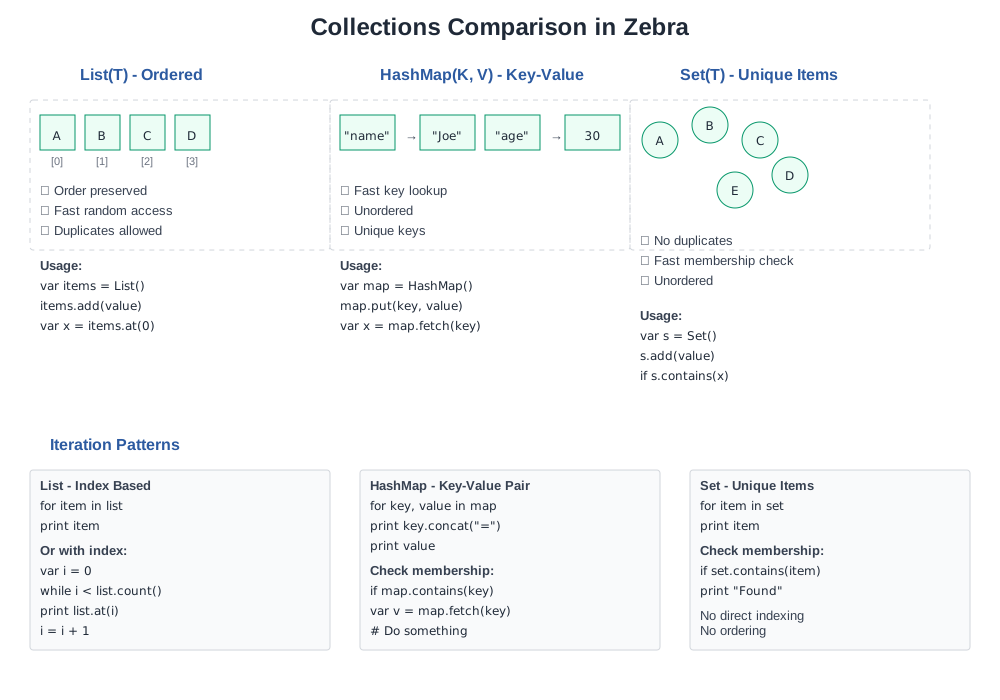
Collections let you group values. Instead of declaring 100 separate variables for 100 names, you use one List(str) that holds all 100.
Zebra provides: - List(T) — Ordered, resizable sequences (like Python's list) - HashMap(K, V) — Key-value pairs (like Python's dict) - Set(T) — Unique values (like Python's set)
Lists
A List holds multiple values of the same type in order.
Creating Lists
// file: 03_lists.zbr
// teaches: list creation and access // chapter: 03-Collections
class Main     shared         def main             // Create an empty list             var fruits as List(str) = List()
            // Add items             fruits.add("apple")             fruits.add("banana")             fruits.add("cherry")
            // Access by index             print fruits.at(0)   // apple             print fruits.at(1)   // banana
            // Check size             print fruits.count() // 3
            // Iterate             for fruit in fruits                 print fruit
List Operations
// file: 03_list_ops.zbr
// teaches: list manipulation // chapter: 03-Collections
class Main     shared         def main             var nums as List(int) = List()             nums.add(10)             nums.add(20)             nums.add(30)
            // Check existence             var has_twenty = nums.contains(20)             print has_twenty                    // true
            // Find index             var idx = nums.indexOf(20)             print idx                           // 1
            // Remove             nums.remove(20)             print nums.count()                  // 2
            // Clear             nums.clear()             print nums.count()                  // 0
Iteration Patterns
// file: 03_iteration.zbr
// teaches: different iteration styles // chapter: 03-Collections
class Main     shared         def main             var items as List(str) = List()             items.add("first")             items.add("second")             items.add("third")
            // Simple iteration             for item in items                 print item
            // Iteration with index (if supported)             var i = 0             while i < items.count()                 print "${i}: ${items.at(i)}"                 i = i + 1
If you're new to programming
> A List is like a numbered shelf. You can: > - Add items: list.add(item) > - Take items: list.remove(item) > - Check what's there: list.at(0) gets the first item > - Count items: list.count()
If you know Python
<h1>Python</h1>
fruits = ["apple", "banana"] fruits.append("cherry") for fruit in fruits:     print(fruit)
<h1>Zebra</h1> var fruits as List(str) = List() fruits.add("apple") fruits.add("banana") fruits.add("cherry") for fruit in fruits     print fruit
The main difference: Zebra requires explicit type (List(str)) while Python infers it.
HashMaps
A HashMap stores key-value pairs. Fast lookup by key.
Creating and Using HashMaps
// file: 03_hashmaps.zbr
// teaches: hashmap creation and access // chapter: 03-Collections
class Main     shared         def main             // Create empty HashMap             var ages as HashMap(str, int) = HashMap()
            // Add key-value pairs             ages.put("Alice", 30)             ages.put("Bob", 25)             ages.put("Carol", 28)
            // Retrieve by key             var alice_age = ages.fetch("Alice")             print alice_age                     // 30
            // Check if key exists             var has_alice = ages.contains("Alice")             print has_alice                     // true
            // Iterate             for name, age in ages                 print "${name}: ${age}"
HashMap Operations
// file: 03_hashmap_ops.zbr
// teaches: hashmap manipulation // chapter: 03-Collections
class Main     shared         def main             var config as HashMap(str, str) = HashMap()             config.put("host", "localhost")             config.put("port", "8080")             config.put("debug", "true")
            // Count entries             print config.count()                // 3
            // Remove entry             config.remove("debug")             print config.count()                // 2
            // Check contains             if config.contains("host")                 print config.fetch("host")      // localhost
            // Iterate over keys and values             for key, value in config                 print "${key} = ${value}"
If you know Python
<h1>Python</h1>
ages = {"Alice": 30, "Bob": 25} print(ages["Alice"]) for name, age in ages.items():     print(name, age)
<h1>Zebra</h1> var ages as HashMap(str, int) = HashMap() ages.put("Alice", 30) ages.put("Bob", 25) print ages.fetch("Alice") for name, age in ages     print "${name} ${age}"
Sets
A Set holds unique values. No duplicates.
// file: 03_sets.zbr
// teaches: sets for uniqueness // chapter: 03-Collections
class Main     shared         def main             var unique_ids as Set(int) = Set()
            // Add values             unique_ids.add(1)             unique_ids.add(2)             unique_ids.add(3)             unique_ids.add(2)    // Duplicate, won't add again
            print unique_ids.count()            // 3
            // Check membership             var has_two = unique_ids.contains(2)             print has_two                       // true
            // Remove             unique_ids.remove(2)             print unique_ids.count()            // 2
            // Iterate             for id in unique_ids                 print id
Real World: Data Processing
// file: 03_real_world.zbr
// teaches: collections in realistic scenarios // chapter: 03-Collections
class Student     var name as str     var gpa as float
class Main     shared         def main             // List of students             var students as List(Student) = List()
            var alice = Student()             alice.name = "Alice"             alice.gpa = 3.9             students.add(alice)
            var bob = Student()             bob.name = "Bob"             bob.gpa = 3.5             students.add(bob)
            // Calculate average GPA             var total = 0.0             for student in students                 total = total + student.gpa             var average = total / students.count()             print "Average GPA: ${average}"
            // Find student by name             var target_name = "Alice"             for student in students                 if student.name == target_name                     print "Found: ${student.name} (${student.gpa})"
Common Patterns
Filter and Transform
// file: 03_patterns.zbr
// teaches: collection patterns // chapter: 03-Collections
class Main     shared         def main             var numbers as List(int) = List()             numbers.add(1)             numbers.add(2)             numbers.add(3)             numbers.add(4)             numbers.add(5)
            // Filter: keep only even numbers             var evens as List(int) = List()             for num in numbers                 if num % 2 == 0                     evens.add(num)
            print "Evens: "             for e in evens                 print e
            // Count matching items             var count_gt_3 = 0             for num in numbers                 if num > 3                     count_gt_3 = count_gt_3 + 1             print "Numbers > 3: ${count_gt_3}"
Common Mistakes
> ❌ Mistake: Forgetting type parameters > >
> var items = List() // What type? List(what)? > > var items as List(str) = List() // Clear: list of strings > > ❌ Mistake: Iterating and modifying > >
> for item in items > items.remove(item) // ❌ Unsafe: modifying while iterating > > var to_remove as List(str) = List() > for item in items > if should_remove(item) > to_remove.add(item) > for item in to_remove > items.remove(item) > > ❌ Mistake: Using wrong key type for HashMap > >
> var map as HashMap(str, int) = HashMap() > map.put(1, 100) // ❌ Key should be str, not int > > var map as HashMap(str, int) = HashMap() > map.put("count", 100) // ✅ Key is str > Exercises
Exercise 1: List Operations
Create a list of numbers and find the sum:
Solution
class Main
    shared         def main             var nums as List(int) = List()             nums.add(10)             nums.add(20)             nums.add(30)             nums.add(40)
            var sum = 0             for num in nums                 sum = sum + num
            print "Sum: ${sum}"  // 100
Exercise 2: HashMap Lookup
Create a phone book and look up a number:
Solution
class Main
    shared         def main             var phone_book as HashMap(str, str) = HashMap()             phone_book.put("Alice", "555-1234")             phone_book.put("Bob", "555-5678")             phone_book.put("Carol", "555-9999")
            var name = "Bob"             if phone_book.contains(name)                 print "${name}'s number: ${phone_book.fetch(name)}"
Exercise 3: Unique Words
Count unique words in a sentence (using Set):
Solution
class Main
    shared         def main             var text = "the quick brown fox jumps over the lazy dog"             var words = text.split(" ")
            var unique as Set(str) = Set()             for word in words                 unique.add(word)
            print "Total words: ${words.count()}"             print "Unique words: ${unique.count()}"
Next Steps
- → 04-Functions — Reuse collection-processing code - → 05-Control-Flow — Pattern matching on collections - 🏋️ Project-3-Data-Analysis — Real collection processing
Key Takeaways
- List(T) holds ordered items, access by index - HashMap(K,V) holds key-value pairs, fast lookup - Set(T) holds unique values - Iteration with for item in collection is the main pattern - Type parameters are required: List(str) not just List - Modifying while iterating is unsafe; collect changes first
Next: Head to 04-Functions to write reusable code.