Project 1: Command-Line Text Processing Tool
Time: 3-4 hours Prereq: 01-12 Build: A file processor that counts words, finds patterns, and analyzes text
Project Overview
Create a CLI tool that: - Reads files from command line arguments - Counts lines, words, characters (like Unix wc command) - Searches for patterns (like grep-lite functionality) - Outputs statistics - Handles multiple files - Reports errors gracefully
Learning Outcomes: - Command-line argument parsing and validation - File I/O with proper error handling - Collections (List/HashMap) for data aggregation - Algorithms for text analysis - Error handling with Result types - Code organization in reusable modules - Testing strategies for CLI tools
Difficulty: Intermediate | Skills Required: 1-12 chapters | Team Size: Solo
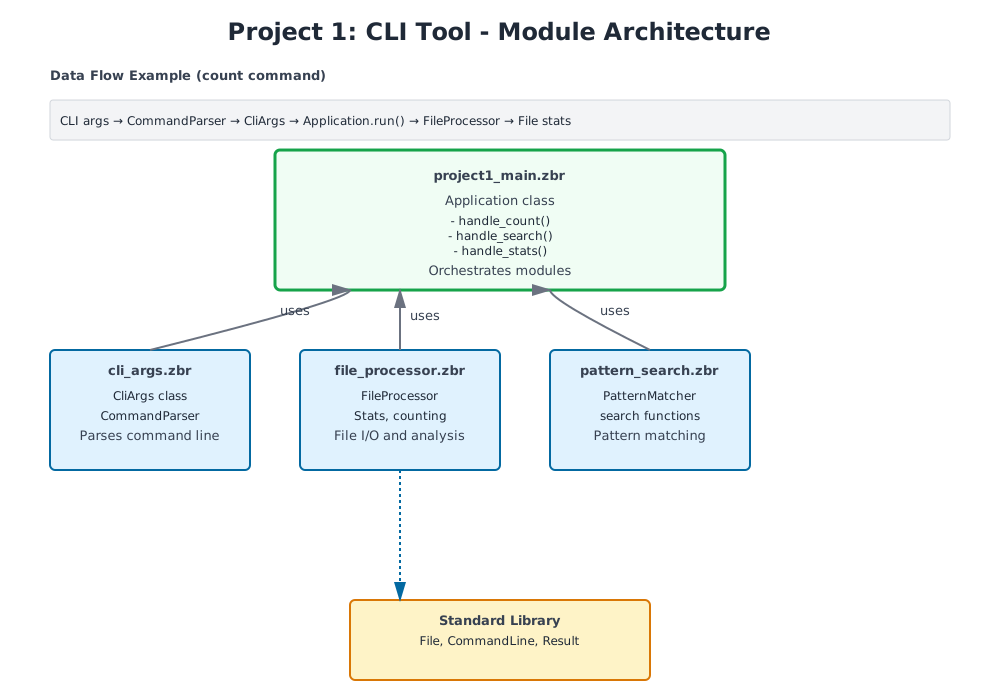
!Project 1 Module Architecture
Step 1: Command-Line Argument Parsing
First, create a module to handle CLI arguments:
// file: cli_args.zbr
// teaches: argument parsing // project: Project-1-CLI-Tool
class CliArgs     var command as str     var filename as str     var pattern as str?
    def init(command as str, filename as str)         this.command = command         this.filename = filename         pattern = nil
class CommandParser     shared         def parse(args as List(str)) as Result(CliArgs, str)             # Precondition: at least 2 arguments (program name + command + filename)             if args.count() < 3                 return Result.err("Usage: textool [command] [file]")
            var command = args.at(1)             var filename = args.at(2)
            # Validate command             if not valid_command(command)                 return Result.err("Unknown command: ${command}")
            # Create args object             var cli_args = CliArgs(command, filename)
            # Add pattern if provided             if args.count() >= 4                 cli_args.pattern = args.at(3)
            return Result.ok(cli_args)
        def valid_command(cmd as str) as bool             return cmd == "count" or cmd == "search" or cmd == "stats"
Step 2: File Reading and Basic Counting
Build the core file I/O and counting functionality:
// file: file_processor.zbr
// teaches: file I/O and text processing // project: Project-1-CLI-Tool
class FileProcessor     shared         def read_file(filename as str) as Result(str, str)             # Check if file exists first             if not File.exists(filename)                 return Result.err("File not found: ${filename}")
            # Read the entire file             var content = File.read(filename)
            if content.len == 0                 return Result.err("File is empty: ${filename}")
            return Result.ok(content)
        def count_lines(filename as str) as Result(int, str)             var content_result = read_file(filename)
            if content_result.isErr()                 return Result.err(content_result.errValue())
            var content = content_result.okValue()             var lines = content.split("\n")
            # Count non-empty lines (common behavior)             var count = 0             for line in lines                 if line.trim().len > 0                     count = count + 1
            return Result.ok(count)
        def count_words(filename as str) as Result(int, str)             var content_result = read_file(filename)
            if content_result.isErr()                 return Result.err(content_result.errValue())
            var content = content_result.okValue()             var words = content.split(" ")
            var count = 0             for word in words                 if word.trim().len > 0                     count = count + 1
            return Result.ok(count)
        def count_chars(filename as str) as Result(int, str)             var content_result = read_file(filename)
            if content_result.isErr()                 return Result.err(content_result.errValue())
            var content = content_result.okValue()             return Result.ok(content.len)
        def get_stats(filename as str) as Result(Stats, str)             var content_result = read_file(filename)
            if content_result.isErr()                 return Result.err(content_result.errValue())
            var content = content_result.okValue()
            var lines = content.split("\n")             var line_count = lines.count()             var word_count = 0             var char_count = content.len
            for line in lines                 var words = line.split(" ")                 for word in words                     if word.len > 0                         word_count = word_count + 1
            var stats = Stats(filename, line_count, word_count, char_count)             return Result.ok(stats)
class Stats     var filename as str     var lines as int     var words as int     var chars as int
    def init(filename as str, lines as int, words as int, chars as int)         this.filename = filename         this.lines = lines         this.words = words         this.chars = chars
    def display as str         return "${lines} lines, ${words} words, ${chars} chars: ${filename}"
Step 3: Pattern Matching
Add grep-like pattern search functionality:
// file: pattern_search.zbr
// teaches: pattern matching and filtering // project: Project-1-CLI-Tool
class PatternMatcher     shared         def search_lines(filename as str, pattern as str) as Result(List(str), str)             var content_result = FileProcessor.read_file(filename)
            if content_result.isErr()                 return Result.err(content_result.errValue())
            var content = content_result.okValue()             var lines = content.split("\n")
            var matches as List(str) = List()             var line_num = 0
            for line in lines                 line_num = line_num + 1                 if line.contains(pattern)                     # Format: "line_number: content"                     var formatted = "${line_num}: ${line}"                     matches.add(formatted)
            if matches.count() == 0                 return Result.err("No matches found for pattern: ${pattern}")
            return Result.ok(matches)
        def search_with_context(filename as str, pattern as str, context_lines as int) as Result(List(str), str)             var content_result = FileProcessor.read_file(filename)
            if content_result.isErr()                 return Result.err(content_result.errValue())
            var content = content_result.okValue()             var lines = content.split("\n")
            var results as List(str) = List()             var line_num = 0
            for line in lines                 line_num = line_num + 1                 if line.contains(pattern)                     # Add context lines before                     var start = line_num - context_lines - 1                     if start < 0                         start = 0
                    var i = start                     while i < line_num - 1                         results.add(lines.at(i))                         i = i + 1
                    # Add the matching line (with marker)                     results.add("> ${line_num}: ${line}")
                    # Add context lines after                     var end = line_num + context_lines                     if end > lines.count()                         end = lines.count()
                    i = line_num                     while i < end                         results.add(lines.at(i))                         i = i + 1
            return Result.ok(results)
Step 4: Main Application Logic
Tie everything together in the main entry point:
// file: project1_main.zbr
// teaches: orchestrating modules // project: Project-1-CLI-Tool
class Application     var args as CliArgs
    def init(parsed_args as CliArgs)         args = parsed_args
    def run as Result(bool, str)         if args.command == "count"             return handle_count()         elif args.command == "search"             return handle_search()         elif args.command == "stats"             return handle_stats()
        return Result.err("Unknown command: ${args.command}")
    def handle_count as Result(bool, str)         var lines = FileProcessor.count_lines(args.filename)
        if lines.isErr()             return lines
        var words = FileProcessor.count_words(args.filename)         var chars = FileProcessor.count_chars(args.filename)
        print "${lines.okValue()} lines"         print "${words.okValue()} words"         print "${chars.okValue()} chars"
        return Result.ok(true)
    def handle_search as Result(bool, str)         if args.pattern == nil             return Result.err("Search requires a pattern")
        var results = PatternMatcher.search_lines(args.filename, args.pattern)
        if results.isErr()             return results
        var matches = results.okValue()         print "Found ${matches.count()} matches:"
        for match in matches             print match
        return Result.ok(true)
    def handle_stats as Result(bool, str)         var stats = FileProcessor.get_stats(args.filename)
        if stats.isErr()             return stats
        var s = stats.okValue()         print s.display()
        return Result.ok(true)
class Main     shared         def main             var args = CommandLine.args()
            var parsed = CommandParser.parse(args)
            if parsed.isErr()                 print "Error: ${parsed.errValue()}"                 return
            var cli_args = parsed.okValue()             var app = Application(cli_args)
            var result = app.run()
            if result.isErr()                 print "Error: ${result.errValue()}"
Part 2: Adding Features
class FileAnalyzer
    shared         def analyze(filename as str) as Result(str, str)             var lines_result = FileProcessor.count_lines(filename)             if lines_result.isErr()                 return Result.err(lines_result.errValue())
            var words_result = FileProcessor.count_words(filename)             if words_result.isErr()                 return Result.err(words_result.errValue())
            var lines = lines_result.okValue()             var words = words_result.okValue()             var report = "Lines: ${lines}, Words: ${words}"             return Result.ok(report)
class Main     shared         def main             var result = FileAnalyzer.analyze("test.txt")             if result.isOk()                 print result.okValue()
Part 3: Full Implementation
Add these features: - Read command-line arguments - Support multiple files - Pattern matching (grep-like) - Output formatting - Error handling
Expected functionality:
<h1>Word count</h1>
tool -c file.txt          # Count lines tool -w file.txt          # Count words tool -l file.txt          # Get line length
<h1>Search</h1> tool -s "pattern" file.txt  # Search lines matching pattern
<h1>Multiple files</h1> tool -c file1.txt file2.txt # Count lines in multiple files
Testing Your Project
Create a test file to verify your implementation:
<h1>Create sample file</h1>
echo "The quick brown fox" > sample.txt echo "jumps over the lazy dog" >> sample.txt
<h1>Test commands</h1> zebra textool count sample.txt        # Count lines, words, chars zebra textool search quick sample.txt # Find pattern zebra textool stats sample.txt        # Show statistics
Exercises & Extensions
Exercise 1: Add Line Numbering Output
Modify the search function to always show line numbers with output:
def search_with_numbers(filename as str, pattern as str) as Result(List(str), str)
    var results = PatternMatcher.search_lines(filename, pattern)     if results.isErr()         return results
    # Results already have line numbers from PatternMatcher     return results
Exercise 2: Find Longest Line
Add a new longest command that finds and displays the longest line:
class FileProcessor
    shared         def find_longest_line(filename as str) as Result(str, str)             var content_result = read_file(filename)             if content_result.isErr()                 return content_result
            var lines = content_result.okValue().split("\n")             var longest = ""             var max_len = 0
            for line in lines                 if line.len > max_len                     max_len = line.len                     longest = line
            return Result.ok("Longest (${max_len} chars): ${longest}")
Exercise 3: Statistics Summary
Extend stats to show min/max/average line length:
class Stats
    var filename as str     var lines as int     var words as int     var chars as int     var min_line_len as int     var max_line_len as int     var avg_line_len as float
    def display as str         var summary = "${lines} lines, ${words} words, ${chars} chars\n"         summary = summary.concat("Line lengths: min=${min_line_len}, max=${max_line_len}, avg=${avg_line_len}")         return summary
Exercise 4: Case-Insensitive Search
Add support for a -i flag to search case-insensitively:
class PatternMatcher
    shared         def search_case_insensitive(filename as str, pattern as str) as Result(List(str), str)             var content_result = FileProcessor.read_file(filename)             if content_result.isErr()                 return content_result
            var content = content_result.okValue()             var lines = content.split("\n")             var pattern_lower = pattern.lower()
            var matches as List(str) = List()             var line_num = 0
            for line in lines                 line_num = line_num + 1                 if line.lower().contains(pattern_lower)                     matches.add("${line_num}: ${line}")
            return Result.ok(matches)
Challenge: Support Multiple Files
Modify the application to process multiple files at once:
class Application
    var files as List(str)
    def aggregate_stats(filenames as List(str)) as Result(str, str)         var total_lines = 0         var total_words = 0         var total_chars = 0
        for filename in filenames             var stats = FileProcessor.get_stats(filename)             if stats.isOk()                 var s = stats.okValue()                 total_lines = total_lines + s.lines                 total_words = total_words + s.words                 total_chars = total_chars + s.chars
        var result = "Total: ${total_lines} lines, ${total_words} words, ${total_chars} chars"         return Result.ok(result)
Key Concepts Reinforced
- File I/O — Reading files with error handling - Collections — Using List to accumulate results - Control flow — Iterating and filtering text - Nil handling — Optional pattern argument - Error handling — Proper Result type propagation - Classes — Organizing functionality into modules - Strings — Splitting, searching, formatting - Result patterns — Success and error paths
Architecture Decisions
Module Organization: - cli_args.zbr — Argument parsing (thin responsibility) - file_processor.zbr — Core file I/O (stable, well-tested) - pattern_search.zbr — Search logic (isolated from I/O) - project1_main.zbr — Orchestration and CLI (thin coordinator)
Why this structure? Each module has a clear, testable responsibility. You can test file reading separately from pattern matching, and both separately from CLI handling.
Error Handling Strategy: All I/O operations return Result. Errors bubble up naturally—if file reading fails, search fails; if search fails, the app reports it. No hidden failures.
Expected code size: 300-400 lines total with all exercises
What You've Built
✅ Real-world program structure with modules ✅ Complete file and stream processing ✅ Command-line interface with argument parsing ✅ Robust error handling with Result types ✅ Pattern matching and text analysis ✅ Extensible design for new features
Performance Notes
For large files (>10MB), consider: 1. Reading line-by-line instead of entire file into memory 2. Early exit from search (stop after first N matches) 3. Streaming pattern matching instead of loading whole file
Example streaming read:
<h1>Read and process line-by-line instead of all at once</h1>
def count_lines_streaming(filename as str) as Result(int, str)     # (Pseudocode - requires file iteration API)     var count = 0     # for line in File.read_lines(filename)     #     count = count + 1     return Result.ok(count)
Next: Project 2 adds networking and concurrency concepts to build an HTTP server.