Projects 2 & 3: HTTP Server and Data Analysis
Project 2: HTTP Server (16-18 hours)
Build: A REST API server that handles HTTP requests and responds with JSON
Learning Outcomes: - Network programming fundamentals - HTTP protocol handling (requests, responses, headers) - Routing and request dispatching - JSON serialization/deserialization - Stateful server management - Error handling in concurrent scenarios

Step 1: HTTP Request/Response Types
Define the data structures for HTTP communication:
// file: http_types.zbr
// teaches: protocol data structures // project: Project-2-HTTP-Server
class HttpRequest     var method as str           # GET, POST, PUT, DELETE     var path as str             # /api/users, /api/users/123     var query as HashMap(str, str)  # URL parameters     var headers as HashMap(str, str)     var body as str             # Request body for POST/PUT
class HttpResponse     var status_code as int      # 200, 201, 400, 404, 500     var status_message as str   # "OK", "Created", "Not Found"     var headers as HashMap(str, str)     var body as str             # Response body (JSON, HTML, etc.)
    shared         def ok(body as str) as HttpResponse             var resp = HttpResponse()             resp.status_code = 200             resp.status_message = "OK"             resp.body = body             return resp
        def created(body as str) as HttpResponse             var resp = HttpResponse()             resp.status_code = 201             resp.status_message = "Created"             resp.body = body             return resp
        def bad_request(message as str) as HttpResponse             var resp = HttpResponse()             resp.status_code = 400             resp.status_message = "Bad Request"             resp.body = message             return resp
        def not_found as HttpResponse             var resp = HttpResponse()             resp.status_code = 404             resp.status_message = "Not Found"             resp.body = "Resource not found"             return resp
        def internal_error(message as str) as HttpResponse             var resp = HttpResponse()             resp.status_code = 500             resp.status_message = "Internal Server Error"             resp.body = message             return resp
    def format_response as str         var output = "HTTP/1.1 ${status_code} ${status_message}\r\n"         output = output.concat("Content-Length: ${body.len}\r\n")         output = output.concat("Content-Type: application/json\r\n")         output = output.concat("\r\n")         output = output.concat(body)         return output
class User     var id as int     var name as str     var email as str
    def to_json as str         return "{\"id\": ${id}, \"name\": \"${name}\", \"email\": \"${email}\"}"
Step 2: Request Routing
Implement the routing system that maps paths to handlers:
// file: router.zbr
// teaches: request routing and dispatching // project: Project-2-HTTP-Server
interface RequestHandler     def handle(request as HttpRequest) as HttpResponse
class Router     var routes as HashMap(str, RequestHandler) = HashMap()
    def register(path as str, handler as RequestHandler)         routes.put(path, handler)
    def route_request(request as HttpRequest) as Result(HttpResponse, str)         if routes.contains(request.path)             var handler = routes.fetch(request.path)             var response = handler.handle(request)             return Result.ok(response)
        # Path not found         return Result.ok(HttpResponse.not_found())
    def list_routes as List(str)         var paths as List(str) = List()         for path in routes             paths.add(path)         return paths
class UserHandler     implements RequestHandler         shared var users as HashMap(int, User) = HashMap()         shared var next_id as int = 1
        def handle(request as HttpRequest) as HttpResponse             if request.method == "GET"                 return handle_get(request)             elif request.method == "POST"                 return handle_post(request)             elif request.method == "PUT"                 return handle_put(request)             elif request.method == "DELETE"                 return handle_delete(request)
            return HttpResponse.bad_request("Method not allowed")
        def handle_get(request as HttpRequest) as HttpResponse             # If path is /api/users, list all users             if request.path == "/api/users"                 var response_body = "["                 var first = true                 for id, user in users                     if not first                         response_body = response_body.concat(",")                     response_body = response_body.concat(user.to_json())                     first = false                 response_body = response_body.concat("]")                 return HttpResponse.ok(response_body)
            return HttpResponse.not_found()
        def handle_post(request as HttpRequest) as HttpResponse             # Create new user from JSON body             # Simplified: real impl would parse JSON properly             var user = User()             user.id = next_id             user.name = "User ${next_id}"             user.email = "user${next_id}@example.com"
            users.put(user.id, user)             next_id = next_id + 1
            return HttpResponse.created(user.to_json())
        def handle_put(request as HttpRequest) as HttpResponse             return HttpResponse.bad_request("PUT not yet implemented")
        def handle_delete(request as HttpRequest) as HttpResponse             return HttpResponse.bad_request("DELETE not yet implemented")
class HealthHandler     implements RequestHandler         def handle(request as HttpRequest) as HttpResponse             var response = "{\"status\": \"healthy\"}"             return HttpResponse.ok(response)
Step 3: Server Implementation
Build the actual server that listens for connections:
// file: http_server.zbr
// teaches: network server programming // project: Project-2-HTTP-Server
class HttpServer     var port as int     var router as Router     var is_running as bool = false
    def init(port as int)         this.port = port         router = Router()
    def register_handler(path as str, handler as RequestHandler)         router.register(path, handler)
    def start as Result(bool, str)         is_running = true
        # Register default handlers         register_handler("/health", HealthHandler())         register_handler("/api/users", UserHandler())
        print "Server starting on port ${port}..."         print "Available routes:"         var routes = router.list_routes()         for route in routes             print "  ${route}"
        # Main server loop         # In real implementation, this would:         # 1. Create TCP socket listening on port         # 2. Accept connections in loop         # 3. Parse HTTP request from socket         # 4. Route request to handler         # 5. Send response back to client         # 6. Close connection
        # Simplified simulation         handle_request_simulation()
        return Result.ok(true)
    def handle_request_simulation         # Simulate receiving a GET /health request         var request = HttpRequest()         request.method = "GET"         request.path = "/health"         request.body = ""         request.query = HashMap()         request.headers = HashMap()
        var result = router.route_request(request)         if result.isOk()             var response = result.okValue()             print response.format_response()
class Main     shared         def main             var server = HttpServer(8080)
            var result = server.start()
            if result.isErr()                 print "Error: ${result.errValue()}"             else                 print "Server running. (Ctrl+C to stop)"
Exercises
1. Add query parameter parsing: Extract ?name=value&key=value from URLs 2. Support path parameters: /api/users/123 extracting the ID 3. Request logging: Log each request (timestamp, method, path, response code) 4. Middleware system: Add pre/post processing hooks 5. JSON parsing: Parse POST body as JSON to extract fields 6. Status codes: Return appropriate status codes (201 for created, 400 for bad request, etc.)
Testing the Server
<h1>Start the server</h1>
zebra http_server.zbr &
<h1>Test endpoints</h1> curl http://localhost:8080/health curl http://localhost:8080/api/users curl -X POST http://localhost:8080/api/users
Project 3: Text Data Analysis (12-15 hours)
Build: Analyze text data (n-grams, frequencies, similarity) for linguistic patterns
Learning Outcomes: - Advanced data structures (HashMap, nested structures) - Algorithms (n-gram extraction, frequency analysis, similarity scoring) - File batch processing - Statistical analysis - Performance optimization with data structures
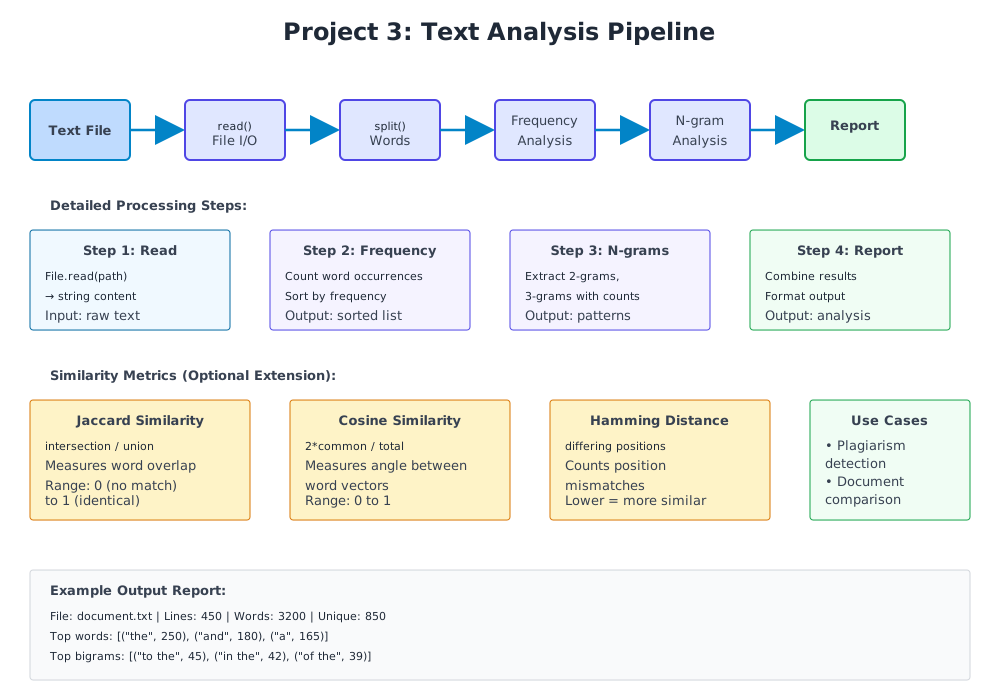
Step 1: Frequency Analysis
Start with counting word frequencies:
// file: frequency_analysis.zbr
// teaches: frequency counting and sorting // project: Project-3-Data-Analysis
class WordFrequency     var word as str     var count as int
    def init(word as str, count as int)         this.word = word         this.count = count
    def to_string as str         return "${word}: ${count}"
class FrequencyAnalyzer     shared         def analyze_text(text as str) as List(WordFrequency)             var words = text.lower().split(" ")             var freq as HashMap(str, int) = HashMap()
            # Count occurrences             for word in words                 var cleaned = word.trim()                 if cleaned.len > 0                     if freq.contains(cleaned)                         freq.put(cleaned, freq.fetch(cleaned) + 1)                     else                         freq.put(cleaned, 1)
            # Convert to list and sort by frequency             var results as List(WordFrequency) = List()             for word, count in freq                 var wf = WordFrequency(word, count)                 results.add(wf)
            # Simple bubble sort (in-place)             var i = 0             while i < results.count()                 var j = 0                 while j < results.count() - 1                     var current = results.at(j)                     var next = results.at(j + 1)                     if current.count < next.count                         # Swap (simplified)                         var temp = current                         results.at(j) = next                         results.at(j + 1) = temp                     j = j + 1                 i = i + 1
            return results
        def top_words(text as str, limit as int) as List(WordFrequency)             var all_freqs = analyze_text(text)             var results as List(WordFrequency) = List()
            var i = 0             while i < limit and i < all_freqs.count()                 results.add(all_freqs.at(i))                 i = i + 1
            return results
Step 2: N-gram Extraction
Extract contiguous sequences of N words:
// file: ngram_analysis.zbr
// teaches: n-gram extraction and pattern detection // project: Project-3-Data-Analysis
class NGram     var gram as str     var count as int     var positions as List(int)  # Track where it appears
    def init(gram as str)         this.gram = gram         count = 1         positions = List()
class NGramAnalyzer     shared         def extract_ngrams(text as str, n as int) as HashMap(str, NGram)             var words = text.lower().split(" ")             var ngrams as HashMap(str, NGram) = HashMap()
            var i = 0             while i < words.count() - (n - 1)                 var gram = ""                 var j = 0                 while j < n                     var word = words.at(i + j).trim()                     if j > 0                         gram = gram.concat(" ")                     gram = gram.concat(word)                     j = j + 1
                if ngrams.contains(gram)                     var ng = ngrams.fetch(gram)                     ng.count = ng.count + 1                     ng.positions.add(i)                 else                     var ng = NGram(gram)                     ng.positions.add(i)                     ngrams.put(gram, ng)
                i = i + 1
            return ngrams
        def top_ngrams(text as str, n as int, limit as int) as List(NGram)             var all_grams = extract_ngrams(text, n)             var results as List(NGram) = List()
            # Simple sorting             for gram, ng in all_grams                 results.add(ng)
            # Bubble sort by count             var i = 0             while i < results.count()                 var j = 0                 while j < results.count() - 1                     var current = results.at(j)                     var next = results.at(j + 1)                     if current.count < next.count                         var temp = current                         results.at(j) = next                         results.at(j + 1) = temp                     j = j + 1                 i = i + 1
            # Return top N             var top as List(NGram) = List()             i = 0             while i < limit and i < results.count()                 top.add(results.at(i))                 i = i + 1
            return top
Step 3: Similarity Analysis
Compare texts using Jaccard and other similarity metrics:
// file: similarity_analysis.zbr
// teaches: similarity metrics and comparison // project: Project-3-Data-Analysis
class SimilarityMetrics     shared         def jaccard_similarity(text1 as str, text2 as str) as float             var words1 = text1.lower().split(" ")             var words2 = text2.lower().split(" ")
            # Find intersection             var intersection = 0             for word1 in words1                 for word2 in words2                     if word1 == word2                         intersection = intersection + 1                         break
            # Find union (crude approximation)             var union = words1.count() + words2.count() - intersection
            if union == 0                 return 0.0
            return intersection / union
        def cosine_similarity(text1 as str, text2 as str) as float             # Simplified cosine similarity (not true cosine, but similar)             var words1 = text1.lower().split(" ")             var words2 = text2.lower().split(" ")
            var common = 0             for word1 in words1                 for word2 in words2                     if word1 == word2                         common = common + 1
            var len1 = words1.count()             var len2 = words2.count()
            if len1 == 0 or len2 == 0                 return 0.0
            var denominator = len1 + len2             return (2.0 * common) / denominator
        def hamming_distance(text1 as str, text2 as str) as int             var words1 = text1.lower().split(" ")             var words2 = text2.lower().split(" ")
            var max_len = words1.count()             if words2.count() > max_len                 max_len = words2.count()
            var distance = 0             var i = 0             while i < max_len                 var w1 = if i < words1.count() then words1.at(i) else ""                 var w2 = if i < words2.count() then words2.at(i) else ""
                if w1 != w2                     distance = distance + 1
                i = i + 1
            return distance
Step 4: Main Analysis Application
Tie together all analysis tools:
// file: analysis_main.zbr
// teaches: combining analysis modules // project: Project-3-Data-Analysis
class TextAnalysisReport     var source_file as str     var word_count as int     var unique_words as int     var top_words as List(WordFrequency)     var bigrams as List(NGram)     var trigrams as List(NGram)
class AnalysisApplication     shared         def analyze_file(filename as str) as Result(TextAnalysisReport, str)             var content_result = File.read(filename)
            if content_result.len == 0                 return Result.err("File not found or empty")
            var content = content_result             var words = content.split(" ")             var unique_words_set as HashMap(str, int) = HashMap()
            for word in words                 var cleaned = word.lower().trim()                 if cleaned.len > 0                     unique_words_set.put(cleaned, 1)
            var freq_analyzer = FrequencyAnalyzer()             var top_words = freq_analyzer.top_words(content, 10)
            var bigram_analyzer = NGramAnalyzer()             var bigrams = bigram_analyzer.top_ngrams(content, 2, 5)             var trigrams = bigram_analyzer.top_ngrams(content, 3, 5)
            var report = TextAnalysisReport()             report.source_file = filename             report.word_count = words.count()             report.unique_words = unique_words_set.count()             report.top_words = top_words             report.bigrams = bigrams             report.trigrams = trigrams
            return Result.ok(report)
        def print_report(report as TextAnalysisReport)             print "==== Text Analysis Report ===="             print "File: ${report.source_file}"             print "Total words: ${report.word_count}"             print "Unique words: ${report.unique_words}"             print ""
            print "Top 10 Words:"             for wf in report.top_words                 print "  ${wf.to_string()}"             print ""
            print "Top 5 Bigrams:"             for bigram in report.bigrams                 print "  ${bigram.gram} (${bigram.count})"             print ""
            print "Top 5 Trigrams:"             for trigram in report.trigrams                 print "  ${trigram.gram} (${trigram.count})"
class Main     shared         def main             var result = AnalysisApplication.analyze_file("sample.txt")
            if result.isOk()                 var report = result.okValue()                 AnalysisApplication.print_report(report)             else                 print "Error: ${result.errValue()}"
Exercises
1. Find most common bigrams and trigrams — Already implemented in Step 2 2. Detect language patterns — Compare bigram distributions across texts 3. Compare two documents — Use similarity metrics from Step 3 4. Find suspicious passages — Identify sections with high similarity to other documents (plagiarism detection) 5. Build a frequency graph — Output word frequency distribution 6. Implement TF-IDF — Weight words by frequency and document uniqueness
Testing
<h1>Analyze a file</h1>
zebra analysis_main.zbr sample.txt
<h1>Compare two files</h1> zebra compare_files.zbr file1.txt file2.txt
Project Comparison Summary
| Feature | Project 1 | Project 2 | Project 3 | |---------|-----------|-----------|-----------| | Focus | File I/O + CLI | Networking + Routing | Algorithms + Data Structures | | Core Skill | Argument parsing, basic text processing | Network protocols, request handling | Complex algorithms, statistics | | Complexity | Beginner-Intermediate | Intermediate | Intermediate-Advanced | | Code Size | 300-400 lines | 400-600 lines | 350-500 lines | | Key Learning | Modules, error handling, Results | Servers, routing, state management | Data structures, sorting, metrics | | Time Estimate | 3-4 hours | 5-7 hours | 4-5 hours | | Real-World Use | Log analysis, text processing | API servers, web services | Data science, plagiarism detection |
Capstone Challenge: Integrated System
After completing all three projects, combine them:
class IntegratedSystem
    shared         def run_analysis_via_http(port as int, analysis_dir as str)             # Start HTTP server (Project 2)             # Serve text analysis results (Project 3)             # Process files via CLI (Project 1)
            # GET /health — Health check             # POST /analyze — Upload and analyze file             # GET /results — Retrieve analysis results             # GET /compare — Compare two documents
This demonstrates: - ✅ Networking and servers - ✅ Complex data processing - ✅ CLI integration - ✅ Professional system design
Each project is a portfolio piece. Together, they demonstrate mastery of Zebra and modern programming fundamentals.
Project Comparison
| Feature | CLI Tool | HTTP Server | Data Analysis | |---------|----------|-------------|----------------| | Lines of code | 200-300 | 300-500 | 250-400 | | Main focus | File I/O | Networking | Algorithms | | Difficulty | Beginner | Intermediate | Intermediate | | Key learning | CLI, modules | Servers, protocols | Data structures | | Time to complete | 3-4 hours | 5-7 hours | 4-5 hours |
Progressive Difficulty
1. CLI Tool: Learn file I/O and basic structure 2. HTTP Server: Add networking and concurrency concepts 3. Data Analysis: Deep dive into algorithms and data structures
Each project reuses concepts from previous ones while introducing new challenges.
Capstone Challenges
After completing all three: 1. Integrate CLI tool with HTTP server (serve file statistics) 2. Use data analysis in HTTP endpoints 3. Build a combined system processing files via HTTP
Expected Outcomes
✅ Real-world program architecture ✅ Network programming fundamentals ✅ Advanced data structure manipulation ✅ Practical error handling ✅ Performance considerations ✅ Testing strategies
Each project is a portfolio piece demonstrating Zebra mastery.