The Zebra Programming Language
A guide to Zebra from fundamentals through advanced patterns, for experienced programmers learning a new language.
Zebra is a statically-typed, compiled language with Python-flavoured syntax (by way of Cobra). It compiles to Zig, and from there to native code. The language and compiler live at github.com/torial/zebra-language; this book's source is at github.com/torial/zebra-language-book.
How the book is organised
| Part | What it covers |
|---|---|
| Part 1: Foundations | Installing the toolchain, values and types, collections, functions, control flow, strings. |
| Part 2: Objects and Interfaces | Classes, structs and unions, interfaces, composition and mixins, properties, modules. |
| Part 3: Advanced Features | Nil tracking, exception-based error handling (throws, raise, catch), generics, contracts, memory and lifetimes, concurrency, pipelines. |
| Part 4: Practical Projects | Three worked projects (a CLI tool, an HTTP server, a text-analysis tool) plus GUI applications. |
| Part 5: Ecosystem | Standard library tour, file I/O, regular expressions, FFI, the build system, testing. |
| Appendices | Grammar, standard library, troubleshooting, and attribute references. |
| Quick References | A 30-minute quickstart, a one-page syntax cheat sheet, and copy-paste patterns for common tasks. |
Where to start
- New to Zebra? Start with 01: Getting Started and read Part 1 in order.
- In a hurry? Read the 30-Minute Quickstart, then keep the Syntax Cheat Sheet open while you work.
- Coming from an OOP language? Chapters 07–10b, then 11 and 12.
- Interested in safety features? Chapters 11 (nil tracking), 12 (results), 14 (contracts), 14b (lifetimes).
Use the sidebar (or the ← / → keys) to move between chapters, and the search icon
(or S) to search the whole book.
Status
The chapters are re-verified against the current Zebra compiler on a rolling basis;
validate-examples.py in the repository is the source of truth for which code examples
compile. Found a mistake? See
CONTRIBUTING.md.
01: Getting Started
Audience: All
Time: 30 minutes
Prerequisites: None
You'll learn: Install Zebra, run your first program, understand the toolchain
The Big Picture
Zebra is a modern, statically-typed language that prioritizes safety, clarity, and correctness. It combines ideas from Python, C#, Objective-C, and Eiffel into a pragmatic language for building robust systems.
This book teaches you to write Zebra code fluently. By the end, you'll understand:
- How Zebra's type system catches bugs at compile time
- Why nil tracking and error handling are first-class citizens
- How to write clean, expressive code that reads almost like pseudocode
Let's get your environment set up and run your first program.
What is Zebra?
Short version: A statically-typed language that feels dynamic, with compile-time safety guarantees that prevent entire categories of bugs.
Key properties:
- Compiled — Zebra code compiles to Zig (which then compiles to machine code)
- Strongly typed — Types are checked at compile time, preventing type mismatches
- Nil-safe — You explicitly mark values that can be
nil, preventing null pointer errors - Error-aware — A function that can fail says so (
throws); every caller either handles the error (catch) or passes it on explicitly (?), so a failure cannot be silently dropped - Expressive — Clear, readable syntax that emphasizes intent over cleverness
Who uses it: People building systems where reliability matters (CLI tools, servers, data processing, embedded systems).
Installation
Which Zebra this book targets. The book tracks the language as of Zebra 0.9.0-rc3. Anything older — including 0.9.0-rc1 and rc2 — lacks parts of what the later chapters teach (the GUI chapter's toolbars, trees,
g.scopeand hotkeys, among others), so install rc3 or newer.zebra --versiontells you what you have.
A release is one folder: the zebra compiler, the Zig toolchain it was built and tested
with, the language guide and the examples. You do not need to install Zig
separately — Zebra compiles your program to Zig and builds it with the bundled copy.
Windows (PowerShell)
irm https://raw.githubusercontent.com/torial/zebra-language/main/install/install.ps1 | iex
This installs to %USERPROFILE%\.zebra\current and adds it to your user PATH. Open a
new terminal so the PATH change takes effect, then:
zebra --version
Linux and macOS
curl -fsSL https://raw.githubusercontent.com/torial/zebra-language/main/install/install.sh | sh
This installs to ~/.zebra/current and prints the export PATH=... line to add to your
shell profile (~/.bashrc, ~/.zshrc). Add it, open a new terminal, then run
zebra --version.
Updating
zebra up            # download the latest release, verify it, swap it in
zebra up --check    # only report whether a newer release exists
Manual install
Download the archive for your platform from
the Releases page, unpack it anywhere,
and put that folder on your PATH.
From source
Building from source needs Zig 0.16.0 on your PATH (other versions are not
supported):
git clone https://github.com/torial/zebra-language.git
cd zebra-language
zig build
The compiler is zig-out/bin/zebra (zebra.exe on Windows). Add zig-out/bin to your
PATH so zebra works from any directory. A source build uses the Zig on your PATH
to build your programs too.
Your First Program
Create a file named hello.zbr:
# file: hello.zbr
# teaches: hello world, the print function
# chapter: 01-Getting-Started

def main()
    print("Hello, Zebra!")
Run it:
zebra hello.zbr
Output:
Hello, Zebra!
What just happened?
def main()— Defined the entry point function. Zebra runsmainautomatically when the program starts.print("...")— Printed text to the console.zebra hello.zbr— Compiled and ran the program.
That's the whole program. No class wrapper, no boilerplate.
If you're new to programming
A function is a reusable block of code.
mainis special — it runs automatically when you start the program.A statement is an instruction.
print("Hello, Zebra!")is a statement that outputs text.Larger programs often group related code into classes (Chapter 07). Small scripts don't need them.
If you know Python
# Python
print("Hello, World!")

# Zebra — same call syntax
print("Hello, Zebra!")
Where Python's entry point is implicit (top-level statements run at import), Zebra's is explicit (you define main). The clarity scales: as programs grow you can group code into classes and modules without reshaping the entry point.
Verbosity dial — annotations are optional when the type is obvious
Zebra has full type inference. You can write either:
def main()
    var name: str = "World"        # explicit — annotation aids the reader
    var age: int = 30
    var pi: float = 3.14159
    print("${name} is ${age}")
or, equivalently:
def main()
    var name = "World"             # inferred from the literal
    var age = 30
    var pi = 3.14159
    print("${name} is ${age}")
Both compile to the same Zig. Use annotations when they aid the reader (function signatures, public class fields, hairy generic returns) and drop them when the right-hand side already makes the type obvious (literals, named-constructor calls, expressions whose return type is plain). The book mostly uses the inferred form going forward; you'll see explicit annotations where they earn their keep.
You can also still use the class-based entry point if you prefer it (older code does):
class Main
    static
        def main
            print("Hello, Zebra!")
Both forms work. Bare def main() is the recommended default for scripts and small programs.
The Toolchain
Zebra's workflow is:
hello.zbr (Zebra code)
    ↓
zebra compiler
    ↓
hello.zig (Zig code)
    ↓
zig compiler
    ↓
hello.exe (Executable)
    ↓
Run: ./hello
Why two steps? Zebra targets Zig because Zig is:
- Low-level (good for systems programming)
- Safe (catches undefined behavior at compile time)
- Explicit (no hidden magic)
- Fast (compiles to efficient machine code)
As a Zebra programmer, you mostly ignore the Zig step. You write .zbr, run zebra <file>, and get a fast executable.
Common Commands
# Compile and run
zebra hello.zbr

# Fast check: parse and type-check only (~60 ms), no Zig build.
# It can pass on a program that would still fail to build -- use --check-full for that.
zebra -c hello.zbr

# Full check: everything short of running (the front end plus Zig's analysis)
zebra --check-full hello.zbr

# Optimised build (the default is a debug build)
zebra --release hello.zbr

# Run the def test_*() functions in a file
zebra test hello.zbr

# Keep the generated Zig for inspection
zebra --emit-zig --output-dir out hello.zbr

# Every command and flag
zebra --help
Flags are exact: whole words take two dashes (--release), single letters one (-c),
and an unrecognised flag is an error rather than being ignored.
Your Second Program (A Little Interesting)
# file: greet.zbr
# teaches: variables, string interpolation
# chapter: 01-Getting-Started

def main()
    var name = "World"
    print("Hello, ${name}!")
Output:
Hello, World!
What's new?
var name = "World"— Declared a variable namednameand initialized it with"World". The typestris inferred from the literal; you could also writevar name: str = "World"if you wanted to make the type explicit."Hello, ${name}!"— String interpolation:${name}is replaced with the value ofname.
Understanding Errors
When you make a mistake, Zebra tells you clearly:
def main()
    var count = 5
    print("Hello " + count)  # ❌ Can't add string + number
Error:
greet.zbr:3:11: error: cannot concatenate 'str' and 'int' — call .toString() on it, or use string interpolation
    print("Hello " + count)  # ❌ Can't add string + number
          ^
What it means:
- File and line:
greet.zbr:3:11— error at line 3, column 11, pointing at the start of"Hello " - Error type: "cannot concatenate 'str' and 'int'" —
+doesn't mix strings and numbers in Zebra - The problem:
+expects both sides to be strings (or both numbers), but got"Hello "(a string) andcount(an int)
Fix: Use string concatenation:
print("Hello ".concat(5.toString()))
Or use string interpolation:
print("Hello ${5}")
Project Structure (Thinking Ahead)
As programs grow, organize them:
my-project/
├── main.zbr          # Entry point
├── utils.zbr         # Helper functions
├── data.zbr          # Data structures
└── lib/
    └── db.zbr        # Database utilities
Later chapters will show how to use multiple files. For now, keep everything in one .zbr file.
Using Other Files: use and exposing
When your program spans multiple files, Zebra's use statement imports another module:
# file: math_utils.zbr
def square(n: int): int
    return n * n

def cube(n: int): int
    return n * n * n
# file: main.zbr
use math_utils exposing square

def main()
    var answer = square(5)
    print(answer)  # 25
Naming note: inside an
ensureblock (Chapter 14),resultmeans the function's return value. Everywhere else it is an ordinary name, sovar result = ...is fine — but avoid it in a function that has anensure, where it would be ambiguous to a reader.
Selective Imports with exposing
use math_utils brings the module into scope as math_utils.square(5). Adding exposing square lifts the name in directly so you can call square(5) without the prefix. You can expose multiple names at once:
use math_utils exposing square, cube
This keeps your code clean when you use many names from a module. You'll see use...exposing extensively in later chapters.
Exercises
Exercise 1: Customize the Greeting
Modify hello.zbr to:
- Declare a variable for your name
- Print a greeting using that variable
Solution
def main()
    var my_name = "Alice"
    print("Hello! My name is ${my_name}.")
Output:
Hello! My name is Alice.
Why this works: We declared my_name (inferred as str), then used it in interpolation.
Exercise 2: Combine Multiple Variables
Create a program that:
- Declares three variables:
first_name,last_name, andage - Prints a sentence combining all three
Solution
def main()
    var first_name = "Bob"
    var last_name = "Smith"
    var age = 30
    print("My name is ${first_name} ${last_name} and I'm ${age} years old.")
Output:
My name is Bob Smith and I'm 30 years old.
Why this works: We declared three variables — two strings and one integer, all inferred from their literals — and used all three in a single string interpolation.
Next Steps
- → 02-Values-and-Types — Dive into Zebra's type system
- → 03-Collections — Work with Lists and HashMaps
- 🏋 Project-1-CLI-Tool — Build something real
Key Takeaways
- Zebra is compiled — Code becomes fast executables
- Entry point is explicit — Every program defines
main(top-leveldef main(), orMain.maininside a class for larger programs) - Type annotations are optional — Use them where they aid the reader; lean on inference when the right-hand side is obvious
- Strings use interpolation —
"${variable}"is easier to read than concatenation - Errors are clear — The compiler helps you fix problems
- Simple programs are simple — Print and variables are enough for Hello World
Troubleshooting
"zebra: command not found" → Zebra isn't in your PATH. Check the installation instructions for your OS.
"error: file not found: hello.zbr"
→ Make sure you're in the directory with hello.zbr. Try: ls hello.zbr
"error: cannot concatenate 'str' and 'int'"
→ You mixed types (like string + number). Use toString() or string interpolation instead.
Program compiles but doesn't run
→ The executable was created but you need to run it. Try: ./hello (Unix/Mac) or hello.exe (Windows)
Ready? Head to 02-Values-and-Types and learn the full type system.
02: Values and Types
Audience: All
Time: 90 minutes
Prerequisites: 01-Getting-Started
You'll learn: Zebra's type system, declaring variables, type inference, value vs. reference semantics
The Big Picture
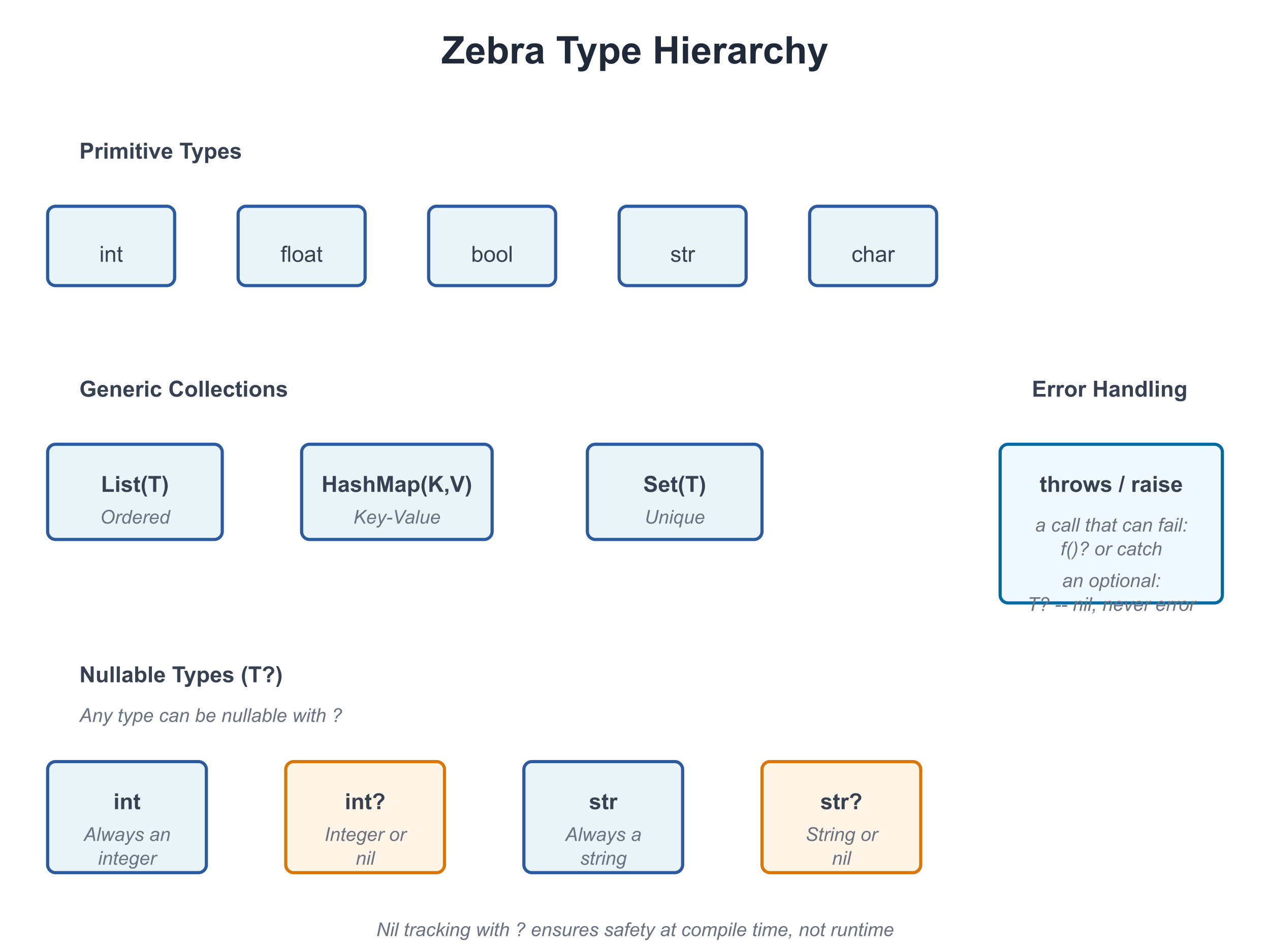
Every value in Zebra has a type. The type tells you:
- What kind of data it holds
- What operations you can perform on it
- How much memory it uses
- Whether it can be
nil
Zebra's type system is your best friend—it catches mistakes at compile time instead of in production.
Basic Types
Integers
# file: 02_integers.zbr
# teaches: integer types, arithmetic
# chapter: 02-Values-and-Types

def main()
    var age = 25
    var population = 8_000_000_000     # Underscores for readability
    var tiny: int8 = 100               # explicit narrow type
    var huge: int64 = 9_223_372_036_854_775_807

    print(age)
    print(population)
    print(tiny)
    print(huge)
Integer types:
int— Default integer (usually 64-bit)int8,int16,int32,int64— Specific sizesuint,uint8, etc. — Unsigned (non-negative) integers
Arithmetic:
var x = 10
var y = 3
print(x + y)  # 13
print(x - y)  # 7
print(x * y)  # 30
print(x / y)  # 3 (integer division)
print(x % y)  # 1 (remainder)
When a Result Doesn't Fit: Overflow
Every integer type has a range — a byte holds 0 to 255, an int8 holds -128 to 127, an
int holds about ±9.2 × 10¹⁸. If +, - or * produces a value outside the range, the
program stops rather than carry on with a wrong number:
# file: 02_overflow_trap.zbr
# teaches: integer overflow stops the program
# chapter: 02-Values-and-Types

def add_ten(b: byte): byte
    return b + 10

def main()
    print(add_ten(100))    # 110
    print(add_ten(250))    # 260 does not fit in a byte: the program stops here
    print("not reached")
110
thread 20484 panic: integer overflow
This holds in every build, including zebra --release — an optimised program does not
quietly wrap. When wrapping or clamping is what you want (hashes, checksums, colour
channels, counters that roll over), say so with an operator:
# file: 02_wrap_saturate.zbr
# teaches: wrapping (+% -% *%) and saturating (+| -| *|) arithmetic
# chapter: 02-Values-and-Types

def main()
    var b: byte = 250
    print(b +% 10)     # 4    -- wraps around past 255
    print(b +| 10)     # 255  -- saturates: clamps at the top
    var s: int8 = -128
    print(s -| 1)      # -128 -- clamps at the bottom
    print(-%s)         # -128 -- wrapping negation
| wraps around | clamps at the bounds | |
|---|---|---|
| add, subtract, multiply | +% -% *% | +| -| *| |
| negate / shift left | -%x | <<| |
| compound forms | +%= -%= *%= | +|= -|= *|= <<|= |
They are Zig's operators with Zig's spelling, and they work on integers only.
Mixing Integer Types
When two different integer types meet in arithmetic, the result is the wider type —
the same rule for + - * / %, for & | ^, and for the wrapping and saturating forms:
# file: 02_mixing_ints.zbr
# teaches: how two integer types combine
# chapter: 02-Values-and-Types

def main()
    var b: byte = 250
    var n: int = 1000
    var t: int8 = -5
    print(b + n)       # 1250 -- byte with int is an int
    print(b + t)       # 245  -- byte with int8 is an int16 (a signed type that holds both)
    print(b + 3)       # 253  -- a plain literal takes the other side's type
Three things the compiler refuses, each with a message naming the fix:
- A literal that does not fit the other side.
k + 300with abytek— 300 is not a byte. The check is by value, sok + (300 - 200)is fine andk + 100 * 3is not. - A result that would have to narrow on its own.
b = b + nwith a byteband an intnproduces an int, and an int does not fit back into a byte silently. Convert it yourself (see Narrowing below). uintbeside a signed type. No signed type holds everyuintvalue, sou + nasks you to convert one side first.
error: 300 does not fit in 'byte' (0..255), the type of the other operand of '+'
error: type mismatch: expected byte, found int -- an int does not narrow to a byte on its own; use `.toByte()` (low 8 bits)
error: cannot mix 'uint' and 'int' in arithmetic: no signed type holds every uint value -- convert one side first (`.toInt()` on the uint, checked)
Literal Suffixes
A suffix gives a literal its type, and the variable it initialises takes that type too:
# file: 02_literal_suffixes.zbr
# teaches: typed literals
# chapter: 02-Values-and-Types

def main()
    var a = 300_i16        # an int16
    var b = 5_u8           # a byte (uint8)
    var c = 7u             # a uint -- the underscore is optional
    var mask = 0xFF_u8     # hex works the same way
    var f = 1.5_f32        # a float32
    print(a)               # 300
    print(b +% 255_u8)     # 4 -- b really is a byte, so this wraps at 255
    print(c)               # 7
    print(mask)            # 255
    print(f)               # 1.5
Integer suffixes are _i and _u (the 64-bit int and uint) or either with a width —
8, 16, 32, 64 or 128. The literal must fit its type: 300_u8 and 128_i8 are refused
(-128_i8, int8's minimum, is fine). Two spellings look alike and are not: in a decimal
number a bare _16 is a digit separator (300_16 is 30016), while in hex a bare size
is the signed type (0xFF_32 is 255 as an int32).
Floating Point
# file: 02_floats.zbr
# teaches: float types, precision
# chapter: 02-Values-and-Types

def main()
    var pi = 3.14159
    var precise: float64 = 3.141592653589793

    print(pi)
    print(precise)

    # Arithmetic
    var result = pi * 2.0
    print(result)
Float types:
float— Default floating point (usually 64-bit)float32,float64— Specific precision
Booleans
# file: 02_bools.zbr
# teaches: boolean values, logic
# chapter: 02-Values-and-Types

def main()
    var is_ready = true
    var is_finished = false

    print(is_ready)
    print(is_finished)

    # Logic
    print(true and false)  # false
    print(true or false)  # true
    print(not true)  # false
Strings
# file: 02_strings.zbr
# teaches: string type, string operations
# chapter: 02-Values-and-Types

def main()
    var greeting = "Hello"
    var name = "World"

    print(greeting)
    print(greeting.len)  # 5
    print(greeting.upper())  # HELLO
    print(name.lower())  # world

    # Concatenation
    var message = greeting.concat(" ").concat(name)
    print(message)  # Hello World
String methods (we'll cover these fully in Chapter 06):
.len— Length.upper()— Uppercase.lower()— Lowercase.concat()— Concatenate.contains()— Check for substring.split()— Split by delimiter
Tuples — Multi-Value Bundles
A tuple holds two or more values of possibly different types, packed together. Useful for returning multiple results from a function or pairing values without writing a struct.
# file: 02_tuples.zbr
# teaches: tuple types, literals, destructuring, and indexing
# chapter: 02-Values-and-Types

def minmax(a: int, b: int): (int, int)
    if a < b
        return (a, b)
    return (b, a)

def main()
    # Positional destructure into named locals
    var (lo, hi) = minmax(7, 3)
    print(lo)  # 3
    print(hi)  # 7

    # Hold as a tuple value, index into it
    var t = minmax(1, 9)
    print(t.0)  # 1
    print(t.1)  # 9

    # Mixed types work — (str, int), (float, bool), etc.
    var pair: (str, int) = ("alice", 42)
    print(pair.0)  # alice
    print(pair.1)  # 42
Rules:
- A tuple type uses parens with commas:
(int, int),(str, int),(float, bool, bool). - A tuple literal uses the same syntax:
(7, 3),("alice", 42). - Destructure with
var (x, y) = expr— binds names positionally. - Index with
.0,.1,.2(integer literal after., zero-based). - For lists of tuples (
List((str, int))), the for-loopfor k, v in listdestructures automatically — see Chapter 03.
Tuples are the right tool when the pair is transient (returning
two values from one function) or structural (a coordinate pair).
For values you'll pass through many functions or attach methods to,
a struct (Chapter 07b) reads better.
Declaring Variables
Type Inference (the default)
Zebra infers the type from the right-hand side. Most variables don't need an annotation:
var age = 25          # Inferred as int
var name = "Alice"    # Inferred as str
var active = true     # Inferred as bool
var pi = 3.14         # Inferred as float
Explicit Types (when they aid the reader)
You can always pin the type explicitly. Reach for this when:
- the right-hand side is a function call whose return type isn't obvious to a reader
- you want a different concrete width (
int8,float32) than inference would pick - the variable starts as
nilorundefinedand inference can't narrow it
var age: int = 25                          # redundant; inference would do
var payment_amount: float = compute_total()  # earns its keep — return type isn't visible
var counter: int8 = 0                      # narrower than the default int
var maybeUser: User? = nil                 # required: nil alone has no type
The book uses inference by default and adds annotations only where they earn their keep.
Naming Conventions
Use snake_case for variables:
var user_id = 42           # ✅ Good
var UserID = 42            # ❌ Avoid (that's for classes)
var user_id_number = 42    # ✅ Clear but verbose
var uid = 42               # ❌ Too abbreviated
Comparison and Equality
# file: 02_comparisons.zbr
# teaches: comparison operators
# chapter: 02-Values-and-Types

def main()
    var x = 10
    var y = 20

    print(x == y)  # false (equal)
    print(x != y)  # true (not equal)
    print(x < y)  # true (less than)
    print(x > y)  # false (greater than)
    print(x <= y)  # true (less or equal)
    print(x >= y)  # false (greater or equal)

    var name = "Alice"
    print(name == "Alice")  # true
    print(name == "Bob")  # false
Type Conversions
Implicit Conversion (When Safe)
var small: int8 = 100
var big: int = small  # ✅ Fine: int8 → int is always safe
Narrowing: Choosing What Happens to Values That Don't Fit
Going from a wider integer to a narrower one is always explicit, and there are two ways to do it — decide which one you mean:
# file: 02_narrowing.zbr
# teaches: checked vs truncating narrowing
# chapter: 02-Values-and-Types

def main()
    var n = 300
    print(n.toByte())      # 44  -- toByte() keeps the low 8 bits
    var small = 200
    print(small.toUint8()) # 200 -- fits, so the checked form returns it
    print(n.toUint8())     # 300 does not fit: the program stops here
44
200
thread 24072 panic: integer conversion out of range: 300 does not fit in byte
toInt8(), toInt16(), toInt32(), toInt64(), toUint8() … toUint64() are
checked: they return the value when it fits and stop the program when it does not.
toByte() is the one that deliberately keeps the low bits.
Explicit Conversion
# file: 02_conversions.zbr
# teaches: type conversion
# chapter: 02-Values-and-Types

def main()
    var x = 42
    var s = x.toString()      # int → str
    print(s)

    var pi = 3.14
    var i = pi.toInt()        # float → int (loses decimal)
    print(i)  # 3

    var flag = true
    var b = flag.toString()   # bool → str
    print(b)  # true
Nullable Types (Introduction)
Sometimes a value might not exist. Zebra uses ? to mark this:
# file: 02_nullables.zbr
# teaches: nullable types introduction
# chapter: 02-Values-and-Types

def main()
    var name: str? = "Alice"    # Can hold str or nil
    var empty: str? = nil       # Explicitly nil

    # You must check before using
    if name != nil
        print(name)  # Safe to use

    if empty != nil
        print(empty)
    else
        print("Name is empty")
Key point: str? means "string or nil". We'll explore nil tracking fully in Chapter 11.
If you're new to programming
A nullable type is like an optional value. Sometimes you have it, sometimes you don't. Instead of errors when it's missing, Zebra lets you check first.
Type Mismatch Errors
Zebra prevents mixing types unsafely:
var x: int = "hello"  # ❌ Error: can't assign str to int
var y: str = 42       # ❌ Error: can't assign int to str
var z: int = 3.14     # ❌ Error: can't assign float to int
Why? Type safety catches bugs before they happen. You can't accidentally treat a string as a number.
Real World: Processing User Data
# file: 02_user_data.zbr
# teaches: realistic variable use
# chapter: 02-Values-and-Types

class User
    var id: int
    var name: str
    var email: str
    var age: int
    var is_active: bool

def main()
    # Create a user
    var user = User()
    user.id = 1
    user.name = "Alice"
    user.email = "alice@example.com"
    user.age = 30
    user.is_active = true

    # Display
    print("User: ${user.name}")
    print("Email: ${user.email}")
    print("Age: ${user.age}")
    print("Active: ${user.is_active}")
Common Mistakes
❌ Mistake: Skipping a type annotation when the right-hand side is opaque
var result = compute() # What's the type?💡 Why it matters: Inference is fine when the literal makes the type obvious (
var x = 25). When the RHS is a function call whose return type isn't visible at the call site, an annotation pays for itself in readability.✅ Better:
var result: int = compute() # Clear: it's an int
❌ Mistake: Mixing types in arithmetic
var x = 10
var y = 3.14
print(x + y)  # ❌ Can't add int + float
💡 Why: Different types might need different handling.
✅ Better:
var x = 10.0
var y = 3.14
print(x + y)  # ✅ Both float
❌ Mistake: Using a nullable type without checking
var name: str? = nil
print(name.upper())  # ❌ Error: nil doesn't have .upper()
✅ Better:
var name: str? = nil
if name != nil
    print(name.upper())  # Safe
Exercises
Exercise 1: Type Conversion
Write a program that:
- Creates an integer variable
- Creates a float variable
- Converts both to strings
- Prints them
Solution
def main()
    var count = 42
    var price = 19.99

    var count_str = count.toString()
    var price_str = price.toString()

    print("Count: ${count_str}")
    print("Price: ${price_str}")
Output:
Count: 42
Price: 19.99
Exercise 2: Comparisons
Write a program that compares two numbers and prints which is larger:
Solution
def main()
    var x = 100
    var y = 75

    if x > y
        print("${x} is larger than ${y}")
    else
        print("${y} is larger than ${x}")
Output:
100 is larger than 75
Exercise 3: User Profile
Create a data structure to hold user information (name, age, email) and print a profile:
Solution
class Person
    var name: str
    var age: int
    var email: str

def main()
    var person = Person()
    person.name = "Carol"
    person.age = 28
    person.email = "carol@example.com"

    print("Name: ${person.name}")
    print("Age: ${person.age}")
    print("Email: ${person.email}")
Next Steps
- → 03-Collections — Lists and HashMaps
- → 04-Functions — Write reusable code
- → 11-Nil-Tracking — Deep dive into nullable types
Key Takeaways
- Every value has a type — Integers, floats, booleans, strings, and more
- Types are checked at compile time — Catches bugs early
- Use type inference when obvious, explicit types when clarity matters
- Conversions are explicit — No silent type changes
- Nullable types use
?—str?can be string or nil - Always check nil before using —
if value != nil { ... }
Next: Head to 03-Collections to learn Lists and HashMaps.
03: Collections
Audience: All
Time: 120 minutes
Prerequisites: 01-Getting-Started, 02-Values-and-Types
You'll learn: Lists, HashMaps, Sets, iteration, indexing, collection methods
The Big Picture
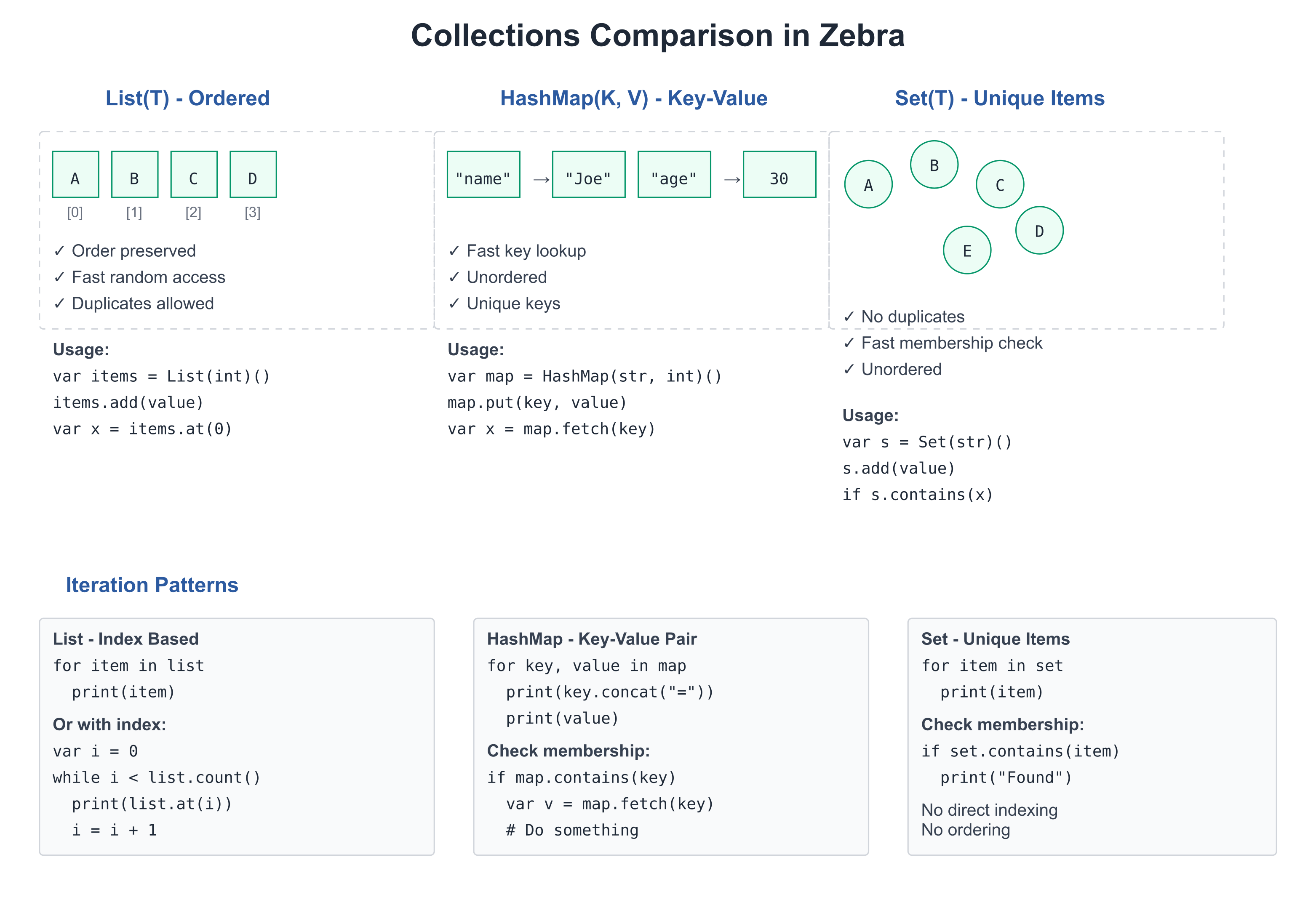
Collections let you group values. Instead of declaring 100 separate variables for 100 names, you use one List(str) that holds all 100.
Zebra provides:
- List(T) — Ordered, resizable sequences (like Python's list)
- HashMap(K, V) — Key-value pairs (like Python's dict)
- Set(T) — Unique elements of any hashable type (
Set(str)(),Set(int)())
Lists
A List holds multiple values of the same type in order.
Creating Lists
# file: 03_lists.zbr
# teaches: list creation and access
# chapter: 03-Collections

def main()
    # List literal — the cleanest way to make a populated list.
    # The element type is inferred from the first element.
    var fruits = ["apple", "banana", "cherry"]

    # An empty list with an explicit annotation — and `.add()` to grow:
    var empty: List(str) = []
    empty.add("date")
    print(empty.count())  # 1

    # Access by index
    var first = fruits.at(0)
    var second = fruits.at(1)
    print(first)  # apple
    print(second)  # banana

    # Check size
    print(fruits.count())  # 3

    # Iterate
    for fruit in fruits
        print(fruit)
The constructor form
var fruits = List(str)()is still valid — useful when you want an empty list to grow without specifying an element type up front (the element type is inferred from the first.add()). For populated lists,[…]is shorter and reads better.
List Operations
# file: 03_list_ops.zbr
# teaches: list manipulation
# chapter: 03-Collections

def main()
    var nums = [10, 20, 30]             # list literal — type inferred

    # Check existence
    print(nums.contains(20))  # true

    # Find the first matching element (there's no indexOf — search with a predicate;
    # .find() returns an Optional, nil if nothing matches)
    print(nums.find(def(x) = x == 20))  # 20

    # Remove by index (List.remove takes an index, not a value)
    nums.remove(1)
    print(nums.count())  # 2

    # Clear
    nums.clear()
    print(nums.count())  # 0
Sorting
# file: 03_sorting.zbr
# teaches: sort, sort with a comparator, sortBy, reverse
# chapter: 03-Collections

def main()
    var nums = [42, 7, 19, 3]
    nums.sort()                            # ascending, in place
    print(nums.at(0))
    print(nums.at(3))

    nums.sort(def(a: int, b: int) = a > b) # comparator: true when a goes first
    print(nums.at(0))

    var names = ["mallory", "bob", "alice"]
    names.sort()                           # strings: lexicographic
    print(names.at(0))
    names.sortBy(def(s: str) = s.len)      # one-argument key: shortest first
    print(names.at(0))
    names.reverse()
    print(names.at(0))
Output:
3
42
42
alice
bob
mallory
All four reorder the list in place. Numbers and strings know
their own order. A list of your own class sorts with plain sort() once
the class declares cue compare, the method sort() and < call to
order two values, together with the cue equals it requires (Chapter 07,
"Cues"). Until then, pass a comparator or
a key.
Iteration Patterns
# file: 03_iteration.zbr
# teaches: different iteration styles
# chapter: 03-Collections

def main()
    var items = List(str)()
    items.add("first")
    items.add("second")
    items.add("third")

    # Simple iteration (typed local works around print's {s} fallback)
    for item in items
        var s: str = item
        print(s)

    # Iteration with index — interpolation into a string handles the type fine
    var i = 0
    while i < items.count()
        print("${i}: ${items.at(i)}")
        i = i + 1
If you're new to programming
A List is like a numbered shelf. You can:
- Add items:
list.add(item)- Take items:
list.remove(item)- Check what's there:
list.at(0)gets the first item- Count items:
list.count()
If you know Python
# Python
fruits = ["apple", "banana"]
fruits.append("cherry")
for fruit in fruits:
    print(fruit)

# Zebra
var fruits = List(str)()
fruits.add("apple")
fruits.add("banana")
fruits.add("cherry")
for fruit in fruits
    print(fruit)
The main difference: Zebra requires the element type (List(str)) at the construction site; once declared, the type flows through inference.
HashMaps
A HashMap stores key-value pairs. Fast lookup by key.
Creating and Using HashMaps
# file: 03_hashmaps.zbr
# teaches: hashmap creation and access
# chapter: 03-Collections

def main()
    # Create empty HashMap
    var ages = HashMap(str, int)()

    # Add key-value pairs
    ages.put("Alice", 30)
    ages.put("Bob", 25)
    ages.put("Carol", 28)

    # Retrieve by key — get returns int? (nil if missing)
    if ages.get("Alice") as a
        print(a)  # 30

    # Check if key exists
    print(ages.contains("Alice"))  # true

    # Iterate over key/value pairs
    for name, age in ages
        print("${name}: ${age}")
A note on the API:
.put()/.fetch()are older HashMap method names that still work;.set()/.get()are the canonical forms used by QUICKSTART..fetch()returns the value directly and panics on missing keys;.get()returns an optional — the safer pattern.
Your own types as keys.
str,intand the other built-ins work asHashMapkeys andSetelements out of the box. A class of your own can be one too, and it is then compared by identity: two separate objects with the same contents are two different keys. To key by contents, give the classcue hashandcue equals(Chapter 07, "Cues"); a struct can get both from@derive(Eq, Hash)(Chapter 07b).
HashMap Operations
# file: 03_hashmap_ops.zbr
# teaches: hashmap manipulation
# chapter: 03-Collections

def main()
    var config = HashMap(str, str)()
    config.put("host", "localhost")
    config.put("port", "8080")
    config.put("debug", "true")

    # Count entries
    print(config.count())  # 3

    # Remove entry
    config.remove("debug")
    print(config.count())  # 2

    # Look up safely — get returns str? (nil if missing)
    if config.get("host") as host
        print(host)  # localhost

    # Iterate over keys and values
    for key, value in config
        print("${key} = ${value}")
If you know Python
# Python
ages = {"Alice": 30, "Bob": 25}
print(ages["Alice"])
for name, age in ages.items():
    print(name, age)

# Zebra
var ages = HashMap(str, int)()
ages.put("Alice", 30)
ages.put("Bob", 25)
if ages.get("Alice") as a
    print(a)
for name, age in ages
    print("${name} ${age}")
Deduplication with HashMap
Need unique values? Use a HashMap where keys track membership:
# file: 03_dedup.zbr
# teaches: using HashMap for uniqueness
# chapter: 03-Collections

def main()
    var seen = HashMap(int, bool)()
    var unique = List(int)()

    var ids = [1, 2, 3, 2]              # last element is a duplicate

    for id in ids
        if not seen.contains(id)
            seen.put(id, true)
            unique.add(id)

    print(unique.count())  # 3

    # Check membership
    print(seen.contains(2))  # true
Real World: Data Processing
# file: 03_real_world.zbr
# teaches: collections in realistic scenarios
# chapter: 03-Collections

class Student
    var name: str
    var gpa: float

def main()
    # List of students
    var students = List(Student)()

    var alice = Student()
    alice.name = "Alice"
    alice.gpa = 3.9
    students.add(alice)

    var bob = Student()
    bob.name = "Bob"
    bob.gpa = 3.5
    students.add(bob)

    # Calculate average GPA
    var total = 0.0
    for student in students
        total = total + student.gpa
    var average = total / students.count()
    print("Average GPA: ${average}")

    # Find student by name
    var target_name = "Alice"
    for student in students
        if student.name == target_name
            print("Found: ${student.name} (${student.gpa})")
Common Patterns
Filter and Transform
# file: 03_patterns.zbr
# teaches: collection patterns
# chapter: 03-Collections

def main()
    var numbers = [1, 2, 3, 4, 5]

    # Filter: keep only even numbers
    var evens: List(int) = []
    for num in numbers
        if num % 2 == 0
            evens.add(num)

    print("Evens: ")
    for e in evens
        print(e)

    # Count matching items
    var count_gt_3 = 0
    for num in numbers
        if num > 3
            count_gt_3 = count_gt_3 + 1
    print("Numbers > 3: ${count_gt_3}")
Common Mistakes
❌ Mistake: Forgetting type parameters
var items = List() # What type? List(what)?✅ Better:
var items = List(str)() # Clear: list of strings
❌ Mistake: Iterating and modifying
for item in items
    items.remove(item)  # ❌ Unsafe: modifying while iterating
✅ Better:
var to_remove = List(str)()
for item in items
    if should_remove(item)
        to_remove.add(item)
for item in to_remove
    for i in 0..items.count()
        if items.at(i) == item
            items.remove(i)
            break
❌ Mistake: Using wrong key type for HashMap
var map = HashMap(str, int)()
map.put(1, 100)  # ❌ Key should be str, not int
✅ Better:
var map = HashMap(str, int)()
map.put("count", 100)  # ✅ Key is str
Exercises
Exercise 1: List Operations
Create a list of numbers and find the sum:
Solution
def main()
    var nums = [10, 20, 30, 40]

    var sum = 0
    for num in nums
        sum = sum + num

    print("Sum: ${sum}")  # 100
Exercise 2: HashMap Lookup
Create a phone book and look up a number:
Solution
def main()
    var phone_book = HashMap(str, str)()
    phone_book.put("Alice", "555-1234")
    phone_book.put("Bob", "555-5678")
    phone_book.put("Carol", "555-9999")

    var name = "Bob"
    if phone_book.get(name) as number
        print("${name}'s number: ${number}")
Exercise 3: Unique Words
Count unique words in a sentence (using HashMap for deduplication):
Solution
def main()
    var text = "the quick brown fox jumps over the lazy dog"
    var words: List(str) = text.split(" ")  # typed annotation auto-collects the iterator

    var seen = HashMap(str, bool)()
    for word in words
        seen.put(word, true)

    print("Total words: ${words.count()}")
    print("Unique words: ${seen.count()}")
Next Steps
- → 04-Functions — Reuse collection-processing code
- → 05-Control-Flow — Pattern matching on collections
- 🏋 Project-3-Data-Analysis — Real collection processing
Key Takeaways
- List(T) holds ordered items, access by index
- HashMap(K,V) holds key-value pairs, fast lookup
- Deduplication — use HashMap keys for unique-value tracking
- Iteration with
for item in collectionis the main pattern - Type parameters are required:
List(str)not justList - Modifying while iterating is unsafe; collect changes first
Next: Head to 04-Functions to write reusable code.
04: Functions and Scope
Audience: All
Time: 120 minutes
Prerequisites: 01-02-03
You'll learn: Define functions, parameters, return values, scope, closures, capture blocks
The Big Picture
Functions let you:
- Reuse code — Write once, call many times
- Organize logic — Group related operations
- Name ideas —
process_payment()is clearer than inline logic - Test parts — Functions are easier to test in isolation
Basic Functions
Defining Functions
# file: 04_functions.zbr
# teaches: function definition and calling
# chapter: 04-Functions-and-Scope

def add(a: int, b: int): int
    return a + b

def multiply(x: int, y: int): int
    return x * y

def main()
    var result1 = add(5, 3)
    print(result1)  # 8

    var result2 = multiply(4, 7)
    print(result2)  # 28
Breakdown:
def add(...)— Define a function namedaddat the module top level. No surrounding class is needed when the function is just a reusable operation.(a: int, b: int)— Parameters:aandb, both integers.: int(after the closing paren) — Return type is integer.return a + b— The value to return.
When you do want to group related functions on a class — for namespacing, or because they share class state — use
static def name(...)insideclass Name. We'll show that pattern when it earns its keep (Chapter 07).
Functions With Multiple Parameters
# file: 04_multi_params.zbr
# teaches: multiple parameters
# chapter: 04-Functions-and-Scope

def pad(text: str, width: int, fill: str): str
    # (Implementation would go here)
    return text

def main()
    var padded = pad("hi", 10, "*")
    print(padded)
Optional Logic (No Return Value)
# file: 04_void.zbr
# teaches: functions that don't return values
# chapter: 04-Functions-and-Scope

def log(message: str)
    print("[LOG] ${message}")

def main()
    log("Application started")
    log("Processing data")
    log("Done")
When a function doesn't return a value, omit the : <type> after the parameter list.
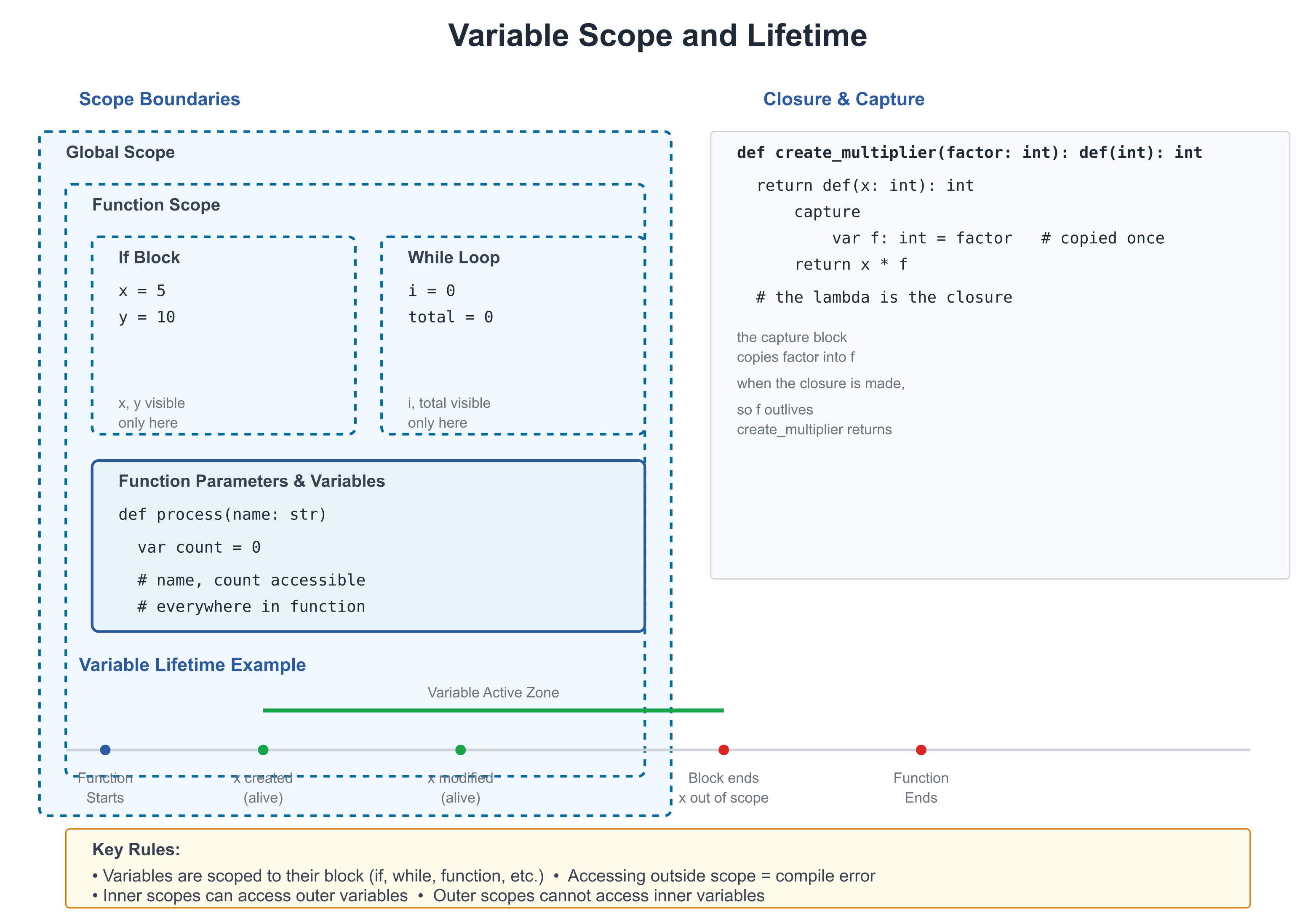
Scope
Scope is where a variable can be accessed.
Local Scope
Variables declared inside a function are local (only accessible there):
# file: 04_scope.zbr
# teaches: variable scope
# chapter: 04-Functions-and-Scope

class Calculator
    static
        var global_val: int = 100  # Shared (class-level)

        def compute()
            var local_val = 50      # Local to this function
            print(local_val)  # ✅ Can access
            print(global_val)  # ✅ Can access class-level

        def other()
            # print local_val       # ❌ Can't access, it's not here
            pass

def main()
    Calculator.compute()
Shadowing (Careful!)
class Example
    static
        var count: int = 10        # Class-level

        def show()
            var count = 5           # Local (shadows class variable)
            print(count)  # 5 (local shadows class)

        def another()
            print(count)  # 10 (uses class-level)
Shadowing can be confusing. Rename to clarify intent.
If you're new to programming
Scope determines where you can use a variable.
- Local: Only inside the function where it's declared
- Class-level: Accessible from all functions in the class
Closures and Capture
Functions can create inner functions that capture outer variables:
# file: 04_closures.zbr
# teaches: closures and variable capture
# chapter: 04-Functions-and-Scope

def make_multiplier(factor: int): def(int)
    return def(x: int)
        capture
            var factor: int = factor
        return x * factor

def main()
    var double = make_multiplier(2)
    var triple = make_multiplier(3)

    print(double(5))  # 10
    print(triple(5))  # 15
What's happening:
make_multiplier(2)creates a function that multiplies by 2double = ...stores that function in a variabledouble(5)calls it: 5 * 2 = 10
A lambda can read its enclosing function's parameters and locals directly. The capture
block does something more specific: it gives each closure its own private copy of
factor, kept for as long as the closure lives — per-closure state, shown next.
Closures Share, They Don't Copy
A var local that a lambda writes is shared with the function that declared it, as in
C#: a write through the closure is seen outside, and every closure naming the variable sees
the same one.
# file: 04_shared_capture.zbr
# teaches: closures share the variables they write
# chapter: 04-Functions-and-Scope

def main()
    var count = 0
    var bump = def()
        count += 1
    bump()
    bump()
    print(count)    # 2 -- the closure and main share `count`
Parameters, loop variables and as bindings are read as a copy made when the closure is
created, so a closure made in a loop sees that iteration's value; changing one of them
after a closure has read it is refused, with the fix (copy it into a var first). And a
closure value is a reference, like a C# delegate: pass it to a function or store it in a
field, and every holder calls the same closure, with the same capture state.
Capture Syntax
# file: 04_capture.zbr
# teaches: capture blocks
# chapter: 04-Functions-and-Scope

def make_counter(): def(): int
    var count: int = 0
    return def(): int
        capture
            var count: int = count
        count = count + 1
        return count

def main()
    var counter = make_counter()
    print(counter())  # 1
    print(counter())  # 2
    print(counter())  # 3
Real World: Reusable Utilities
# file: 04_utilities.zbr
# teaches: practical function use
# chapter: 04-Functions-and-Scope

def repeat_str(text: str, times: int): str
    var result = ""
    var i = 0
    while i < times
        result = result.concat(text)
        i = i + 1
    return result

def pad_left(text: str, width: int): str
    var padding_needed = width - @as(int, text.len)
    if padding_needed <= 0
        return text
    var padding = repeat_str(" ", padding_needed)
    return padding.concat(text)

def main()
    var padded = pad_left("hello", 10)
    print("[${padded}]")  # [     hello]
Aside: the
@as(int, text.len)cast works around BUG-093 (s.lenisusize, notint, so it can't be subtracted from anintliteral directly). Once that bug is fixed the cast becomes optional.
Common Patterns
Early Return
# file: 04_patterns.zbr
# teaches: early return pattern
# chapter: 04-Functions-and-Scope

def validate_email(email: str): bool
    if email.len == 0
        return false
    if not email.contains("@")
        return false
    if not email.contains(".")
        return false
    return true
Default Arguments
Zebra supports parameter defaults directly — you don't need an overload:
def log(message: str, prefix: str = "[INFO]")
    print("${prefix} ${message}")

def main()
    log("Application started")              # [INFO] Application started
    log("Disk failing", "[WARN]")           # [WARN] Disk failing
You can also pass arguments by name when that aids the reader:
log(prefix: "[ERROR]", message: "Out of memory")
Passing Functions As Arguments
# file: 04_higher_order.zbr
# teaches: functions as arguments
# chapter: 04-Functions-and-Scope

def map_int(items: List(int), transform: def(int): int): List(int)
    var result = List(int)()
    for item in items
        result.add(transform(item))
    return result

def main()
    var nums = List(int)()
    nums.add(1)
    nums.add(2)
    nums.add(3)

    var double_it = def(x: int): int = x * 2
    var doubled = map_int(nums, double_it)

    for d in doubled
        print(d)  # 2, 4, 6
sig — Named Function Types
When you pass functions around frequently, name the function type with
sig for cleaner code and reusable signatures:
# file: 04_sig.zbr
# teaches: named function types with sig
# chapter: 04-Functions-and-Scope

sig Transformer(x: int): int      # "a function int → int"
sig Predicate(s: str): bool       # "a function str → bool"

def apply_all(nums: List(int), fn: Transformer): List(int)
    var result = List(int)()
    for n in nums
        result.add(fn(n))
    return result

static def double(x: int): int
    return x * 2

static def square(x: int): int
    return x * x

def main()
    var nums = List(int)()
    nums.add(1)
    nums.add(2)
    nums.add(3)

    var doubled = apply_all(nums, double)
    var squared = apply_all(nums, square)

    for d in doubled
        print(d)  # 2, 4, 6
    for s in squared
        print(s)  # 1, 4, 9
sig Transformer(x: int): int is a type alias — "a function that takes
one int and returns an int". Any function or lambda with that shape is
compatible (structural typing — no implements required).
sig as a class field — the idiomatic event-callback pattern:
sig OnClick()

class Button
    var onClick: OnClick? = nil

    def click()
        if .onClick as cb
            cb()
Cross-module: sig types are exported and importable across modules:
# callbacks.zbr
sig OnReady()
sig OnError(msg: str)

# main.zbr
use callbacks exposing OnReady, OnError

def run(cb: OnReady)
    cb()
Lambda Passed Directly as an Argument
Instead of assigning a lambda to a variable first, pass it directly:
# file: 04_lambda_arg.zbr
# teaches: lambda as call argument (statement-body form)
# chapter: 04-Functions-and-Scope

sig IntFn(x: int): int      # name the function type first

def apply(n: int, transform: IntFn): int
    return transform(n)

def main()
    # Statement-body lambda as a call argument:
    var result = apply(5, def(x: int): int
        var doubled = x * 2
        return doubled
    )
    print(result)  # 10
Indentation rule: the lambda body indents under def(...). The closing
) of the enclosing call returns to the call-site indent level — one
level out from the lambda body. Nesting works too:
# file: 04_nested_lambda.zbr
# teaches: nested lambda as argument
# chapter: 04-Functions-and-Scope

sig VoidFn()        # function type: no params, no return

def run_twice(action: VoidFn)
    action()
    action()

def with_logging(label: str, action: VoidFn)
    print("start: ${label}")
    action()
    print("end: ${label}")

def main()
    with_logging("outer", def()
        run_twice(def()
            print("  inner")
        )
    )
    # Prints:
    # start: outer
    #   inner
    #   inner
    # end: outer
Common Mistakes
❌ Mistake: Returning wrong type
def get_age(): int
    return "25"  # ❌ Returning str, not int
✅ Better:
def get_age(): int
    return 25    # ✅ Returning int
❌ Mistake: Using variable outside its scope
def process()
    var data = fetch_data()

def use()
    print(data)  # ❌ data doesn't exist here
✅ Better:
def process(): str
    var data = fetch_data()
    return data

def use()
    var data = process()
    print(data)  # ✅ data is here
❌ Mistake: Forgetting to return
def compute(): int
    var result = 5 + 3
    # Forgot return!
✅ Better:
def compute(): int
    var result = 5 + 3
    return result
Exercises
Exercise 1: Simple Function
Write a function that calculates the factorial of a number:
Solution
def factorial(n: int): int
    if n <= 1
        return 1
    return n * factorial(n - 1)

def main()
    print(factorial(5))  # 120
Exercise 2: Closure
Create a function that returns an "adder" function:
Solution
def make_adder(base: int): def(int): int
    return def(x: int): int
        capture
            var base: int = base
        return x + base

def main()
    var add_10 = make_adder(10)
    print(add_10(5))  # 15
    print(add_10(20))  # 30
Exercise 3: Filtering
Write a function that filters a list:
Solution
def even_numbers(nums: List(int)): List(int)
    var evens = List(int)()
    for num in nums
        if num % 2 == 0
            evens.add(num)
    return evens

def main()
    var nums = List(int)()
    nums.add(1)
    nums.add(2)
    nums.add(3)
    nums.add(4)
    nums.add(5)

    var result = even_numbers(nums)
    for r in result
        print(r)
Next Steps
- → 05-Control-Flow — if/else, loops, pattern matching
- → 15-Pipelines — Function composition
- 🏋 Project-1-CLI-Tool — Use functions extensively
Key Takeaways
- Functions are reusable blocks of code with clear inputs and outputs
- Scope determines where variables can be accessed
- Closures capture outer variables for use in inner functions
- Early return makes logic clearer
- Functions as arguments enable powerful abstractions
signames a function type — required for parameters that accept lambdas (inlinedef(T): Ris not a valid parameter type);sigis also importable across modules- Lambda-in-call — pass a statement-body
def(...)directly as an argument; closing)returns to the call-site indent level - Name functions well —
process_payment()is better thando_thing()
Next: Head to 05-Control-Flow to learn if/else, loops, and pattern matching.
05: Control Flow
Audience: All
Time: 90 minutes
Prerequisites: 01-04
You'll learn: if/else, match, for loops, while loops, guards, break/continue
The Big Picture
Control flow directs which code runs based on conditions. Instead of executing every line in order, you:
- Skip code if a condition isn't met (
if) - Repeat code until done (
for,while) - Branch based on many options (
match)
If / Else
Basic If
# file: 05_if.zbr
# teaches: conditional execution
# chapter: 05-Control-Flow

def main()
    var age = 18

    if age >= 18
        print("You can vote")
If / Else
# file: 05_if_else.zbr
# teaches: if-else branching
# chapter: 05-Control-Flow

def main()
    var score = 75

    if score >= 90
        print("A")
    else if score >= 80
        print("B")
    else if score >= 70
        print("C")
    else
        print("F")
Breakdown:
if condition— Execute if trueelse if condition— Try the next condition (Zebra spells the chainelse if, two words)else— Default case (if all above are false)
Multiple Conditions
# file: 05_conditions.zbr
# teaches: boolean logic
# chapter: 05-Control-Flow

def main()
    var age = 25
    var has_license = true

    if age >= 18 and has_license
        print("Can drive")

    if age < 16 or not has_license
        print("Cannot drive")
Operators:
and— Both must be trueor— At least one must be truenot— Flip the value
Inline Conditions
Zebra lets you write short conditions on one line, and use if as an
expression that produces a value.
One-Line If Statement
# file: 05_inline_if.zbr
# teaches: one-line if statement
# chapter: 05-Control-Flow

def main()
    var x = 10
    if x > 0: print("positive")     # colon required before body

    # One-line with else:
    var label = ""
    if x > 0: label = "pos" else: label = "non-pos"

    # Chained else-if on one line:
    var grade = 78
    var letter = ""
    if grade >= 90: letter = "A" else if grade >= 80: letter = "B" else: letter = "C"
    print(letter)  # C
The : is required before the body. No block — the condition and body sit
on the same line.
If as an Expression
To produce a value — to initialise a variable or pass an argument — use the
three-argument form if(condition, value_if_true, value_if_false):
# file: 05_if_expr.zbr
# teaches: if-expression
# chapter: 05-Control-Flow

def main()
    var score = 85

    # Choose a value:
    var verdict = if(score >= 60, "pass", "fail")
    print(verdict)  # pass

    # Use it directly as an argument:
    print(if(score > 90, "excellent", "good"))  # good

    # Absolute value:
    var n: int = -5
    var abs_n: int = if(n >= 0, n, -n)
    print(abs_n)  # 5
Rules for the expression form:
- It takes exactly three arguments, and the two values must have the same type.
- For more than two outcomes, nest it —
if(a, x, if(b, y, z))— or use the statement form above and assign inside each branch. - The colon form
if cond: a else: bis a statement only: it runs one of two statements, and it does not parse where a value is expected.
Coming from Python? This does the job of
value_if_true if cond else value_if_false, but reads condition-first, like a function call.
Match (Pattern Matching)
Match is more powerful than if/else. It handles many cases elegantly.
Simple Match
# file: 05_match.zbr
# teaches: pattern matching
# chapter: 05-Control-Flow

def main()
    var color = "red"

    branch color
        on "red"
            print("Stop")
        on "yellow"
            print("Caution")
        on "green"
            print("Go")
        else
            print("Unknown")
Match With Types
Zebra's idiomatic way to dispatch on "what kind of thing is this" is a
union plus branch. Each variant of the union carries its own data:
# file: 05_match_type.zbr
# teaches: type-based matching with unions
# chapter: 05-Control-Flow

union Pet
    dog: str       # name
    cat: str       # name
    fish: str      # tank-size

def main()
    var pet: Pet = Pet.dog("Rex")

    branch pet
        on Pet.dog as name
            print("${name} says: Woof!")
        on Pet.cat as name
            print("${name} says: Meow!")
        on Pet.fish as size
            print("tank: ${size}")
        else
            pass
Zebra has no class inheritance, so dispatching on a class hierarchy isn't the natural pattern here. See Chapter 09 (Composition and Mixins) for why, and Chapter 07b (Structs and Unions) for more on tagged unions.
If you know Python
# Python
match color:
    case "red":
        print("Stop")
    case "green":
        print("Go")

# Zebra
branch color
    on "red"
        print("Stop")
    on "green"
        print("Go")
Loops
For Loop (Iteration)
# file: 05_for.zbr
# teaches: for loop iteration
# chapter: 05-Control-Flow

def main()
    var fruits = List(str)()
    fruits.add("apple")
    fruits.add("banana")
    fruits.add("cherry")

    for fruit in fruits
        var f: str = fruit       # typed local for {s} formatting
        print(f)

    # Numeric range — n.to(end) is exclusive on `end`.
    var i = 0
    while i < fruits.count()
        print("Item ${i}: ${fruits.at(i)}")
        i = i + 1
While Loop (Condition-Based)
# file: 05_while.zbr
# teaches: while loop
# chapter: 05-Control-Flow

def main()
    var count = 0

    while count < 5
        print("Count: ${count}")
        count = count + 1

    print("Done!")
Break and Continue
# file: 05_break_continue.zbr
# teaches: loop control
# chapter: 05-Control-Flow

def main()
    # Break: exit loop early
    var i = 0
    while true
        if i == 5
            break
        print(i)
        i = i + 1

    # Continue: skip to next iteration. Numeric ranges use either `start:end`
    # or the equivalent method form `start.to(end)` — both are exclusive on
    # `end` (so `1.to(11)` yields 1,2,...,10).
    for num in 1.to(11)
        if num % 2 == 0
            continue
        print(num)  # Prints odd numbers only
for walks lists, ranges and maps. It also walks any type of your own
that declares the iteration cues, cue iter / cue next; Chapter 07
("Cues") shows how. The quickest way to get such a type is to let the
compiler write it, with a generator.
Generators: Lazy Sequences with yield
A top-level def whose return type is Iter(T) is a generator. Its
body does not run when you call it. It runs a step at a time as the
caller asks for values: each yield v hands one value to the loop and
pauses, and the next request resumes the body just after the yield.
Nothing is collected into a list first.
# file: 05_generators.zbr
# teaches: generators -- a def returning Iter(T) that produces values with yield
# chapter: 05-Control-Flow

def evens(limit: int): Iter(int)
    var i = 0
    while i < limit
        yield i
        i = i + 2

def longWords(words: List(str), n: int): Iter(str)
    for w in words
        if w.len > n
            yield w

def naturals(): Iter(int)              # never finishes on its own
    var n = 1
    while true
        yield n
        n = n + 1

def main()
    for x in evens(7)
        print(x)

    var words = ["generator", "is", "lazy", "iteration"]
    for w in longWords(words, 4)
        print(w)

    for n in naturals()                # the consumer decides when to stop
        if n > 3
            break
        print("n = ${n}")

    var it = evens(4)                  # next() by hand: one value per call
    print(it.next()!)
    print(it.next()!)
    print(it.next() == nil)            # finished
Output:
0
2
4
6
generator
iteration
n = 1
n = 2
n = 3
0
2
true
What happened here:
evens(7)produced 0, 2, 4, 6 one at a time; the loop'silives across the pauses.naturals()would run forever on its own. It is safe because the caller stops asking (break), and the generator never computes a value nobody asked for.- A generator is an iterator, so
it.next()gives the next value, andnilonce the body has finished.
The rules:
yield vproduces a value. A barereturnfinishes early; a generator cannotreturna value ("a generator finishes with a barereturn; it produces values withyield").Iter(T)is only a return type. Bind the call (var it = evens(4)) and let the type be inferred;var it: Iter(int) = ...is refused.- Generators are top-level
defs. A method cannotyield(yet). - A
yieldinsidebranch,try,with,usingorallocateis refused by name; restructure with anifchain. Aforthat yields can walk aList, a range, or another iterable (a generator included), with one loop variable and noiffilter on the loop.
Under the hood: the compiler turns a generator into a class with
cue next, the same shape you would write by hand in Chapter 07, with the function's locals as fields.
Guards
Guards are conditions that must be true for code to run. Zebra spells them with
the one early-exit form it has — an inline if — rather than a dedicated keyword (a
guard statement existed until 2026-09-15 and was removed: it was if not with a
second spelling).
# file: 05_guards.zbr
# teaches: guard conditions
# chapter: 05-Control-Flow

def process(name: str)
    # Early returns state the precondition and leave at once:
    if not name.len > 0: return
    if name.len > 100: return

    # Process only if all guards passed
    print("Processing: ${name}")

def main()
    process("")            # Guard fails — returns early
    process("Alice")       # Guards pass — processes
    process("xxxxxxxxxxxxxxxxxxxxxxxxxxxxxxxxxxxxxxxxxxxxxxxxxxxxxxxxxxxxxxxxxxxxxxxxxxxxxxxxxxxxxxxxxxxxxxxxxxxxxxxxxxxxxxxxxxxxxxxxxxxxxxxxxxxxxxxxxxxxxxxxxxxxxxxxxxxxxxxxxxxxxxxxxxxxxxxx")  # too long — returns early
if not cond: return reads as "the call must satisfy cond; otherwise return now". When the precondition is a contract — something the caller was wrong to violate rather than an input to tolerate — use require instead (Chapter 14): it names the violation and can be stripped from a --turbo build.
Real World: Data Validation
# file: 05_validation.zbr
# teaches: practical control flow
# chapter: 05-Control-Flow

def validate_email(email: str): bool
    # Check not empty
    if email.len == 0
        return false

    # Check has @
    if not email.contains("@")
        return false

    # Check has domain
    var parts: List(str) = email.split("@")
    if parts.count() != 2
        return false

    var domain: str = parts.at(1)
    if not domain.contains(".")
        return false

    return true

def main()
    var emails = List(str)()
    emails.add("alice@example.com")
    emails.add("invalid.email")
    emails.add("bob@domain.co")

    for email in emails
        var e: str = email
        if validate_email(e)
            print("Valid: ${e}")
        else
            print("Invalid: ${e}")
Common Patterns
Early Return
def process_order(order_id: int): bool
    var order = fetch_order(order_id)

    if order == nil
        return false

    if order.total == 0
        return false

    if not order.has_items
        return false

    # Do the real processing
    charge_card(order)
    ship_items(order)
    return true
Nested Conditions
for user in users
    if user.is_active
        for order in user.orders
            if order.status == "pending"
                process_order(order)
Else-If Chain
if age < 13
    category = "child"
else if age < 18
    category = "teen"
else if age < 65
    category = "adult"
else
    category = "senior"
Common Mistakes
❌ Mistake: Forgetting the condition
if age >= 18  # Missing condition or wrong structure
    print("Adult")
    print("Extra")  # Both print regardless
✅ Better:
if age >= 18
    print("Adult")
else
    print("Minor")
❌ Mistake: Unreachable code
if x > 0
    return true
else
    return false
return false  # ❌ Never reached
✅ Better:
if x > 0
    return true
return false
❌ Mistake: Mutating collection while iterating
for fruit in fruits
    if fruit == "apple"
        fruits.remove(0)  # ❌ Unsafe — modifying during iteration
✅ Better:
var to_remove = List(int)()           # collect indices
var idx = 0
for fruit in fruits
    if fruit == "apple"
        to_remove.add(idx)
    idx = idx + 1
# Remove in reverse so earlier indices stay valid.
var k = to_remove.count() - 1
while k >= 0
    fruits.remove(to_remove.at(k))
    k = k - 1
Exercises
Exercise 1: Grade Calculator
Write a function that converts numeric scores to letter grades:
Solution
def grade_to_letter(score: int): str
    if score >= 90
        return "A"
    else if score >= 80
        return "B"
    else if score >= 70
        return "C"
    else if score >= 60
        return "D"
    else
        return "F"

def main()
    var scores = List(int)()
    scores.add(95)
    scores.add(75)
    scores.add(88)
    scores.add(62)

    for score in scores
        var grade = grade_to_letter(score)
        print("${score} = ${grade}")
Exercise 2: Find Maximum
Iterate through a list and find the maximum value:
Solution
def find_max(nums: List(int)): int
    if nums.count() == 0
        return 0

    var max_val = nums.at(0)
    for num in nums
        if num > max_val
            max_val = num
    return max_val

def main()
    var nums = List(int)()
    nums.add(10)
    nums.add(45)
    nums.add(23)
    nums.add(89)
    nums.add(34)

    var max = find_max(nums)
    print("Max: ${max}")  # 89
Exercise 3: Filter With Control Flow
Count elements matching a condition:
Solution
def count_evens(nums: List(int)): int
    var count = 0
    for num in nums
        if num % 2 == 0
            count = count + 1
    return count

def main()
    var nums = List(int)()
    nums.add(1)
    nums.add(2)
    nums.add(3)
    nums.add(4)
    nums.add(5)
    nums.add(6)

    var even_count = count_evens(nums)
    print("Even numbers: ${even_count}")  # 3
Next Steps
- → 06-Strings-and-Unicode — Text manipulation
- → 05-Control-Flow — Combine control flow with strings
- 🏋 Project-1-CLI-Tool — Use loops and conditions extensively
Key Takeaways
- if/else handles simple binary choices
- Inline if (
if cond: stmt) compresses a simple branch to one line - If-expression (
var x = if cond: a else: b) produces a value —else:required; chainedelse ifnot supported in expression position - match (branch) is better for many cases
- for loops iterate over collections, ranges, and anything with
cue iter/cue next - Generators (
def f(): Iter(T)withyield) produce a sequence lazily, one value per request - while loops repeat based on conditions
- break exits loops, continue skips iterations
- Early return makes functions clearer
- Guard clauses prevent "arrow code" (deeply nested if statements)
Next: Head to 06-Strings-and-Unicode to work with text.
06: Strings and Unicode
Audience: All
Time: 90 minutes
Prerequisites: 01-05
You'll learn: String operations, Unicode, formatting, pattern matching with regex
The Big Picture
Strings are how programs work with text. Zebra treats strings as:
- Unicode-aware — Emoji, Chinese, Arabic, etc. all work correctly
- First-class — Rich library of methods
- Immutable — Can't change them after creation (create new ones instead)
- Efficient — UTF-8 encoding optimizes storage
String Basics
String Literals
# file: 06_string_basics.zbr
# teaches: string creation
# chapter: 06-Strings-and-Unicode

def main()
    # Simple string
    var greeting = "Hello"
    print(greeting)

    # With quotes inside
    var quoted = "She said \"Hello\""
    print(quoted)

    # Multi-line (triple-quoted)
    var poem = """
    Roses are red
    Violets are blue
    """
    print(poem)

    # Escape sequences
    var path = "C:\\Users\\Name\\Documents"
    var tab = "Name\tAge\tCity"
    var newline = "Line1\nLine2"
String Properties
# file: 06_string_props.zbr
# teaches: string properties and methods
# chapter: 06-Strings-and-Unicode

def main()
    var text = "Hello, World!"

    # Byte length (Unicode-aware count is below — see codePointCount)
    print(text.len)  # 13

    # Indexing gives a BYTE, not a character: text[i] is the i-th byte of the UTF-8
    # encoding, so it prints as a number. For text, take a slice (next) or iterate
    # text.chars(), which yields whole characters even when they are multi-byte.
    var first_byte = text[0]
    print(first_byte.toString())  # 72  (the byte for "H")
    print(text[0..1])             # H

    # Substring/slice
    var part: str = text[0..5]
    print(part)  # Hello

    # Case conversion
    print(text.upper())  # HELLO, WORLD!
    print(text.lower())  # hello, world!
String Interpolation
# file: 06_interpolation.zbr
# teaches: string interpolation
# chapter: 06-Strings-and-Unicode

def main()
    var name = "Alice"
    var age = 30

    # Simple interpolation
    print("Name: ${name}")  # Name: Alice

    # Expressions in interpolation
    print("Age next year: ${age + 1}")  # Age next year: 31

    # Method calls
    var lower_name = name.lower()
    print("Lowercase: ${lower_name}")  # Lowercase: alice

    # Format specifiers
    var price = 19.99
    print("Price: ${price:.2f}")  # Price: 19.99
String Methods
Searching
# file: 06_search.zbr
# teaches: searching in strings
# chapter: 06-Strings-and-Unicode

def main()
    var text = "Hello, World!"

    # Contains
    print(text.contains("World"))  # true
    print(text.contains("xyz"))  # false

    # Index — returns -1 when not found
    print(text.indexOf("World"))  # 7
    print(text.indexOf("xyz"))  # -1

    # Starts/ends with
    print(text.startsWith("Hello"))  # true
    print(text.endsWith("!"))  # true
Splitting and Joining
# file: 06_split_join.zbr
# teaches: splitting and joining strings
# chapter: 06-Strings-and-Unicode

def main()
    # Split — annotate the local with `: List(str)` to materialise the iterator
    # into an actual list (otherwise it stays as a forward iterator only).
    var csv = "apple,banana,cherry"
    var fruits: List(str) = csv.split(",")
    for fruit in fruits
        var f: str = fruit
        print(f)

    # Join
    var items = List(str)()
    items.add("one")
    items.add("two")
    items.add("three")
    var result = ", ".join(items)
    print(result)  # one, two, three
Trimming and Padding
# file: 06_trim_pad.zbr
# teaches: trimming and padding
# chapter: 06-Strings-and-Unicode

def main()
    var padded = "  hello  "

    # Trim whitespace
    print("|${padded.trim()}|")  # |hello|
    print("|${padded.trimLeft()}|")  # |hello  |
    print("|${padded.trimRight()}|")  # |  hello|

    # Padding
    var short = "hi"
    print(short.padLeft(10, "*"))  # ********hi
    print(short.padRight(10, "-"))  # hi--------
    print(short.center(10, "*"))  # ****hi****
Replacing
# file: 06_replace.zbr
# teaches: string replacement
# chapter: 06-Strings-and-Unicode

def main()
    var text = "cat and dog and bird"

    # Replace (first occurrence, or all)
    var once = text.replace("and", "or")      # Replaces once
    print(once)

    var all = text.replaceAll("and", "or")    # Replaces all
    print(all)

    # Case conversion
    var lower = "Hello World".lower()
    print(lower)  # hello world
Unicode and Internationalization
Unicode Basics
# file: 06_unicode.zbr
# teaches: unicode support
# chapter: 06-Strings-and-Unicode

def main()
    # Emoji
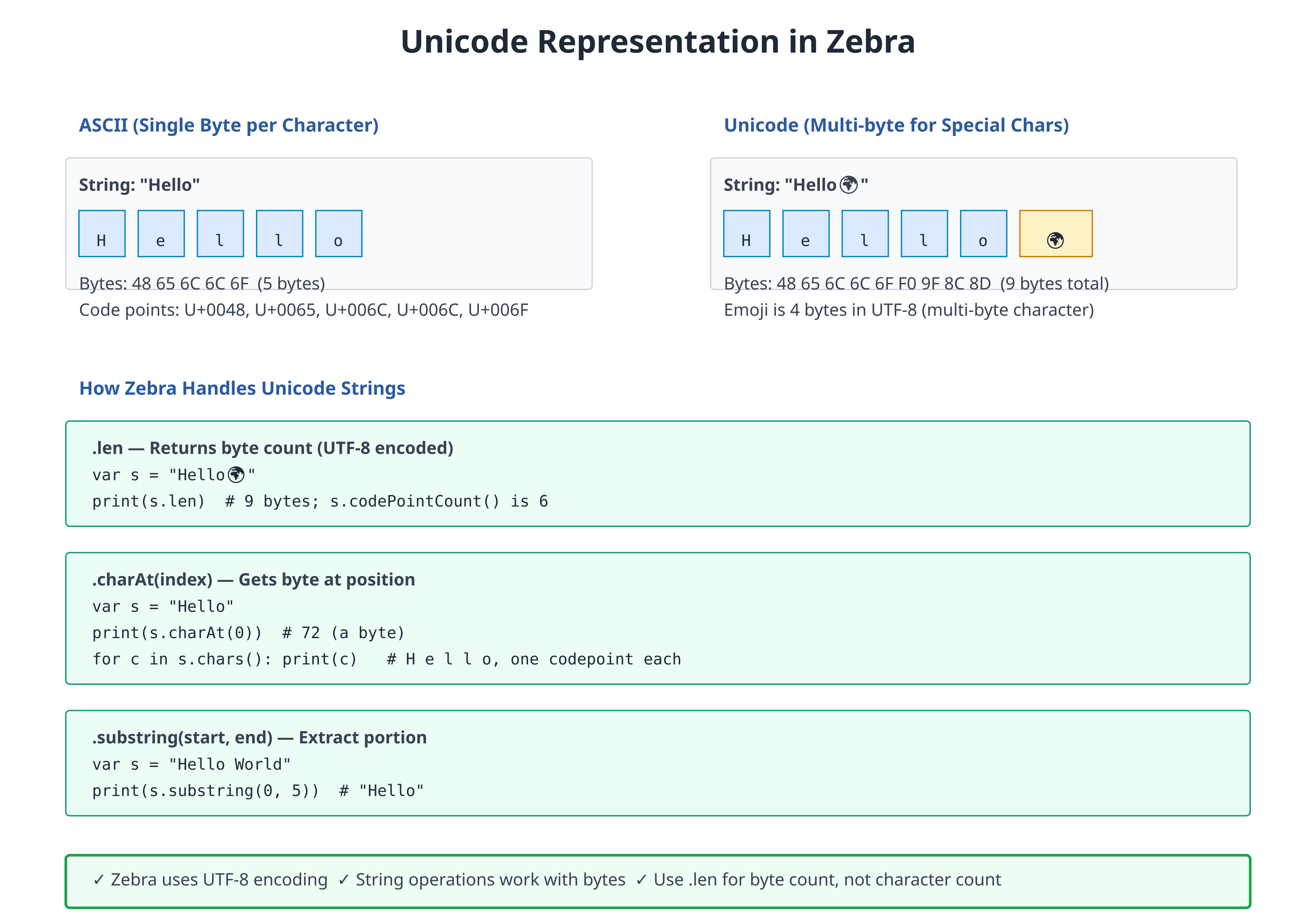
    var emoji = "Hello 👋 🌍 🎉"
    print(emoji)
    print(emoji.len)  # Byte length
    print(emoji.codePointCount())  # Character count

    # Chinese
    var chinese = "你好世界"             # Hello World in Chinese
    print(chinese)

    # Arabic (right-to-left)
    var arabic = "مرحبا بالعالم"         # Hello World
    print(arabic)

    # Mixed scripts
    var mixed = "Hello 世界 مرحبا"
    print(mixed)
Character Iteration
# file: 06_char_iter.zbr
# teaches: iterating over characters
# chapter: 06-Strings-and-Unicode

def main()
    var text = "Hello"

    # Iterate characters (yields `char`; .toString() lifts back to str for printing)
    for c in text.chars()
        print(c.toString())

    # Byte iteration — yields each byte as a u8
    var data = "AB"
    for byte in data.bytes()
        print(byte)  # 65, 66 (ASCII values)
.chars()and.bytes()are different lenses on the same string..chars()walks Unicode codepoints (so"👋"yields one element);.bytes()walks the raw UTF-8 bytes (so"👋"yields four). Use whichever matches what you're counting.
Regular Expressions (Intro)
Regular expressions let you search and validate text patterns.
Basic Patterns
# file: 06_regex_intro.zbr
# teaches: regular expressions introduction
# chapter: 06-Strings-and-Unicode

def main()
    # Simple pattern
    var email = "alice@example.com"
    var pattern = Regex.compile("[a-z]+@[a-z]+\\.[a-z]+")

    print(pattern.match(email))  # true

    # Find matches
    var text = "I have 2 apples and 3 oranges"
    var digit_pattern = Regex.compile("\\d+")
    if digit_pattern.find(text) as found
        print(found)  # 2

    # Replace
    var clean = digit_pattern.replace(text, "X")
    print(clean)  # I have X apples and X oranges
Real World: Text Processing
# file: 06_text_processing.zbr
# teaches: practical text operations
# chapter: 06-Strings-and-Unicode

def parse_csv_line(line: str): List(str)
    var out: List(str) = line.split(",")
    return out

def normalize_whitespace(text: str): str
    var lines = List(str)()
    for line in text.split("\n")
        var trimmed = line.trim()
        if trimmed.len > 0
            lines.add(trimmed)
    return "\n".join(lines)

def extract_numbers(text: str): List(str)
    var results = List(str)()
    var pattern = Regex.compile("\\d+")
    for match in pattern.findAll(text)
        results.add(match)
    return results

def main()
    # Parse CSV
    var csv_line = "Alice,30,alice@example.com"
    var fields = parse_csv_line(csv_line)
    var name: str = fields.at(0)
    var age:  str = fields.at(1)
    print("Name: ${name}")
    print("Age: ${age}")

    # Extract numbers
    var text = "I was born in 1990 and moved in 2005"
    var years = extract_numbers(text)
    for year in years
        var y: str = year
        print(y)
Common Patterns
Email Validation
def is_valid_email(email: str): bool
    if not email.contains("@")
        return false
    var parts: List(str) = email.split("@")
    if parts.count() != 2
        return false
    var domain: str = parts.at(1)
    if not domain.contains(".")
        return false
    return true
URL Parsing
def parse_url(url: str): HashMap(str, str)
    var result = HashMap(str, str)()
    var parts: List(str) = url.split("://")
    if parts.count() == 2
        var proto: str = parts.at(0)
        result.put("protocol", proto)
    return result
String Templating
def template(text: str, values: HashMap(str, str)): str
    var result = text
    for key, value in values
        var placeholder = "${${key}}"
        result = result.replace(placeholder, value)
    return result
Common Mistakes
❌ Mistake: Forgetting that strings are immutable
var text = "hello"
text[0] = 'H'  # ❌ Can't modify
✅ Better:
var text = "hello"
var capitalized = "H".concat(text[1..])
❌ Mistake: Ignoring Unicode length
var emoji = "👋"
print(emoji.len)  # ❌ Returns 4 (bytes), not 1
✅ Better:
var emoji = "👋"
print(emoji.codePointCount())  # ✅ Returns 1 (characters)
❌ Mistake: Inefficient concatenation in loops
var result = ""
for i in 1.to(1000)
    result = result + "${i},"  # ❌ O(n²) complexity
✅ Better:
var sb = StringBuilder()
for i in 1.to(1000)
    sb.append("${i},")
var result = sb.build()  # ✅ O(n) complexity
Exercises
Exercise 1: String Reversal
Write a function that reverses a string:
Solution
def reverse_str(text: str): str
    var chars = List(str)()
    for c in text.chars()
        chars.add(c.toString())

    var result = ""
    var i = chars.count() - 1
    while i >= 0
        result = result.concat(chars.at(i))
        i = i - 1
    return result

def main()
    var reversed = reverse_str("hello")
    print(reversed)  # olleh
Zebra also has a built-in
text.reverse()for the common case; the loop above is just to show character iteration.
Exercise 2: Email Validator
Write a simple email validator:
Solution
def is_valid_email(email: str): bool
    if email.len < 5
        return false
    if not email.contains("@")
        return false
    if not email.contains(".")
        return false
    var parts: List(str) = email.split("@")
    if parts.count() != 2
        return false
    var domain: str = parts.at(1)
    if domain.len < 3
        return false
    return true

def main()
    var emails = List(str)()
    emails.add("alice@example.com")
    emails.add("invalid")
    emails.add("bob@domain.co")

    for email in emails
        var e: str = email
        if is_valid_email(e)
            print("Valid: ${e}")
        else
            print("Invalid: ${e}")
Exercise 3: CSV Parsing
Parse a CSV line and extract fields:
Solution
def parse_csv(line: str): List(str)
    var out: List(str) = line.split(",")
    return out

def parse_with_trim(line: str): List(str)
    var trimmed = List(str)()
    for field in line.split(",")
        trimmed.add(field.trim())
    return trimmed

def main()
    var csv = "Alice, 30, NYC"
    var fields = parse_with_trim(csv)
    for field in fields
        var f: str = field
        print("|${f}|")
Next Steps
- → 07-Classes — Object-oriented programming
- → 18-Regular-Expressions — Deep dive into regex
- 🏋 Project-1-CLI-Tool — Text processing practical application
Key Takeaways
- Strings are immutable — Create new ones instead of modifying
- Interpolation is readable — Use
"${var}"over concatenation - Methods are rich —
.split(),.replace(),.trim(), etc. - Unicode works seamlessly — emoji, Chinese, Arabic, etc.
- Regex enables pattern matching — For validation and extraction
- StringBuilder is efficient — Use for loop-based concatenation
Next: Head to Part 2 for object-oriented programming with 07-Classes.
07: Classes and Instances
Audience: All (with beginner sidebar)
Time: 120 minutes
Prerequisites: 01-06
You'll learn: Define classes, instantiate objects, instance methods, fields, initialization, cues (the methods the compiler calls for printing, ==, hashing, ordering and for)
The Big Picture
Classes are blueprints for objects. Instead of a loose collection of variables, a class groups related data and behavior together.
Real world: A car has properties (color, speed) and behaviors (accelerate, brake)
Code: A Car class has fields (color, speed) and methods (accelerate, brake)
Defining Classes
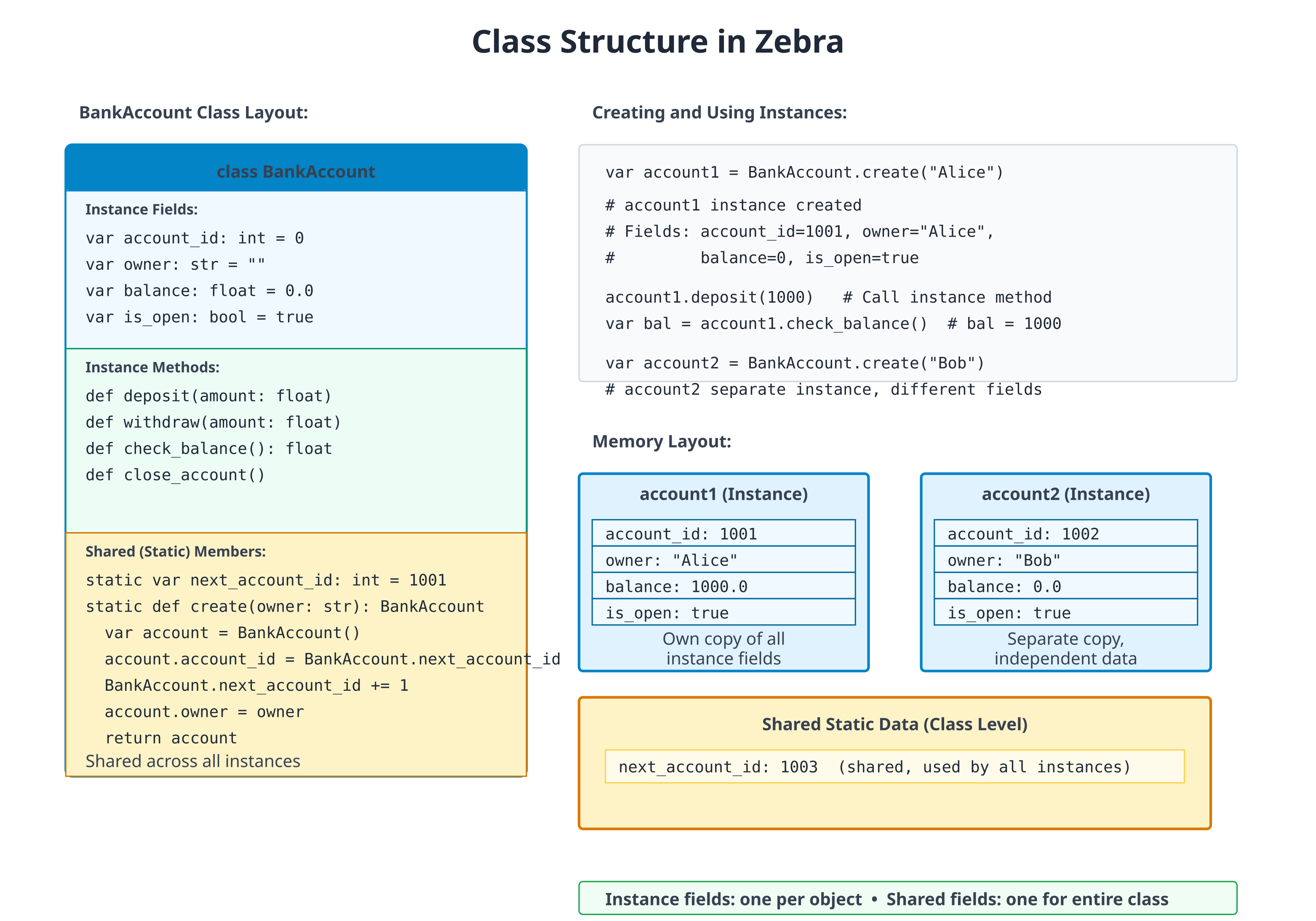
Simple Class
# file: 07_class_basic.zbr
# teaches: class definition, cue init
# chapter: 07-Classes-and-Instances

class Person
    var name: str
    var age: int

    cue init(name: str, age: int)
        this.name = name
        this.age = age

    def greet()
        print("Hi, I'm ${this.name}")

def main()
    var person = Person("Alice", 30)
    person.greet()  # Hi, I'm Alice
Breakdown:
class Person— Define a class named Person.var name: str— Field (property) of the class.cue init(name, age)— Constructor.this.name = nameinitialises the field from the argument of the same name (usingthis.to disambiguate).def greet()— Method of the class.Person("Alice", 30)— Create an instance, passing constructor args.
The class fields don't need defaults when
cue initalways sets them. The "field default" form (var name: str = "") shines when you want to allow construction without specifying every field — see "Fields and Initialization" below.
Fields and Initialization
# file: 07_init.zbr
# teaches: field defaults vs. explicit init
# chapter: 07-Classes-and-Instances

class Rectangle
    var width: int = 0      # Defaults — class is constructible with `Rectangle()`
    var height: int = 0

    def area(): int
        return this.width * this.height

def main()
    var rect = Rectangle()
    rect.width = 10
    rect.height = 5
    print(rect.area())  # 50
Field defaults make a class bare-constructible (
Rectangle()works) and let callers fill in only the fields they care about. Addingcue init(width: int, height: int)would make construction strict and let you drop the defaults — both styles compose.
Instance Methods
# file: 07_methods.zbr
# teaches: instance methods
# chapter: 07-Classes-and-Instances

class Counter
    var count: int = 0

    def increment()
        this.count = this.count + 1

    def decrement()
        this.count = this.count - 1

    def reset()
        this.count = 0

    def get_count(): int
        return this.count

def main()
    var counter = Counter()
    counter.increment()
    counter.increment()
    counter.increment()
    print(counter.get_count())  # 3
    counter.reset()
    print(counter.get_count())  # 0
Static Methods (Class Methods)
# file: 07_static.zbr
# teaches: static (class-level) methods
# chapter: 07-Classes-and-Instances

class MathUtil
    static
        def abs(x: int): int
            if x < 0
                return 0 - x
            return x

        def max_of(a: int, b: int): int
            if a > b
                return a
            return b

def main()
    print(MathUtil.abs(-5))  # 5
    print(MathUtil.max_of(10, 20))  # 20
When the methods are pure and don't share state, you have a choice: group them on a class for namespacing (as above) or write them as plain top-level
defs in a module. Pick the form that reads better at the call site. Top-leveldefkeeps the call asabs(-5); the class form makesMathUtil.abs(-5)self-documenting at a distance.
If you're new to programming
A class is like a template. When you create an instance (with
Person()), you're making a specific copy from that template.Fields are the properties (like
name,age)Methods are the behaviors (like
greet())Instance methods work on a specific object (
person.greet())Static methods belong to the class itself (
MathUtil.abs())
Method Modifiers and Attributes
Three method-level attributes alter the generated code without changing the method's signature:
class Config
    @once
    def load(): str                  # body runs once; result cached on the instance
        return File.read("config.json")

    @profile
    def heavy_work()                 # body wrapped with Profile.start/end automatically
        # ...

    static
        @tag("unit", "fast")
        def test_defaults()          # tagged for filtered test runs
            assert Config().load() == "{}"
| Attribute | Effect |
|---|---|
@once | First call runs the body and stores the result on the instance; subsequent calls return the cached value without re-running |
@profile | Wraps the body with Profile.start("Class.method") / defer Profile.end(...); requires the Profile stdlib module |
@tag("label", ...) | Attaches one or more string tags to a test_* method for use with zebra test --tag <label> — see Chapter 22c |
@once is the most common — handy for expensive lazy initialisation
(loading a config file, building a lookup table) where you want the
caching to be invisible at the call site.
with — Contextual Self
with obj makes obj the implicit receiver for bare-name method
calls and field assignments inside the block. It's a compile-time
textual rewrite — no runtime cost:
with g
    text("Status: ready")        # → g.text("Status: ready")
    button("OK", .ok)            # → g.button("OK", .ok)
    x = 5                        # → g.x = 5
What's rewritten:
| Source | After rewrite |
|---|---|
method(args) (statement position) | obj.method(args) |
field = value | obj.field = value |
What's not rewritten:
- Statements nested inside
if,for,while,branchinside the block — those still need the fullobj.method(...)form. - Expression positions — only top-level statements in the block are rewritten.
with is most useful for GUI-style code where you'd otherwise type
the same g. prefix on every line. It pairs naturally with using for
layout containers (Chapter 14b).
Cues — Methods the Compiler Calls
You have already written one cue: cue init, the constructor. The word
cue marks a method that the compiler calls for you, at a place the
language defines. A def is a method that your code calls.
The set of cues is closed. There are exactly nine, and each one has a call site:
| Cue | Shape | The compiler calls it for |
|---|---|---|
cue init(...) | any parameters, no return type | T(...) (construction) |
cue toString(): str | no parameters | print(x) and "${x}" |
cue equals(other: T): bool | one parameter | x == y, x != y |
cue hash(): int | no parameters; needs cue equals | x as a HashMap(T, V) key or a Set(T) element |
cue compare(other: T): int | negative, zero, or positive; needs cue equals | < <= > >=, and list.sort() |
cue iter(): I | I is a type that declares cue next | for x in obj |
cue next(): E? | returns nil when there is nothing left | for x in obj, on obj itself or on what iter() returned |
cue begin() / cue end() | no parameters, no return value | using obj: begin on entry to the block, end on the way out (Chapter 14b) |
T in equals and compare is the declaring type: == and < hand
the cue another value of the same type, so cue equals(other: int) is
refused where you write it.
A cue is still a method, so you can call it yourself (a.equals(b),
x.toString(), it.next()). The cue keyword adds two things: the
compiler promises to call it at that site, and it checks the signature
against the shape in the table when you declare it, not later.
If you know Python
Cues are Python's dunder methods without the underscores:
__init__,__str__,__eq__,__hash__,__lt__and friends,__iter__,__next__, and__enter__/__exit__, which Python'swithstatement calls (Zebra'susing, not itswith). Two differences. The set is closed, so you cannot invent a cue the way you can invent__frobnicate__. And onecomparereturning negative/zero/positive stands in for all four ordering operators.
Printing, equality, hashing, ordering
# file: 07_cues_money.zbr
# teaches: the toString, equals, hash and compare cues, and where the compiler calls them
# chapter: 07-Classes-and-Instances

class Money
    var cents: int

    cue init(cents: int)
        .cents = cents

    cue toString(): str
        var c = .cents % 100
        var pad = if(c < 10, "0", "")
        return "${.cents / 100}.${pad}${c}"

    cue equals(other: Money): bool
        return .cents == other.cents

    cue hash(): int
        return .cents

    cue compare(other: Money): int
        return .cents - other.cents

def main()
    var price = Money(1505)
    print(price)                       # toString
    print("Total: ${price}")           # toString again, inside ${}

    var same = Money(1505)
    print(price == same)               # equals: same value, two objects
    print(price != Money(99))

    print(price < Money(2000))         # compare
    var prices = List(Money)()
    prices.add(Money(2000))
    prices.add(price)
    prices.add(Money(5))
    prices.sort()                      # compare, once per comparison
    print(prices.at(0))

    var notes: HashMap(Money, str) = HashMap()
    notes.put(price, "lunch")
    print(notes.get(same)!)            # hash finds the slot, equals confirms it
    var seen: Set(Money) = Set()
    seen.add(price)
    seen.add(same)
    print(seen.count())
Output:
15.05
Total: 15.05
true
true
true
0.05
lunch
1
What happened here:
print(price)and"Total: ${price}"both calledtoString.price == samecalledequals.priceandsameare two separate objects, and they compare equal because their values match.<andsort()calledcompare. A negative result means "this one comes first", sosort()puts the smallest amount at index 0.- The
HashMapcalledhashto find the slot andequalsto confirm the key. That is whynotes.get(same)finds the entry stored underprice, and why theSetends up holding one element, not two.
Without cues, a class has identity
A class is a reference type: a variable holds a reference to an object,
and var c = a gives the same object a second name. With no
cue equals, == asks whether two names refer to the same object.
With no cue hash, a HashMap keys a class by identity too.
# file: 07_cues_identity.zbr
# teaches: what == and HashMap keys mean for a class with no cues
# chapter: 07-Classes-and-Instances

class Ticket
    var seat: int

    cue init(seat: int)
        .seat = seat

def main()
    var a = Ticket(12)
    var b = Ticket(12)
    var c = a
    print(a == b)                      # two objects
    print(a == c)                      # one object, two names
    var holders: HashMap(Ticket, str) = HashMap()
    holders.put(a, "Ann")
    holders.put(b, "Bob")
    print(holders.count())             # keyed by identity
Output:
false
true
2
Identity is often what you want for an object that is something: a
connection, a service, a game entity. Add equals (and hash, if it will
be a key) when two separate objects with the same contents should count
as the same value, as Money does. Ordering has no default at all: <
and sort() on a class without cue compare do not build.
Keep the cues consistent
The compiler checks each cue's shape, and it checks that the cues which
depend on each other come together: cue hash without cue equals is
refused, and so is cue compare without cue equals. What it cannot
check is that your cues agree with each other, so that part is up to
you:
- Equal values must hash equally. If
a == b, thena.hash()must equalb.hash(), or aHashMapwill look in the wrong slot and miss a key it holds. The safe rule: hash only fields thatequalscompares. comparereturns 0 exactly whenequalsis true. Otherwise the operators disagree. Hereequalslooks at the student and the score, whilecomparelooks only at the score:
# file: 07_cues_consistency.zbr
# teaches: compare and equals must agree -- the compiler checks that both exist, not that they agree
# chapter: 07-Classes-and-Instances

class Grade
    var student: str
    var score: int

    cue init(student: str, score: int)
        .student = student
        .score = score

    cue equals(other: Grade): bool
        return .student == other.student and .score == other.score

    cue compare(other: Grade): int
        return .score - other.score

def main()
    var a = Grade("Ann", 90)
    var b = Grade("Bob", 90)
    print(a <= b)
    print(a >= b)
    print(a == b)
Output:
true
true
false
a <= b and a >= b both hold, yet a == b is false: compare says
the two grades tie, and equals says they differ. Make them tell the
same story. Either have compare break a tie on the student's name, or
have equals compare only score.
Iteration: cue iter and cue next
for x in obj works on lists, ranges and maps (Chapters 03 and 05), and
on any type that declares these cues:
cue next(): E?hands out the next element, ornilwhen there are no more. A type withcue nextis its own iterator.cue iter(): Ireturns a separate iterator object, whose typeIdeclarescue next. Eachforloop callsiter()again and gets a fresh one.
# file: 07_cues_iter.zbr
# teaches: cue iter and cue next -- making a type work in `for x in obj`
# chapter: 07-Classes-and-Instances

class Countdown
    var start: int

    cue init(start: int)
        .start = start

    cue iter(): CountdownIter          # a fresh iterator for each `for`
        return CountdownIter(.start)

class CountdownIter
    var n: int

    cue init(n: int)
        .n = n

    cue next(): int?                   # nil means "no more"
        if .n <= 0
            return nil
        .n = .n - 1
        return .n + 1

class Ticker                           # its own iterator: `cue next`, no `cue iter`
    var left: int

    cue init(left: int)
        .left = left

    cue next(): int?
        if .left <= 0
            return nil
        .left = .left - 1
        return .left + 1

def main()
    var launch = Countdown(3)
    for n in launch
        print("launch ${n}")
    for n in launch                    # iter() runs again: a fresh countdown
        print("again ${n}")

    var t = Ticker(2)
    for n in t
        print("tick ${n}")
    for n in t                         # t is used up: the body never runs
        print("never ${n}")
    else
        print("ticker exhausted")

    var manual = Ticker(1)
    print(manual.next()!)              # next() is callable by hand, too
    print(manual.next() == nil)
Output:
launch 3
launch 2
launch 1
again 3
again 2
again 1
tick 2
tick 1
ticker exhausted
1
true
The two shapes behave differently the second time round. Countdown
can be walked any number of times, because each loop asks it for a new
iterator. Ticker is used up after one pass, because the loop consumes
the object itself. Use cue iter for something that holds its
elements (a collection), and a lone cue next for something that
produces them once (a stream of tokens, lines from a reader).
Only the cue spelling makes a type iterable: a def next() or
def iter() is an ordinary method that for does not look at. (A
debugger client's next() is a command, not an iterator, which is why
the two spellings are kept apart.)
For most lazy sequences you will not write the iterator class at all. A
generator (Chapter 05), a def that returns Iter(T) and produces
values with yield, is compiled into a class with cue next for you.
What is not a cue
allocatecalls ordinarydefs.allocateuses an allocator source'sdef allocator()anddef deinit()(Chapter 14b). Those are spelleddef, andcue deinitis refused as an unknown cue. (usingis different: itsbeginandendare cues, in the table above.)- A
def begin()nousingreaches is just a method. Likedef next(), adef begin()ordef end()is an ordinary method until ausingblock meets it. Older code that spells ausingresource's hooksdef begin()/def end()still compiles in this release, with a deprecation warning at eachusing; a later release will refuse it. - There is no destructor. Zebra 1.0 has no
cue deinit; the compiler refuses it. Memory is reclaimed by the arena that owns it (Chapter 14b), and anything with a release step (a file, a lock, a layout group) goes in ausingblock. lenandcontainsare not cues. Adef len(): inton your type is an ordinary method; nothing in the language calls it for you.- There is no operator overloading.
equalsgives you==, andcomparegives you<<=>>=; nothing gives you+,*, or indexing withobj[i]on your own types. Write a named method (a.plus(b),bag.at(i)).
@derive — Auto-Generated Methods
For struct declarations, @derive(Debug, Eq, Hash) instructs the
compiler to auto-generate the toString, equals, and hash cues based
on the struct's fields:
@derive(Debug, Eq, Hash)
struct Point
    var x: int
    var y: int

def main()
    var p = Point(x: 1, y: 2)
    var q = Point(x: 1, y: 2)
    print(p.toString())  # Point(x=1, y=2)
    print(p.equals(q))  # true (and p == q routes through it)
    print(p.hash() == q.hash())  # true
What each trait generates:
| Trait | Cue | Behaviour |
|---|---|---|
Debug | cue toString(): str | "TypeName(field=value, field=value, ...)" |
Eq | cue equals(other: TypeName): bool | Field-wise equality; == / != route through it |
Hash | cue hash(): int | Combines per-field hashes; consistent with equals. Every field must be hashable — a float field is not |
The traits are independent — derive any subset. Without @derive, you'd
write the cues by hand; with it, the compiler keeps them in sync as
you add or remove fields. A hand-written cue wins over the derived one.
These three are the toString, equals and hash cues from the
previous section, written for you. @derive does not write compare,
iter or next; write those by hand.
@derive is struct-only. For a class, write the cues explicitly, as
Money does above. A class has identity, and the field-by-field
default is rarely what its equality should mean.
Real World: User Management
# file: 07_user_system.zbr
# teaches: realistic class design
# chapter: 07-Classes-and-Instances

class User
    var username: str = ""
    var email: str = ""
    var created_at: str = ""
    var is_active: bool = true

    def is_valid(): bool
        return this.username.len > 0 and this.email.contains("@")

    def deactivate()
        this.is_active = false

    def display_profile()
        print("User: ${this.username}")
        print("Email: ${this.email}")
        print("Active: ${this.is_active}")

class UserManager
    static
        var users: List(User) = List(User)()

        def add_user(user: User): bool
            if not user.is_valid()
                return false
            UserManager.users.add(user)
            return true

        def find_user(username: str): User?
            for user in UserManager.users
                if user.username == username
                    return user
            return nil

        def user_count(): int
            return UserManager.users.count()

def main()
    var user1 = User()
    user1.username = "alice"
    user1.email = "alice@example.com"

    if UserManager.add_user(user1)
        print("User added")

    if UserManager.find_user("alice") as found
        found.display_profile()
Common Patterns
Value Object
class Point
    var x: int = 0
    var y: int = 0

    def distance_from_origin(): float
        return 0.0  # sqrt(x*x + y*y) once you have a sqrt to call
Service Class
class EmailService
    static
        def send(to: str, subject: str, body: str): bool
            # Implementation
            return true
Builder Pattern
class UserBuilder
    var username: str = ""
    var email: str = ""
    var age: int = 0

    def with_username(name: str)
        this.username = name

    def with_email(addr: str)
        this.email = addr

    def build(): User
        var user = User()
        user.username = this.username
        user.email = this.email
        return user
Common Mistakes
❌ Mistake: Forgetting to initialize fields
class Person
    var name: str  # No default value
var p = Person()
print(p.name)  # ❌ Uninitialized!
✅ Better:
class Person
    var name: str = ""  # Has default
❌ Mistake: Modifying shared fields unintentionally
class Counter
    static var count: int = 0

    def reset
        count = 0  # Affects ALL instances!
✅ Better:
class Counter
    var count: int = 0  # Instance field

    def reset
        count = 0  # Only this instance
❌ Mistake: Writing a cue as a
defclass Widget var n: int cue init(n: int) .n = n def toString(): str return "Widget(${.n})"💡 Why it's wrong:
toString,equals,hashandcompareare found by name, so there is one spelling for each. The compiler refuses thedefand names the fix:error: `toString` is a cue -- the compiler calls it for print and string interpolation -- so it is written `cue toString(): str`, not `def`The constructor is the same:
def init(...)is refused with "the constructor is writtencue init(...), notdef init".✅ Better:
cue toString(): str
❌ Mistake: A
hashwith noequalsclass Key var id: int cue init(id: int) .id = id cue hash(): int return .id💡 Why it's wrong: a key is found by its hash and confirmed by
equals. On its own, the hash would quietly leave the key compared by identity:error: `cue hash` needs `cue equals` on the same type (a HashMap key is looked up by hash, then confirmed by equals)✅ Better: add
cue equals(other: Key): boolcomparing the same fields the hash uses.
❌ Mistake: A cue with the wrong shape
class Ver
    var n: int
    cue init(n: int)
        .n = n
    cue equals(other: Ver): bool
        return .n == other.n
    cue compare(other: Ver): bool    # "is this less?" -- the wrong question
        return .n < other.n
💡 Why it's wrong:
compareanswers "before, same, or after" with one int, so one cue can drive all four operators andsort(). The shape is checked where you declare it:error: `cue compare` takes the other value and returns int (negative, zero, positive): `cue compare(other: Ver): int`✅ Better:
return .n - other.nfrom acue compare(other: Ver): int.
❌ Mistake: A
comparewith noequalsclass Score var n: int cue init(n: int) .n = n cue compare(other: Score): int return .n - other.n💡 Why it's wrong: with no
equals,==would still mean "the same object", so two scores could be neither less nor greater than each other and still not equal. The compiler refuses the pair at the declaration:error: `cue compare` needs `cue equals` on the same type (otherwise `a <= b` and `a >= b` can both hold while `a == b` is false)✅ Better: add
cue equals(other: Score): boolcomparing the same fields ascompare(on a struct,@derive(Eq)counts).
❌ Mistake: Inventing a cue (or looking for a destructor)
class Connection
    var open: bool = true
    cue deinit()
        .open = false
💡 Why it's wrong: the nine cues are the whole set. Anything else is refused,
deinitincluded:error: unknown cue 'deinit': the cues are init, toString, equals, hash, compare, iter, next, begin, end (a method the compiler calls for you; anything else is a `def`)✅ Better: for a release step, give the class
cue begin()/cue end()and use it in ausingblock (Chapter 14b). For any other method, writedef.
❌ Mistake:
usinghooks written asdefclass Section def begin() print("start") def end() print("stop") def main() using Section() print("work")💡 Why it's wrong:
usingcallsbeginandendfor you, so they are cues. Code written before they were still builds and runs, but everyusingthat reaches thedefpair prints a warning, and a later release will refuse it:warning: type 'Section' used in 'using' declares begin/end with `def`; they are cues now -- write `cue begin()` and `cue end()` (`def` is deprecated here and will be refused)✅ Better:
cue begin()andcue end().
Exercises
Exercise 1: Bank Account
Create a BankAccount class with deposit and withdraw methods:
Solution
class BankAccount
    var balance: float = 0.0
    var account_number: str = ""

    def deposit(amount: float)
        this.balance = this.balance + amount

    def withdraw(amount: float): bool
        if amount > this.balance
            return false
        this.balance = this.balance - amount
        return true

    def get_balance(): float
        return this.balance

def main()
    var account = BankAccount()
    account.account_number = "1234567890"
    account.deposit(1000.0)
    print("Balance: ${account.get_balance()}")
    account.withdraw(100.0)
    print("Balance: ${account.get_balance()}")
Exercise 2: Product Catalog
Create a Product class and a simple store:
Solution
class Product
    var name: str = ""
    var price: float = 0.0
    var quantity: int = 0

    def total_value(): float
        return this.price * @as(f64, @floatFromInt(this.quantity))

class Store
    var products: List(Product) = List(Product)()

    def add_product(product: Product)
        this.products.add(product)

    def total_inventory_value(): float
        var total = 0.0
        for product in this.products
            total = total + product.total_value()
        return total

def main()
    var store = Store()

    var apple = Product()
    apple.name = "Apple"
    apple.price = 0.50
    apple.quantity = 100
    store.add_product(apple)

    var orange = Product()
    orange.name = "Orange"
    orange.price = 0.75
    orange.quantity = 80
    store.add_product(orange)

    print("Total value: ${store.total_inventory_value()}")
The
@as(f64, @floatFromInt(this.quantity))is a temporary float-from-int cast — Zebra'sint * floatdoesn't auto-promote (mixed-type arithmetic is rejected, by design). Once a typedfloat(int)builtin lands, that escape hatch becomes a clean conversion.
Next Steps
- → 08-Interfaces — Contracts for classes
- → 09-Inheritance — Class hierarchies
- 🏋 Project-2-HTTP-Server — Use classes extensively
Key Takeaways
- Classes group data and behavior — Fields + methods
- Instances are references — Each
Person()is a new object, butvar b = agives the same object a second name - Cues are the methods the compiler calls —
init,toString,equals,hash,compare,iter,next, andbegin/endforusing; the set is closed, and there is nocue deinit ==on a class is identity unless the class hascue equals; aHashMapkey needscue hashandcue equals, ordering needscue compareandcue equals, and they must agree- Instance methods work on specific objects
- Shared methods belong to the class, not instances
- Initialize fields — Don't leave them undefined
- Methods should have clear names —
deposit()notd()
Next: Head to 08-Interfaces to define contracts between classes.
7b: Structs, Unions, and Value Types
Audience: All
Time: 120 minutes
Prerequisites: 02-Values, 04-Functions, 07-Classes
You'll learn: Structs (value types), unions (tagged unions), ^T heap indirection, except for struct updates, branch pattern matching on unions
The Big Picture
Zebra has three kinds of composite types:
| Type | Semantics | Assignment copies... | Allocated on... |
|---|---|---|---|
class | Reference | The pointer | Heap |
struct | Value | The whole value | Stack |
union | Tagged union | The whole value | Stack |
You already know classes (Chapter 07). This chapter covers the other two — and they're essential for writing efficient, safe Zebra code.
Structs: Value Types
A struct is like a class, but with value semantics. When you assign a struct variable, the entire value is copied.
# file: 07b_struct_basic.zbr
# teaches: struct definition and value semantics
# chapter: 07b-Structs-Unions

struct Point
    var x: int
    var y: int

    cue init(x: int, y: int)
        this.x = x
        this.y = y

    def distSq(): int
        return x * x + y * y

def main()
    var a = Point(3, 4)
    var b = a              # copies the entire Point
    print(a.distSq())  # 25
    print(b.x)  # 3
When to use struct vs class
- Struct: Small, short-lived values. Config objects, coordinates, tokens, AST nodes.
- Class: Long-lived objects with identity. Collections, services, shared mutable state.
Rule of thumb: if you'd never ask "is this the same object?", use a struct.
Cues on structs
A struct takes the same cues as a class (Chapter 07, "Cues"): toString
for printing, equals for ==, hash for use as a key, compare for
< and sort(), iter / next for for. They work by value.
There is no identity to fall back on, so == on a struct needs an
equals, written by hand or by @derive(Eq).
# file: 07b_struct_cues.zbr
# teaches: cues on a struct -- toString, equals, hash, compare, by value
# chapter: 07b-Structs-Unions

struct Version
    var major: int
    var minor: int

    cue toString(): str
        return "v${.major}.${.minor}"

    cue equals(other: Version): bool
        return .major == other.major and .minor == other.minor

    cue hash(): int
        return .major * 1000 + .minor

    cue compare(other: Version): int
        if .major != other.major
            return .major - other.major
        return .minor - other.minor

def main()
    var installed = Version(major: 1, minor: 10)
    var wanted = Version(major: 1, minor: 2)
    print(installed)
    print(installed > wanted)          # compare: 10 > 2, not "1.10" < "1.2"

    var releases = List(Version)()
    releases.add(installed)
    releases.add(wanted)
    releases.add(Version(major: 0, minor: 9))
    releases.sort()
    for r in releases
        print(r)

    var copy = installed               # a struct copy...
    print(copy == installed)           # ...is equal by value
    var seen: Set(Version) = Set()
    seen.add(installed)
    seen.add(copy)
    print(seen.count())
Output:
v1.10
true
v0.9
v1.2
v1.10
true
1
@derive(Debug, Eq, Hash) (Chapter 07) writes toString, equals and
hash field by field. It does not write compare; write that one
yourself, as Version does. compare needs an equals on the same type,
and a derived one counts, so @derive(Eq) plus a hand-written
cue compare is enough. A hand-written cue wins over a derived one,
so you can derive Eq, Hash and still write your own toString.
except — Struct Update Copies
The except keyword creates a copy of a struct with specific fields overridden. This is the primary idiom for immutable-style struct manipulation:
# file: 07b_except.zbr
# teaches: except struct update syntax
# chapter: 07b-Structs-Unions

struct Config
    var indent: int
    var owner: str
    var verbose: bool

    cue init(indent: int, owner: str, verbose: bool)
        this.indent = indent
        this.owner = owner
        this.verbose = verbose

    def indented(): Config
        var c = this except
            indent = indent + 1
        return c

    def withOwner(name: str): Config
        var c = this except
            owner = name
        return c

def main()
    var base = Config(0, "nobody", false)
    var inner = base.indented()
    var owned = inner.withOwner("Alice")
    print(owned.indent)  # 1
    print(owned.owner)  # Alice
    print(owned.verbose)  # false (unchanged)
Critical rule: no method chaining on temporaries
# WRONG — temporary struct can't be mutated:
# var c = makeConfig().indented().withOwner("Foo")

# RIGHT — use intermediate variables:
var c0 = makeConfig()
var c1 = c0.indented()
var c = c1.withOwner("Foo")
Enums
Enums define a fixed set of named constants:
# file: 07b_enum.zbr
# teaches: enum types
# chapter: 07b-Structs-Unions

enum Color
    red
    green
    blue

enum Status(int)
    ok = 0
    err = 1

def main()
    var c = Color.red
    var s = Status.ok
    print(s)  # 0
Use branch (see below) to match on enum values.
Unions: Tagged Unions
A union is a type that can hold one of several variants, each with its own payload type. Think of it as a type-safe alternative to "this could be an int OR a string OR nothing."
# file: 07b_union_basic.zbr
# teaches: union definition and construction
# chapter: 07b-Structs-Unions

union Value
    int_: int
    str_: str
    bool_: bool
    none_

def main()
    var v1 = Value.int_(42)
    var v2 = Value.str_("hello")
    var v3 = Value.none_()
Naming convention: Variants that collide with Zebra keywords get a trailing underscore: int_, str_, bool_, none_.
branch — Pattern Matching on Unions
Use branch to inspect which variant a union holds:
# file: 07b_branch.zbr
# teaches: branch pattern matching
# chapter: 07b-Structs-Unions

union Shape
    circle: float           # radius
    rect: Dims              # width/height struct
    point                   # no payload

struct Dims
    var w: float
    var h: float
    cue init(w: float, h: float)
        this.w = w
        this.h = h

def describe(s: Shape): str
    branch s
        on Shape.circle as r
            return "Circle with radius ${r}"
        on Shape.rect as d
            return "Rectangle ${d.w} x ${d.h}"
        on Shape.point
            return "Point"
        else
            pass
    return "unknown"

def main()
    var c = Shape.circle(3.14)
    var r = Shape.rect(Dims(10.0, 5.0))
    print(describe(c))  # Circle with radius 3.14
    print(describe(r))  # Rectangle 10.0 x 5.0
Rules:
- Each
onarm binds the variant's payload to a name (as r,as d) elsewithpassis required for non-exhaustive branches- Payload-less variants (
point) don't needasbinding
Branch on enums and strings
branch also works on enums and strings:
branch color
    on Color.red
        print("Stop")
    on Color.green
        print("Go")
    else
        print("Unknown")

branch command
    on "quit"
        sys.exit(0)
    on "help"
        print("Available commands: quit, help")
    else
        print("Unknown command")
^T — Heap Indirection for Recursive Types
Structs and unions live on the stack. But what if a type needs to reference itself? A Node with a next field that's also a Node would be infinitely sized.
^T solves this — it's a heap-allocated pointer to T:
# file: 07b_heap_indirect.zbr
# teaches: ^T heap indirection
# chapter: 07b-Structs-Unions

struct Node
    var value: int
    var next: ^Node?     # optional heap pointer to another Node

    cue init(value: int, next: ^Node?)
        this.value = value
        this.next = next

def main()
    var a = Node(1, nil)
    var b = Node(2, nil)
    a.next = b              # auto-boxes: copies b to the heap
    print(a.value)  # 1
Key points:
^Tin field type →*Tin Zig (a pointer)^T?→?*T(an optional pointer)- Assignment to a
^Tfield auto-boxes: allocates a heap copy - Inside
branch,^Tpayloads are transparent — the binding has typeT, not*T
Where you see ^T in practice
The Zebra compiler's own AST uses ^T heavily:
union Expr
    int_: int
    str_: str
    binary: ^ExprBinary       # recursive: contains two sub-Exprs
    call: ^ExprCall

struct ExprBinary
    var left: ^Expr
    var op: BinaryOp
    var right: ^Expr
Putting It All Together: A Small AST
# file: 07b_mini_ast.zbr
# teaches: combining structs, unions, and ^T
# chapter: 07b-Structs-Unions

union Expr
    num: int
    add: ^BinExpr
    neg: ^Expr

struct BinExpr
    var left: ^Expr
    var right: ^Expr

    cue init(left: ^Expr, right: ^Expr)
        this.left = left
        this.right = right

def eval(e: Expr): int
    branch e
        on Expr.num as n
            return n
        on Expr.add as b
            return eval(b.left) + eval(b.right)
        on Expr.neg as inner
            return 0 - eval(inner)
        else
            pass
    return 0

def main()
    # 3 + (neg 2) = 1
    var three = Expr.num(3)
    var two = Expr.neg(Expr.num(2))
    var sum = Expr.add(BinExpr(three, two))
    print(eval(sum))  # 1
Exercises
Exercise 1: RGB Color Struct
Define a Color struct with r, g, b fields (all int). Add a mix method that averages two colors using except.
Solution
struct Color
    var r: int
    var g: int
    var b: int

    cue init(r: int, g: int, b: int)
        this.r = r
        this.g = g
        this.b = b

    def mix(other: Color): Color
        var c = this except
            r = (r + other.r) / 2
            g = (g + other.g) / 2
            b = (b + other.b) / 2
        return c

def main()
    var red = Color(255, 0, 0)
    var blue = Color(0, 0, 255)
    var purple = red.mix(blue)
    print(purple.r)  # 127
    print(purple.b)  # 127
Exercise 2: Expression Evaluator
Extend the mini AST to support multiplication. Add a mul variant and handle it in eval.
Key Takeaways
struct= value type; assignment copies the whole value- Cues work on structs by value —
==on a struct needsequals(hand-written or@derive(Eq));compareis always hand-written and needs anequalsbeside it union= tagged union; holds one variant at a timebranch= pattern matching on unions, enums, and stringsexcept= create a struct copy with specific fields overridden^T= heap-indirection pointer; breaks recursive type cycles- Use structs for small config/data objects, classes for stateful services
Next: Head to 08-Interfaces for polymorphism without inheritance.
08: Interfaces and Protocols
Audience: All
Time: 120 minutes
Prerequisites: 07-Classes-and-Instances
You'll learn: Define interfaces, implement contracts, polymorphism, real-world patterns
The Big Picture
Interfaces define contracts—promises about what an object can do, without specifying how. Instead of depending on concrete classes, you depend on interfaces. This enables:
- Swappable implementations — Change how something works without changing callers
- Polymorphism — Treat different objects the same way
- Testing — Mock implementations easily
- Flexibility — Add new implementations without modifying existing code
Defining Interfaces
Simple Interface
# file: 08_interface_basic.zbr
# teaches: interface definition
# chapter: 08-Interfaces-and-Protocols

interface Animal
    def speak(): str
    def move()

class Dog implements Animal
    def speak(): str
        return "Woof!"

    def move()
        print("Running on four legs")

class Bird implements Animal
    def speak(): str
        return "Tweet!"

    def move()
        print("Flying through the air")

def main()
    var dog: Animal = Dog()
    print(dog.speak())  # Woof!
    dog.move()             # Running on four legs

    var bird: Animal = Bird()
    print(bird.speak())  # Tweet!
    bird.move()            # Flying through the air
Key points:
interface Animal— Define what any animal must doimplements Animalgoes on theclassline itself (class Dog implements Animal) — Promise to implement all methods- To implement more than one interface, list them on the same line:
class Dog implements Animal, Trainable - Treat objects as their interface type (
var dog: Animal)
Multiple Methods
# file: 08_interface_methods.zbr
# teaches: interface with multiple methods
# chapter: 08-Interfaces-and-Protocols

interface PaymentProcessor
    def process(amount: float): bool
    def refund(transaction_id: str): bool
    def get_status(transaction_id: str): str

class CreditCardProcessor implements PaymentProcessor
    def process(amount: float): bool
        print("Processing credit card: ${amount}")
        return true

    def refund(transaction_id: str): bool
        print("Refunding transaction: ${transaction_id}")
        return true

    def get_status(transaction_id: str): str
        return "completed"

class PayPalProcessor implements PaymentProcessor
    def process(amount: float): bool
        print("Processing PayPal: ${amount}")
        return true

    def refund(transaction_id: str): bool
        print("PayPal refund: ${transaction_id}")
        return true

    def get_status(transaction_id: str): str
        return "pending"
Polymorphism in Action
Using Different Implementations
# file: 08_polymorphism.zbr
# teaches: polymorphic behavior
# chapter: 08-Interfaces-and-Protocols

def process_payment(processor: PaymentProcessor, amount: float)
    if processor.process(amount)
        print("Payment successful")
    else
        print("Payment failed")

def main()
    var cc_processor = CreditCardProcessor()
    var paypal_processor = PayPalProcessor()

    # Same code, different behavior
    process_payment(cc_processor, 99.99)
    process_payment(paypal_processor, 49.99)
Collections of Interface Types
# file: 08_collection_interface.zbr
# teaches: storing different implementations
# chapter: 08-Interfaces-and-Protocols

class Zoo
    var animals: List(Animal) = List(Animal)()

    def add_animal(animal: Animal)
        this.animals.add(animal)

    def make_them_speak()
        for animal in this.animals
            print(animal.speak())

    def exercise_all()
        for animal in this.animals
            animal.move()

def main()
    var zoo = Zoo()
    zoo.add_animal(Dog())
    zoo.add_animal(Bird())
    zoo.add_animal(Dog())

    zoo.make_them_speak()
    zoo.exercise_all()
Real World: Logging System
# file: 08_logger_system.zbr
# teaches: realistic interface use
# chapter: 08-Interfaces-and-Protocols

interface Logger
    def debug(message: str)
    def info(message: str)
    def warn(message: str)
    def log_error(message: str)

class ConsoleLogger implements Logger
    def debug(message: str)
        print("[DEBUG] ${message}")

    def info(message: str)
        print("[INFO] ${message}")

    def warn(message: str)
        print("[WARN] ${message}")

    def log_error(message: str)
        print("[ERROR] ${message}")

class FileLogger implements Logger
    def debug(message: str)
        # Write to file: [DEBUG] message

    def info(message: str)
        # Write to file: [INFO] message

    def warn(message: str)
        # Write to file: [WARN] message

    def log_error(message: str)
        # Write to file: [ERROR] message

class Application
    var logger: Logger

    def set_logger(l: Logger)
        this.logger = l

    def do_work()
        this.logger.info("Starting work")
        # Do work
        this.logger.info("Work complete")

def main()
    var app = Application()

    # Use console logger
    app.set_logger(ConsoleLogger())
    app.do_work()

    # Switch to file logger (same code, different output)
    app.set_logger(FileLogger())
    app.do_work()
Why
log_error, noterror?erroris a plain identifier in Zebra itself, but an interface's methods are also emitted as a Zig vtable field name, anderroris a Zig keyword there —interface Loggerwith a plaindef error(...)type-checks but fails at build with a Zig parse error (expected '.', found ':'). It's a gap in the compiler's keyword-escaping for interface vtables specifically (BUG to file), not a rule of the language — but until it's fixed, avoiderroras an interface method name.
Common Patterns
Strategy Pattern
interface SortStrategy
    def sort(items: List(int))

class AscendingSort implements SortStrategy
    def sort(items: List(int))
        # Sort ascending

class DescendingSort implements SortStrategy
    def sort(items: List(int))
        # Sort descending

class Sorter
    var strategy: SortStrategy

    def set_strategy(s: SortStrategy)
        this.strategy = s

    def sort(items: List(int))
        this.strategy.sort(items)
Adapter Pattern
interface NewSystem
    def process(data: str)

class OldSystem
    def old_process(input: str)
        # Old implementation
        pass

class OldSystemAdapter implements NewSystem
    var old_system: OldSystem = OldSystem()

    def process(data: str)
        # Adapt new interface to old system
        this.old_system.old_process(data)
If you're new to programming
An interface is like a promise or contract. When you say a class "implements" an interface, you promise that it has all the methods the interface requires.
This lets you write code that works with any object that implements that interface, without knowing exactly which class it is.
Polymorphism means "many forms"—the same code can work with different types of objects.
If you know Python
# Python (using duck typing)
class Dog:
    def speak(self):
        return "Woof!"

class Bird:
    def speak(self):
        return "Tweet!"

def get_sound(animal):
    return animal.speak()
# Zebra (using interfaces)
interface Animal
    def speak(): str

class Dog implements Animal
    def speak(): str
        return "Woof!"

class Bird implements Animal
    def speak(): str
        return "Tweet!"

def get_sound(animal: Animal): str
    return animal.speak()
Python relies on duck typing ("if it quacks like a duck"). Zebra makes the contract explicit with interfaces.
Common Mistakes
❌ Mistake: Not implementing all interface methods
interface Animal
    def speak(): str
    def move()

class Dog implements Animal
    def speak(): str
        return "Woof!"
    # ❌ Missing: def move
💡 Why: The compiler requires all methods. You're breaking the contract.
✅ Better:
class Dog implements Animal
    def speak(): str
        return "Woof!"
    def move()
        print("Running")
❌ Mistake: Wrong method signature
interface PaymentProcessor
    def process(amount: float): bool

class CreditCard implements PaymentProcessor
    def process(amount: int): bool  # ❌ int, not float
        return true
✅ Better:
class CreditCard implements PaymentProcessor def process(amount: float): bool # ✅ Matches interface return true
❌ Mistake: Forgetting to declare implementation
class Dog # ❌ Doesn't say implements Animal def speak(): str return "Woof!"✅ Better:
class Dog implements Animal # ✅ Explicit contract def speak(): str return "Woof!"
Exercises
Exercise 1: Shape Interface
Create an interface for shapes and multiple implementations:
Solution
interface Shape
def area(): float
def perimeter(): float
class Circle implements Shape
var radius: float = 0.0
def area(): float
return 3.14 * this.radius * this.radius
def perimeter(): float
return 2.0 * 3.14 * this.radius
class Rectangle implements Shape
var width: float = 0.0
var height: float = 0.0
def area(): float
return this.width * this.height
def perimeter(): float
return 2.0 * (this.width + this.height)
def print_shape_info(shape: Shape)
print("Area: ${shape.area()}")
print("Perimeter: ${shape.perimeter()}")
def main()
var circle = Circle()
circle.radius = 5.0
print_shape_info(circle)
var rect = Rectangle()
rect.width = 10.0
rect.height = 5.0
print_shape_info(rect)
Exercise 2: Database Interface
Create a database interface with multiple implementations:
Solution
interface Database
def save(key: str, value: str): bool
def load(key: str): str?
def delete(key: str): bool
class MemoryDatabase implements Database
var data: HashMap(str, str) = HashMap(str, str)()
def save(key: str, value: str): bool
this.data.put(key, value)
return true
def load(key: str): str?
return this.data.get(key)
def delete(key: str): bool
this.data.remove(key)
return true
def main()
var db: Database = MemoryDatabase()
db.save("user1", "Alice")
db.save("user2", "Bob")
if db.load("user1") as user
print("Found: ${user}")
db.delete("user1")
Exercise 3: Document Processor
Create an interface for document processors:
Solution
interface DocumentProcessor
def process(content: str): str
def validate(content: str): bool
class MarkdownProcessor implements DocumentProcessor
def process(content: str): str
# Convert markdown to HTML
return "<html>${content}</html>"
def validate(content: str): bool
return content.len > 0
class JSONValidator implements DocumentProcessor
def process(content: str): str
return content # Already valid JSON
def validate(content: str): bool
return content.contains("{") and content.contains("}")
def process_document(processor: DocumentProcessor, doc: str)
if processor.validate(doc)
var processed = processor.process(doc)
print("Processed: ${processed}")
else
print("Invalid document")
def main()
var md = MarkdownProcessor()
process_document(md, "# Hello")
var json = JSONValidator()
process_document(json, "{}")
Next Steps
- → 09-Composition-and-Mixins — Sharing behaviour without inheritance
- → 14-Contracts — More complex interfaces
- 🏋 Project-2-HTTP-Server — Interfaces for handlers and middleware
Key Takeaways
- Interfaces define contracts — What methods must exist, not how they work
- Polymorphism lets you write code once, work with many types
- Swap implementations without changing callers
- Testing is easier — Mock implementations implement the interface
- Makes code flexible — Add new implementations without modifying existing code
- Forces clear design — Interfaces make relationships explicit
Next: Head to 09-Composition-and-Mixins for code reuse without classical inheritance.
09: Composition and Mixins
Audience: All Time: 90 minutes Prerequisites: 07-Classes, 08-Interfaces You'll learn: Why Zebra rejects class inheritance, how to share behaviour with mixins, and how to combine smaller classes via composition
Why no inheritance?
Zebra deliberately omits class inheritance. There is no extends, no super,
no parent class.
Decades of inheritance experience surfaced known problems: the fragile base-class problem (a change in the parent silently breaks subclasses), diamond inheritance ambiguity, surprising method-resolution order, and tight coupling between base and derived classes. Languages like Go and Rust have shown that large systems can be built without ever needing inheritance.
Zebra leans on three reuse primitives, each with a clear role:
| Primitive | Purpose | Keyword |
|---|---|---|
| Interface | Polymorphism — "X plays the role of Drawable" | implements (Chapter 08) |
| Mixin | Behaviour reuse — "X has the methods of Logger" | adds |
| Composition | "X has-a Logger" | normal field |
This chapter covers mixins (adds) and composition (field-holding).
Interfaces were covered in Chapter 08.
Mixins — sharing methods across classes
A mixin is a named bag of methods that a class can pull in. Declare it
with mixin:
# file: 09_mixin_basic.zbr
# teaches: declaring and using mixins
# chapter: 09-Composition-and-Mixins
mixin Loggable
def log(message: str)
print("[log] ${message}")
mixin Cacheable
var _cache: HashMap(str, str)
cue init()
_cache = HashMap(str, str)()
def cache_get(key: str): str?
return _cache.get(key)
def cache_set(key: str, value: str)
_cache.set(key, value)
Then use adds on the class:
class UserService adds Loggable, Cacheable
var _cache: HashMap(str, str) # redeclared — see the note below
cue init()
_cache = HashMap(str, str)()
def lookup(id: str): str
var hit = this.cache_get(id)
if hit as found
return found
this.log("cache miss for ${id}")
var fetched = "user-${id}"
this.cache_set(id, fetched)
return fetched
def main()
var svc = UserService()
print(svc.lookup("42")) # logs "cache miss for 42", returns "user-42"
print(svc.lookup("42")) # silent cache hit, returns "user-42"
Key points:
- A mixin is declared with
mixin, notclass. It can't be instantiated on its own. class C adds M1, M2, M3includesM1's,M2's, andM3's methods (and fields) intoCas if they were declared onCdirectly.- From outside the class, mixin members look identical to native ones:
svc.log(...)andsvc.cache_get(...)need no dotted prefix. - No method-resolution magic: if two mixins define a method with the same name, that's a compile error — pick one or rename one.
Two workarounds you'll need with the current compiler. The current Zebra compiler (2026-09) has a codegen gap with mixin state that a plain reading of the language wouldn't predict, so both patterns below are deliberate, not stylistic:
- Redeclare mixin
varfields on the class itself (var _cache: HashMap(str, str)onUserServiceabove, matching the mixin's declaration exactly). Without the redeclaration, the field type-checks fine but the compiler never emits it into the class's struct, and every access — eventhis.field— fails at compile time with "no field named … in struct". This is a compiler bug, not a language rule; it has no workaround inside the mixin's own methods, only at the class that adds it.- Call a mixin method from the class's own methods with an explicit
this.prefix (this.cache_get(id), not barecache_get(id)). Bare calls to mixin methods only resolve for an external caller (svc.cache_get(...)); called bare from inside the class that added the mixin, they fail with "undefined name".this.sidesteps it.
Composition — has-a, not is-a
When a class needs the services of another class but isn't conceptually the same kind of thing, hold an instance as a field:
# file: 09_composition.zbr
# teaches: composition with helper classes
# chapter: 09-Composition-and-Mixins
class FileWriter
var path: str = ""
cue init(p: str)
path = p
def write(content: str)
File.write(path, content)
class AuditedReport
var writer: FileWriter
var entries: List(str)
cue init(p: str)
this.writer = FileWriter(p)
this.entries = List(str)()
def add_entry(line: str)
this.entries.add(line)
def publish()
var content = this.entries.join("\n")
this.writer.write(content)
def main()
var r = AuditedReport("/tmp/audit.log")
r.add_entry("user logged in")
r.add_entry("user updated profile")
r.publish()
AuditedReport uses FileWriter; it isn't a FileWriter. The same idea
inheritance-heavy languages call "favouring composition over inheritance."
In Zebra it's just the natural pattern.
Mixin vs. composition — when to use each
| Use a mixin when… | Use composition when… |
|---|---|
| The shared behaviour is part of the class's identity ("X is also Loggable") | The class uses a helper but isn't the helper ("X has a FileWriter") |
| The mixin's state should be flat with the class's state | You want the helper to have its own lifecycle |
| The behaviour doesn't need its own configuration or replaceable identity | You want the helper independently testable, mockable, or swappable |
A reasonable default order: reach for interfaces first (when you only need a contract), composition second (when you need a helper), mixins last (when the same exact methods need to be reused verbatim across multiple classes).
Multiple mixins — building richer classes
A class can combine several mixins:
# file: 09_multiple_mixins.zbr
# teaches: combining multiple mixins
# chapter: 09-Composition-and-Mixins
mixin Timestamped
var created_at_ms: int = 0
def stamp_now()
this.created_at_ms = DateTime.now().toEpoch()
mixin Tagged
var tags: List(str)
cue init()
this.tags = List(str)()
def tag(t: str)
this.tags.add(t)
class BlogPost adds Timestamped, Tagged
var title: str = ""
var body: str = ""
var created_at_ms: int = 0 # redeclared from Timestamped — see the note above
var tags: List(str) # redeclared from Tagged
cue init(t: str, b: str)
this.title = t
this.body = b
this.tags = List(str)()
this.stamp_now()
def main()
var p = BlogPost("Hello", "First post body")
p.tag("intro")
p.tag("zebra")
print("${p.title} — ${p.tags.count()} tags @ ${p.created_at_ms} ms")
The class picks up created_at_ms, tags, stamp_now(), and tag(...)
as if they were declared directly on BlogPost.
Polymorphism — reach for interfaces (Chapter 08)
When you want a function that works on "anything that can do X," use an interface — not a hierarchy:
# file: 09_polymorphism.zbr
# teaches: interface-based polymorphism (instead of inheritance)
# chapter: 09-Composition-and-Mixins
interface Sounding
def sound(): str
class Dog implements Sounding
var name: str = ""
cue init(n: str)
this.name = n
def sound(): str
return "${this.name}: Woof!"
class Cat implements Sounding
var name: str = ""
cue init(n: str)
this.name = n
def sound(): str
return "${this.name}: Meow!"
def main()
var animals: List(Sounding) = List(Sounding)()
animals.add(Dog("Rex"))
animals.add(Cat("Whiskers"))
for a in animals
print(a.sound())
Both Dog and Cat implements Sounding. Code that wants any sounding thing
accepts a Sounding; the underlying class can be anything. This is the
polymorphism inheritance offers — without coupling Dog or Cat to a shared
base implementation.
Real world: a document with capabilities
A realistic example combining interface + mixin + field composition:
# file: 09_document_capabilities.zbr
# teaches: combining interface + mixin + composition
# chapter: 09-Composition-and-Mixins
interface Publishable
def publish()
mixin Versioned
var version: int = 0
def bump()
this.version = this.version + 1
class Storage
var path: str = ""
cue init(p: str)
path = p
def write(content: str)
File.write(path, content)
class BlogPost implements Publishable adds Versioned
var title: str = ""
var body: str = ""
var storage: Storage
var version: int = 0 # redeclared from Versioned — see the note above
cue init(t: str, store_path: str)
title = t
storage = Storage(store_path)
def publish()
this.bump() # mixin method
var content = "${this.title} v${this.version}\n\n${this.body}"
this.storage.write(content) # composition
def main()
var post = BlogPost("Hello", "/tmp/hello.txt")
post.body = "First post"
post.publish() # writes v1
post.body = "First post (revised)"
post.publish() # writes v2
BlogPost plays the role of a Publishable (interface), gains version-tracking
(mixin), and uses a Storage helper (field). Three orthogonal capabilities,
none of them coupled into a fragile inheritance chain.
If you're new to programming
Inheritance is a popular but easy-to-misuse feature. The mental shift Zebra asks of you is: instead of "Dog is a kind of Animal," ask "what does Dog need to do?" and pull those abilities in piece by piece.
A useful default: start with no mixins. When two classes share a contract, declare an
interfaceand have bothimplementsit. When one class needs another class's services, hold an instance as a field. When two classes need exactly the same methods, factor those methods into amixinand have bothaddsit.
Common mistakes
❌ Reaching for class hierarchies you can't have
class Dog inherits Animal # ❌ `inherits` doesn't exist in Zebra def bark print("${name} says: Woof!")✅ Use a mixin or an interface:
mixin Named var name: str = "" class Dog adds Named def bark print("${name} says: Woof!")
❌ Calling
superto chain into a "parent"def accelerate super.accelerate() # ❌ no `super` in Zebra✅ Express the shared behaviour as a method on a mixin and call it directly:
mixin Acceleratable var speed: int = 0 def base_accelerate speed = speed + 10 class Car adds Acceleratable def accelerate base_accelerate() print("Car cruising at ${speed} mph")
❌ Two mixins declaring the same method name
mixin A def hello print("A") mixin B def hello print("B") class C adds A, B # ❌ ambiguous: which hello()?✅ Rename one or pick the canonical mixin:
mixin A def hello_a print("A") mixin B def hello_b print("B") class C adds A, B
❌ Modelling a "kind-of" relationship with a mixin
A
mixinis for shared methods, not for "is-a" modelling. If you find yourself reaching for inheritance because Dog is a kind of Animal, the right answer is usually aninterfacefor the shared contract, with each concrete class implementing it independently.
Exercises
Exercise 1: Vehicle behaviours
Build three vehicle types (Car, Motorcycle, Truck) that share
starting/stopping behaviour via a mixin, but each has a distinct describe()
method.
Solution
mixin Engine
var running: bool = false
def start
running = true
print("Engine started")
def stop
running = false
print("Engine stopped")
class Car adds Engine
var brand: str = ""
var doors: int = 4
var running: bool = false # redeclared from Engine — see the note above
cue init(b: str)
brand = b
def describe(): str
return "${brand} car with ${doors} doors"
class Motorcycle adds Engine
var brand: str = ""
var running: bool = false # redeclared from Engine
cue init(b: str)
brand = b
def describe(): str
return "${brand} motorcycle"
class Truck adds Engine
var brand: str = ""
var payload_kg: int = 0
var running: bool = false # redeclared from Engine
cue init(b: str, p: int)
brand = b
payload_kg = p
def describe(): str
return "${brand} truck (${payload_kg}kg payload)"
def main()
var car = Car("Toyota")
car.start()
print(car.describe())
car.stop()
Exercise 2: Employees and managers — without inheritance
Model Employee, Manager, and Director without any "kind-of" relationship.
Use a mixin for shared salary/name behaviour, and composition for the
manager's reporting structure.
Solution
mixin Compensated
var name: str = ""
var salary: float = 0.0
def info(): str
return "${name} (${salary})"
class Employee adds Compensated
var name: str = "" # redeclared from Compensated
var salary: float = 0.0 # redeclared from Compensated
cue init(n: str, s: float)
name = n
salary = s
class Manager adds Compensated
var name: str = "" # redeclared from Compensated
var salary: float = 0.0 # redeclared from Compensated
var team: List(Employee)
cue init(n: str, s: float)
name = n
salary = s
team = List(Employee)()
def add_report(e: Employee)
team.add(e)
def full_info(): str
return "${this.info()}, manages ${team.count()}"
class Director adds Compensated
var name: str = "" # redeclared from Compensated
var salary: float = 0.0 # redeclared from Compensated
var managers: List(Manager)
var budget: float = 0.0
cue init(n: str, s: float, b: float)
name = n
salary = s
budget = b
managers = List(Manager)()
def full_info(): str
return "${this.info()}, budget ${budget}"
Manager and Director aren't subclasses of Employee — they each adds Compensated independently. Where a manager needs to know its reports, it
holds them by composition (team: List(Employee)).
Note two things that follow from the workarounds described earlier in this
chapter: name and salary are redeclared on every class that adds
Compensated, and Manager/Director can't simply override info() —
redeclaring a mixin's method name on the class is a separate compiler bug
(a "duplicate struct member" error at build time, even though it type-checks).
So each defines a differently-named full_info() that calls the mixin's
info() via this.info() and appends its own detail, rather than shadowing it.
Exercise 3: Shapes implementing a common interface
Use the Shape interface from Chapter 08 with three independent classes —
no shared base, no inheritance.
Solution
interface Shape
def area(): float
def perimeter(): float
class Circle implements Shape
var radius: float = 0.0
cue init(r: float)
radius = r
def area(): float
return 3.14 * radius * radius
def perimeter(): float
return 2.0 * 3.14 * radius
class Rectangle implements Shape
var width: float = 0.0
var height: float = 0.0
cue init(w: float, h: float)
width = w
height = h
def area(): float
return width * height
def perimeter(): float
return 2.0 * (width + height)
class Triangle implements Shape
var base: float = 0.0
var height: float = 0.0
var hypotenuse: float = 0.0
cue init(b: float, h: float, hy: float)
base = b
height = h
hypotenuse = hy
def area(): float
return 0.5 * base * height
def perimeter(): float
return base + height + hypotenuse
def main()
var shapes: List(Shape) = List(Shape)()
shapes.add(Circle(5.0))
shapes.add(Rectangle(4.0, 6.0))
shapes.add(Triangle(3.0, 4.0, 5.0))
for s in shapes
print("area=${s.area()} perim=${s.perimeter()}")
Next Steps
- → 10-Properties — Field access patterns and getter idioms
- → 14-Contracts — Enforce invariants across composed types
- 🏋 Project-1-CLI-Tool — Use mixins for cross-cutting concerns (logging, configuration)
Key Takeaways
- Zebra has no inheritance. No
extends, nosuper, no parent class. This is by design. - Three reuse primitives: interfaces (
implements— polymorphism), mixins (adds— behaviour reuse), composition (fields — has-a). - Reach for interfaces first, composition second, mixins last.
- Mixins are flat — their methods become part of the class as if declared directly.
- Conflicting mixin methods are a compile error — no method-resolution magic, no diamond ambiguity.
Next: Head to 10-Properties for getter idioms and computed-value patterns.
10: Properties and Computed Values
Audience: All
Time: 90 minutes
Prerequisites: 07-Classes
You'll learn: Getters, setters, computed properties, lazy initialization, encapsulation
The Big Picture
Properties, in the sense this chapter uses the word, let you control how a value is read or changed instead of letting code touch a field directly. You can:
- Validate on assignment (no negative ages)
- Calculate on access (compute age from birth year)
- Cache computed values
- Log access for debugging
Zebra has no dedicated property syntax. There is no prop, get, or set
keyword, and no paren-less "computed field" declaration — a def that looks
like a field access (def age: int, no parentheses) is a parse error. Every
pattern in this chapter is an ordinary method: declared with ()
(def age(): int) and called with () (person.age()). "Property" here
describes the pattern — a method that behaves like a field from the
caller's point of view — not a language feature. A plain var field, by
contrast, is read and assigned with no parentheses at all (person.age,
person.age = 30) — see the "Read-only and write-only" section below for how
that interacts with the method-based patterns here — see "Read-Only
Properties" and "Write-Only Properties" under Common Patterns.
Getters
Simple Getter
# file: 10_getter.zbr
# teaches: computed properties
# chapter: 10-Properties-and-Computed-Values
class Person
var birth_year: int = 2000
def age(): int
return 2024 - birth_year
def name_length(): int
var name = "Alice"
return name.len
def main()
var person = Person()
person.birth_year = 1990
print(person.age()) # 34
print(person.name_length()) # 5
Derived Properties
# file: 10_derived.zbr
# teaches: deriving values from fields
# chapter: 10-Properties-and-Computed-Values
class Rectangle
var width: int = 0
var height: int = 0
def area(): int
return width * height
def perimeter(): int
return 2 * (width + height)
def is_square(): bool
return width == height
def main()
var rect = Rectangle()
rect.width = 10
rect.height = 10
print("Area: ${rect.area()}") # 100
print("Perimeter: ${rect.perimeter()}") # 40
print("Square: ${rect.is_square()}") # true
Setters (Validation)
Controlling Field Assignment
# file: 10_setter_validation.zbr
# teaches: setters with validation
# chapter: 10-Properties-and-Computed-Values
class Account
var balance: float = 0.0
def deposit(amount: float): bool
if amount <= 0.0
return false
balance = balance + amount
return true
def withdraw(amount: float): bool
if amount <= 0.0
return false
if amount > balance
return false
balance = balance - amount
return true
def get_balance(): float
return balance
def main()
var account = Account()
account.deposit(100.0)
print(account.get_balance()) # 100.0
account.withdraw(25.0)
print(account.get_balance()) # 75.0
account.withdraw(100.0) # Fails (not enough balance)
print(account.get_balance()) # 75.0 (unchanged)
Setter with Side Effects
# file: 10_setter_effects.zbr
# teaches: setters with side effects
# chapter: 10-Properties-and-Computed-Values
class User
var username: str = ""
var email: str = ""
var last_modified: str = ""
def set_username(new_name: str): bool
if new_name.len < 3
return false
username = new_name
last_modified = "2024-01-01" # Update timestamp
return true
def set_email(new_email: str): bool
if not new_email.contains("@")
return false
email = new_email
last_modified = "2024-01-01" # Update timestamp
return true
def main()
var user = User()
if user.set_username("alice")
print("Username set")
if user.set_email("alice@example.com")
print("Email set")
print("Last modified: ${user.last_modified}")
Computed Properties
# file: 10_computed.zbr
# teaches: expensive computed properties
# chapter: 10-Properties-and-Computed-Values
class DataSet
var numbers: List(int) = List()
def sum(): int
var total = 0
for num in numbers
total = total + num
return total
def average(): float
if numbers.count() == 0
return 0.0
return sum() / numbers.count()
def min_value(): int
var min = numbers.at(0)
for num in numbers
if num < min
min = num
return min
def max_value(): int
var max = numbers.at(0)
for num in numbers
if num > max
max = num
return max
def main()
var data = DataSet()
data.numbers.add(10)
data.numbers.add(20)
data.numbers.add(30)
data.numbers.add(40)
print("Sum: ${data.sum()}") # 100
print("Average: ${data.average()}") # 25
print("Min: ${data.min_value()}") # 10
print("Max: ${data.max_value()}") # 40
Lazy Initialization
# file: 10_lazy_init.zbr
# teaches: lazy initialization
# chapter: 10-Properties-and-Computed-Values
class Database
var connection: str? = nil
var is_connected: bool = false
def get_connection(): str
if connection == nil
# Expensive operation: only when needed
connection = "Connected to DB"
is_connected = true
return connection! # narrowed to str? above; unwrap for the str return type
def main()
var db = Database()
# Connection not created yet
print("Is connected: ${db.is_connected}") # false
# Access connection (now it's created)
var conn = db.get_connection()
print(conn) # Connected to DB
# Already exists — no second connection attempt
var conn2 = db.get_connection()
print(conn2) # Connected to DB
Real World: Temperature Converter
# file: 10_temperature.zbr
# teaches: properties in realistic scenarios
# chapter: 10-Properties-and-Computed-Values
class Temperature
var celsius: float = 0.0
def fahrenheit(): float
return celsius * 9.0 / 5.0 + 32.0
def kelvin(): float
return celsius + 273.15
def set_from_fahrenheit(f: float)
celsius = (f - 32.0) * 5.0 / 9.0
def set_from_kelvin(k: float)
celsius = k - 273.15
def is_freezing(): bool
return celsius <= 0.0
def is_boiling(): bool
return celsius >= 100.0
def main()
var temp = Temperature()
temp.celsius = 25.0
print("Celsius: ${temp.celsius}")
print("Fahrenheit: ${temp.fahrenheit()}")
print("Kelvin: ${temp.kelvin()}")
print("Freezing: ${temp.is_freezing()}")
print("Boiling: ${temp.is_boiling()}")
temp.set_from_fahrenheit(98.6)
print("Body temp in Celsius: ${temp.celsius}")
Real World: Configuration
# file: 10_config.zbr
# teaches: configuration management
# chapter: 10-Properties-and-Computed-Values
class Config
var host: str = "localhost"
var port: int = 8080
var debug: bool = false
def set_host(h: str): bool
if h.len == 0
return false
host = h
return true
def set_port(p: int): bool
if p < 1 or p > 65535
return false
port = p
return true
def get_url(): str
return "http://${host}:${port}"
def set_debug(d: bool)
debug = d
def main()
var config = Config()
config.set_host("example.com")
config.set_port(443)
config.set_debug(true)
print(config.get_url()) # http://example.com:443
print("Debug: ${config.debug}") # true
Common Patterns
Read-Only Properties
class BankAccount
var balance: float = 0.0
def get_balance(): float
return balance # Can read
def deposit(amount: float)
balance = balance + amount # Can modify only via methods
# No setter: direct assignment not allowed
Write-Only Properties
class Password
var encrypted_password: str = ""
def set_password(plain: str)
# Encrypt and store
encrypted_password = "encrypted:" + plain
# No getter: can't read it back
If you're new to programming
A getter is a method that retrieves a value (often computing it on the fly).
A setter is a method that stores a value (often with validation).
Computed properties are values you calculate rather than store. Like
age= current_year - birth_year.Lazy initialization means "don't create something expensive until someone actually asks for it."
Common Mistakes
❌ Mistake: Exposing internal fields directly
class User var age: int = 0 var user = User() user.age = -5 # ❌ No validation!✅ Better:
class User var age: int = 0 def set_age(new_age: int): bool if new_age < 0 return false age = new_age return true
❌ Mistake: Computing expensive properties every time
class DataSet var numbers: List(int) = List() def sum(): int # Recalculates every call var total = 0 for num in numbers total = total + num return total # O(n) every time!✅ Better (if called often):
class DataSet var numbers: List(int) = List() var cached_sum: int? = nil def sum(): int if cached_sum == nil var total = 0 for num in numbers total = total + num cached_sum = total return cached_sum def add_number(num: int) numbers.add(num) cached_sum = nil # Invalidate cache
❌ Mistake: Side effects in getters
class Logger var count: int = 0 def get_count(): int count = count + 1 # ❌ Has side effect! return count✅ Better:
class Logger var count: int = 0 def get_count(): int return count # ✅ Pure getter, no side effects def log_access count = count + 1 # Explicit method for side effects
Exercises
Exercise 1: Bank Account Properties
Create a bank account with validated setters:
Solution
class BankAccount
var owner: str = ""
var balance: float = 0.0
var interest_rate: float = 0.02
def set_owner(name: str): bool
if name.len < 2
return false
owner = name
return true
def deposit(amount: float): bool
if amount <= 0.0
return false
balance = balance + amount
return true
def withdraw(amount: float): bool
if amount > balance
return false
balance = balance - amount
return true
def apply_interest
var interest = balance * interest_rate
balance = balance + interest
def get_balance(): float
return balance
def main()
var account = BankAccount()
account.set_owner("Alice")
account.deposit(1000.0)
account.apply_interest()
print("Balance: ${account.get_balance()}")
Exercise 2: Circle Properties
Create a circle class with radius and diameter properties:
Solution
class Circle
var radius: float = 0.0
def set_radius(r: float): bool
if r <= 0.0
return false
radius = r
return true
def diameter(): float
return radius * 2.0
def set_diameter(d: float): bool
if d <= 0.0
return false
radius = d / 2.0
return true
def area(): float
return 3.14159 * radius * radius
def circumference(): float
return 2.0 * 3.14159 * radius
def main()
var circle = Circle()
circle.set_radius(5.0)
print("Radius: ${circle.radius}")
print("Diameter: ${circle.diameter()}")
print("Area: ${circle.area()}")
print("Circumference: ${circle.circumference()}")
circle.set_diameter(20.0)
print("New radius: ${circle.radius}")
Exercise 3: User Profile with Validation
Create a user profile with validated properties:
Solution
class UserProfile
var username: str = ""
var email: str = ""
var age: int = 0
def set_username(name: str): bool
if name.len < 3 or name.len > 20
return false
username = name
return true
def set_email(addr: str): bool
if not addr.contains("@") or not addr.contains(".")
return false
email = addr
return true
def set_age(a: int): bool
if a < 13 or a > 120
return false
age = a
return true
def is_adult(): bool
return age >= 18
def is_valid(): bool
return username.len > 0 and email.contains("@") and age > 0
def main()
var user = UserProfile()
if user.set_username("alice_wonder")
print("Username set")
if user.set_email("alice@example.com")
print("Email set")
if user.set_age(25)
print("Age set")
print("Is adult: ${user.is_adult()}")
print("Is valid: ${user.is_valid()}")
Next Steps
- → 11-Nil-Tracking — Advanced safety with properties
- → 14-Contracts — Enforce property invariants
- 🏋 Project-1-CLI-Tool — Use configuration properties
Key Takeaways
- Zebra has no property syntax — every getter and setter in this chapter
is an ordinary method, declared and called with
() - Getters compute values from fields
- Setters validate before storing
- Computed properties derive from other data
- Lazy initialization defers expensive work
- Control access to prevent invalid states
- Encapsulation protects class invariants
Next: Head to Part 3 and 11-Nil-Tracking for Zebra's safety features.
10b: Modules, Namespaces, and Visibility
Audience: All
Time: 90 minutes
Prerequisites: 04-Functions-and-Scope, 07-Classes-and-Instances
You'll learn: Splitting code across files with use, qualified vs. exposed imports, visibility keywords (public/private/internal/protected), namespaces (flat and nested), extend for adding methods to existing types, partial files
The Big Picture
A single .zbr file works for an example or a small tool. Real projects
need to split code across many files for the same reasons every other
language does:
- Comprehension — a 200-line file is readable; a 20,000-line file is not
- Reuse — the same
Vec2struct shouldn't be re-defined in every script - Boundaries — a
Walletclass should hide its internal balance from the rest of the program - Naming —
parsecould mean three different things in three different domains; the module name disambiguates
Zebra gives you four tools for this:
| Tool | What it does |
|---|---|
| Modules (one file = one module) | Reuse code across files |
Visibility keywords (public/private/internal/protected) | Hide internals |
namespace | Group related declarations inside a file |
extend | Add methods to existing types without inheritance |
This chapter walks each in turn.
Files as Modules
Every .zbr file is automatically a module. The module name is the
filename without the extension.
# file: math_utils.zbr
def square(x: int): int
return x * x
struct Vec2
var x: float
var y: float
def length(): float
return Math.sqrt(x*x + y*y)
To use this from another file, write use math_utils and then reference
the names with a math_utils. prefix:
# file: main.zbr
use math_utils
def main()
var n = math_utils.square(5)
var v = math_utils.Vec2(3.0, 4.0)
print(v.length())
The compiler resolves use math_utils by looking for math_utils.zbr:
- In the same directory as the importing file
- In
selfhost/,test/, and the stdlib path
That's the whole module model — one file, one module, lookup by name.
exposing — Importing Specific Names
The qualified math_utils.square(...) form gets verbose if you call into
the module often. exposing lets you bind specific names directly into
your scope:
# file: main.zbr
use math_utils exposing square, Vec2
def main()
var n = square(5) # no math_utils. prefix
var v = Vec2(3.0, 4.0)
print(v.length())
Combine forms freely:
use math_utils exposing square, Vec2 # also have math_utils.* available
After this line, square and Vec2 are in scope unqualified; everything
else in math_utils is still reachable as math_utils.something().
Qualified vs. exposed — which to use
- Exposed — when the names are domain-specific and unambiguous in
context (
square,Vec2,parseJson). - Qualified — when the unqualified name would collide with another
module's name, or when the qualification adds useful context for the
reader (
db.query(...)is clearer thanquery(...)).
A common pattern: expose the types and qualify the operations.
use http exposing Request, Response
def handle(req: Request): Response
return http.json_response(req.body)
Request and Response are types you'll mention often; json_response
is an action where the http. prefix reads naturally.
Cross-Module Type Annotations
Either form works in a type annotation:
# Qualified:
var v: math_utils.Vec2 = math_utils.Vec2(1.0, 2.0)
# Exposed:
use math_utils exposing Vec2
var v: Vec2 = Vec2(1.0, 2.0)
Pick the one that matches the rest of your imports — consistency reads better than micro-optimisation.
Visibility Keywords
By default every top-level declaration in a module is public — reachable from any file that imports the module. Use a visibility keyword to narrow that:
| Keyword | Reachable from |
|---|---|
public (default) | Anywhere |
protected | The owning class and its subclasses |
internal | The same module; excluded from cross-module interface tables |
private | The owning class only |
Visibility applies to fields and methods inside a class, and to top-level functions/types in a module:
# file: wallet.zbr
class Wallet
private var balance: float # only Wallet's own methods can read/write
public def deposit(amount: float)
.balance = .balance + amount
public def get_balance(): float
return .balance
private def log_event(msg: str)
# internal bookkeeping — callers can't reach this
print("[wallet] ${msg}")
# file: main.zbr
use wallet exposing Wallet
def main()
var w = Wallet()
w.deposit(100.0) # ok — deposit is public
print(w.get_balance()) # ok
# w.balance # ERROR — balance is private
# w.log_event("oops") # ERROR — log_event is private
The compiler enforces visibility at use sites. The error message tells you which keyword would unlock access.
When to use each
private— the default for state and helpers. Startprivate; promote topubliconly when an external caller actually needs the access.protected— used when subclasses need access but the public API doesn't. Rare in Zebra (composition is preferred over inheritance, see Ch09).internal— module-private. Useful when a top-level helper is shared among several classes in the same file but not part of the public API.public— the rest.
Note on
_underscoreprefix. Earlier Zebra code used a leading_on identifiers to signal "compiler-internal." The visibility keywords superseded that convention for user code. The_prefix is now reserved for compiler-emitted symbols (_io,_allocator, etc.) — don't use it in your own code.
Namespaces — Grouping Inside a File
A namespace block wraps top-level declarations under a named scope:
# file: colors.zbr
namespace Colors
struct Rgb
var r: int
var g: int
var b: int
def from_hex(hex: int): Rgb
return Rgb(r: (hex >> 16) & 0xFF,
g: (hex >> 8) & 0xFF,
b: hex & 0xFF)
Usage:
use colors
def main()
var red = Colors.Rgb(r: 255, g: 0, b: 0)
var blue = Colors.from_hex(0x0000FF)
All names declared inside namespace Colors are accessed as Colors.X.
Inside the namespace, methods can call each other without the prefix —
from_hex could call another helper inside Colors directly.
When to use a namespace
- Group related helpers that don't share state. A class is overkill for utility functions; a namespace gives them a name without instantiation.
- Cluster a small type with its operations.
Colors.RgbandColors.from_hexbelong together; a namespace keeps them paired. - Avoid top-level pollution. Without a namespace, every helper in every file lives in the module's top scope. Namespaces structure that.
Nested namespaces
Two syntaxes — pick whichever reads better for your case.
Dotted path — concise for a single leaf:
namespace Sql.Sqlite
static def open(path: str): int
# ...
def main()
var db = Sql.Sqlite.open("mydb.db")
Nested body — natural when the outer namespace also has direct members:
namespace Sql
static def version(): str
return "1.0"
namespace Sqlite
static def open(path: str): int
# ...
namespace Postgres
static def connect(url: str): int
# ...
def main()
print(Sql.version())
var db = Sql.Sqlite.open("mydb.db")
var pg = Sql.Postgres.connect("postgresql://localhost/mydb")
Both compile to the same nested struct in the generated Zig.
extend — Adding Methods to Existing Types
extend adds methods to a type that's already defined — including
built-in types like str and int:
extend str
def shout(): str
return this.upper() + "!"
def word_count(): int
return this.split(" ").len
# Anywhere in the same file:
var s = "hello world"
print(s.shout()) # HELLO WORLD!
print(s.word_count()) # 2
this inside an extend body is the receiver value. The extended type
can be any built-in (str, int, float, bool, char) or any user
class/struct.
Common patterns
extend int
def is_even(): bool
return this % 2 == 0
def abs(): int
if this < 0: return -this
return this
extend List(str)
def join_with(sep: str): str
return this.join(sep)
extend can also conform an existing type to an interface or include
a mixin:
extend str is Printable
def show(): str
return this
Important: extensions are file-scoped
Methods added via extend are visible only in the file where the
extend block appears. They are not exported across module boundaries.
# file: helpers.zbr
extend int
def double(): int
return this * 2
# file: main.zbr
use helpers
def main()
# var n = 5.double() # ERROR — double() not visible here
pass
If you need a cross-module extension, either:
- Repeat the
extendblock in each importing file (intentional, explicit), or - Wrap the extension in a regular function:
def double(n: int): int { return n * 2 }
This is a deliberate design — extensions are powerful but ambient. Forcing them to be file-local keeps surprises out of large codebases.
Partial Files
A class can be split across multiple files by naming convention. Given
a primary file Foo.zbr declaring class Foo, any file named Foo.X.zbr
(where X is any segment) is treated as a partial. Its class Foo
members are merged into the primary class at compile time.
# file: Wallet.zbr (primary)
class Wallet
private var balance: float
public def get_balance(): float
return .balance
# file: Wallet.transactions.zbr (partial — merges into Wallet)
class Wallet
public def deposit(amount: float)
.balance = .balance + amount
public def withdraw(amount: float) throws
if amount > .balance
raise "insufficient funds"
.balance = .balance - amount
After compilation, Wallet has balance, get_balance, deposit, and
withdraw — as though they had all been declared in one file.
When to use partials: large classes whose methods cluster by concern (persistence, JSON serialisation, UI binding). The compiler emits identical code either way; partials are a source-organisation tool, not a runtime concept.
Real World: Multi-Module CLI Project
Here's a project layout that uses every primitive in this chapter:
my-tool/
├── build.zbr
└── src/
├── main.zbr # entry point
├── cli.zbr # argument parsing (public API)
├── cli.internal.zbr # cli internals (partial of cli)
└── work.zbr # core logic
src/main.zbr
use cli exposing Options
use work
def main()
var opts = cli.parse_args(sys.args())
work.run(opts)
src/cli.zbr
class Options
public var verbose: bool = false
public var input_path: str = ""
namespace Cli
static def usage(): str
return "my-tool [--verbose] FILE"
def parse_args(args: List(str)): Options
var opts = Options()
for arg in args
if arg == "--verbose"
opts.verbose = true
else
opts.input_path = arg
return opts
src/cli.internal.zbr (partial — merges with Cli namespace)
namespace Cli
# internal helper — not exposed in cli.zbr's public surface
static def normalize_path(p: str): str
if p.starts_with("./")
return p.slice(2, p.len)
return p
src/work.zbr
use cli exposing Options
extend Options
def describe(): str
return "verbose=${.verbose}, input=${.input_path}"
def run(opts: Options)
if opts.verbose
print("Processing: ${opts.describe()}")
# ... core logic ...
Two things worth noticing:
work.zbrextendsOptions(defined incli.zbr) with adescribe()method. The extension is local towork.zbr— other files seeOptionswithoutdescribe.cli.internal.zbris a partial of theClinamespace fromcli.zbr. The compiler merges the two before resolving names. Frommain.zbr's perspective,Cli.normalize_pathandCli.usageare in the same namespace.
Common Mistakes
❌ Mistake: Forgetting to import a module
def main() var v = math_utils.square(5) # ERROR: math_utils not in scope✅ Better:
use math_utils def main() var v = math_utils.square(5)
❌ Mistake: Trying to use an
extendmethod across files# helpers.zbr extend int def is_prime(): bool # ... # main.zbr use helpers def main() print(7.is_prime()) # ERROR: extension not visible here✅ Better: wrap the logic in a regular function instead:
# helpers.zbr def is_prime(n: int): bool # ... # main.zbr use helpers exposing is_prime def main() print(is_prime(7))
❌ Mistake: Making everything
publicby defaultclass Wallet var balance: float # default = public — leaks internal state✅ Better: start
private, promote when needed:class Wallet private var balance: float public def get_balance(): float return .balance
❌ Mistake: Confusing a namespace with a class
namespace Colors struct Rgb var r: int # Wrong — can't instantiate a namespace: # var c = Colors(...)✅ Better: instantiate the type inside the namespace:
var c = Colors.Rgb(r: 255, g: 0, b: 0)
Exercises
Exercise 1: Split and Import
Split this single-file program into a geometry.zbr module and a
main.zbr that imports it. Expose the Circle class and the area
function.
# Single file (start)
struct Circle
var radius: float
def area(): float
return 3.14159 * radius * radius
def total_area(circles: List(Circle)): float
var sum = 0.0
for c in circles
sum = sum + c.area()
return sum
def main()
var cs = [Circle(1.0), Circle(2.0), Circle(3.0)]
print(total_area(cs))
Solution
geometry.zbr:
struct Circle
var radius: float
def area(): float
return 3.14159 * radius * radius
def total_area(circles: List(Circle)): float
var sum = 0.0
for c in circles
sum = sum + c.area()
return sum
main.zbr:
use geometry exposing Circle, total_area
def main()
var cs = [Circle(1.0), Circle(2.0), Circle(3.0)]
print(total_area(cs))
Exercise 2: Namespace Refactor
Convert this loose-functions module into a namespace-based one:
def hex_to_rgb(hex: int): (int, int, int)
return ((hex >> 16) & 0xFF, (hex >> 8) & 0xFF, hex & 0xFF)
def darken(rgb: (int, int, int), pct: int): (int, int, int)
var (r, g, b) = rgb
return (r * (100 - pct) / 100,
g * (100 - pct) / 100,
b * (100 - pct) / 100)
Solution
namespace Colors
def hex_to_rgb(hex: int): (int, int, int)
return ((hex >> 16) & 0xFF, (hex >> 8) & 0xFF, hex & 0xFF)
def darken(rgb: (int, int, int), pct: int): (int, int, int)
var (r, g, b) = rgb
return (r * (100 - pct) / 100,
g * (100 - pct) / 100,
b * (100 - pct) / 100)
Callers use Colors.hex_to_rgb(...) and Colors.darken(...). The
operations group naturally under the domain name.
Exercise 3: Visibility Audit
Take a class you've written and audit its visibility. Which fields are truly private? Which methods are only called from inside the class? Tighten the visibility, then make sure the rest of your program still compiles.
This exercise has no programmatic solution — it's the workflow that matters. Done well, visibility tightening usually finds at least one field or method that shouldn't have been exposed.
Next Steps
- → 22b-Build-System-and-Tooling — multi-module project builds
- → 22c-Testing-and-Validation — test each module independently
- → 08-Interfaces-and-Protocols — pair modules with interface conformance
Key Takeaways
- One file = one module —
use module_nameimports it; resolution is filename-based use M exposing X, Ybinds names directly into scope; bareuse MrequiresM.Xqualificationpublic/private/internal/protectedcontrol access;privateis the right default for state, promote as needednamespacegroups declarations inside a file; nested form (namespace Outer.Innerornamespace Outer { namespace Inner { ... } }) builds hierarchiesextendadds methods to existing types, including built-ins — but the extension is file-scoped, not exported across modules- Partial files (
Foo.X.zbrmerging intoFoo.zbr) split a large class across files at compile time
Next: Chapter 14b shifts focus to runtime — memory lifetimes, the allocate block, the <- copy-out operator, and the heap-indirection ^T syntax that ties them together.
11: Nil Tracking and Safety
Audience: All
Time: 120 minutes
Prerequisites: 02-Values, 05-Control-Flow, 07-Classes
You'll learn: Nullable types, nil checking, type narrowing, the ! force-unwrap operator, optionals
The Big Picture
Nil (null/nothing) is one of the most common sources of bugs. Zebra's nil tracking forces you to handle it:
"A billion-dollar mistake." — Tony Hoare, on inventing the null reference
Zebra says: Explicit nil is safe. Implicit nil is forbidden.
Nullable Types
Marking Optionality
# file: 11_nullable.zbr
# teaches: nullable types
# chapter: 11-Nil-Tracking-and-Safety
class User
var name: str # Can't be nil
var nickname: str? # Can be nil
var bio: str? # Can be nil
def main()
var user = User()
user.name = "Alice" # ✅ Fine
user.nickname = nil # ✅ Allowed (it's str?)
user.bio = "Developer" # ✅ Can assign string to str?
# This won't compile:
# var empty: str = nil # ❌ str can't be nil
Key point: The ? mark means "this can be nil or the type."
Nil Checking
Safe Access Pattern
# file: 11_nil_check.zbr
# teaches: nil checking
# chapter: 11-Nil-Tracking-and-Safety
def main()
var nickname: str? = "Bobby"
var empty: str? = nil
# Check before using
if nickname != nil
print(nickname) # Safe: known to not be nil
if empty == nil
print("No nickname set")
else
print(empty)
# Two ways to check:
if nickname != nil
print("Has nickname")
if nickname == nil
print("No nickname")
else
print("Has: ${nickname}")
Type Narrowing
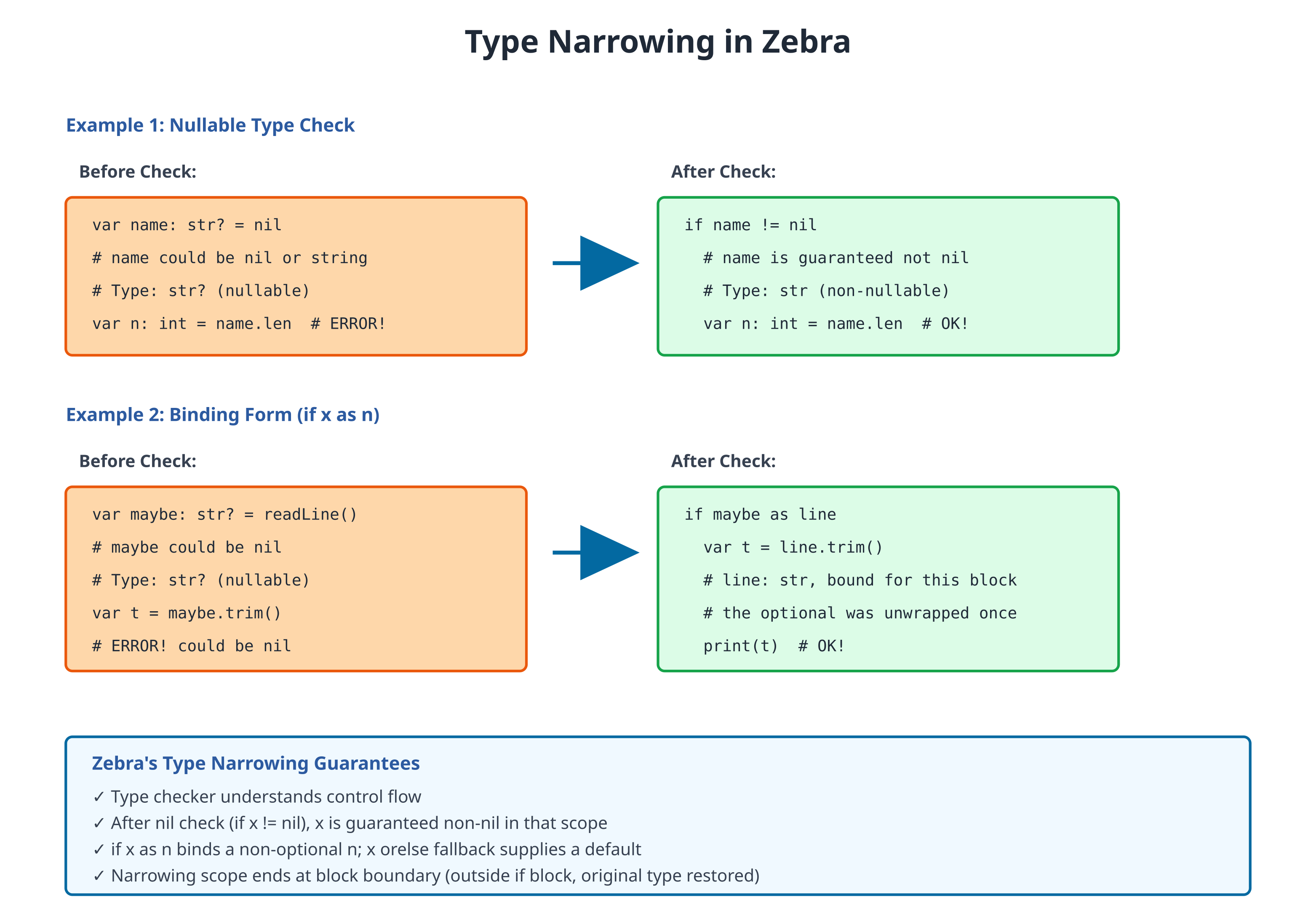
After checking, the type is narrowed:
# file: 11_narrowing.zbr
# teaches: type narrowing
# chapter: 11-Nil-Tracking-and-Safety
def process_name(input: str?)
if input != nil
# Inside the block, input is narrowed to str
print(input.len) # ✅ Safe: know it's str
print(input.upper()) # ✅ Safe
Narrowing follows the if x != nil block, not an early return. The early-return
shape — if input == nil: return and then using input below — does not narrow
(the else-branch of == nil is on the not-yet list), so write it as the block above,
or bind with if input as name (next section), or unwrap explicitly with input!.
# an early return still works, with an explicit unwrap after it
def shout(input: str?): str
if input == nil
return ""
return input!.upper()
if x as n — Unwrap-and-Bind
The most idiomatic way to unwrap an optional and use the inner value is the
if x as n binding form. When x: T?, it binds a non-optional n: T in
the then-branch — no separate unwrap required:
# file: 11_if_as.zbr
# teaches: optional unwrap binding form
# chapter: 11-Nil-Tracking-and-Safety
def main()
var maybe_name: str? = "Alice"
if maybe_name as name
# `name` is `str` here — non-optional
print("Hello, ${name}!")
else
print("No name")
This form combines the nil-check, the unwrap, and the binding into a single
statement, and it works both for plain optionals (T?) and for optional
class/union check + unwrap together:
# Combined type check + unwrap:
var maybe_user: User? = lookup()
if maybe_user is User as u
print(u.name) # u is `User` (non-optional)
if x as n is preferred over ! whenever the wrapped value is going to
be used right away — it's safer (no panic possibility) and reads more
naturally.
The ! Operator (Force-Unwrap)
Warning: Only use when you're absolutely certain the value isn't nil.
# file: 11_unwrap.zbr
# teaches: force-unwrap operator
# chapter: 11-Nil-Tracking-and-Safety
def main()
var name: str? = "Alice"
# Unwrap: assert it's not nil
var safe_name = name!
print(safe_name) # Now just str
# If it WAS nil, this would crash
var empty: str? = nil
# var crash = empty! # ❌ Would panic at runtime
Unwrap with Fallback
# file: 11_unwrap_or.zbr
# teaches: safe unwrapping
# chapter: 11-Nil-Tracking-and-Safety
def get_user_name(user_id: int): str?
if user_id == 1
return "Alice"
return nil
def main()
var maybe_name = get_user_name(1)
# Option 1: Check and use default
if maybe_name as name
print(name)
else
print("Unknown user")
# Option 2: `orelse` supplies a fallback when the value is nil
var safe_name = get_user_name(2) orelse "Guest"
print(safe_name) # Guest
Real World: Database Queries
# file: 11_database.zbr
# teaches: nil in realistic scenarios
# chapter: 11-Nil-Tracking-and-Safety
class User
var id: int
var name: str
var email: str?
class UserDatabase
static
def find_user(user_id: int): User?
if user_id == 1
var user = User()
user.id = 1
user.name = "Alice"
user.email = "alice@example.com"
return user
return nil
def find_user_email(user_id: int): str?
var user = find_user(user_id)
if user == nil
return nil
return user.email
def main()
var user = UserDatabase.find_user(1)
if user != nil
print(user.name)
if user.email != nil
print(user.email)
else
print("No email on file")
else
print("User not found")
# Chaining nil checks
var email = UserDatabase.find_user_email(999)
if email != nil
print("Email: ${email}")
else
print("User not found")
Common Patterns
Optional Chaining
def get_user_city(user_id: int): str?
var user = find_user(user_id)
if user == nil
return nil
var address = get_address(user.id)
if address == nil
return nil
return address.city
Guard Clauses
def process(data: str?)
if data == nil
return
if data.len == 0
return
# Now process safely
do_work(data)
If you're new to programming
Nil means "nothing" or "no value." Different languages call it null, None, undefined.
Zebra makes you declare which variables can be nil with
?. This prevents accidental crashes.Type narrowing means the compiler recognizes that after you check
if x != nil, you can safely usex.
Common Mistakes
❌ Mistake: Forgetting to check for nil
var email: str? = get_email() print(email.len) # ❌ Crash if email is nil!✅ Better:
var email: str? = get_email() if email != nil print(email.len) # ✅ Safe
❌ Mistake: Using
!without certaintyvar value: str? = get_value() print(value!) # ❌ Crashes if value is nil✅ Better:
var value: str? = get_value() if value != nil print(value) # ✅ Safe — or use a fallback: print(value orelse "none")
❌ Mistake: Assigning nil to non-nullable
var name: str = nil # ❌ str can't be nil✅ Better:
var name: str? = nil # ✅ Declares it can be nil
Exercises
Exercise 1: Find User Email
Write a function that safely retrieves a user's email:
Solution
class User
var id: int
var name: str
var email: str?
class UserDB
static
def find_user(id: int): User?
if id == 1
var user = User()
user.id = 1
user.name = "Alice"
user.email = "alice@example.com"
return user
return nil
def get_email(user_id: int): str?
var user = find_user(user_id)
if user == nil
return nil
return user.email
def main()
var email = UserDB.get_email(1)
if email != nil
print("Email: ${email}")
else
print("User not found or no email")
Exercise 2: Safe Division
Write a division function that returns nil on error:
Solution
class Calculator
static
def safe_divide(a: float, b: float): float?
if b == 0.0
return nil
return a / b
def main()
var result = Calculator.safe_divide(10.0, 2.0)
if result != nil
print("Result: ${result}")
var bad = Calculator.safe_divide(10.0, 0.0)
if bad != nil
print(bad)
else
print("Cannot divide by zero")
Exercise 3: Nullable Chain
Write a function that navigates nullable fields:
Solution
class Profile
var name: str
var bio: str?
class User
var id: int
var profile: Profile?
class UserService
static
def get_user_bio(user_id: int): str?
var user = find_user(user_id)
if user == nil
return nil
var profile = user.profile
if profile == nil
return nil
return profile.bio
def find_user(id: int): User?
if id == 1
var user = User()
user.id = 1
var profile = Profile()
profile.name = "Alice"
profile.bio = "Developer"
user.profile = profile
return user
return nil
def main()
var bio = UserService.get_user_bio(1)
if bio != nil
print("Bio: ${bio}")
else
print("No bio found")
Next Steps
- → 12-Error-Handling —
throws,raise, andcatchfor error cases - → 14-Contracts — Enforce non-nil invariants
- 🏋 Project-2-HTTP-Server — Handle nil API responses
Key Takeaways
?marks nullable types —str?can be string or nil- Check before using —
if value != nil { ... } - Type narrowing — Compiler recognizes after checks
!unwraps — Only when certain it's not nil- Guard clauses — Exit early if nil
- Nil safety prevents crashes — It's a feature, not a limitation
Next: Head to 12-Error-Handling for exceptions (throws/raise/catch) and error propagation.
12: Error Handling
Audience: All
Time: 120 minutes
Prerequisites: 02-Values, 04-Functions, 07-Classes, 11-Nil-Tracking
You'll learn: throws annotation, raise statement, method-level catch clauses, error propagation, inline catch expressions
The Big Picture
Zebra's error model is exceptions — throws/raise/try/catch.
The shape is inspired by Zig's error-set system (each throws function returns
anyerror!T in the generated Zig), but enriched: raise "msg" carries a
string message, and raise "msg", obj attaches a structured details object
via a thread-local _error_ctx — strictly more than Zig's payload-less
error enums.
Error paths are explicit in the type system: throws on a signature is the
only way a function can fail, so you can see at a glance which functions may
fail and which cannot.
Note: Earlier versions of Zebra exposed a
Result(T)type as an error-as-value alternative. That type and its.isOk()/.okValue()methods were removed. Usethrowsfor all error handling.
Functions That Can Fail: throws
Mark a function with throws to indicate it may produce an error:
# file: 12_throws_basic.zbr
# teaches: throws annotation
# chapter: 12-Error-Handling
class Validator
static
def parse_int(text: str): int throws
if text.len == 0
raise "Empty string"
# Parse and return
return 42
def main()
var result = Validator.parse_int("123") catch 0
print(result)
Breakdown:
: int throws— This function returnsintbut may failraise "Empty string"— Signal an error with a messagecatch 0— If the call fails, use0as the fallback value
raise — Signaling Errors
Use raise to signal that something went wrong:
# file: 12_raise.zbr
# teaches: raise statement
# chapter: 12-Error-Handling
class FileLoader
static
def load(path: str): str throws
if path.len == 0
raise "Path cannot be empty"
if not path.endsWith(".txt")
raise "Only .txt files supported"
return "file contents here"
raise immediately exits the function and propagates the error to the caller.
Method-Level catch — Handling Errors
Block Form
For structured error handling, attach a catch clause to a method (or def)
at the same indent level as the def keyword. The clause runs when any
throws call inside the method body raises:
# file: 12_method_catch.zbr
# teaches: method-level catch clause
# chapter: 12-Error-Handling
def attempt()
var value = Validator.parse_int("")
print("Got: ${value}")
catch
print("Failed to parse")
def main()
attempt()
Catch with Binding
Bind the error value to inspect it. The binding gives you an error object with
a .message field (a plain string binding, |err|, prints the whole error via
interpolation; .message is how you pull just the text out):
# file: 12_catch_binding.zbr
# teaches: catch with error binding
# chapter: 12-Error-Handling
def attempt()
var value = Validator.parse_int("")
print("Got: ${value}")
catch |err|
print("Error: ${err.message}")
def main()
attempt()
Note: Earlier Zebra versions allowed a
try ... catch ...block at any point inside a method body, and a typed error binding written|err as str|. Both forms were removed; today everycatchclause attaches to either adef(method-level) or a single expression (inline postfixexpr catch fallback), and the binding is untyped — use|err|and read.message.
catch Expression — Inline Fallbacks
For simple cases, use catch as an expression to provide a default:
# file: 12_catch_expr.zbr
# teaches: catch expression for defaults
# chapter: 12-Error-Handling
def main()
# Provide a default value if the call fails
var value = Validator.parse_int("abc") catch 0
print(value) # 0
var count = Validator.parse_int("") catch 0
print(count) # 0
This is the most common pattern for simple error recovery. An inline catch
can also bind the error (expr catch |e| fallback), but e there is a bare
anyerror with no .message field — for a fallback that depends on what
went wrong, use a method-level catch |e| (above), where e.message is
available.
Error Propagation
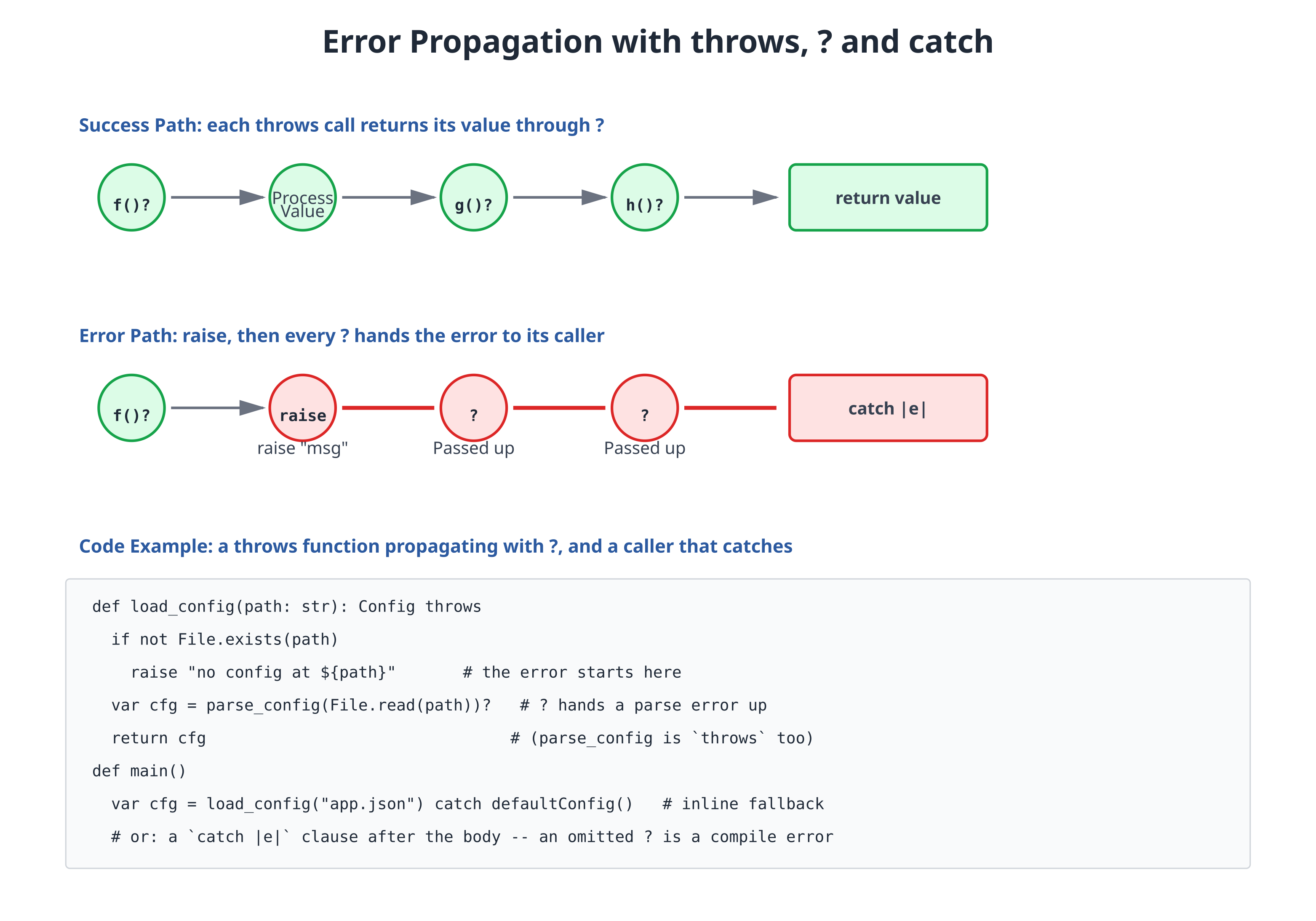
Functions annotated with throws can propagate errors from callees, but propagation isn't automatic — mark the call with ?. If a throws function calls another throws function without catching, the ? sends the error straight to the caller:
# file: 12_propagation.zbr
# teaches: error propagation
# chapter: 12-Error-Handling
class Parser
static
def parse_config(text: str): str throws
if text.len == 0
raise "Empty config"
return "parsed"
class System
static
def load_system(config_text: str): str throws
# The `?` sends a raise from parse_config straight to our caller
var parsed = Parser.parse_config(config_text)?
return "System loaded with: ${parsed}"
def main()
var result = System.load_system("data") catch "load failed"
print(result)
Real World: API Client
# file: 12_api_client.zbr
# teaches: realistic error handling
# chapter: 12-Error-Handling
class APIClient
static
def fetch_user(user_id: int): str throws
if user_id <= 0
raise "Invalid user ID"
if user_id == 1
return "Alice"
raise "User not found"
def fetch_and_greet(user_id: int): str throws
var user = fetch_user(user_id)?
return "Hello, ${user}!"
def attempt_greet(user_id: int)
var g = APIClient.fetch_and_greet(user_id)
print(g)
catch |err|
print("Error: ${err.message}")
def main()
# Using inline catch expression
var greeting = APIClient.fetch_and_greet(1) catch "Could not greet"
print(greeting) # Hello, Alice!
# Using method-level catch (wraps a multi-line block)
attempt_greet(999) # prints "Error: User not found"
Exercises
Exercise 1: Safe Division
Write a function safe_divide(a: int, b: int): int throws that raises on division by zero.
Solution
class MathUtils
static
def safe_divide(a: int, b: int): int throws
if b == 0
raise "Division by zero"
return a / b
def main()
var r1 = MathUtils.safe_divide(10, 2) catch 0
var r2 = MathUtils.safe_divide(10, 0) catch 0
print(r1) # 5
print(r2) # 0
Exercise 2: Chained Error Handling
Write two functions that chain: parse_age(text: str): int throws and validate_age(text: str): str throws (returns "valid" if age is 0-150).
Solution
class AgeValidator
static
def parse_age(text: str): int throws
if text.len == 0
raise "Empty input"
var age = text.tryInt() # int? -- nil when the text is not a number
if age == nil
raise "Not a number"
return age!
def validate_age(text: str): str throws
var age = parse_age(text)?
if age < 0
raise "Age cannot be negative"
if age > 150
raise "Age too large"
return "valid"
def attempt_validate(text: str)
var result = AgeValidator.validate_age(text)
print(result) # "valid"
catch |err|
print("Error: ${err.message}")
def main()
attempt_validate("25") # prints "valid"
var r2 = AgeValidator.validate_age("200") catch "invalid"
print(r2) # invalid
Next Steps
- → 13-Generics — Type-safe containers
- → 15-Pipelines — Chain operations gracefully
Key Takeaways
throws— Annotates functions that may failraise— Signals an error, exits the function immediately- Method-level
catch— Attach acatchclause to adefat the same indent level; it runs when anythrowscall in the body raises catchexpression — Inline fallback:expr catch default- Errors propagate with
?— Mark every call to athrowsfunction with?to send its error to the caller; propagation is not automatic - Errors are explicit — You always know which functions can fail
Next: Head to 13-Generics for type-safe abstractions.
13: Generics and Type Constraints
Audience: Experienced programmers
Time: 120 minutes
Prerequisites: 02-Values-and-Types, 07-Classes-and-Instances, 08-Interfaces-and-Protocols
You'll learn: Generic types, type parameters, constraints, practical uses, common pitfalls
The Big Picture
So far, you've written code that works with specific types: a List(int), a HashMap(str, int). But what if you want a function that works with any type? That's where generics come in.
Generics let you write code that's type-safe but reusable across different types:
class Container(T)
var item: T
def get(): T
return item
Container(int) holds integers. Container(str) holds strings. Same code, different types. This is safer than using object or any, because the type checker still verifies you don't mix types.
Generic Classes
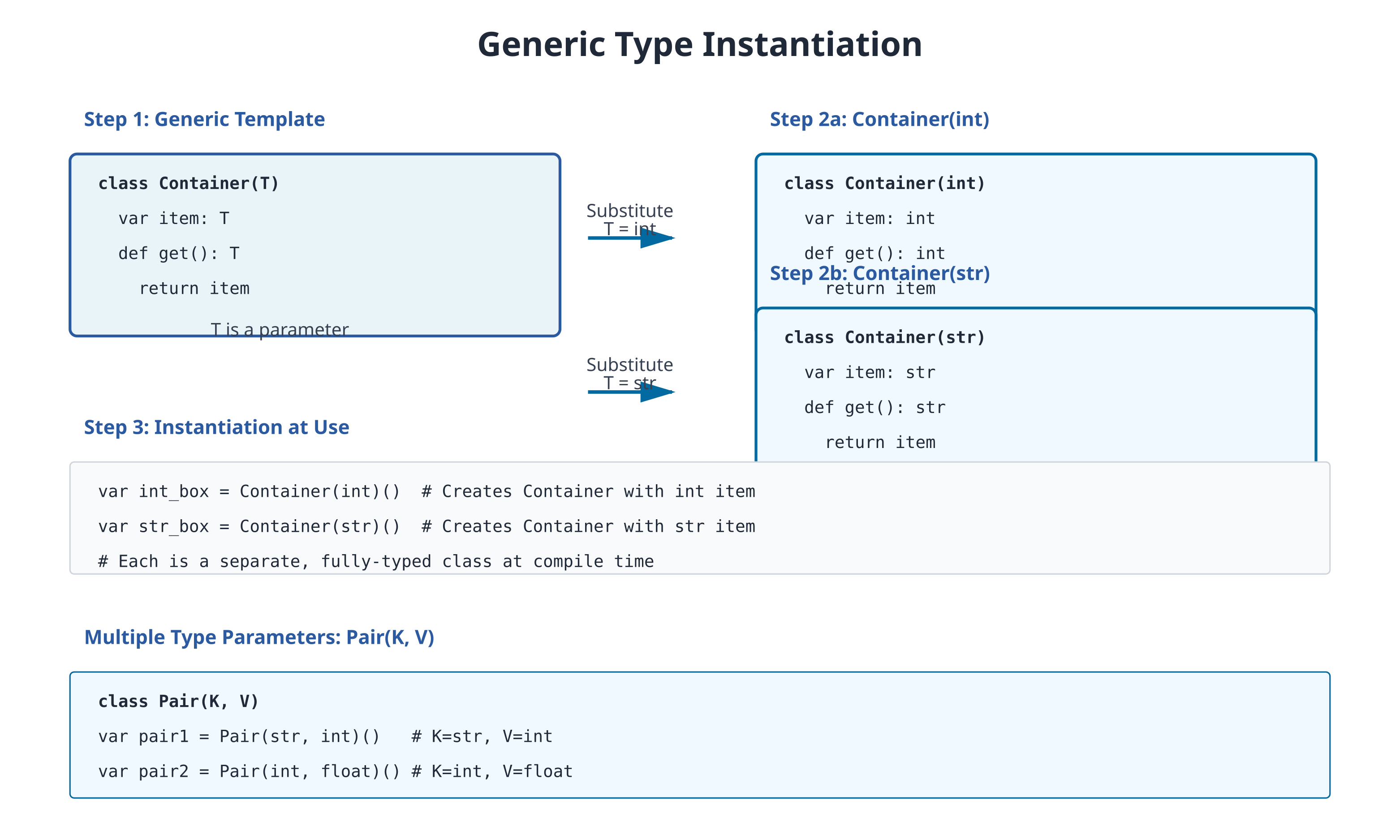
The simplest generic is a container that holds a single value:
# file: 13_generic_container.zbr
# teaches: generic class definition
# chapter: 13-Generics-and-Type-Constraints
class Container(T)
var item: T
def store(value: T)
item = value
def retrieve(): T
return item
def main()
var int_box = Container(int)()
int_box.store(42)
print(int_box.retrieve()) # Output: 42
var str_box = Container(str)()
str_box.store("hello")
print(str_box.retrieve()) # Output: hello
Notice the syntax:
Container(T)—Tis a type parameterContainer(int)()— substituteintforT, then create an instance- Inside the class,
Tcan be used like any other type
You can have multiple type parameters:
# file: 13_generic_pair.zbr
# teaches: multiple type parameters
# chapter: 13-Generics-and-Type-Constraints
class Pair(K, V)
var key: K
var value: V
def set_key(k: K)
key = k
def set_value(v: V)
value = v
def get_key(): K
return key
def get_value(): V
return value
def main()
var p = Pair(str, int)()
p.set_key("count")
p.set_value(42)
print("Key: ${p.get_key()}, Value: ${p.get_value()}")
Generic Methods
You can also write generic methods within regular classes:
# file: 13_generic_methods.zbr
# teaches: generic methods
# chapter: 13-Generics-and-Type-Constraints
class Utils
static
def identity(T)(value: T): T
return value
def first_of_three(T)(a: T, b: T, c: T): T
return a
def main()
var x = Utils.identity(int)(42)
print(x) # Output: 42
var y = Utils.identity(str)("hello")
print(y) # Output: hello
var z = Utils.first_of_three(int)(1, 2, 3)
print(z) # Output: 1
A generic method declares its type parameters in their own parentheses before the value
parameters -- def identity(T)(value: T): T -- and the caller passes the type first:
Utils.identity(int)(42). Zebra does not infer the type argument from the values;
Utils.identity(42) is refused with a message showing the explicit form. Instance methods
work the same way (box.wrap(int)(7)).
Generic Functions
Top-level functions can be generic too. The type parameters come in their
own parens before the value parens — def fname(T)(value: T): T:
# file: 13_generic_function.zbr
# teaches: top-level generic function declaration
# chapter: 13-Generics-and-Type-Constraints
def identity(T)(value: T): T
return value
def first(T)(items: List(T)): T?
if items.count() == 0
return nil
return items.at(0)
def main()
var n: int = identity(int)(42)
var s: str = identity(str)("hello")
var first_num: int? = first(int)([1, 2, 3])
if first_num as v
print(v) # 1
print(s) # hello
Rules:
- The type parameter list
(T)(or(T, U)etc.) comes immediately after the function name. - Inside the body,
Tis a regular type — usable in annotations, casts, and return types. - At the call site the type argument is required:
identity(int)(42). A bareidentity(42)is refused -- the type is not inferred from the arguments. - A type name that is declared nowhere (for example writing
def total(items: List(T))without the(T)) is refused asunknown type 'T', with the generic spelling as the hint. - Under the hood the compiler emits a
comptime T: typeparameter to Zig.
When to use:
- Generic function — utility code that works for any type (
identity,first,swap). - Generic method — operation that belongs to a generic class (covered above).
- Generic class — container or wrapper around values of any type (
Stack(T),Cache(K, V)).
The three forms cover almost every generic pattern you'll need.
Generic Collections
You already use generics implicitly with List and HashMap:
# file: 13_generic_collections.zbr
# teaches: using generic stdlib types
# chapter: 13-Generics-and-Type-Constraints
def main()
var numbers: List(int) = List()
numbers.add(1)
numbers.add(2)
numbers.add(3)
for n in numbers
print(n)
var ages: HashMap(str, int) = HashMap()
ages.put("Alice", 30)
ages.put("Bob", 25)
for name, age in ages
print("${name}: ${age}")
These are all generic types. The standard library provides them pre-built.
Type Constraints
Sometimes you want a generic that works with any type that implements an interface:
# file: 13_type_constraints.zbr
# teaches: interface constraints
# chapter: 13-Generics-and-Type-Constraints
interface Printable
def display(): str
class Dog implements Printable
def display(): str
return "Woof!"
class Cat implements Printable
def display(): str
return "Meow!"
class Printer
static
def print_item(item: Printable)
print(item.display())
def main()
var dog = Dog()
var cat = Cat()
Printer.print_item(dog) # Output: Woof!
Printer.print_item(cat) # Output: Meow!
Here, Printer.print_item accepts any type that implements Printable. This is a constraint: "T must implement interface Printable".
More advanced: a constraint on a generic class's type parameter. The
interface itself takes a type parameter — Comparable(T) — which is how a
class names itself in the signature (Score implements Comparable(Score)),
and where T implements Comparable(T) is checked when the class is
instantiated: ComparableList(int)() is refused, because a primitive
cannot implement an interface.
# file: 13_generic_constraints_advanced.zbr
# teaches: constraints in generic methods
# chapter: 13-Generics-and-Type-Constraints
interface Comparable(T)
def compareTo(other: T): int
class Score implements Comparable(Score)
var value: int
cue init(v: int)
value = v
def compareTo(other: Score): int
return value - other.value
class ComparableList(T where T implements Comparable(T))
var items: List(T) = List(T)()
def add(item: T)
items.add(item)
def find_max(): T?
if items.count() == 0
return nil
var max = items.at(0)
var i = 1
while i < items.count()
var item = items.at(i)
# T implements Comparable(T), so compareTo is available
if item.compareTo(max) > 0
max = item
i = i + 1
return max
def main()
var list = ComparableList(Score)()
list.add(Score(10))
list.add(Score(5))
list.add(Score(20))
if list.find_max() as max
print("Max: ${max.value}") # Max: 20
Comparable(T)is notcue compare. The interface above is a constraint you declare and you call (item.compareTo(max)). The language's own ordering protocol is thecomparecue (Chapter 07, "Cues"):<,<=,>,>=andlist.sort()callcue compare, and they do not look atcompareTo.Score(1) < Score(2)does not build with only the interface. If you want both, give the class both; the cue's body can simplyreturn .compareTo(other). Like everycue compare, it needs acue equalson the same class.
Type Aliases and Refinement Types
A different flavour of "generic" — instead of parameterising over types, you can parameterise over values that constrain a base type at runtime.
Plain type aliases
A type declaration creates a named alias for an existing type, optionally
with a where constraint:
# file: 13_type_aliases.zbr
# teaches: type aliases with constraints
# chapter: 13-Generics-and-Type-Constraints
type PositiveInt = int where value > 0
type NonEmptyStr = str where value.len > 0
type Ratio = float where value >= 0.0 and value <= 1.0
type UncheckedInt = int # no constraint — plain alias
def main()
var count: PositiveInt = 42 # OK — 42 > 0
var doubled: int = count * 2 # transparent — works as int
print(doubled) # 84
# var bad: PositiveInt = -1 # runtime panic: "type constraint 'PositiveInt' failed"
Key properties:
- Transparent.
PositiveIntis justintin the generated Zig — no wrapper struct, no runtime overhead beyond the constraint check. valueis the implicit binding in thewhereclause — refers to the variable being declared.- Check at initialization. The compiler emits a runtime check after
every
var x: AliasType = exprdeclaration. If the constraint fails, the program panics with the alias name in the message. --turbostrips checks — the same flag that strips contract assertions (Chapter 14) also strips type-alias checks for production builds.
Refinement types — aliases with value parameters
A type alias can carry value parameters that are bound into the constraint. Same family of alias, many different bounds:
# file: 13_refinement_types.zbr
# teaches: parametric refinement types
# chapter: 13-Generics-and-Type-Constraints
type Bounded(lo: int, hi: int) = int where value >= lo and value <= hi
def main()
var score: Bounded(0, 100) = 85 # OK
var neg: Bounded(-50, 50) = -20 # OK
# var bad: Bounded(0, 100) = 150 # runtime panic
var temp: Bounded(-273, 1000) = 37 # body temperature — OK
print(temp) # 37
The parameters (here lo and hi) sit alongside value in the where
expression. Each var x: Bounded(...) declaration substitutes the
parameter values and emits the check.
Struct base types
The base type can be a struct, and the constraint can inspect fields:
struct Range
var lo: int
var hi: int
type ValidRange = Range where value.lo < value.hi
def main()
var r: ValidRange = Range(lo: 0, hi: 10) # OK
# var bad: ValidRange = Range(lo: 5, hi: 3) # runtime panic
Struct aliases don't carry value parameters in v1.0 — the parametric form is for primitive base types only.
When to reach for refinement types
- Domain invariants that should hold at every assignment — port numbers in
1..65535, percentages in0..100, ages in0..150. - Self-documenting parameter types —
Bounded(0, 100)reads better thanintplus a comment. - Bug-catching in tests — paired with
--turbo-stripped release builds, you pay the check cost only during development.
For invariants on whole functions (not just variable assignments),
prefer require / ensure contracts — see Chapter 14.
Real World: Generic Cache
A practical example: a cache that works with any type:
# file: 13_generic_cache.zbr
# teaches: realistic generic class
# chapter: 13-Generics-and-Type-Constraints
class Cache(K, V)
var data: HashMap(K, V) = HashMap()
var max_size: int
cue init(max_size: int)
this.max_size = max_size
def put(key: K, value: V)
if data.count() >= max_size and not data.contains(key)
# Evict first key (simplistic LRU simulation)
# In real code, track access order
pass
data.put(key, value)
def lookup(key: K): V?
if data.contains(key)
return data.fetch(key)
return nil
def clear
data = HashMap()
def main()
var cache = Cache(str, int)(3) # the ctor args go on the constructor call
cache.put("a", 1)
cache.put("b", 2)
cache.put("c", 3)
var val = cache.lookup("b")
if val != nil
print("Got: ${val}")
Common Mistakes
Mistake 1: Forgetting to Instantiate Generic Parameters
# WRONG
var box = Container() # Error: T not specified
box.store(42)
# CORRECT
var box = Container(int)()
box.store(42)
Mistake 2: Mixing Types in a Generic Container
# WRONG
var box = Container(int)()
box.store("hello") # Error: Expected int, got str
# CORRECT
var box = Container(str)()
box.store("hello")
Mistake 3: Forgetting to Declare the Type Parameter
# WRONG - T is used but never declared
def find_max(items: List(T)): T # error: unknown type 'T'
var max = items.at(0)
for item in items
if item > max
max = item
return max
# CORRECT - declare T, and pass it at the call
def find_max(T)(items: List(T)): T
var max = items.at(0)
for item in items
if item > max
max = item
return max
# find_max(int)([3, 9, 4]) is 9
The body is checked for each type it is called with: find_max(int) and find_max(str)
compile; a type with no > does not (today the error comes from Zig, not Zebra).
Mistake 4: Expecting Runtime Type Tests on T
Type parameters are not erased. Each distinct type argument compiles its own copy of
the function (Zig's comptime monomorphization), so inside process(int) the parameter
simply is int, and there is nothing to test at runtime. Code that only makes sense for
some types belongs behind an interface constraint (T where T implements Comparable(T))
or in a separate, non-generic function -- not behind a runtime check on T.
Exercises
Exercise 1: Generic Stack
Implement a Stack(T) class with push, pop, and is_empty methods:
Solution
class Stack(T)
var items: List(T) = List()
def push(value: T)
items.add(value)
def pop(): T?
if items.count() == 0
return nil
var value = items.at(items.count() - 1)
# Remove last item (simplified - no remove method)
return value
def is_empty(): bool
return items.count() == 0
def main()
var stack = Stack(int)()
stack.push(1)
stack.push(2)
stack.push(3)
var val = stack.pop()
if val != nil
print("Popped: ${val}")
Exercise 2: Filter Function with a sig Predicate
Write a function that filters a list of int based on a predicate. Function
parameters that accept lambdas must use a named sig type — inline
def(T): R types are not valid in parameter position (see Chapter 04).
Solution
sig IntPredicate(x: int): bool # name the function type
class ListUtils
static
def filter(items: List(int), pred: IntPredicate): List(int)
var result: List(int) = List()
for item in items
if pred(item)
result.add(item)
return result
def is_even(x: int): bool
return x % 2 == 0
def main()
var numbers: List(int) = List()
numbers.add(1)
numbers.add(2)
numbers.add(3)
numbers.add(4)
var evens = ListUtils.filter(numbers, is_even)
for e in evens
print(e)
A truly generic filter — filter(T)(items: List(T), pred: ???) — would need
a generic sig type. Generic sigs aren't part of the language yet, so the
idiomatic move is to write one concrete filter per element type, or to write a
generic function whose predicate is a comptime callable (see the generic
functions section of QUICKSTART for advanced patterns).
Exercise 3: Generic Wrapper with Validation
Create a ValidatedBox(T) that only accepts values passing a validation function:
Solution
class ValidatedBox(T)
var item: T?
var validator: T -> bool
cue init(validator: T -> bool)
this.validator = validator
def set(value: T): bool
if validator(value)
item = value
return true
return false
def get(): T?
return item
def main()
var age_box = ValidatedBox(int)()
age_box.init({ x in x >= 0 and x <= 150 })
if age_box.store(25)
print("Valid age: ${age_box.retrieve()}")
if not age_box.store(200)
print("Invalid age")
Key Takeaways
- Generics enable type-safe reusable code — Write once, use with many types
- Type parameters are like function parameters —
Container(T)where T is filled in at use time - Collections are generics —
List(T),HashMap(K, V)work with any type - Constraints limit generics — Use interfaces to require specific capabilities
- Type erasure happens at compile time — Don't rely on runtime type information
Next Steps
- → 14-Contracts — Express what generics must provide
- → 15-Pipelines — Chain generic operations cleanly
- → Project 1 — Use generics in real code
Generics are the bridge between flexibility and safety. Master them, and your code scales.
14: Contracts and Assertions
Audience: All
Time: 90 minutes
Prerequisites: 04-Functions-and-Scope, 07-Classes-and-Instances, 12-Error-Handling
You'll learn: require (preconditions), ensure (postconditions, result, old), invariant (class invariants), assert, and the --turbo strip flag
The Big Picture
Contracts are one of Zebra's marquee features. A contract is an executable specification attached to a function or class — the compiler emits runtime checks for each clause:
def withdraw(amount: int): int throws
require
amount > 0
amount <= balance
ensure
result == old balance - amount
balance = balance - amount
return balance
Three keywords cover the common cases:
| Keyword | Where | What it asserts |
|---|---|---|
require | Top of method body | Inputs are valid (precondition) |
ensure | Top of method body | Output is valid (postcondition) |
invariant | Top of class body | Object state is always valid |
These get checked at runtime by default. Pass --turbo to the compiler to
strip them all out for production builds — same semantics as
-DNDEBUG for C assert.
Why bother? Manual
if x raise "..."checks at the top of each method work, but they bury the contract in normal control flow.require/ensure/invariantmake the contract syntactically distinct, give it a structured failure message with the failing clause, and let the production build remove the cost without touching the source.
This is Design by Contract, an idea from Eiffel that Zebra inherits and adapts.
Preconditions: require
A require block lists conditions that must hold when the method is called.
Each condition is a Boolean expression on its own line:
# file: 14_require.zbr
# teaches: precondition checking with require
# chapter: 14-Contracts-and-Assertions
class Bank
var balance: int = 100
def withdraw(amount: int): int
require
amount > 0
amount <= balance
balance = balance - amount
return balance
def main()
var bank = Bank()
print(bank.withdraw(50)) # 50
# bank.withdraw(-10) # → panic: require failed in 'withdraw'
# bank.withdraw(1000) # → panic: require failed in 'withdraw'
If any clause is false, Zebra panics with a message naming the method and the failing clause.
When to use require:
- Validate parameters (range, non-emptiness, format)
- Assert preconditions on the receiver's state ("only call after
init") - Document required ordering between methods
require failures indicate a caller bug — the caller violated the
contract. Don't use require for user input you intend to validate
gracefully; that's throws + raise (Chapter 12).
Postconditions: ensure
An ensure block lists conditions that must hold when the method returns
normally:
# file: 14_ensure.zbr
# teaches: postcondition checking with ensure
# chapter: 14-Contracts-and-Assertions
class Counter
var count: int = 0
def increment(): int
ensure
count > 0
count = count + 1
return count
def main()
var c = Counter()
print(c.increment()) # 1
print(c.increment()) # 2
ensure clauses fire only on the success path, not when the method
raises an error. This is by design (a throwing method has no meaningful
postcondition).
The result keyword
Inside ensure, the keyword result refers to the value the method is about
to return. It has the same type as the method's declared return, so member
access works naturally:
# file: 14_ensure_result.zbr
# teaches: result in ensure clauses
# chapter: 14-Contracts-and-Assertions
class Strings
static
def normalise(s: str): str
ensure
result.len <= s.len # never grows
not result.startsWith(" ")
not result.endsWith(" ")
return s.trim()
result is only valid inside ensure. In the method body, you'd refer to
the to-be-returned variable by its own name; result is a contract-time
binding, not a regular variable.
The old snapshot
When you need to compare the post-call state to the pre-call state, use the
old operator inside ensure. It snapshots an expression at function entry:
# file: 14_ensure_old.zbr
# teaches: old snapshots in ensure clauses
# chapter: 14-Contracts-and-Assertions
class Counter
var count: int = 0
def increment(): int
ensure
result == old count + 1 # post-state vs pre-state
count == old count + 1
count = count + 1
return count
old expr is valid only inside ensure. Each occurrence captures expr
once at function entry; the captured value is then used in the
post-condition check.
Invariants: invariant
A class invariant block lists conditions that must hold whenever the
object is observable from outside. Zebra checks the invariant after cue init returns and after every public method exits:
# file: 14_invariant.zbr
# teaches: class invariants
# chapter: 14-Contracts-and-Assertions
class Account
var balance: int = 0
var transactions: int = 0
invariant
balance >= 0
transactions >= 0
def deposit(amount: int)
require
amount > 0
balance = balance + amount
transactions = transactions + 1
def withdraw(amount: int)
require
amount > 0
amount <= balance
balance = balance - amount
transactions = transactions + 1
def main()
var acct = Account()
acct.deposit(50)
acct.withdraw(30)
# Both invariants checked after each method returns.
Why invariants are a force multiplier: instead of repeating the same
five sanity checks at the end of every method, you write them once in
invariant and the compiler weaves them into every method exit. When you
add a sixth method later, it gets the invariant check for free.
An invariant is checked after
cue initreturns, not before — your constructor is allowed to assemble state stepwise. Same for setters: the invariant is checked once at the end, not after each individual assignment.
Assertions: assert
For one-off checks inside a method body — debug-time sanity probes that
don't fit the contract structure — Zebra has a plain assert statement:
# file: 14_assert.zbr
# teaches: assert statement
# chapter: 14-Contracts-and-Assertions
class Math
static
def divide(a: int, b: int): int
require
b != 0
var q = a / b
assert q * b == a # integer-division sanity probe
return q
Like the contract clauses, assert panics on a false condition — but
unlike them it is not stripped by --turbo: a contract is an
obligation on the caller, an assert is a check you wrote to run in every
build. It's a more granular tool than ensure — useful
for checking intermediate values inside a method body.
Real-world example: a sorted list
A class that combines require (caller contract), ensure (per-method
guarantee), and invariant (always-true property):
# file: 14_sorted_list.zbr
# teaches: combining require, ensure, and invariant
# chapter: 14-Contracts-and-Assertions
class SortedList
var items: List(int)
cue init()
items = List(int)()
invariant
# The list is always non-decreasing
isSorted()
# private: the invariant is checked after every PUBLIC method, so a
# public isSorted() would re-trigger the invariant that calls it.
private def isSorted(): bool
var i = 1
while i < items.count()
if items.at(i - 1) > items.at(i)
return false
i = i + 1
return true
def insert(value: int)
ensure
items.count() == old items.count() + 1
# Find the first position whose element is not smaller than value.
var i = 0
while i < items.count() and items.at(i) < value
i = i + 1
items.add(value)
# Shift the tail right by one, then drop value into its slot.
var j = items.count() - 1
while j > i
items.set(j, items.at(j - 1))
j = j - 1
items.set(i, value)
def smallest(): int
require
items.count() > 0
return items.at(0)
def main()
var sl = SortedList()
sl.insert(3)
sl.insert(1)
sl.insert(2)
print(sl.smallest()) # 1
# Invariant verified after every public method.
The invariant catches any bug in insert automatically — there's no need
to remember to add a "verify still sorted" check at the end of every
mutation.
--turbo: stripping contracts for production
In normal builds, every require, ensure, and invariant emits
runtime check code. These add safety during development but cost
cycles in hot paths. Pass --turbo to the compiler to strip them
entirely (assert statements are kept):
zebra app.zbr # contracts active — runtime checks emitted
zebra --turbo app.zbr # contracts stripped — same source, faster binary
--turbo is, for contracts, the same source-to-binary toggle C/C++ get with -DNDEBUG.
Use it for production releases; develop and test without it.
Don't put load-bearing logic inside contract clauses — anything you can't afford to lose at
--turbotime. Side effects inrequire/ensureare already a code smell;--turbomakes the smell into a bug.
If you're new to programming
A precondition is "what must be true before I run." A postcondition is "what I promise will be true after I run." An invariant is "what stays true the whole time the object exists."
Contracts are a way of writing your assumptions down as code instead of in comments — comments rot when the code changes; contracts panic when the code violates them.
Common Mistakes
❌ Using
requirefor user-input validationdef parse_age(s: str): int require s.len > 0 # ❌ user-supplied — should be a graceful failure, not a panic return 42✅ Use
throws/raisefor failures the caller can handle:def parse_age(s: str): int throws if s.len == 0 raise "empty input" return 42Reserve
requirefor caller-bug detection.
❌ Putting side effects in
require/ensure/invariantdef step(): int ensure logger.write("step done") # ❌ side effect in ensure result > 0 ...Contract clauses are stripped by
--turbo. Anything you do inside one evaporates in production.
❌ Using
resultoutsideensuredef f(): int return result + 1 # ❌ `result` is contract-only; not a regular variable
resultis only meaningful insideensure. Inside the method body, store the to-be-returned value in a regularvarif you need to refer to it.
❌ Expecting
ensureto fire on the error pathdef divide(a: int, b: int): int throws ensure result > 0 if b == 0 raise "div by zero" return a / bWhen the function raises,
ensureis not evaluated — that's correct behaviour (a throwing method has no meaningful postcondition). Don't design contracts that depend onensurerunning on error paths.
Exercises
Exercise 1: Bank account with contracts
Rewrite the standard bank-account example using require, ensure, and
invariant:
Solution
class BankAccount
var balance: int = 0
var transactions: int = 0
invariant
balance >= 0
transactions >= 0
def deposit(amount: int)
require
amount > 0
ensure
balance == old balance + amount
transactions == old transactions + 1
balance = balance + amount
transactions = transactions + 1
def withdraw(amount: int)
require
amount > 0
amount <= balance
ensure
balance == old balance - amount
transactions == old transactions + 1
balance = balance - amount
transactions = transactions + 1
def main()
var acct = BankAccount()
acct.deposit(100)
acct.withdraw(30)
print("Balance: ${acct.balance}")
print("Transactions: ${acct.transactions}")
The invariant catches any future bug that would leave balance negative
or transactions not incrementing.
Exercise 2: Validated array indexer
Write a class that wraps a List(int) with bounds-checked access, using
require to document the contract:
Solution
class SafeArray
var items: List(int)
cue init()
items = List(int)()
def push(v: int)
ensure
items.count() == old items.count() + 1
items.add(v)
def at(i: int): int
require
i >= 0
i < items.count()
return items.at(i)
def first(): int
require
items.count() > 0
return items.at(0)
def main()
var sa = SafeArray()
sa.push(10)
sa.push(20)
print(sa.at(0)) # 10
print(sa.first()) # 10
# sa.at(99) # → panic: require failed in 'at'
Exercise 3: Stack with size invariant
Write a Stack(int) with push/pop/top that maintains an invariant
relating count() to items.count():
Solution
class Stack
var items: List(int)
var size: int = 0
cue init()
items = List(int)()
invariant
size >= 0
size == items.count()
def push(v: int)
ensure
size == old size + 1
items.add(v)
size = size + 1
def pop(): int
require
size > 0
ensure
size == old size - 1
var last = items.at(size - 1)
items.remove(size - 1) # remove by index, keeping the invariant true
size = size - 1
return last
def top(): int
require
size > 0
return items.at(size - 1)
def main()
var s = Stack()
s.push(1)
s.push(2)
s.push(3)
print(s.top()) # 3
print(s.pop()) # 3
print(s.top()) # 2
The invariant size == items.count() would catch any future bug that
broke the relationship between the count field and the underlying list.
Key Takeaways
requiredocuments the caller's contract. Use it for caller-bug detection, not for graceful user-input validation.ensuredocuments the method's promise.resultrefers to the return value;old exprsnapshotsexprat entry.invariantdocuments the object's permanent state. Checked afterinitand after every public method exit — write the invariant once, get the check for free everywhere.assertis the granular tool: an inline sanity probe inside a method body.--turbostrips the contract clauses (require/ensure/invariant);assertsurvives it. Develop with contracts on; ship with contracts off. Don't put side effects inside contract clauses.
Next Steps
- → 15-Pipelines — Composing functions whose contracts compose, too
- 🏋 Project 1 (CLI Tool) — Use contracts for argument validation
Contracts turn debugging from "where did this go wrong" into "the contract says what was supposed to be true; here's exactly which clause failed."
14b: Memory Management and Lifetimes
Audience: All — required for long-running services or bounded-memory work
Time: 120 minutes
Prerequisites: 07-Classes-and-Instances, 07b-Structs-Unions-and-Value-Types
You'll learn: The default arena allocator, scoped allocate blocks, the <<- copy-out operator, the using EXPR resource pattern, and ^T heap-indirection for recursive types
The Big Picture
Most languages handle memory in one of three ways:
- Garbage collection (Python, Java, Go) — fast to write, periodic pauses
- Manual
malloc/free(C, C++) — total control, easy to misuse - Borrow checker / ownership (Rust) — compile-time safe, learning curve
Zebra picks a fourth option: a program-wide arena allocator, with
optional bounded scopes. By default every allocation lives until program
exit; you never write free. When you need to reclaim memory mid-program
— for a long-running server, a streaming file processor, a large batch
job — you wrap the work in an allocate Arena() block.
This model has two benefits worth naming:
- The 90% case has zero cognitive overhead. Short-lived programs, CLI tools, scripts — they just work. No annotations, no ceremony.
- The 10% case is explicit. When you need bounded memory, the
allocateblock is right there in the source: a reader can see exactly where the memory is reclaimed.
This chapter covers the default model, the scoped escape hatch, the
<<- copy-out operator for passing values past a scope boundary, and the
^T heap-indirection syntax for recursive types.
The Default Allocator
Every Zebra program starts with one ArenaAllocator, exposed internally
as _allocator. Every implicit allocation — string concatenation, List
growth, class instantiation — pulls from this arena.
def main()
var s = "hello"
var t = " world"
var combined = s + t # allocates a new str — arena handles it
var nums = List(int)()
nums.add(1); nums.add(2) # List growth — arena handles it
var c = Circle(radius: 5.0) # class instance — arena handles it
print(combined)
# Program exits; arena is destroyed; all of the above freed at once.
There's no s.free(), nums.deinit(), or c.drop(). There's no
defer. Allocations live until program exit.
Why no individual free?
Two reasons:
ArenaAllocatordoesn't support targeted frees. Callingallocator.free(x)on an arena either no-ops (middle of the arena) or rewinds the bump pointer (last allocation) — which corrupts any sub-slice still in use elsewhere. So even if Zebra emitteddefer allocator.free(x), it would not be safe.- For typical programs it doesn't matter. A CLI tool that runs for 200ms doesn't care that its strings outlive a function call. The OS reclaims the whole arena on process exit.
For long-running programs that do care, the answer is allocate.
Scoped Memory: allocate Blocks
The allocate <expr> block redirects _allocator to a different
allocator for a lexical scope. When the block exits, scoped allocators
clean up and _allocator reverts to the parent.
def main()
var summary = ""
allocate Arena()
var src = File.read("big_file.txt")
var parsed = parse(src)
summary <<- summarise(parsed) # copy result out (see below)
# src, parsed, and all parse temporaries freed here.
print(summary)
Inside the block, every implicit allocation goes through the inner
arena. When the block exits, the entire inner arena is reclaimed — even
if big_file.txt was 100MB and parsed produced thousands of intermediate
strings.
Named allocator wrappers
allocate accepts any value that implements AllocatorSource (a class
with def allocator(): Allocator + def deinit()). The stdlib ships a
named wrapper for every common pattern:
| Wrapper | Backing allocator | Scoped? | Use when |
|---|---|---|---|
Arena() | std.heap.ArenaAllocator | ✓ | General sub-arena; most common |
Debug() | std.heap.DebugAllocator | ✓ | Leak detection during development |
FixedBuffer(buf) | std.heap.FixedBufferAllocator | ✓ | Bounded-size scratch; buf is a []byte |
StackFallback(N)() | std.heap.stackFallback(N, _allocator) | ✓ | Try stack first, spill to parent arena |
Pool(T)() | std.heap.MemoryPool(T) | ✓ | Single-type object pool |
ThreadSafe(inner) | std.heap.ThreadSafeAllocator | ✓ | Wrap another scoped allocator for cross-thread use |
Page() | std.heap.page_allocator | ✗ | Singleton; no cleanup |
Smp() | std.heap.smp_allocator | ✗ | Thread-safe singleton; no cleanup |
C() | std.heap.c_allocator | ✗ | libc malloc/free; no cleanup |
Scoped means the wrapper frees everything on block exit. Non-scoped wrappers are singletons; allocations outlive the block naturally.
Typical use cases
- Streaming file processor. Read → parse → reduce, in a loop. Wrap
each iteration in
allocate Arena()so the previous iteration's buffers don't pile up. - Leak detection in CI. Swap
Arena()forDebug()during development;Debug()reports any unmatched allocations on exit. - Stack-local scratch.
allocate StackFallback(4096)()keeps small work on the stack and only spills to the heap if the 4KB budget is exceeded. - Bounded peak memory. Any batch operation where you want a hard ceiling on memory usage.
What Does NOT Survive a Scoped Block
Anything allocated inside a scoped allocate block is freed when the
block exits. If you save a reference to it in an outer variable
directly, that reference becomes dangling.
# UNSAFE — DO NOT DO THIS
var dangling: str
allocate Arena()
var src = File.read("config.txt")
dangling = src # WRONG: src lives in the inner arena
print(dangling) # dangling slice — undefined behaviour
The compiler can't always catch this — dangling = src looks like a
normal assignment. The right pattern is the <<- copy-out operator.
<<- Copy-Out
The <<- operator deep-copies a value from the inner allocator into the
parent allocator and assigns it to an outer variable:
var summary: str = ""
allocate Arena()
var src = File.read("big_file.txt")
var s = process(src)
summary <<- s # deep-copies s into the parent allocator
# src + s + temporaries freed; summary survives.
print(summary)
For each supported type, <<- does the right thing:
| Type | What <<- does |
|---|---|
str | Duplicates the bytes into the parent allocator |
List(T) | Allocates a new ArrayList in the parent; deep-copies each element |
class / struct | Recursively deep-copies every field (handles ^T? chains) |
int, float, bool, char | Plain assignment — no heap |
HashMap | Not supported — compile error; rebuild manually if needed |
The HashMap limitation is by design. Deep-copying a HashMap requires re-hashing every key, and the result almost always indicates the wrong data structure for the lifetime pattern. If you need to surface key/value data past a block boundary, iterate and rebuild:
var out: HashMap(str, int) = HashMap(str, int)()
allocate Arena()
var tmp: HashMap(str, int) = HashMap(str, int)()
populate(tmp)
# out <<- tmp # ERROR
for k, v in tmp # iterate + rebuild
out.set(k, v) # k and v are str/int — copy-out implicit
Outside a scoped block
<<- is a normal assignment when used outside any scoped block (or
inside a non-scoped wrapper like Page()/Smp()/C()). You can write
<<- defensively in code that might or might not be inside allocate
— it's always safe.
def main()
var x: str = ""
x <<- "hello" # outside any allocate block — plain assignment
using EXPR — Resource Scope Blocks
The using EXPR block runs a body with a resource that has a
begin() / end() lifecycle. The compiler calls those two methods for
you, so they are cues (Chapter 07, "Cues"): any class that declares
cue begin() and cue end() works — no interface declaration required:
class CountGroup
var entered: int = 0
var exited: int = 0
cue begin()
.entered = .entered + 1
cue end()
.exited = .exited + 1
def main()
var g = CountGroup()
using g
print("inside the using block")
# Here: g.entered == 1, g.exited == 1
Desugaring
A using EXPR block compiles to Zig of this shape (a sketch, not
Zebra — body... stands for the block's statements):
{
const _resource = EXPR;
_resource.begin();
defer _resource.end();
body...
}
EXPR is evaluated exactly once. end() fires only if begin()
completed successfully — if begin() raises, end() does not run.
Why this matters for memory
using is the RAII pattern from C++ and the with statement from
Python, in one form. It pairs begin/end calls so a reader can see
the resource is cleaned up. The GUI stdlib uses it for layout groups:
using g.vbox("##main", true)
using g.hbox("##row", false)
g.button("OK", .ok)
g.button("Cancel", .cancel)
g.text("Status: ready")
Each vbox and hbox opens a layout container in begin() and closes
it in end(). The body in between issues widget commands inside that
container.
using vs. allocate
| Pattern | Use when |
|---|---|
allocate Arena() | Want memory reclaimed at scope exit |
using x | Want arbitrary cleanup (close file, release lock, end paint, leave layout group) |
They compose. A program can have using blocks inside allocate
blocks and vice versa.
No destructors
Zebra has no destructor: there is no cue deinit in 1.0, and the
compiler refuses one ("unknown cue 'deinit'"). A destructor would run at
the end of a scope, and a class instance is a reference that can outlive
the scope it was made in (stored in a list, returned, captured), so
"end of scope" is not "end of the object". The two constructs above
cover the two jobs a destructor does elsewhere. The arena reclaims
memory, and using runs a release step at a point you can see in the
source. begin() and end() are the two cues using calls; there is no
third one for the end of a scope.
Older code: before
beginandendbecame cues they were writtendef begin()/def end(). That spelling still builds in this release, but eachusingthat reaches it prints a warning ("declares begin/end withdef; they are cues now") and a later release will refuse it.
^T — Heap Indirection for Recursive Types
^T is a special field-type marker for breaking recursive struct or
union cycles. It's the only reason to reach for ^T in Zebra; for
ordinary references, classes already give you reference semantics.
struct Node
var value: int
var next: ^Node? # heap-boxed optional pointer
def main()
var a = Node(1, nil)
var b = Node(2, nil)
a.next = b # auto-boxes b into a *Node on the heap
The rules
| Rule | Detail |
|---|---|
| Type mapping | ^T in a field → *T in the generated Zig; ^T? → ?*T |
| Auto-boxing | ^T field = T value → compiler allocates a heap copy |
| Transparency | Inside a branch arm binding a ^T payload, the binding has type T (pointer stripped) |
^ClassName is illegal | Classes are already references; double-boxing is rejected |
| For-in transparency | for n in List(^Node) binds n: Node, not ^Node |
^T? and nil
struct TreeNode
var value: int
var left: ^TreeNode?
var right: ^TreeNode?
def main()
var root = TreeNode(value: 5, left: nil, right: nil)
var child = TreeNode(value: 3, left: nil, right: nil)
root.left = child # auto-boxes child into *TreeNode
if root.left as n # n: TreeNode — pointer is transparent
print(n.value)
Unions with ^T payload
The classic AST shape:
union Expr
num(value: int)
add(left: ^Expr, right: ^Expr)
def main()
var e = Expr.add(left: Expr.num(1), right: Expr.num(2))
branch e
on Expr.add as a
# a.left: Expr (not ^Expr — auto-deref'd)
print("add")
on Expr.num as n
print(n.value)
This is exactly how Zebra's own compiler models its AST.
Memory interaction
^T allocations go through whatever _allocator is active. Inside an
allocate Arena() block, the boxes live in the inner arena and are
freed on block exit. The <<- copy-out operator recursively follows
^T? chains — copying out a linked list copies every node.
var head: ^Node? = nil
allocate Arena()
var n = Node(value: "a", next: Node(value: "b", next: nil))
head <<- n # recursively copies the entire chain into parent
# inner nodes freed; head's chain is intact in the parent arena.
Where the Memory Goes: --census
When a long-running program grows, the question is which line is allocating. Build and
run it with --census and every allocation is counted under the source line that made it:
zebra --census prog.zbr # report on stderr at exit
ZEBRA_CENSUS_OUT=out.json zebra --census prog.zbr
At exit — including through sys.exit — the program prints a report on stderr and writes
zebra-census.json. It lists the totals (allocations, bytes requested, bytes freed, peak),
then each site: the file and line, what allocated there (a runtime helper such as
_str_concat, a constructor, your own function), how many allocations and bytes it
requested, and how many bytes it still keeps at the end. The ranking by bytes kept is
the one that shows a leak or an unbounded cache. Without the flag nothing is counted, and
sys.memStats() reports the census fields as -1 (not measured) rather than 0.
A program embedded in a host (--library-mode) can be built with --census=host: the
census is compiled in but not started, and the host calls _zbr_cens_install() when the
window it wants to measure begins — after start-up, say, so the report covers the steady
state only. A census build costs time per allocation, so use it to investigate, not to ship.
Real World: Streaming File Processor
A pattern that benefits from every primitive in this chapter — a loop that processes many files, with bounded peak memory and a structured result that survives each iteration:
# file: 14b_streaming_processor.zbr
# teaches: allocate + <<- + using together
# chapter: 14b-Memory-Management-and-Lifetimes
class Summary
public var filename: str = ""
public var word_count: int = 0
public var top_word: str = ""
def process_one(path: str): Summary
var result = Summary()
result.filename = path
allocate Arena()
var src = File.read(path)
var words = src.split(" ")
result.word_count = words.count()
result.top_word <<- most_frequent(words) # copy-out the single str
# All of src + words freed here; result survives.
return result
def most_frequent(words: List(str)): str
# ... implementation that allocates a HashMap internally ...
return ""
def main()
var summaries: List(Summary) = List()
for name in File.listDir("./docs") # entry names, not paths
var s = process_one(Path.join("./docs", name))
summaries.add(s) # Summary itself is in the outer arena
for s in summaries
print("${s.filename}: ${s.word_count} words, top=${s.top_word}")
Each call to process_one reads its file, computes its summary, copies
the relevant strings into the caller's arena, then frees everything
else. Peak memory stays bounded at one file's worth — regardless of
whether there are 10 files or 10,000.
Common Mistakes
❌ Mistake: Storing a value from inside an
allocateblock without<<-var s: str allocate Arena() s = File.read("config.txt") # s now points into the inner arena # s is dangling here✅ Better:
var s: str allocate Arena() var tmp = File.read("config.txt") s <<- tmp # deep-copy into parent
❌ Mistake: Trying to copy out a HashMap
var out: HashMap(str, int) = HashMap(str, int)() allocate Arena() var tmp: HashMap(str, int) = HashMap(str, int)() out <<- tmp # ERROR: HashMap copy-out not supported✅ Better: iterate and rebuild outside:
for k, v in tmp out.set(k, v) # primitives copy implicitly
❌ Mistake: Reaching for
^Ton a class fieldclass Tree var left: ^Tree? # ERROR: ^ClassName is illegal✅ Better:
Treeis already a reference type:class Tree var left: Tree? # plain reference; no ^ needed
❌ Mistake: Forgetting that
allocate Page()doesn't freeallocate Page() var src = File.read("huge.bin") # src is NOT freed here — Page() is non-scoped✅ Better: use
Arena()for bounded scopes:allocate Arena() var src = File.read("huge.bin") # src freed here
Exercises
Exercise 1: A Bounded-Memory Loop
Rewrite this loop so peak memory stays bounded at one file at a time:
def main()
var counts: List(int) = List()
for name in File.listDir("./logs")
var path = Path.join("./logs", name)
var src = File.read(path) # accumulates across iterations
counts.add(src.split("\n").count())
Solution
def main()
var counts: List(int) = List()
for name in File.listDir("./logs")
var path = Path.join("./logs", name)
var n: int = 0
allocate Arena()
var src = File.read(path)
n <<- src.split("\n").count()
counts.add(n)
int is a primitive — <<- is a plain assignment — but the src
buffer is freed before the next iteration reads its file.
Exercise 2: A Recursive Tree
Define a binary tree of integers using ^T? and write a function that
counts the nodes recursively.
Solution
struct TreeNode
var value: int
var left: ^TreeNode?
var right: ^TreeNode?
def count_nodes(t: ^TreeNode?): int
if t as n # n: TreeNode — pointer is transparent
return 1 + count_nodes(n.left) + count_nodes(n.right)
return 0
def main()
var leaf = TreeNode(value: 3, left: nil, right: nil)
var leaf2 = TreeNode(value: 7, left: nil, right: nil)
var root = TreeNode(value: 5, left: leaf, right: leaf2)
print(count_nodes(root)) # 3
Exercise 3: A using Resource
Write a BlockTimer class whose cue begin() starts a clock and whose cue end()
prints the elapsed milliseconds. Use it with using to time a block. (The standard
library's Timer.start() is the clock; t.elapsed() gives milliseconds as a float.)
Solution
class BlockTimer
var label: str
var clock: Timer
cue init(label: str)
.label = label
.clock = Timer.start()
cue begin()
.clock = Timer.start()
cue end()
print("${.label}: ${.clock.elapsed()} ms")
def main()
using BlockTimer("nap")
sys.sleep(20)
# ... work ...
# Prints "nap: NN ms" when the block exits
Next Steps
- → 14c-Concurrency-Channels-and-Threads — concurrent primitives that share this memory model
- → 22-FFI-and-Interop —
allocate C()for libc-allocated values crossing the FFI boundary - → 07b-Structs-Unions-and-Value-Types — the value-type model that
^Tpunches through
Key Takeaways
- Default model: arena allocator, no individual frees. Allocations live until program exit; the OS reclaims the arena.
allocate <wrapper>scopes the allocator for a block; on exit, scoped wrappers free everything inside.- Named wrappers include
Arena()(most common),Debug()(leak detection),FixedBuffer(buf),StackFallback(N)(),Pool(T)(), and non-scoped singletonsPage()/Smp()/C(). <<-copy-out deep-copies a value past a scope boundary — works forstr,List(T), classes/structs (incl. recursive^T?chains), and primitives; HashMap is intentionally not supported — iterate and rebuild.using EXPRblocks call thebegin()/end()cues around a body; any class that declarescue begin()andcue end()works. Use for arbitrary cleanup; pair withallocatefor memory.^Theap-indirection is for recursive structs/unions only; auto-boxes, transparent inbranchand for-loops;^ClassNameis illegal (classes are already references).
Next: Chapter 14c covers concurrency — Chan(T) channels, sys.go() for spawning threads, and the ThreadPool / Atomic primitives — built on the memory model from this chapter.
14c: Concurrency — Channels and Threads
Audience: All — required for servers, parallel computation, or any I/O at scale
Time: 120 minutes
Prerequisites: 04-Functions-and-Scope, 14b-Memory-Management-and-Lifetimes
You'll learn: Chan(T) channels, sys.go() for spawning threads, Atomic(T) for shared counters and flags, ThreadPool(n) for bounded worker pools, and which primitive to reach for in each situation
The Big Picture
Concurrency in Zebra has two pillars:
- Threads — independent stacks running in parallel, sharing the same arena allocator
- Channels — typed, buffered queues that move values safely between threads
This is the [CSP model] popularised by Go: prefer communicating over
sharing. Most patterns reduce to "spawn a worker, give it a channel,
read from the channel." The compiler doesn't have a borrow checker, so
correctness comes from this discipline plus a small set of Atomic
primitives for the few cases where channels are overkill.
This chapter walks the four primitives — Chan(T), sys.go(),
Atomic(T), ThreadPool(n) — and the patterns that combine them.
Channels: Chan(T)
Chan(T) is a thread-safe buffered channel carrying values of type
T. Construct it with a capacity:
var ch: Chan(int) = Chan(int)(4) # buffer up to 4 values
Three operations:
| Method | Returns | Behaviour |
|---|---|---|
ch.send(val) | void | Sends a value; blocks when full |
ch.recv() | T? | Receives a value; blocks when empty; returns nil when closed + empty |
ch.close() | void | Signals "no more values"; outstanding recv() calls drain remaining, then receive nil |
def main()
var ch: Chan(int) = Chan(int)(4)
ch.send(1)
ch.send(2)
ch.close()
var v1: int? = ch.recv() # 1
var v2: int? = ch.recv() # 2
var v3: int? = ch.recv() # nil — channel closed + empty
if v1 as n
print(n) # 1
if v3 == nil: print("done")
The <- operator
The <- operator is syntactic sugar for send / recv:
ch <- 42 # equivalent to ch.send(42)
var v: int? = nil
v <- ch # equivalent to v = ch.recv()
<- reads naturally — left arrow into the channel for send, left arrow
into the variable for receive. Many Zebra programs use the sugar
exclusively.
Not to be confused with
<<-. Chapter 14b covers<<-, the copy-out operator insideallocateblocks. It is a different token:<-means channel send/receive and nothing else.
Spawning Threads: sys.go()
sys.go(def() ...) spawns a fire-and-forget background thread that
runs the function's body:
sys.go(def()
print("hello from a thread")
)
The function takes no parameters. Every variable from the enclosing
scope that the body uses must be declared in a capture block at the
top of the body. An ordinary lambda captures what it reads on its own; a
thread closure does not, and using an outside variable without declaring
it is refused ("a sys.go closure names what it uses in a capture
block"). Re-declaring under the same name
(var ch: Chan(int) = ch) is the usual idiom. Captured values are
copied into the thread closure at spawn time, so the spawning function
can return immediately without leaving dangling references.
def main()
var ch: Chan(int) = Chan(int)(4)
sys.go(def()
capture
var ch: Chan(int) = ch
ch.send(1)
ch.send(2)
ch.close()
)
# Main thread reads:
var sum = 0
var done = false
while not done
var v: int? = ch.recv()
if v as n
sum = sum + n
else
done = true
print(sum) # 3
What sys.go() does NOT give you
- No join. Threads are detached. There's no
thread.wait()or return-value collection — use a channel to signal completion or to return a result. - No backpressure. Every
sys.go()call spawns a new OS thread. If you need bounded concurrency, useThreadPool(n)(below). - No panic recovery. If the body raises, the thread terminates. Design tasks to validate inputs before running heavy work.
Producer / Consumer Pattern
The canonical pattern: one or more producers send to a channel; one or
more consumers recv until the channel is closed + empty.
# file: 14c_pipeline.zbr
# teaches: producer/consumer with Chan
# chapter: 14c-Concurrency-Channels-and-Threads
def main()
var ch: Chan(int) = Chan(int)(4)
# Producer: send 1..5, then close
sys.go(def()
capture
var ch: Chan(int) = ch
for i in 1..5
ch.send(i)
ch.close()
)
# Consumer: read until closed + empty
var sum: int = 0
var done: bool = false
while not done
var v: int? = ch.recv()
if v as n
sum = sum + n
else
done = true
print(sum) # 1+2+3+4 = 10
This is the workhorse of concurrent Zebra. Two takeaways:
- The producer is responsible for closing. Without
ch.close(), the consumer'srecv()would block forever after the last value — it has no way to know the producer is finished. - The consumer reads
T?, notT.recv()returnsnilwhen the channel is closed and empty. Theif v as npattern is the idiomatic way to handle both cases.
Atomic(T) — Lock-Free Counters and Flags
Some shared state doesn't need a channel — a counter incremented by many
threads, a "done" flag, a one-shot signal. For those, use Atomic(T):
var counter: Atomic(int) = Atomic(int)(0)
counter.add(1)
var n: int = counter.load()
| Method | Returns | Notes |
|---|---|---|
Atomic(T)(init) | Atomic(T) | Create with initial value |
a.load() | T | Atomic read |
a.store(v) | void | Atomic write |
a.add(n) / a.sub(n) | T | Fetch-and-add — returns the old value |
a.swap(v) | T | Atomic exchange — returns the old value |
Supported T: int and bool.
All operations use sequentially-consistent memory ordering — the
safest and least-surprising default. For cases where relaxed ordering
would be sound and faster, drop into zig"..." and call
@atomicRmw directly.
Shared counter
def main()
var total: Atomic(int) = Atomic(int)(0)
sys.go(def()
capture
var total: Atomic(int) = total
var _ = total.add(1)
)
sys.go(def()
capture
var total: Atomic(int) = total
var _ = total.add(1)
)
# There is no join: poll until both increments have landed.
while total.load() < 2
sys.sleep(1)
print(total.load()) # 2
One-shot done flag
def do_work()
sys.sleep(20) # stand-in for real work
def main()
var done: Atomic(bool) = Atomic(bool)(false)
sys.go(def()
capture
var done: Atomic(bool) = done
do_work()
done.store(true)
)
while not done.load()
sys.sleep(10)
print("worker finished")
Atomic vs. Chan — Which to Reach For
Atomic(T) | Chan(T) | |
|---|---|---|
| Best for | Shared counters, flags, one-shot signals | Producer/consumer pipelines |
| Blocking | Never | send blocks when full; recv blocks when empty |
| Carries | A single value | A stream of values |
| Ordering | Atomic, but no message order | Message order preserved |
Rule of thumb: if multiple threads write the value, reach for
Atomic; if one thread produces and another consumes, reach for
Chan.
ThreadPool(n) — Bounded Workers
sys.go() spawns an unbounded thread per call — fine for a handful, bad
for thousands. ThreadPool(n) runs a fixed n workers and queues
submitted tasks among them:
def main()
var pool: ThreadPool = ThreadPool(4) # 4 worker threads
var counter: Atomic(int) = Atomic(int)(0)
var i: int = 0
while i < 8
pool.submit(def()
capture
var counter: Atomic(int) = counter
var _: int = counter.add(1)
)
i = i + 1
pool.wait() # blocks until all submitted tasks finish
print(counter.load()) # 8
| Method | Notes |
|---|---|
ThreadPool(n) | Constructs a pool with n workers |
pool.submit(def() ...) | Queue a zero-parameter function for async execution |
pool.wait() | Block until all queued tasks finish |
Key behaviours
- Reusable.
submitafterwaitqueues more work. A subsequentwaitblocks on the new tasks. - Workers run for the pool's lifetime — they're spawned at construction.
- Task panics terminate the worker, not the program — and they are not recovered. Validate inputs before submitting.
ThreadPool vs. sys.go()
ThreadPool(n) | sys.go(def() ...) | |
|---|---|---|
| Worker count | Fixed n | One new thread per call |
| Backpressure | Natural — submit waits if all workers are busy | None |
| Result collection | Via Atomic or Chan | Via Chan |
| Best for | CPU-bound parallel work | Fire-and-forget I/O |
For a 1000-item batch, ThreadPool(8) is almost always the right
choice. For two or three I/O tasks running alongside the main thread,
sys.go() is simpler.
ThreadPool + Chan: collecting results
The standard pattern for parallel computation with a return value:
def main()
var ch: Chan(int) = Chan(int)(8)
var pool: ThreadPool = ThreadPool(4)
for i in 0..8
pool.submit(def()
capture
var idx: int = i
var ch: Chan(int) = ch
ch.send(idx * idx)
)
pool.wait() # all tasks done; close the channel
ch.close()
var sum: int = 0
var done: bool = false
while not done
var v: int? = ch.recv()
if v as n
sum = sum + n
else
done = true
print(sum) # 0+1+4+9+16+25+36+49 = 140
Three things to notice:
- The
captureblock names everything the closure uses — captured-by-value semantics mean each task sees its ownidx, not the shared loop variable. pool.wait()runs beforech.close()— closing too early would race with sends still in flight.- The consumer is the main thread — no extra worker needed.
Memory and Allocator Interactions
Two important caveats:
Chan(T)uses the page allocator, not the arena. This is intentional — channels need to outlive any singleallocatescope. But it means: do not construct a channel inside a short-livedallocateblock if it's going to be used after the block exits. The channel itself survives, but its internal buffer storage may not.
ThreadPoolalso uses the page allocator. Same rule: don't construct one inside a short-livedallocatescope.
For practical purposes: declare your channels and pools at function
scope (or higher) and pass them by reference. Don't nest them inside
allocate Arena() blocks unless you understand the lifetime implications.
Real World: Parallel File Processor
A common shape: walk a directory, process each file in parallel with a bounded pool, collect results via a channel.
# file: 14c_parallel_files.zbr
# teaches: ThreadPool + Chan for parallel I/O
# chapter: 14c-Concurrency-Channels-and-Threads
class FileResult
public var path: str = ""
public var line_count: int = 0
def process_file(path: str): FileResult
var src = File.read(path)
var lines = src.lines() # not split("\n"): that counts the empty piece after a final newline
var r = FileResult()
r.path = path
r.line_count = lines.count()
return r
def main()
var names = File.listDir("./docs") # entry names, not paths
var ch: Chan(FileResult) = Chan(FileResult)(names.count())
var pool: ThreadPool = ThreadPool(4)
for name in names
pool.submit(def()
capture
var p: str = Path.join("./docs", name)
var ch: Chan(FileResult) = ch
ch.send(process_file(p))
)
pool.wait()
ch.close()
var results: List(FileResult) = List()
var done = false
while not done
var r: FileResult? = ch.recv()
if r as got
results.add(got)
else
done = true
for r in results
print("${r.path}: ${r.line_count} lines")
This same shape — pool + channel + capture closure — covers parallel HTTP requests, parallel database queries, parallel image processing, and most other batch I/O patterns.
Common Mistakes
❌ Mistake: Forgetting to close the channel
sys.go(def() capture var ch: Chan(int) = ch for i in 1..5 ch.send(i) # ch.close() omitted — consumer will block forever after the 4th value )✅ Better:
sys.go(def() capture var ch: Chan(int) = ch for i in 1..5 ch.send(i) ch.close() )
❌ Mistake: Sending to a closed channel
ch.close() ch.send(1) # PANIC at runtime✅ Better: the producer is the only one who should close, and only after the last send.
❌ Mistake: Closing the channel before the producers finish
for i in 0..8 pool.submit(def() capture var ch: Chan(int) = ch ch.send(work()) ) ch.close() # WRONG: tasks are still running pool.wait()✅ Better: wait first, then close:
for i in 0..8: pool.submit(...) pool.wait() # all sends are complete ch.close()
❌ Mistake: Sharing a plain counter across threads
var counter: int = 0 sys.go(def() counter = counter + 1 # refused: a `sys.go` closure names what it uses in a `capture` block )The compiler refuses this —
counteris not declared in acaptureblock. Declaring it there does not make it shared either: a capturedintis a copy taken at spawn time, so it cannot carry a count back to the spawning thread.✅ Better: use
Atomic(int)and capture the cell:var counter: Atomic(int) = Atomic(int)(0) sys.go(def() capture var counter: Atomic(int) = counter var _ = counter.add(1) ) sys.go(def() capture var counter: Atomic(int) = counter var _ = counter.add(1) )
❌ Mistake: Using the loop variable without capturing it
for i in 0..8 pool.submit(def() # capture missing — compile error: mutable 'i' not accessible print(i) )✅ Better: use a
captureblock to snapshot the value — each task gets its own copy ofias it was when the task was submitted:for i in 0..8 pool.submit(def() capture var idx: int = i print(idx) )
Exercises
Exercise 1: A Simple Pipeline
Write a program that uses one producer thread to send the integers 1 through 10 down a channel, and the main thread to print their sum.
Solution
def main()
var ch: Chan(int) = Chan(int)(4)
sys.go(def()
capture
var ch: Chan(int) = ch
for i in 1..11
ch.send(i)
ch.close()
)
var sum: int = 0
var done: bool = false
while not done
var v: int? = ch.recv()
if v as n
sum = sum + n
else
done = true
print(sum) # 55
Exercise 2: Parallel Squaring
Use ThreadPool(4) to compute the squares of 0..16 in parallel.
Collect the results in any order via a channel and print the sum.
Solution
def main()
var ch: Chan(int) = Chan(int)(16)
var pool: ThreadPool = ThreadPool(4)
for i in 0..16
pool.submit(def()
capture
var idx: int = i
var ch: Chan(int) = ch
ch.send(idx * idx)
)
pool.wait()
ch.close()
var sum: int = 0
var done: bool = false
while not done
var v: int? = ch.recv()
if v as n
sum = sum + n
else
done = true
print(sum) # 0^2 + 1^2 + ... + 15^2 = 1240
Exercise 3: Wait Without Joining
Threads don't expose a join() call. Use an Atomic(bool) flag to
have the main thread wait until a background thread signals completion.
Solution
def main()
var done: Atomic(bool) = Atomic(bool)(false)
sys.go(def()
capture
var done: Atomic(bool) = done
# ... do work ...
sys.sleep(100)
done.store(true)
)
while not done.load()
sys.sleep(10)
print("background work finished")
For a single signal, this is fine. For more than one — multiple
workers, or a sequence — use a Chan instead and recv() on it: a
channel recv blocks naturally without polling.
Next Steps
- → 14b-Memory-Management-and-Lifetimes — the memory model that underpins all of this
- → 22c-Testing-and-Validation — concurrent code needs tests; the runner handles them like any other
- → 20-File-IO-and-System-Access — combine with
sys.gofor non-blocking I/O patterns
Key Takeaways
Chan(T)is a thread-safe buffered channel:sendblocks when full,recvblocks when empty,closesignals end-of-stream<-sugar —ch <- vsends;v <- chreceives; reads naturally for pipelinessys.go(def() ...)spawns a fire-and-forget thread; outside variables must be declared in acaptureblock and are copied at spawn time; no join (use a channel for completion)Atomic(T)(T=intorbool) is for shared counters, flags, and one-shot signals; never blocks- Rule of thumb: multiple writers →
Atomic; producer/consumer →Chan ThreadPool(n)is a bounded worker pool withsubmit/wait; natural backpressure; reusableThreadPool+Chanis the standard pattern for parallel computation with collected results- Allocator caveat:
ChanandThreadPooluse the page allocator; declare them at function scope, not inside short-livedallocateblocks - Capture loop variables explicitly in
for i in 0..N: pool.submit(...)— usingiwithout acaptureblock is a compile error, and the capture gives each task its own copy
That's the end of the new chapters in Part 3. The next chapter in reading order is the existing 15-Pipelines-and-Function-Composition; when you're ready for the practical project arc, jump ahead to Part 4.
15: Pipelines and Function Composition
Audience: Experienced programmers
Time: 90 minutes
Prerequisites: 04-Functions-and-Scope, 06-Strings-and-Unicode
You'll learn: Pipeline operator, function composition, readable chains, real-world data flow
The Big Picture
Imagine you have a string and want to:
- Convert to lowercase
- Split into words
- Get the first word
- Get its length
Without pipelines:
var text = "HELLO WORLD"
var words = text.lower().split(" ")
var first_word = words.at(0)
var length = first_word.len
With the pipeline operator ->, this reads left-to-right:
var text = "HELLO WORLD"
var first_word = (text
-> .lower()
-> .split(" ")
-> .at(0))
var length = first_word.len # .len is a field, not a call — pipelines need calls
Pipelines make data transformations flow naturally, like reading prose.
Note on multi-line pipelines: Zebra's tokenizer ends an expression at a bare end-of-line, so a multi-line pipeline must be wrapped in parentheses. Single-line pipelines (
var r = 5 -> add(10) -> double()) don't need parens.
Basic Pipeline Syntax
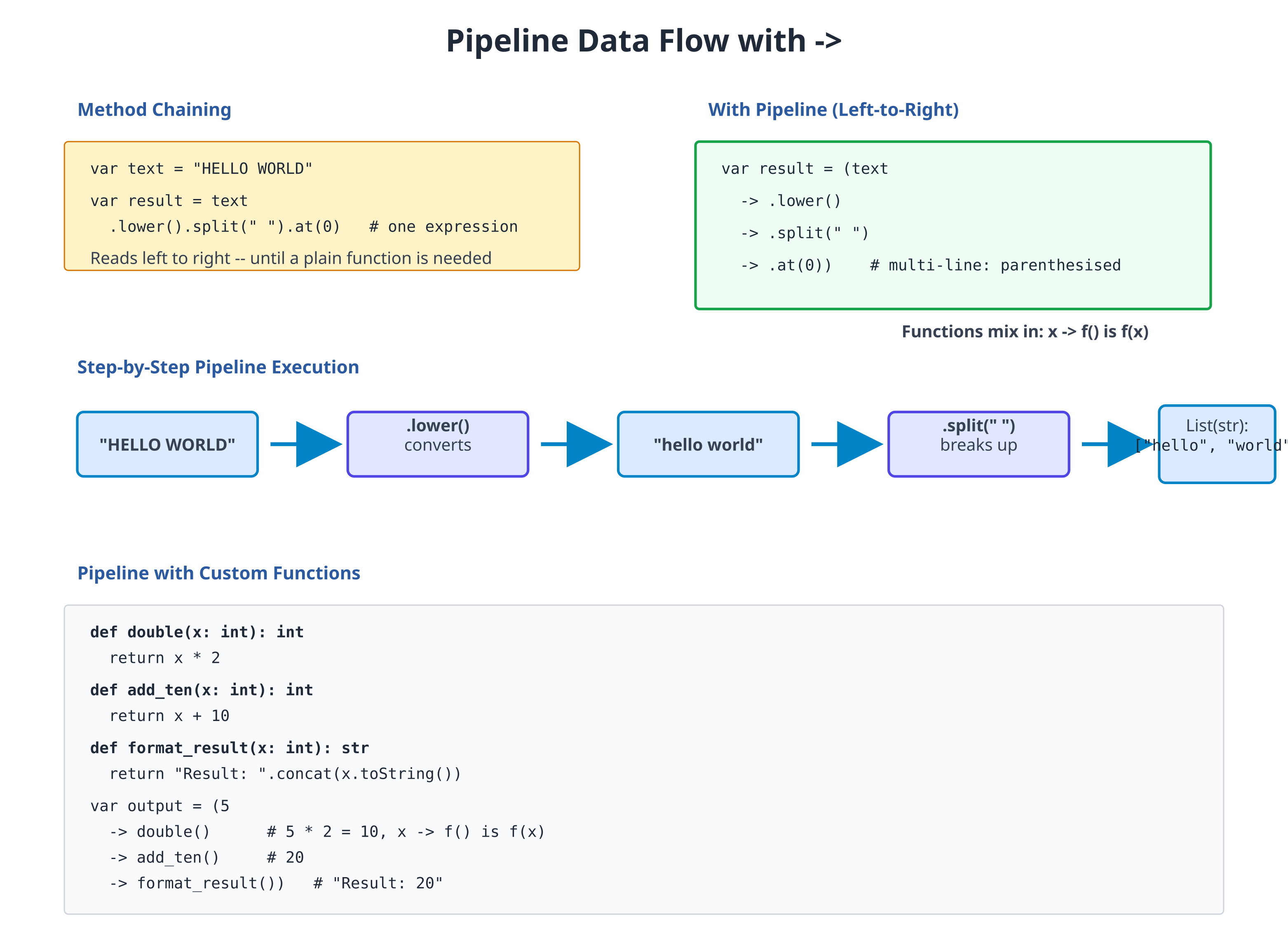
The -> operator passes the left-hand value to the right-hand expression:
# file: 15_pipeline_basics.zbr
# teaches: pipeline operator
# chapter: 15-Pipelines-and-Function-Composition
def main()
var text = "HELLO WORLD"
# Without pipeline (nested calls)
var result1 = text.lower().split(" ")
# With pipeline (left-to-right) — multi-line needs parens
var result2 = (text
-> .lower()
-> .split(" "))
# Both are equivalent
for word in result2
print(word)
Notice how pipeline reads more naturally: "take text, lowercase it, split it". Each -> says "pass the result of the previous expression to this one".
Chaining Multiple Operations
Pipelines shine when you have many sequential transformations:
# file: 15_pipeline_chain.zbr
# teaches: chaining operations
# chapter: 15-Pipelines-and-Function-Composition
class StringProcessor
static
def process(text: str): str
return (text
-> .lower()
-> .trim()
-> .replace(" ", " "))
def main()
var input = " HELLO WORLD "
var output = StringProcessor.process(input)
print(output) # Output: hello world
Each line applies one transformation. This is much clearer than deeply nested method calls.
Pipelines with Collections
Pipelines work great with lists and maps:
# file: 15_pipeline_collections.zbr
# teaches: piping through collections
# chapter: 15-Pipelines-and-Function-Composition
class DataProcessor
static
def count_words(text: str): int
return (text
-> .lower()
-> .split(" ")
-> .count())
def main()
var input = "The Quick Brown Fox"
var words = (input
-> .lower()
-> .split(" "))
var count = words.count()
print("Word count: ${count}")
Here, the pipeline takes a string, lowercases it, splits into a list, and we can call .count() on the result.
Custom Functions in Pipelines
You can pipe to any function that takes one argument:
# file: 15_pipeline_custom.zbr
# teaches: custom functions in pipelines
# chapter: 15-Pipelines-and-Function-Composition
class Utils
static
def double(x: int): int
return x * 2
def add_ten(x: int): int
return x + 10
def format_result(x: int): str
return "Result: ${x}"
def main()
var result = (5
-> Utils.double()
-> Utils.add_ten()
-> Utils.format_result())
print(result) # Output: Result: 20
The pipeline auto-prepends the left-hand value as the first argument to the
right-hand call. 5 -> Utils.double() becomes Utils.double(5). If the
function takes more arguments, supply them in the parens: 5 -> Utils.add(10)
becomes Utils.add(5, 10).
Real World: Data Transformation Pipeline
A practical example: process a CSV-like dataset:
# file: 15_pipeline_real_world.zbr
# teaches: realistic pipeline
# chapter: 15-Pipelines-and-Function-Composition
class DataAnalysis
static
def parse_numbers(line: str): List(int)
var numbers: List(int) = List()
var parts = line.split(",")
for part in parts
# Simplified: real parsing more complex
var num = part.trim().toInt()
numbers.add(num)
return numbers
def sum_list(items: List(int)): int
var total = 0
for item in items
total = total + item
return total
def average(total: int, count: int): float
if count == 0
return 0.0
return total / count
def main()
var csv_line = "10, 20, 30, 40"
var avg = (csv_line
-> DataAnalysis.parse_numbers()
-> DataAnalysis.sum_list()
-> DataAnalysis.average(4)) # auto-prepends sum as first arg
print("Average: ${avg}")
This reads as: "Parse CSV, sum values, calculate average." Much clearer than nested calls!
Function Composition Pattern
You can create composed functions that combine multiple operations:
# file: 15_function_composition.zbr
# teaches: composing functions
# chapter: 15-Pipelines-and-Function-Composition
class Transform
static
def lowercase(text: str): str
return text.lower()
def remove_spaces(text: str): str
return text.replace(" ", "")
def reverse_it(text: str): str
return text.reverse()
def compose_all(text: str): str
return (text
-> Transform.lowercase()
-> Transform.remove_spaces()
-> Transform.reverse_it())
def main()
var input = "HELLO WORLD"
var output = Transform.compose_all(input)
print(output) # Output: dlrowolleh
Each step is a self-contained function. Composition lets you reuse them in different orders.
Pipelines with Error Handling
Pipelines propagate errors naturally — if any step's throws function raises,
the whole pipeline aborts and the error surfaces at the function boundary.
Use a method-level catch clause to handle it:
# file: 15_pipeline_results.zbr
# teaches: pipelines with error handling
# chapter: 15-Pipelines-and-Function-Composition
class SafeParser
static
def parse_int(text: str): int throws
if text.len == 0
raise "Empty string"
# NOTE: Hardcoded for demonstration. A real implementation would parse
# the string into an integer. See Chapter 06 (Strings) for actual parsing.
if text == "42"
return 42
raise "Not a number"
def double_it(x: int): int
return x * 2
def run(input: str)
var doubled = (input
-> SafeParser.parse_int()
-> SafeParser.double_it())
print(doubled)
catch |e|
print("error: ${e}")
def main()
run("42") # prints 84
run("not a number") # prints "error: Not a number"
When an error occurs, the pipeline aborts and the method-level catch clause
runs. The catch |e| block sits at the same indent level as def — that's
the Zebra error-handling idiom (see Chapter 12).
Common Mistakes
Mistake 1: Piping to a Field, Not a Call
# WRONG — pipeline RHS must be a call expression
var result = (text
-> .lower()
-> .len) # Error: .len is a field access, not a call
# CORRECT — finish the pipeline, then read the field
var lowered = text -> .lower()
var result = lowered.len
Mistake 2: Forgetting the Parens on a Multi-Line Pipeline
# WRONG — the expression ends at the first newline
var result = text
-> .lower() # parse error: unexpected token
-> .split(" ")
# CORRECT — wrap the whole pipeline in parens
var result = (text
-> .lower()
-> .split(" "))
# Or write it on a single line (no parens needed):
var result = text -> .lower() -> .split(" ")
Mistake 3: Forgetting That the Pipe Becomes the First Argument
# Pipeline auto-prepends the left-hand value as the FIRST argument.
# So `10 -> Utils.add(5)` calls `Utils.add(10, 5)`, not `Utils.add(5, 10)`.
# Want 10 as the SECOND argument? Don't use a pipeline:
var result = Utils.add(5, 10)
Mistake 4: Over-Piping (Readability)
# TOO MUCH — hard to follow after many steps
var result = ("data"
-> .lower()
-> .trim()
-> .replace("a", "b")
-> .reverse()
-> .split("")
-> Filter.remove_blanks()
-> Sorter.sort()
-> Formatter.join_with_commas())
# BETTER — break into logical chunks with intermediate variables
var cleaned = ("data"
-> .lower()
-> .trim()
-> .replace("a", "b"))
var processed = (cleaned
-> .reverse()
-> .split(""))
Exercises
Exercise 1: Text Processing Pipeline
Create a pipeline that takes user input and: converts to lowercase, removes leading/trailing spaces, and counts words:
Solution
class TextStats
static
def count_words(text: str): int
if text.len == 0
return 0
var words = text.split(" ")
return words.count()
def main()
var user_input = " HELLO WORLD FOO "
var word_count = (user_input
-> .lower()
-> .trim()
-> TextStats.count_words())
print("Words: ${word_count}")
Exercise 2: Number Transformation Pipeline
Build a pipeline that: parses an integer, doubles it, adds 10, and formats as a string:
Solution
class NumUtils
static
def parse_safe(text: str): int throws
if text == "5"
return 5
raise "Invalid number"
def double_it(x: int): int
return x * 2
def add_ten(x: int): int
return x + 10
def to_message(x: int): str
return "Final result: ${x}"
def run(input: str)
var final = (input
-> NumUtils.parse_safe()
-> NumUtils.double_it()
-> NumUtils.add_ten()
-> NumUtils.to_message())
print(final)
catch |e|
print("error: ${e}")
def main()
run("5") # prints "Final result: 20"
run("not a number") # prints "error: Invalid number"
Exercise 3: List Filtering Pipeline
Create a pipeline that filters a list of numbers to keep only even values and sums them:
Solution
class ListOps
static
def filter_even(items: List(int)): List(int)
var result: List(int) = List()
for item in items
if item % 2 == 0
result.add(item)
return result
def sum_all(items: List(int)): int
var total = 0
for item in items
total = total + item
return total
def main()
var numbers: List(int) = List()
numbers.add(1)
numbers.add(2)
numbers.add(3)
numbers.add(4)
numbers.add(5)
numbers.add(6)
var sum = (numbers
-> ListOps.filter_even()
-> ListOps.sum_all())
print("Sum of evens: ${sum}")
Key Takeaways
- Pipelines make data transformations read naturally — Left-to-right flow matches human thinking
- The
->operator passes results forward — The left value auto-prepends as the first argument of the right-hand call - Pipelines work with methods and functions — Mix
.method()calls withFunction()calls - Multi-line pipelines must be wrapped in
(...)— Zebra ends an expression at a bare EOL; parens keep the chain together - Break long pipelines into logical chunks — Maintain readability for complex transformations
- Pipelines +
throws= clean error handling — A method-levelcatchclause handles errors anywhere in the chain
Next Steps
- → 16-Project-1 — Build a tool that uses pipelines extensively
- → 21-Regular-Expressions — Pipelines + pattern matching = powerful text processing
Pipelines let your code flow like your thoughts. Master them, and complex transformations become natural.
Project 1: Command-Line Text Processing Tool
Time: 3-4 hours
Prereq: 01-12
Build: A file processor that counts words, finds patterns, and analyzes text
Project Overview
Create a CLI tool that:
- Reads files from command line arguments
- Counts lines, words, characters (like Unix
wccommand) - Searches for patterns (like grep-lite functionality)
- Outputs statistics
- Handles multiple files
- Reports errors gracefully
Learning Outcomes:
- Command-line argument parsing and validation
- File I/O with proper error handling
- Collections (List/HashMap) for data aggregation
- Algorithms for text analysis
- Error handling with
throws,?andcatch - Code organization in reusable modules
- Testing strategies for CLI tools
Difficulty: Intermediate | Skills Required: 1-12 chapters | Team Size: Solo
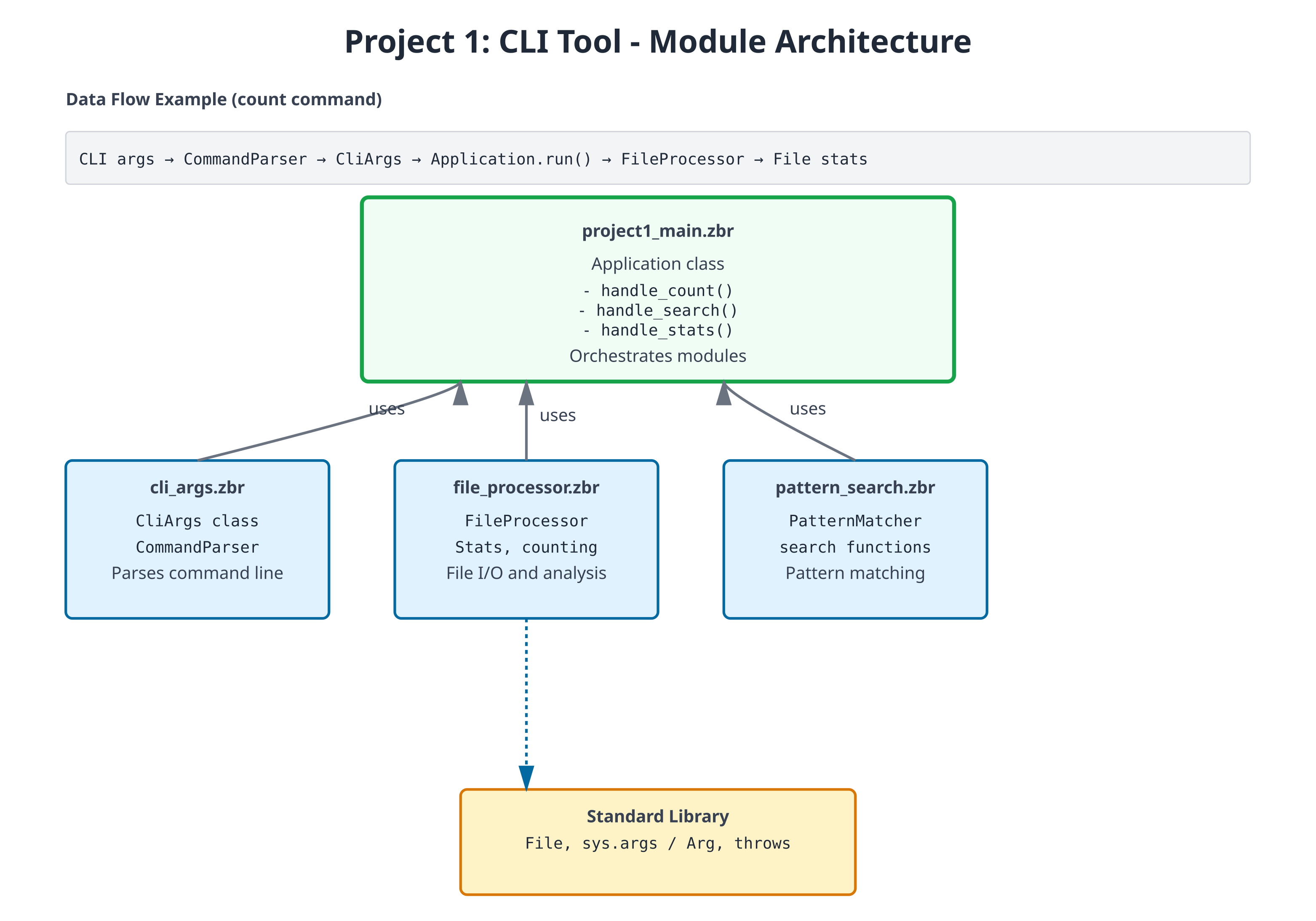
Step 1: Command-Line Argument Parsing
First, create a module to handle CLI arguments:
# file: cli_args.zbr
# teaches: argument parsing
# project: Project-1-CLI-Tool
class CliArgs
var command: str
var filename: str
var pattern: str?
cue init(command: str, filename: str)
this.command = command
this.filename = filename
pattern = nil
class CommandParser
static
def parse(args: List(str)): CliArgs throws
# Precondition: program name + command + filename
if args.count() < 3
raise "Usage: textool [command] [file]"
var command = args.at(1)
var filename = args.at(2)
# Validate command
if not valid_command(command)
raise "Unknown command: ${command}"
# Create args object
var cli_args = CliArgs(command, filename)
# Add pattern if provided
if args.count() >= 4
cli_args.pattern = args.at(3)
return cli_args
def valid_command(cmd: str): bool
return cmd == "count" or cmd == "search" or cmd == "stats"
Step 2: File Reading and Basic Counting
Build the core file I/O and counting functionality. Every operation that can fail is marked throws; a caller writes ? after the call to pass the error up, so count_lines needs no error-handling code of its own:
# file: file_processor.zbr
# teaches: file I/O and text processing
# project: Project-1-CLI-Tool
class Stats
var filename: str
var lines: int
var words: int
var chars: int
cue init(filename: str, lines: int, words: int, chars: int)
this.filename = filename
this.lines = lines
this.words = words
this.chars = chars
def display(): str
return "${lines} lines, ${words} words, ${chars} chars: ${filename}"
class FileProcessor
static
def read_file(filename: str): str throws
# Check if file exists first
if not File.exists(filename)
raise "File not found: ${filename}"
# Read the entire file
var content = File.read(filename)
if content.len == 0
raise "File is empty: ${filename}"
return content
def count_lines(filename: str): int throws
var content = read_file(filename)?
var lines = content.split("\n")
# Count non-empty lines (common behavior)
var count = 0
for line in lines
if line.trim().len > 0
count = count + 1
return count
def count_words(filename: str): int throws
var content = read_file(filename)?
var words = content.split(" ")
var count = 0
for word in words
if word.trim().len > 0
count = count + 1
return count
def count_chars(filename: str): int throws
var content = read_file(filename)?
return content.len
def get_stats(filename: str): Stats throws
var content = read_file(filename)?
var lines = content.split("\n")
var line_count = lines.count()
var word_count = 0
var char_count = content.len
for line in lines
var words = line.split(" ")
for word in words
if word.len > 0
word_count = word_count + 1
return Stats(filename, line_count, word_count, char_count)
Step 3: Pattern Matching
Add grep-like pattern search functionality. use file_processor exposing FileProcessor brings the class from Step 2 into scope by name:
# file: pattern_search.zbr
# teaches: pattern matching and filtering
# project: Project-1-CLI-Tool
use file_processor exposing FileProcessor, Stats
class PatternMatcher
static
def search_lines(filename: str, pattern: str): List(str) throws
var content = FileProcessor.read_file(filename)?
var lines = content.split("\n")
var matches = List(str)()
var line_num = 0
for line in lines
line_num = line_num + 1
if line.contains(pattern)
# Format: "line_number: content"
matches.add("${line_num}: ${line}")
if matches.count() == 0
raise "No matches found for pattern: ${pattern}"
return matches
def search_with_context(filename: str, pattern: str, context_lines: int): List(str) throws
var content = FileProcessor.read_file(filename)?
var lines = content.split("\n")
var results = List(str)()
var line_num = 0
for line in lines
line_num = line_num + 1
if line.contains(pattern)
# Add context lines before
var start = line_num - context_lines - 1
if start < 0
start = 0
var i = start
while i < line_num - 1
results.add(lines.at(i))
i = i + 1
# Add the matching line (with marker)
results.add("> ${line_num}: ${line}")
# Add context lines after
var end = line_num + context_lines
if end > lines.count()
end = lines.count()
i = line_num
while i < end
results.add(lines.at(i))
i = i + 1
return results
Step 4: Main Application Logic
Tie everything together in the main entry point. main is where errors stop: its method-level catch clause (after the body, at the same indent as def) turns any error raised anywhere below into one printed line. Note if args.pattern as pattern — the optional is unwrapped and bound in one step:
# file: project1_main.zbr
# teaches: orchestrating modules
# project: Project-1-CLI-Tool
use cli_args exposing CliArgs, CommandParser
use file_processor exposing FileProcessor
use pattern_search exposing PatternMatcher
class Application
var args: CliArgs
cue init(parsed_args: CliArgs)
args = parsed_args
def run(): bool throws
if args.command == "count"
return handle_count()?
else if args.command == "search"
return handle_search()?
else if args.command == "stats"
return handle_stats()?
raise "Unknown command: ${args.command}"
def handle_count(): bool throws
var lines = FileProcessor.count_lines(args.filename)?
var words = FileProcessor.count_words(args.filename)?
var chars = FileProcessor.count_chars(args.filename)?
print("${lines} lines")
print("${words} words")
print("${chars} chars")
return true
def handle_search(): bool throws
if args.pattern as pattern
var matches = PatternMatcher.search_lines(args.filename, pattern)?
print("Found ${matches.count()} matches:")
for match in matches
print(match)
return true
raise "Search requires a pattern"
def handle_stats(): bool throws
var stats = FileProcessor.get_stats(args.filename)?
print(stats.display())
return true
def main()
var parsed = CommandParser.parse(sys.args())?
var app = Application(parsed)
app.run()?
catch |e|
print("Error: ${e.message}")
Part 2: Adding Features
A throws method composes other throws methods with ?; the first failure ends the method and hands the error to the caller. At the top, an inline postfix catch supplies a fallback value instead of propagating:
use file_processor exposing FileProcessor
class FileAnalyzer
static
def analyze(filename: str): str throws
var lines = FileProcessor.count_lines(filename)?
var words = FileProcessor.count_words(filename)?
return "Lines: ${lines}, Words: ${words}"
def main()
print(FileAnalyzer.analyze("test.txt") catch "could not analyze test.txt")
Part 3: Full Implementation
Add these features:
- Read command-line arguments
- Support multiple files
- Pattern matching (grep-like)
- Output formatting
- Error handling
Expected functionality:
# Word count
tool -c file.txt # Count lines
tool -w file.txt # Count words
tool -l file.txt # Get line length
# Search
tool -s "pattern" file.txt # Search lines matching pattern
# Multiple files
tool -c file1.txt file2.txt # Count lines in multiple files
Testing Your Project
Create a test file to verify your implementation:
# Create sample file
echo "The quick brown fox" > sample.txt
echo "jumps over the lazy dog" >> sample.txt
# Test commands (with compile-and-run, the program's own arguments go after `--`)
zebra project1_main.zbr -- count sample.txt # Count lines, words, chars
zebra project1_main.zbr -- search sample.txt quick # Find pattern
zebra project1_main.zbr -- stats sample.txt # Show statistics
zebra project1_main.zbr -- search sample.txt zzz # Error: No matches found for pattern: zzz
Exercises & Extensions
Exercise 1: Add Line Numbering Output
Modify the search function to always show line numbers with output:
def search_with_numbers(filename: str, pattern: str): List(str) throws
# Results already carry line numbers from PatternMatcher; `?` passes
# any error straight through to our caller
return PatternMatcher.search_lines(filename, pattern)?
Exercise 2: Find Longest Line
Add a new longest command that finds and displays the longest line:
class FileProcessor
static
def find_longest_line(filename: str): str throws
var content: str = read_file(filename)?
var lines = content.split("\n")
var longest = ""
var max_len = 0
for line in lines
if line.len > max_len
max_len = line.len
longest = line
return "Longest (${max_len} chars): ${longest}"
Exercise 3: Statistics Summary
Extend stats to show min/max/average line length:
class Stats
var filename: str
var lines: int
var words: int
var chars: int
var min_line_len: int
var max_line_len: int
var avg_line_len: float
def display(): str
var summary = "${lines} lines, ${words} words, ${chars} chars\n"
return summary + "Line lengths: min=${min_line_len}, max=${max_line_len}, avg=${avg_line_len}"
Exercise 4: Case-Insensitive Search
Add support for a -i flag to search case-insensitively:
class PatternMatcher
static
def search_case_insensitive(filename: str, pattern: str): List(str) throws
var content = FileProcessor.read_file(filename)?
var lines = content.split("\n")
var pattern_lower = pattern.lower()
var matches = List(str)()
var line_num = 0
for line in lines
line_num = line_num + 1
if line.lower().contains(pattern_lower)
matches.add("${line_num}: ${line}")
return matches
Challenge: Support Multiple Files
Modify the application to process multiple files at once. A file that cannot be read should be skipped rather than abort the whole run — catch nil turns the error into an optional, and if ... as keeps only the successes:
class Application
var files: List(str)
def aggregate_stats(filenames: List(str)): str
var total_lines = 0
var total_words = 0
var total_chars = 0
for filename in filenames
var s = FileProcessor.get_stats(filename) catch nil
if s as stats
total_lines = total_lines + stats.lines
total_words = total_words + stats.words
total_chars = total_chars + stats.chars
return "Total: ${total_lines} lines, ${total_words} words, ${total_chars} chars"
Key Concepts Reinforced
- File I/O — Reading files with error handling
- Collections — Using List to accumulate results
- Control flow — Iterating and filtering text
- Nil handling — Optional pattern argument
- Error handling —
throwsmethods,?propagation,catchat the boundary - Classes — Organizing functionality into modules
- Strings — Splitting, searching, formatting
- Optionals —
catch nilandif ... asto skip failures without aborting
Architecture Decisions
Module Organization:
cli_args.zbr— Argument parsing (thin responsibility)file_processor.zbr— Core file I/O (stable, well-tested)pattern_search.zbr— Search logic (isolated from I/O)project1_main.zbr— Orchestration and CLI (thin coordinator)
Why this structure? Each module has a clear, testable responsibility. You can test file reading separately from pattern matching, and both separately from CLI handling.
Error Handling Strategy: Every I/O operation is throws, and every caller writes ?. Errors bubble up naturally—if file reading fails, search fails; if search fails, main's catch clause reports it. No hidden failures, and no error-checking code anywhere except the one place errors are actually handled.
Expected code size: 300-400 lines total with all exercises
What You've Built
✅ Real-world program structure with modules
✅ Complete file and stream processing
✅ Command-line interface with argument parsing
✅ Robust error handling with throws, ? and catch
✅ Pattern matching and text analysis
✅ Extensible design for new features
Performance Notes
For large files (>10MB), consider:
- Reading line-by-line instead of entire file into memory
- Early exit from search (stop after first N matches)
- Streaming pattern matching instead of loading whole file
Example streaming read:
# Read and process line-by-line instead of all at once
def count_lines_streaming(filename: str): int throws
# (Pseudocode - requires file iteration API)
var count = 0
# for line in File.read_lines(filename)
# count = count + 1
return count
Next: Project 2 adds networking and concurrency concepts to build an HTTP server.
Projects 2 & 3: HTTP Server and Data Analysis
Project 2: HTTP Server (16-18 hours)
Build: A small REST API server that answers real HTTP requests with JSON
Learning Outcomes:
- Serving HTTP with the built-in
Http.serve - Routing on method and path, including a path parameter
- Producing and parsing JSON with
Json - Choosing status codes (200, 201, 400, 404, 405)
- Module-level state shared by a server's handlers
- What "one thread per connection" means for that state
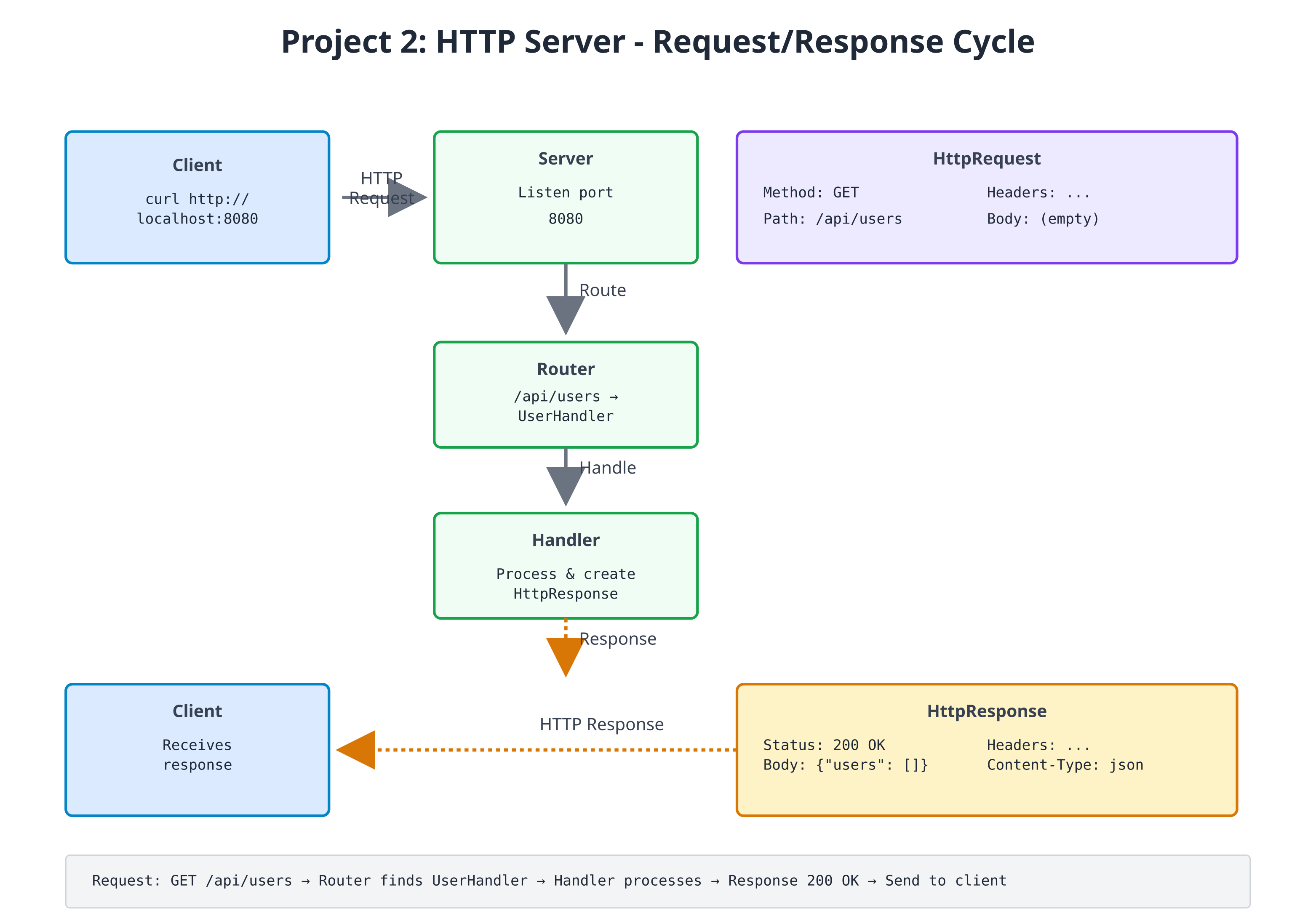
Zebra's standard library already knows how to speak HTTP. Http.serve(port, handler)
listens on a port, parses each request into an HttpRequest (method, path,
content, and the raw query string), calls your handler, and writes the
HttpResponse it returns back to the client. Your job is the part that is actually
about your application: the data, and deciding which response each request gets.
The project is three files in one directory:
| File | Role |
|---|---|
user_store.zbr | The data: a User class and the list of users |
router.zbr | route(req) — turns one request into one response |
http_server.zbr | main() — starts the server |
Step 1: The Data Model
# file: user_store.zbr
# teaches: module-level state, a small data model, JSON output
# project: Project-2-HTTP-Server
class User
var id: int
var name: str
cue init(id: int, name: str)
this.id = id
this.name = name
def toJson(): str
var obj = Json.object()
obj.putInt("id", this.id)
obj.put("name", this.name)
return Json.stringify(obj)
# One list shared by every function in this file (QUICKSTART §2.1).
var users = List(User)()
var next_id = 1
def addUser(name: str): User
var user = User(next_id, name)
users.add(user)
next_id = next_id + 1
return user
def findUser(id: int): User?
for user in users
if user.id == id
return user
return nil
def allUsersJson(): str
var parts = List(str)()
for user in users
parts.add(user.toJson())
return "[" + parts.join(",") + "]"
users and next_id are module-level variables: one value shared by every
function in the file, so a user added by one request is visible to the next.
Json.object() builds the JSON text for us, so a name containing a quote is
escaped correctly without any hand-written string gymnastics.
Step 2: Request Routing
The router is a single function from HttpRequest to HttpResponse. The
built-in HttpResponse has factories for the common cases — HttpResponse.ok(body)
and HttpResponse.notFound(body) — and HttpResponse.new(status, body) for any
other status code.
# file: router.zbr
# teaches: routing on method and path, path parameters, status codes
# project: Project-2-HTTP-Server
use user_store exposing addUser, findUser, allUsersJson
def route(req: HttpRequest): HttpResponse
if req.path == "/health"
return HttpResponse.ok("{\"status\": \"healthy\"}")
if req.path == "/api/users"
if req.method == "GET"
return HttpResponse.ok(allUsersJson())
if req.method == "POST"
return createUser(req.content)
return HttpResponse.new(405, "method not allowed")
# /api/users/<id> -- a path parameter
if req.path.startsWith("/api/users/") and req.method == "GET"
# "/api/users/2".split("/") is ["", "api", "users", "2"].
# Keep the ": str" -- without it, today's compiler mistypes the element.
var idText: str = req.path.split("/").at(3)
if findUser(idText.toInt()) as user
return HttpResponse.ok(user.toJson())
return HttpResponse.notFound("no user ${idText}")
return HttpResponse.notFound("no route for ${req.method} ${req.path}")
def createUser(body: str): HttpResponse
# Expect a JSON body like {"name": "Ada"}
if Json.parse(body) as json
var name = json.tryStr("name") orelse ""
if name.len > 0
return HttpResponse.new(201, addUser(name).toJson())
return HttpResponse.new(400, "expected a JSON body like {\"name\": \"Ada\"}")
Every route is an if you can read top to bottom. Adding a route is adding a
branch; there is no registration table to keep in sync.
Step 3: Starting the Server
# file: http_server.zbr
# teaches: starting a real server with Http.serve
# project: Project-2-HTTP-Server
use router exposing route
def main()
print("Listening on http://localhost:8080 (Ctrl+C to stop)")
Http.serve(8080, route)
Http.serve takes the port and the handler function, and never returns: it
accepts connections until you stop the process.
Concurrency note.
Http.servehandles each connection on its own thread, so requests can run at the same time. Theuserslist has no lock around it, so two simultaneousPOSTs could race. That is fine for trying the server out with one client at a time, as below; a production server would need to guard shared state.
Exercises
- Add query parameter parsing:
req.queryholds the raw text after?(e.g.name=Ada&limit=5); split it into key/value pairs and supportGET /api/users?name=Ada - Complete the resource: add
PUT /api/users/<id>(rename) andDELETE /api/users/<id>, returning 404 for an unknown id - Request logging: log each request (timestamp, method, path, response code)
- Middleware: wrap
routein a function that runs code before and after every request - Validation: reject names that are empty after
.trim()or longer than 50 characters with a 400 - Guard the shared state: make concurrent
POSTs safe (see Chapter 14c)
Testing the Server
Run the three files from the same directory. The first build takes a little while; then the server prints its banner and waits:
$ zebra http_server.zbr
Listening on http://localhost:8080 (Ctrl+C to stop)
From a second terminal:
$ curl http://localhost:8080/health
{"status": "healthy"}
$ curl http://localhost:8080/api/users
[]
$ curl -X POST -d '{"name": "Ada"}' http://localhost:8080/api/users
{"id":1,"name":"Ada"}
$ curl -X POST -d '{"name": "Grace"}' http://localhost:8080/api/users
{"id":2,"name":"Grace"}
$ curl http://localhost:8080/api/users
[{"id":1,"name":"Ada"},{"id":2,"name":"Grace"}]
$ curl http://localhost:8080/api/users/2
{"id":2,"name":"Grace"}
$ curl -i http://localhost:8080/api/users/9
HTTP/1.1 404 Not Found
...
no user 9
$ curl -i -X DELETE http://localhost:8080/api/users
HTTP/1.1 405 Method Not Allowed
...
method not allowed
Use curl -i to see the status line and headers. (The runtime labels every
response Content-Type: text/html; charset=utf-8, even when the body is JSON.)
Stop the server with Ctrl+C.
Project 3: Text Data Analysis (12-15 hours)
Build: Analyze text data (n-grams, frequencies, similarity) for linguistic patterns
Learning Outcomes:
- Advanced data structures (HashMap, nested structures)
- Algorithms (n-gram extraction, frequency analysis, similarity scoring)
- File batch processing
- Statistical analysis
- Performance optimization with data structures
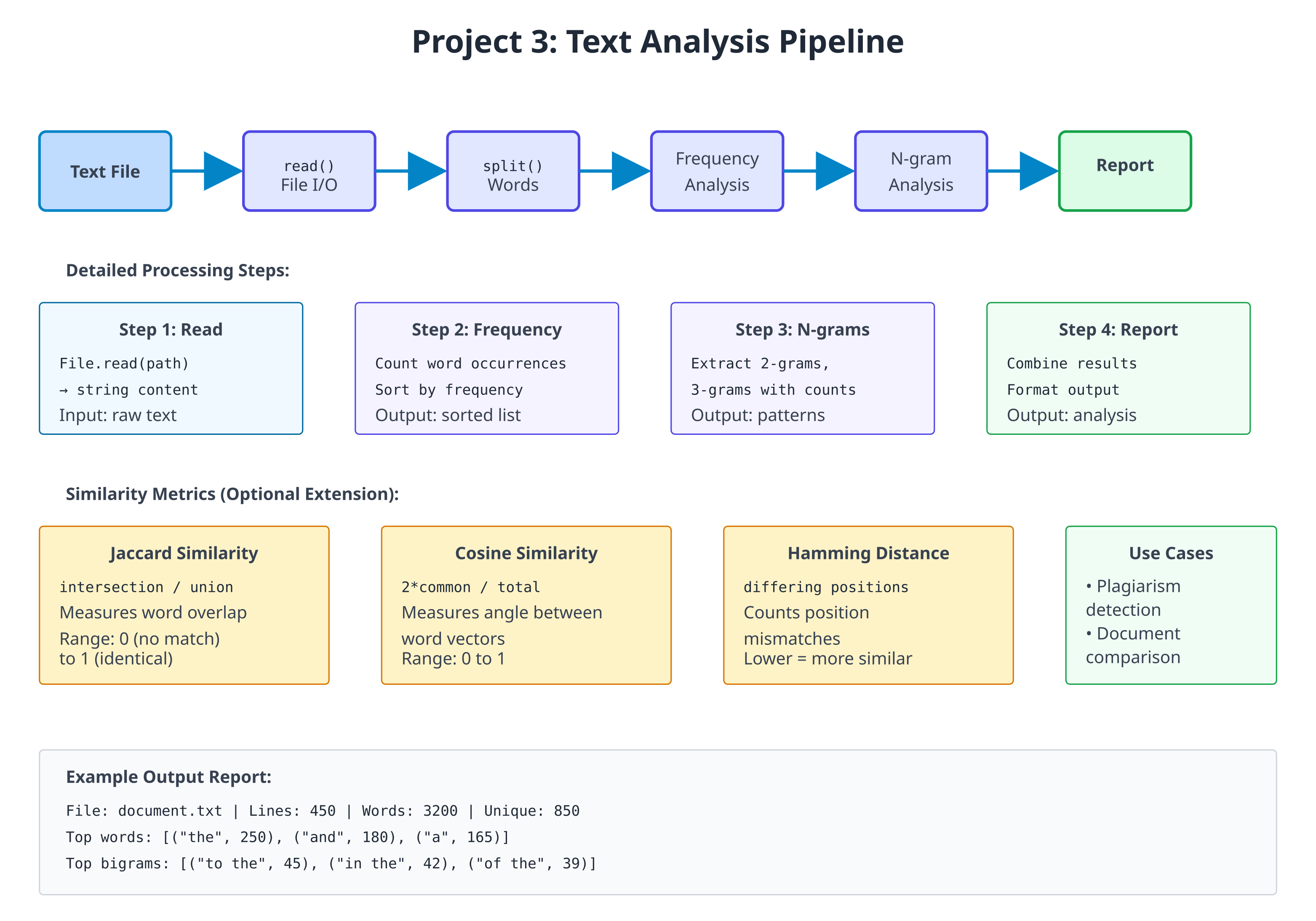
Step 1: Frequency Analysis
Start with counting word frequencies:
# file: frequency_analysis.zbr
# teaches: frequency counting and sorting
# project: Project-3-Data-Analysis
class WordFrequency
var word: str
var count: int
cue init(word: str, count: int)
this.word = word
this.count = count
def to_string(): str
return "${word}: ${count}"
class FrequencyAnalyzer
static
def analyze_text(text: str): List(WordFrequency)
var words = text.lower().split(" ")
var freq: HashMap(str, int) = HashMap()
# Count occurrences
for word in words
var cleaned = word.trim()
if cleaned.len > 0
if freq.contains(cleaned)
freq.put(cleaned, freq.fetch(cleaned) + 1)
else
freq.put(cleaned, 1)
# Convert to list and sort by frequency
var results: List(WordFrequency) = List()
for word, count in freq
var wf = WordFrequency(word, count)
results.add(wf)
# Simple bubble sort (in-place)
var i = 0
while i < results.count()
var j = 0
while j < results.count() - 1
var current = results.at(j)
var next = results.at(j + 1)
if current.count < next.count
# Swap (simplified)
var temp = current
results[j] = next
results[j + 1] = temp
j = j + 1
i = i + 1
return results
def top_words(text: str, limit: int): List(WordFrequency)
var all_freqs = analyze_text(text)
var results: List(WordFrequency) = List()
var i = 0
while i < limit and i < all_freqs.count()
results.add(all_freqs.at(i))
i = i + 1
return results
Step 2: N-gram Extraction
Extract contiguous sequences of N words:
# file: ngram_analysis.zbr
# teaches: n-gram extraction and pattern detection
# project: Project-3-Data-Analysis
class NGram
var gram: str
var count: int
var positions: List(int) # Track where it appears
cue init(gram: str)
this.gram = gram
count = 1
positions = List()
class NGramAnalyzer
static
def extract_ngrams(text: str, n: int): HashMap(str, NGram)
var words = text.lower().split(" ")
var ngrams: HashMap(str, NGram) = HashMap()
var i = 0
while i < words.count() - (n - 1)
var gram = ""
var j = 0
while j < n
var word = words.at(i + j).trim()
if j > 0
gram = gram.concat(" ")
gram = gram.concat(word)
j = j + 1
if ngrams.contains(gram)
var ng = ngrams.fetch(gram)
ng.count = ng.count + 1
ng.positions.add(i)
else
var ng = NGram(gram)
ng.positions.add(i)
ngrams.put(gram, ng)
i = i + 1
return ngrams
def top_ngrams(text: str, n: int, limit: int): List(NGram)
var all_grams = extract_ngrams(text, n)
var results: List(NGram) = List()
# Simple sorting
for gram, ng in all_grams
results.add(ng)
# Bubble sort by count
var i = 0
while i < results.count()
var j = 0
while j < results.count() - 1
var current = results.at(j)
var next = results.at(j + 1)
if current.count < next.count
var temp = current
results[j] = next
results[j + 1] = temp
j = j + 1
i = i + 1
# Return top N
var top: List(NGram) = List()
i = 0
while i < limit and i < results.count()
top.add(results.at(i))
i = i + 1
return top
Step 3: Similarity Analysis
Compare texts using Jaccard and other similarity metrics:
# file: similarity_analysis.zbr
# teaches: similarity metrics and comparison
# project: Project-3-Data-Analysis
class SimilarityMetrics
static
def jaccard_similarity(text1: str, text2: str): float
var words1 = text1.lower().split(" ")
var words2 = text2.lower().split(" ")
# Find intersection
var intersection = 0
for word1 in words1
for word2 in words2
if word1 == word2
intersection = intersection + 1
break
# Size of the union (crude approximation)
var total = words1.count() + words2.count() - intersection
if total == 0
return 0.0
return intersection.toFloat() / total.toFloat()
def cosine_similarity(text1: str, text2: str): float
# Simplified cosine similarity (not true cosine, but similar)
var words1 = text1.lower().split(" ")
var words2 = text2.lower().split(" ")
var common = 0
for word1 in words1
for word2 in words2
if word1 == word2
common = common + 1
var len1 = words1.count()
var len2 = words2.count()
if len1 == 0 or len2 == 0
return 0.0
var denominator = len1 + len2
return (2.0 * common.toFloat()) / denominator.toFloat()
def hamming_distance(text1: str, text2: str): int
var words1 = text1.lower().split(" ")
var words2 = text2.lower().split(" ")
var max_len = words1.count()
if words2.count() > max_len
max_len = words2.count()
var distance = 0
var i = 0
while i < max_len
var w1 = if(i < words1.count(), words1.at(i), "")
var w2 = if(i < words2.count(), words2.at(i), "")
if w1 != w2
distance = distance + 1
i = i + 1
return distance
Step 4: Main Analysis Application
Tie together all analysis tools:
# file: analysis_main.zbr
# teaches: combining analysis modules
# project: Project-3-Data-Analysis
use frequency_analysis exposing WordFrequency, FrequencyAnalyzer
use ngram_analysis exposing NGram, NGramAnalyzer
class TextAnalysisReport
var source_file: str = ""
var word_count: int = 0
var unique_words: int = 0
var top_words: List(WordFrequency) = List(WordFrequency)()
var bigrams: List(NGram) = List(NGram)()
var trigrams: List(NGram) = List(NGram)()
class AnalysisApplication
static
def analyze_file(filename: str): TextAnalysisReport throws
# File.read is not `throws` -- a missing file stops the program --
# so check first and raise an error the caller can catch.
if not File.exists(filename)
raise "File not found: ${filename}"
var content = File.read(filename)
if content.len == 0
raise "File is empty: ${filename}"
var words = content.split(" ")
var unique_words_set: HashMap(str, int) = HashMap()
for word in words
var cleaned = word.lower().trim()
if cleaned.len > 0
unique_words_set.put(cleaned, 1)
var report = TextAnalysisReport()
report.source_file = filename
report.word_count = words.count()
report.unique_words = unique_words_set.count()
report.top_words = FrequencyAnalyzer.top_words(content, 10)
report.bigrams = NGramAnalyzer.top_ngrams(content, 2, 5)
report.trigrams = NGramAnalyzer.top_ngrams(content, 3, 5)
return report
def print_report(report: TextAnalysisReport)
print("==== Text Analysis Report ====")
print("File: ${report.source_file}")
print("Total words: ${report.word_count}")
print("Unique words: ${report.unique_words}")
print("")
print("Top 10 Words:")
for wf in report.top_words
print(" ${wf.to_string()}")
print("")
print("Top 5 Bigrams:")
for bigram in report.bigrams
print(" ${bigram.gram} (${bigram.count})")
print("")
print("Top 5 Trigrams:")
for trigram in report.trigrams
print(" ${trigram.gram} (${trigram.count})")
def main()
var report = AnalysisApplication.analyze_file("sample.txt")
AnalysisApplication.print_report(report)
catch |err|
print("Error: ${err.message}")
Exercises
- Find most common bigrams and trigrams — Already implemented in Step 2
- Detect language patterns — Compare bigram distributions across texts
- Compare two documents — Use similarity metrics from Step 3
- Find suspicious passages — Identify sections with high similarity to other documents (plagiarism detection)
- Build a frequency graph — Output word frequency distribution
- Implement TF-IDF — Weight words by frequency and document uniqueness
Testing
Put the four files in one directory with a sample.txt next to them, then:
$ zebra analysis_main.zbr
==== Text Analysis Report ====
File: sample.txt
Total words: 15
Unique words: 11
Top 10 Words:
the: 3
quick: 2
fox: 2
...
(That is the report for a sample.txt containing the quick brown fox jumps
over the lazy dog and the quick red fox runs. Words with equal counts may come
out in a different order.) Without a sample.txt the program prints
Error: File not found: sample.txt.
Exercise 3 is where a compare_files.zbr comes from: write it yourself, using
SimilarityMetrics from Step 3.
Project Comparison Summary
| Feature | Project 1 | Project 2 | Project 3 |
|---|---|---|---|
| Focus | File I/O + CLI | Networking + Routing | Algorithms + Data Structures |
| Core Skill | Argument parsing, basic text processing | Network protocols, request handling | Complex algorithms, statistics |
| Complexity | Beginner-Intermediate | Intermediate | Intermediate-Advanced |
| Code Size | 300-400 lines | 400-600 lines | 350-500 lines |
| Key Learning | Modules, error handling | Servers, routing, state management | Data structures, sorting, metrics |
| Time Estimate | 3-4 hours | 5-7 hours | 4-5 hours |
| Real-World Use | Log analysis, text processing | API servers, web services | Data science, plagiarism detection |
Capstone Challenge: Integrated System
After completing all three projects, combine them:
class IntegratedSystem
static
def run_analysis_via_http(port: int, analysis_dir: str)
# Start HTTP server (Project 2)
# Serve text analysis results (Project 3)
# Process files via CLI (Project 1)
# GET /health — Health check
# POST /analyze — Upload and analyze file
# GET /results — Retrieve analysis results
# GET /compare — Compare two documents
This demonstrates:
- ✅ Networking and servers
- ✅ Complex data processing
- ✅ CLI integration
- ✅ Professional system design
Each project is a portfolio piece. Together, they demonstrate mastery of Zebra and modern programming fundamentals.
Project Comparison
| Feature | CLI Tool | HTTP Server | Data Analysis |
|---|---|---|---|
| Lines of code | 200-300 | 300-500 | 250-400 |
| Main focus | File I/O | Networking | Algorithms |
| Difficulty | Beginner | Intermediate | Intermediate |
| Key learning | CLI, modules | Servers, protocols | Data structures |
| Time to complete | 3-4 hours | 5-7 hours | 4-5 hours |
Progressive Difficulty
- CLI Tool: Learn file I/O and basic structure
- HTTP Server: Add networking and concurrency concepts
- Data Analysis: Deep dive into algorithms and data structures
Each project reuses concepts from previous ones while introducing new challenges.
Capstone Challenges
After completing all three:
- Integrate CLI tool with HTTP server (serve file statistics)
- Use data analysis in HTTP endpoints
- Build a combined system processing files via HTTP
Expected Outcomes
✅ Real-world program architecture
✅ Network programming fundamentals
✅ Advanced data structure manipulation
✅ Practical error handling
✅ Performance considerations
✅ Testing strategies
Each project is a portfolio piece demonstrating Zebra mastery.
18b: Building GUI Applications
Audience: All — anyone who wants a window instead of a terminal
Time: 120 minutes
Prerequisites: 05-Control-Flow, 07-Classes-and-Instances, 07b-Structs-Unions-and-Value-Types
You'll learn: The MVU (Model-View-Update) architecture, Gui.run, dispatching messages with g.send, laying out widgets with using g.vbox/g.hbox, the widget catalogue, forms, the native tree, drawing on a canvas, the embedded code editor, and how to test a GUI without ever opening a window
Version note: this chapter tracks Zebra 0.9.0-rc3 or newer. Trees, toolbars,
g.scope, window-wide hotkeys (g.hotkey) and theg.areacanvas all landed after 0.9.0-rc2 and are not in the rc1 or rc2 releases. A compiler built from the main branch after rc2 has them too, even though itszebra --versionmay still say rc2.
The Big Picture
Zebra's GUI is built on MVU — Model, View, Update — the architecture
popularised by Elm. There is no widget tree for you to mutate, no callbacks
firing at unpredictable times, and no onClick handler reaching into global
state. There are three functions and one rule:
| Function | Signature | Job |
|---|---|---|
init | (): Model | Build the starting state. Called once. |
update | (Model, Msg): Model | Given a state and something that happened, produce the next state. |
view | (Gui, Model) | Draw the current state. Never changes it. |
The rule: view may not modify the model. When the user does something,
view sends a message; update is the only place state changes. That single
constraint is what makes a GUI reasonable to think about — every possible state
transition is a branch arm in one function you can read top to bottom.
If you have written a GUI before, the thing to unlearn is the callback. You will not write "when this button is clicked, do X." You will write "when this button is clicked, say that it was clicked," and separately, "when someone says the button was clicked, the new state is X."
Zebra runs the loop for you:
init() ──▶ model ──▶ view(g, model) ──▶ user clicks ──▶ g.send(Msg.foo)
▲ │
└────────── update(model, Msg.foo) ◀───────────┘
Your First Window
Here is a complete, working program. Save it as counter.zbr:
# file: counter.zbr
# teaches: MVU, Gui.run, g.send, hbox layout
# chapter: 18b-GUI-Applications
struct Counter
var count: int
union Msg
inc
dec
reset
def init(): Counter
return Counter(count: 0)
def update(m: Counter, msg: Msg): Counter
branch msg
on Msg.inc return Counter(count: m.count + 1)
on Msg.dec return Counter(count: m.count - 1)
on Msg.reset return Counter(count: 0)
def view(g: Gui, m: Counter)
g.text("Count: " + m.count.toString())
g.separator()
using g.hbox("##buttons", false)
g.button("+", Msg.inc)
g.button("-", Msg.dec)
g.button("Reset", Msg.reset)
def main()
Gui.run("Counter", 300, 160, init, update, view)
Run it with native OS controls:
zebra --gui-backend=libui_ng counter.zbr
A real window appears, with real Win32 / GTK3 / Cocoa buttons. Click + and the
label updates.
What each piece is doing
struct Counteris the Model. It holds everything the program knows. If it isn't in the model,viewcan't draw it.union Msgenumerates everything that can happen. Three variants, three things a user can do. This union is the complete vocabulary of your program's events — which is why reading it tells you what the program does.updatetakes the old state and a message and returns the new state. It never touches the screen.viewtakes the state and draws it. It never changes the state; each widget carries the message it sends when the user acts on it (g.button("+", Msg.inc)), andg.send(...)reports anything else.Gui.runwires them together and owns the event loop.
Notice that update returns a new Counter rather than modifying the old
one. That's the immutable-update idiom from Chapter 07b, and it is the natural
fit here: each message produces the next state, so the history of your program is
a chain of values rather than a pile of mutations.
Running It: Two Backends and a Stub
The same source runs against several backends. You choose at the command line — the program does not change:
zebra --gui-backend=libui_ng counter.zbr # native OS controls (recommended)
zebra counter.zbr # stub backend — see below
The terminal backend (
--gui-backend=tui) is unavailable in current releases. It is built on the ZigZag library, which does not support Zig 0.17 yet, and the compiler refuses the flag by name, saying so. The notes on the TUI later in this chapter describe that backend for when it returns.
The compiler scaffolds a zig build project next to your source
(counter_gui_libui_ng/) and builds it. The first build fetches and compiles the
GUI library, so it takes a while; subsequent runs are fast.
The stub backend is your test harness
Run a GUI program with no --gui-backend flag at all and you get the stub
backend: it runs exactly one frame, prints every widget it would have drawn to
stderr, and exits.
$ zebra counter.zbr
[gui] text: Count: 0
[gui] ---
[gui] button: +
[gui] button: -
[gui] button: Reset
This is more useful than it looks. It means a GUI program is testable in CI — no display, no window manager, no clicking. You can assert on the widget tree the way you would assert on any other output. It is also the fastest way to check that a layout change did what you meant before waiting on a full native build.
Note: the stub never fires an event, so a single stub frame shows you the initial view. To exercise
update, call it directly from a test (see Testing Your Update Function below) — not by sending a message unconditionally fromview, which is a livelock (see Common Mistakes).
Messages That Carry Data
Not everything is a bare event. When the user types, the message needs to carry what they typed. Union variants can hold a payload:
# file: greeter.zbr
# teaches: payload messages, g.field, mixed unions
# chapter: 18b-GUI-Applications
struct Model
var name: str
var greeting: str
union Msg
name_changed: str
greet
clear
def init(): Model
return Model(name: "", greeting: "")
def update(m: Model, msg: Msg): Model
branch msg
on Msg.name_changed as newName
return Model(name: newName, greeting: m.greeting)
on Msg.greet
if m.name.len == 0
return Model(name: m.name, greeting: "Please type a name first.")
return Model(name: m.name, greeting: "Hello, " + m.name + "!")
on Msg.clear
return Model(name: "", greeting: "")
def view(g: Gui, m: Model)
g.text("What is your name?")
g.field("##name", m.name, def(s: str): Msg = Msg.name_changed(s))
using g.hbox("##row", false)
g.button("Greet", Msg.greet)
g.button("Clear", Msg.clear)
g.separator()
g.text(m.greeting)
def main()
Gui.run("Greeter", 360, 200, init, update, view)
Two things to notice.
A payload comes from the widget. g.field(id, text, on) shows text and
calls on with whatever the user typed; on builds the message, here
Msg.name_changed(s) in call syntax. Receiving it uses a binding in the branch
arm: on Msg.name_changed as newName. This is exactly the union pattern from
Chapter 07b — the GUI adds no new concepts here.
A Msg union may mix payload and no-payload variants freely, as this one
does. greet and clear carry nothing; name_changed carries a str.
Widgets That Carry Their Message
A button carries a message. A checkbox and a text entry carry a function that builds one, because the message needs the new value:
| Widget | Shape | The on function |
|---|---|---|
g.button(label, msg) | sends msg on click | — |
g.toggle(label, checked, on) | shows checked; calls on when it flips | def(b: bool): Msg |
g.field(label, text, on) | shows text; calls on on every change | def(s: str): Msg |
The model drives the widget: you pass the model's value in, and the widget
reports a change by sending the message on returns. update stores it; the
next render passes the stored value back in. Nothing is read out of a widget,
so view never learns about a change before update does.
# file: widgets.zbr
# teaches: toggle, field, slider; the on function
# chapter: 18b-GUI-Applications
struct Model
var loud: bool
var volume: float
var label: str
union Msg
set_loud: bool
set_volume: float
set_label: str
def init(): Model
return Model(loud: false, volume: 50.0, label: "untitled")
def update(m: Model, msg: Msg): Model
branch msg
on Msg.set_loud as v return Model(loud: v, volume: m.volume, label: m.label)
on Msg.set_volume as v return Model(loud: m.loud, volume: v, label: m.label)
on Msg.set_label as v return Model(loud: m.loud, volume: m.volume, label: v)
def view(g: Gui, m: Model)
g.toggle("Loud mode", m.loud, def(b: bool): Msg = Msg.set_loud(b))
g.field("Label", m.label, def(s: str): Msg = Msg.set_label(s))
g.slider("Volume", m.volume, 0.0, 100.0, def(v: float): Msg = Msg.set_volume(v))
g.separator()
g.text("volume=" + m.volume.toString() + " loud=" + m.loud.toString())
def main()
Gui.run("Widgets", 380, 260, init, update, view)
Every widget that holds state has this shape: the model supplies the value the
widget shows, and the on function names the message for a change. There is no
widget that returns a value — so view never compares anything, and update
is the only place the model changes. g.inputMultiline(label, text, on),
g.combobox(label, items, selected, on) and g.spinbox(label, value, min, max, on)
follow the same rule with def(s: str), def(i: int) and def(n: int).
So do the entries that look different but are not. g.password(label, text, on)
and g.search(label, text, on) are g.field on a masked entry and a search-styled
one; same def(s: str). g.radio(label, items, selected, on) is one radio button
per item with exactly one selected; it reports the chosen index with def(i: int),
like a combobox, but the choices are in the open instead of behind a click.
g.comboboxEditable(label, items, text, on) is a drop-down the user can also type
into — a recent-files list with "or enter your own" — and because what comes back
is text, its on is def(s: str), not an index.
Layout
Widgets stack vertically by default. To place them side by side, put them in a
horizontal box. Boxes nest, and using scopes them:
# file: layout.zbr
# teaches: using g.vbox / g.hbox, nesting, stretch
# chapter: 18b-GUI-Applications
struct Model
var status: str
union Msg
refresh
def init(): Model
return Model(status: "ready")
def update(m: Model, msg: Msg): Model
branch msg
on Msg.refresh return Model(status: "refreshed")
def view(g: Gui, m: Model)
using g.vbox("##root", true)
using g.hbox("##toolbar", false)
g.button("Refresh", Msg.refresh)
g.text("Status: " + m.status)
g.separator()
using g.hbox("##body", true)
using g.vbox("##left", true)
g.text("Left panel")
using g.vbox("##right", true)
g.text("Right panel")
def main()
Gui.run("Layout", 480, 300, init, update, view)
That produces a toolbar row across the top and two panels side by side filling the rest of the window.
The two arguments
g.vbox(id, stretch) and g.hbox(id, stretch) both take:
id— a unique string identifying this box. The backend creates the box on the first frame and reuses it thereafter, so the id must be stable across frames. Prefix with##by convention: it marks the string as an identifier rather than a user-visible label.stretch— whether this box expands to fill the space available in its parent. A toolbar row isfalse(it should stay as short as its contents); a main content area istrue.
using versus begin/end
using is the recommended form because the box closes itself at the end of the
indented block — you cannot forget an endVBox. The explicit pair exists too:
g.beginHBox("##row", false)
g.button("Left", Msg.left)
g.button("Right", Msg.right)
g.endHBox()
Both compile to the same thing. Prefer using.
Gotcha: the
usingheader and the first line of its body must be on adjacent lines — no blank line between them.
The Widget Catalogue
| Call | Returns | Notes |
|---|---|---|
g.text(s) | — | A label. Its text updates every frame. |
g.button(label, msg) | — | Sends msg when clicked. |
g.toggle(label, checked, on) | — | A checkbox; on: def(b: bool): Msg is called when it flips. |
g.field(label, text, on) | — | Single-line text entry; on: def(s: str): Msg on every change. |
g.slider(label, value, min, max, on) | — | on: def(v: float): Msg as it moves. Range is fixed at creation. |
g.inputMultiline(label, text, on) | — | Multi-line entry; on: def(s: str): Msg on every change. |
g.combobox(label, items, sel, on) / g.spinbox(label, value, min, max, on) | — | on: def(i: int): Msg. |
g.comboboxEditable(label, items, text, on) | — | A drop-down that also takes typed text; on: def(s: str): Msg on a pick or a keystroke. |
g.radio(label, items, sel, on) | — | One radio button per item; on: def(i: int): Msg. Pick-one-of-N in the open. |
g.password(label, text, on) / g.search(label, text, on) | — | field on a masked / search-styled entry; on: def(s: str): Msg. |
g.menuItem(label, msg) | — | A menubar item, inside g.beginMenu(name) … g.endMenu(). |
g.tool(label, msg) / g.toolIcon(label, icon, tip, msg) | — | A toolbar item, inside g.beginToolbar() … g.endToolbar(); g.toolSeparator(), and g.toolEnabled(bool) for the next item. See Toolbars below. |
g.every(ms, msg) | — | Sends msg every ms milliseconds while the view declares it. |
g.separator() | — | A horizontal rule. |
g.send(msg) | — | Dispatch a message to update. |
g.vbox(id, stretch) / g.hbox(id, stretch) | — | Layout containers (with using). |
g.beginPanel(id) / g.endPanel(id) | — | A titled group box. The id is the title; the end call must repeat it. This open/close pair is the only panel form. |
g.beginForm(id) / g.endForm(id) | — | A settings-dialog layout: labels left, aligned; controls right. Each child's label is its row label. See Forms below. |
g.beginTable(id, cols) … g.endTable() | bool | A list; tableSetupColumn(name) per column, tableNextRow() / tableNextColumn() + g.text per cell, tableSetupCheckColumn(name, on) + tableCheck(checked) for a checkbox column (on: def(row: int, checked: bool): Msg), tableSetupEditColumn(name, on) for an editable text column (on(row, text); a declined edit snaps back on the next render), tableSetupButtonColumn(name, on) for a button per row (on(row), cells are the labels); one of each per table. |
g.beginTree(id, onSelect, onActivate, onExpand) … g.endTree() | — | The native tree; treeNode(key, label, expanded) … treePop() and treeLeaf(key, label) between them. See Trees below. |
g.tooltip(text) | — | The hover text for the widget emitted just before it. See Tooltips, Icons and the Clipboard below. |
Gui.clipboardText() / Gui.setClipboardText(s) | str / — | The system clipboard's text. Statics, called from update. |
g.area(id, w, h, draw, on) | — | A canvas; draw: def(c: Gui) paints, on: def(x: float, y: float, button: int): Msg on a mouse press. See Drawing below. |
Widget identity comes from the label. A widget is matched to last render's
widget of the same kind and label, in order — so two buttons labelled + are
still two buttons. For a widget whose label you don't want displayed, use the
## prefix: g.field("##filepath", m.path, on).
A variant carries one payload. The check column's on gets two values, a row
and a flag, and a union variant holds exactly one — so the message carries a small
struct: struct Pick with row and checked, and
def(row: int, checked: bool): Msg = Msg.pick_row(Pick(row: row, checked: checked)).
The tree's onExpand is the same shape; you will see it below.
What is not there yet
Being honest about the edges, because discovering these by trial is unpleasant:
- Trees are a single text column. An icon from a built-in set, but no extra columns, no drag-and-drop, no in-place editing, and no keyboard on the TUI. A file browser that needs a size column is a table.
- Icons are bytes, not files.
folder,file,dotandwarnare painted by the runtime, andGui.registerIcontakes your own RGBA pixels — but there is no image decoder yet, so a PNG is yours to decode. Buttons and table cells take no images at all. - Drawing has no images, gradients or transforms. libui has them; they are
not bound. (
g.canvascovers the rest of the mouse and the keyboard — below.) g.sameLine(),g.spacing(),g.indent()are cosmetic no-ops on native backends — they belong to the immediate-mode style. Use anhbox.g.textColoredrenders the text but ignores the colour.- Fixed pixel widths aren't supported; boxes divide space by
stretch(g.minSize(id, w, h)gives a box a floor).
Forms
A settings dialog is two columns: labels on the left, lined up, and the controls
on the right. g.beginForm(id) / g.endForm(id) lays its children out that way.
Nothing else about the view changes. Each widget's own label becomes its row label,
so g.field("Host name", ...) inside a form is a row called Host name.
# file: settings_form.zbr
# teaches: g.beginForm / g.endForm, a widget's label as its row label, m except
# chapter: 18b-GUI-Applications
struct Model
var host: str
var port: int
var tls: bool
union Msg
set_host: str
set_port: int
set_tls: bool
def init(): Model
return Model(host: "localhost", port: 8080, tls: true)
def update(m: Model, msg: Msg): Model
branch msg
on Msg.set_host as s return m except host = s
on Msg.set_port as n return m except port = n
on Msg.set_tls as b return m except tls = b
def view(g: Gui, m: Model)
g.beginForm("settings")
g.field("Host name", m.host, def(s: str): Msg = Msg.set_host(s))
g.spinbox("Port", m.port, 1, 65535, def(n: int): Msg = Msg.set_port(n))
g.toggle("Use TLS", m.tls, def(b: bool): Msg = Msg.set_tls(b))
g.endForm("settings")
g.separator()
g.text(if(m.tls, "https://", "http://") + m.host + ":" + m.port.toString())
def main()
Gui.run("Settings", 380, 220, init, update, view)
On the stub:
[gui] form: settings
[gui] input: Host name = localhost
[gui] spinbox: Port val=8080 [1,65535]
[gui] checkbox: Use TLS = true
[gui] ---
[gui] text: https://localhost:8080
Three things to notice.
The form is geometry, not behaviour. The three widgets inside it are the
same field, spinbox and toggle from the catalogue, with the same on
functions. Take the beginForm / endForm lines out and the program still
works; it just stacks.
m except host = s is the struct-update idiom from Chapter 07b. widgets.zbr
rebuilt the whole Model in every arm; with three fields that was tolerable, with
ten it is not. except copies the model and changes one field.
A row may be conditional. Wrap a widget in if m.advanced and its row appears
and disappears with the flag. The backend inserts and removes the row; you do not
manage it.
On the TUI and the stub a form is a plain vertical box. Only the native backend has the two-column layout, which is why the stub output above looks like any other stack.
Trees
Every desktop has one native tree: a single text column with expanders, a
selection, and a double-click. Windows' SysTreeView32 has no columns at all, so
that is the subset Zebra binds — the same widget on Win32, GTK (GtkTreeView)
and Cocoa (NSOutlineView).
The view emits the whole tree on every render. Between g.beginTree(...) and
g.endTree():
g.treeNode(key, label, expanded)opens a node; the calls that follow are its children, untilg.treePop().g.treeLeaf(key, label)is a node with no children.
key is the app's stable name for the node — a path is the natural key. The
backend diffs by key from one render to the next, so the tree is not rebuilt
when a label changes.
The part to get right is expansion. An expander click does not open the node.
It sends onExpand(key, open); update puts the key into (or out of) the model;
the next render passes expanded: true for that key, and that opens it. The
model owns what is open. So "Open all" is not a special tree operation — it is a
message like any other, and update sets the list.
onExpand gets two values, a key and a flag, and a variant carries one — so the
message carries a small struct, Toggle, exactly as the table's check column did.
# file: file_tree.zbr
# teaches: g.beginTree / treeNode / treeLeaf / treePop / endTree, the model owns what is open
# chapter: 18b-GUI-Applications
struct Toggle
var key: str
var open: bool
struct Model
var open: List(str)
var selected: str
union Msg
select: str
expand: Toggle
open_all
close_all
def init(): Model
var open: List(str) = ["src"]
return Model(open: open, selected: "")
def isOpen(m: Model, key: str): bool
for k in m.open
if k == key
return true
return false
def update(m: Model, msg: Msg): Model
branch msg
on Msg.select as k
return m except selected = k
on Msg.expand as t
var out: List(str) = []
for k in m.open
if k != t.key
out.add(k)
if t.open
out.add(t.key)
return m except open = out
on Msg.open_all
var all: List(str) = ["src", "docs"]
return m except open = all
on Msg.close_all
var none: List(str) = []
return m except open = none
def view(g: Gui, m: Model)
g.beginTree("files", def(k: str): Msg = Msg.select(k), def(k: str): Msg = Msg.select(k), def(k: str, o: bool): Msg = Msg.expand(Toggle(key: k, open: o)))
g.treeNode("src", "src/", isOpen(m, "src"))
g.treeLeaf("src/main.zbr", "main.zbr")
g.treeLeaf("src/Parser.zbr", "Parser.zbr")
g.treePop()
g.treeNode("docs", "docs/", isOpen(m, "docs"))
g.treeLeaf("docs/README.md", "README.md")
g.treePop()
g.treeLeaf("build.zbr", "build.zbr")
g.endTree()
g.text("selected: " + m.selected)
using g.hbox("##buttons", false)
g.button("Open all", Msg.open_all)
g.button("Close all", Msg.close_all)
def main()
Gui.run("Files", 320, 320, init, update, view)
On the stub:
[gui] beginTree: files
[gui] tree d=0 v src/ (src)
[gui] tree d=1 - main.zbr (src/main.zbr)
[gui] tree d=1 - Parser.zbr (src/Parser.zbr)
[gui] tree d=0 > docs/ (docs)
[gui] tree d=1 - README.md (docs/README.md)
[gui] tree d=0 - build.zbr (build.zbr)
[gui] text: selected:
[gui] button: Open all
[gui] button: Close all
Read v as an open node, > as a closed one, - as a leaf, and d= as the
depth. src is open because init put it in the list; docs is closed. Nothing
in view decided that — isOpen only reads the model.
g.beginTree takes three functions after the id: onSelect and onActivate
are def(key: str): Msg, sent on selection and on double-click; onExpand is
def(key: str, open: bool): Msg. This program does not distinguish a double-click
from a click, so both build Msg.select.
The treePop() calls are the tree's structure: src/ has two leaves and then
pops, docs/ has one and pops, and build.zbr is at the root. Miss a pop and
everything after it becomes a child of the wrong node. The stub's d= column is
the quickest way to check.
Drawing
g.area(id, w, h, draw, on) is a canvas: Direct2D on Windows, Cairo on GTK,
CoreGraphics on macOS. draw paints it; on is the message for a mouse press.
draw is different from every other function in this chapter: the toolkit calls
it at paint time, not view. By then view has returned and m is gone. So the
closure starts with a capture block that copies what it needs out of the model.
The runtime keeps those captured bytes and repaints only when they change — a
message that alters a captured value repaints the area, one that does not, does
not.
# file: board.zbr
# teaches: g.area, a draw closure with capture, the mouse-press message
# chapter: 18b-GUI-Applications
struct Model
var cells: List(bool)
union Msg
press: int
clear
def init(): Model
var cells: List(bool) = [false, false, false, false, false, false, false, false, false]
return Model(cells: cells)
def update(m: Model, msg: Msg): Model
branch msg
on Msg.press as cell
var out: List(bool) = []
var i = 0
for c in m.cells
out.add(if(i == cell, not c, c))
i += 1
return Model(cells: out)
on Msg.clear
return init()
def view(g: Gui, m: Model)
g.area("board", 240, 240, def(c: Gui)
capture
var cells: List(bool) = m.cells
var side = 240.0
var k = 80.0
c.fillRect(0.0, 0.0, side, side, 0xFAFAF0)
c.line(k, 0.0, k, side, 0x333333, 2.0)
c.line(k * 2.0, 0.0, k * 2.0, side, 0x333333, 2.0)
c.line(0.0, k, side, k, 0x333333, 2.0)
c.line(0.0, k * 2.0, side, k * 2.0, 0x333333, 2.0)
var i = 0
for filled in cells
if filled
var cx = (i % 3).toFloat() * k + k / 2.0
var cy = (i / 3).toFloat() * k + k / 2.0
c.fillCircle(cx, cy, 28.0, 0x2A6EBB)
i += 1
, def(x: float, y: float, button: int): Msg = if(button == 1, Msg.press((y / 80.0).toInt() * 3 + (x / 80.0).toInt()), Msg.clear))
g.button("Clear", Msg.clear)
def main()
Gui.run("Board", 300, 320, init, update, view)
A left click on a cell toggles it; any other button clears the board. On the stub the draw closure runs once and prints its verbs:
[gui] area: board 240x240
[gui] fillRect (0,0) 240x240 #fafaf0
[gui] line (80,0)-(80,240) #333333 t=2.0
[gui] line (160,0)-(160,240) #333333 t=2.0
[gui] line (0,80)-(240,80) #333333 t=2.0
[gui] line (0,160)-(240,160) #333333 t=2.0
[gui] button: Clear
No circles, because every cell starts false.
Some things to know:
- The block-lambda shape. A multi-line closure is
def(c: Gui)on the call line, its body indented under it, and then,on a line of its own to start the next argument. Thecaptureblock comes first inside the body. - Coordinates are the area's own pixels, origin top-left;
wandhare a minimum size, andc.canvasWidth()/c.canvasHeight()tell you what you actually got. - Colours are
0xRRGGBB; a float is written with a point (2.0, not2). - The verbs:
line(x1, y1, x2, y2, colour, thickness),rect(x, y, w, h, colour, thickness),fillRect(x, y, w, h, colour),circle(cx, cy, r, colour, thickness),fillCircle(cx, cy, r, colour),drawText(x, y, s, colour, size)withsize0 meaning the control font. Outside a draw closure they do nothing. - The press goes through
updatelike everything else.onturns a coordinate into a cell index and that into a message;viewnever looks at the mouse.
The TUI shows a placeholder where the area would be.
The rest of the mouse, and the keyboard
g.area reports a press and nothing else. g.canvas(id, w, h, draw, onMouse, onKey)
is the same surface with the whole story: onMouse(ev, x, y, b) is called with ev
1 for a press, 2 for a release, 3 for a move (b is the buttons held, so a drag is a
move with b != 0), 4 when the pointer enters and 5 when it leaves; onKey(vk, mods, down) gets keys once the canvas has focus (a click gives it), in the same vocabulary
as g.hotkey — letters as uppercase ASCII, arrows 0x25–0x28. Every event is a
message, which is the point: a draggable dot is three arms of update.
# file: canvas.zbr
# teaches: g.canvas, mouse move/release and keys as messages, a drag in update
# chapter: 18b-GUI-Applications
struct Model
var x: float
var y: float
var dragging: bool
struct Ev
var ev: int
var x: float
var y: float
var b: int
struct Key
var vk: int
var mods: int
var down: bool
union Msg
mouse: Ev
key: Key
def init(): Model
return Model(x: 60.0, y: 60.0, dragging: false)
def update(m: Model, msg: Msg): Model
branch msg
on Msg.mouse as e
var dx: float = e.x - m.x
var dy: float = e.y - m.y
if e.ev == 1 and dx * dx + dy * dy < 400.0
return m except dragging = true
if e.ev == 2
return m except dragging = false
if e.ev == 3 and m.dragging
return m except x = e.x, y = e.y
return m
on Msg.key as k
if not k.down
return m
if k.vk == 0x25
return m except x = m.x - 10.0
if k.vk == 0x27
return m except x = m.x + 10.0
return m
def view(g: Gui, m: Model)
g.canvas("dot", 240, 160, def(c: Gui)
capture
var px: float = m.x
var py: float = m.y
var drag: bool = m.dragging
c.fillRect(0.0, 0.0, c.canvasWidth(), c.canvasHeight(), 0xF4F4F4)
c.fillCircle(px, py, 20.0, if(drag, 0xE05020, 0x2060C0))
, def(ev: int, x: float, y: float, b: int): Msg = Msg.mouse(Ev(ev: ev, x: x, y: y, b: b)), def(vk: int, mods: int, down: bool): Msg = Msg.key(Key(vk: vk, mods: mods, down: down)))
def main()
Gui.run("Canvas", 260, 220, init, update, view)
Two closures carry structs because a variant holds one payload (the same reason as
the check column above). Note that the colour while dragging is not set anywhere in
view — the draw closure captured dragging, so the press that flipped it also
repainted.

Tooltips, Icons and the Clipboard
Three small things that separate a working app from a finished one.
g.tooltip(text) gives the widget emitted just before it a hover text. It is a
statement about the previous line, so it reads like a caption:
g.button("Copy", Msg.copy)
g.tooltip("Copy the text above to the system clipboard")
The clipboard has no widget to hang on, so it is two statics on Gui, and they
belong in update, where the model changes:
# file: clipboard.zbr
# teaches: g.tooltip, Gui.clipboardText / setClipboardText, treeNodeIcon / treeLeafIcon
# chapter: 18b-GUI-Applications
struct Model
var text: str
var pasted: str
var picked: str
union Msg
set_text: str
copy
paste
pick: str
def init(): Model
return Model(text: "hello from zebra", pasted: "", picked: "")
def update(m: Model, msg: Msg): Model
branch msg
on Msg.set_text as s
return m except text = s
on Msg.copy
Gui.setClipboardText(m.text)
return m
on Msg.paste
return m except pasted = Gui.clipboardText()
on Msg.pick as k
return m except picked = k
def view(g: Gui, m: Model)
g.field("Text", m.text, def(s: str): Msg = Msg.set_text(s))
g.tooltip("What Copy puts on the clipboard")
using g.hbox("##row", false)
g.button("Copy", Msg.copy)
g.tooltip("Copy the text above to the system clipboard")
g.button("Paste", Msg.paste)
g.tooltip("Read the system clipboard into the line below")
g.text("pasted: " + m.pasted)
g.beginTree("files", def(k: str): Msg = Msg.pick(k), def(k: str): Msg = Msg.pick(k), def(k: str, o: bool): Msg = Msg.pick(if(o, k, k)))
g.treeNodeIcon("src", "src/", true, "folder")
g.treeLeafIcon("src/main.zbr", "main.zbr", "file")
g.treeLeafIcon("src/todo", "unsaved", "warn")
g.treePop()
g.treeLeafIcon("build", "build", "dot")
g.treeLeaf("plain", "no icon")
g.endTree()
g.tooltip("Icons come from the built-in set")
g.text("picked: " + m.picked)
def main()
Gui.run("Clipboard", 340, 360, init, update, view)
Msg.copy writes the model's text to the clipboard and returns the model
unchanged; Msg.paste reads the clipboard into the model, and view shows it. On
the stub both are a process-local string, so a copy followed by a paste prints what
was copied; on a desktop the round trip crosses the operating system's clipboard,
and what you paste may have come from another program.
treeNodeIcon and treeLeafIcon are treeNode and treeLeaf with one more
argument, an icon name. Four are painted by the runtime (folder, file, dot,
warn), and the program can add its own: Gui.registerIcon(name, w, h, rgba) takes
straight-alpha RGBA bytes in a str — w * h * 4 of them, which
StringBuilder.appendChar(n) assembles a byte at a time or a raw file supplies —
and the name then works wherever a built-in one does. Register in main before
Gui.run (registrations are queued until the toolkit is up) or from update. Any
unregistered name draws nothing. Zebra has no image decoder yet, so a PNG is the
program's to decode; when one exists, a path will slot in beside the bytes.
On the stub:
[gui] tooltip: What Copy puts on the clipboard
[gui] tree d=0 v src/ (src) [folder]
[gui] tree d=1 - main.zbr (src/main.zbr) [file]
The TUI ignores tooltips and icons; it has nowhere to hover and no cell to draw in.
Toolbars
A menubar is fixed when the window is created, which is why the menus are declared in every render and the first one wins. A toolbar is the other kind of strip: it lives under the menubar (GTK and Windows) or in the title bar (macOS, where the platform keeps them), its items carry icons, and it can change -- an item may be enabled by the model, and the set itself may grow and shrink between renders. The verbs mirror the menus with those two differences:
# file: toolbar.zbr
# teaches: g.beginToolbar / tool / toolIcon / toolSeparator / toolEnabled, a toolbar that follows the model
# chapter: 18b-GUI-Applications
struct Model
var running: bool
var log: str
var clicks: int
union Msg
build
run
stop
clear
def init(): Model
return Model(running: false, log: "idle", clicks: 0)
def update(m: Model, msg: Msg): Model
branch msg
on Msg.build
return m except log = "built", clicks = m.clicks + 1
on Msg.run
return m except running = true, log = "running", clicks = m.clicks + 1
on Msg.stop
return m except running = false, log = "stopped", clicks = m.clicks + 1
on Msg.clear
return m except log = "", clicks = 0
# a 12x12 filled square, straight-alpha RGBA
def square(r: int, g: int, b: int): str
var sb = StringBuilder()
var i: int = 0
while i < 144
sb.appendChar(r)
sb.appendChar(g)
sb.appendChar(b)
sb.appendChar(255)
i = i + 1
return sb.build()
def view(g: Gui, m: Model)
g.beginToolbar()
g.toolIcon("Build", "hammer", "Compile the project", Msg.build)
g.toolIcon("Run", "go", "Run the tests", Msg.run)
g.toolEnabled(m.running)
g.tool("Stop", Msg.stop)
if m.clicks > 0
g.toolSeparator()
g.toolIcon("Clear", "warn", "Clear the log", Msg.clear)
g.endToolbar()
g.text("state: " + m.log)
g.text("clicks: " + m.clicks.toString())
def main()
Gui.registerIcon("hammer", 12, 12, square(0x60, 0x60, 0xC0))
Gui.registerIcon("go", 12, 12, square(0x2E, 0xB8, 0x4E))
Gui.run("toolbar", 420, 160, init, update, view)
g.tool(label, msg) is a button in the strip; g.toolIcon(label, icon, tip, msg)
adds an icon -- a built-in name or one from Gui.registerIcon, exactly as for the
tree -- and a tooltip. g.toolEnabled(b) applies to the next item and then
resets, so g.toolEnabled(m.running) followed by the Stop item is the whole of
"Stop is only clickable while something runs". A g.toolSeparator() is an item
too, which keeps the indices the runtime uses stable.
The strip is compared with the last render's: the same labels, icons and tooltips in the same order means the runtime updates it in place (refreshing which message each item sends, pushing any enabled change); anything else rebuilds it. So the Clear item appearing after the first click costs one rebuild, and nothing in the program has to know that.

On the stub each item prints as [gui] tool: Build [hammer]; the TUI shows a row of
buttons.
The Code Editor
Zebra ships a real code editor widget — the libui-ng backend embeds Scintilla, the editing component behind Notepad++ and SciTE. This is what makes it practical to write a development tool in Zebra.
# file: editor.zbr
# teaches: CodeEditor, class Model, widget handles
# chapter: 18b-GUI-Applications
class Model
var editor: CodeEditor? = nil
var status: str = "ready"
union Msg
save
clear
def init(): Model
var m = Model()
m.editor = CodeEditor.forZebra()
m.editor!.setText("def main()\n print(\"hi\")\n")
return m
def update(m: Model, msg: Msg): Model
branch msg
on Msg.save
var text = m.editor!.getText()
m.status = "saved " + text.len.toString() + " bytes"
on Msg.clear
m.editor!.setText("")
m.status = "cleared"
return m
def view(g: Gui, m: Model)
using g.vbox("##root", true)
using g.hbox("##bar", false)
g.button("Save", Msg.save)
g.button("Clear", Msg.clear)
g.text(m.status)
m.editor!.render(g, "##editor", 0, 0)
def main()
Gui.run("Editor", 520, 360, init, update, view)
The editor's methods:
| Method | Purpose |
|---|---|
CodeEditor() | A plain editor |
CodeEditor.forZebra() | An editor preset for Zebra source |
.render(g, id, w, h) | Create (first frame) and draw it; w/h are ignored — it fills its box |
.setText(s) / .getText() | Replace / retrieve the content |
.setReadOnly(v) | Make it a display pane rather than an editor |
.getCursorLine() / .getCursorCol() | Caret position, 1-based |
.setCursorPosition(line, col) | Jump to a location |
Why this Model is a class
Every other example in this chapter used struct Model. This one uses class,
and the reason is worth understanding.
A CodeEditor is a handle to a live widget that owns a text buffer. It has
identity: there is one actual editor on screen, and the model needs to refer to
that one, not to a copy of it. Structs are value types — passing one to
update copies it — so a struct model would hand update a copy whose field
mutations are thrown away. A class is a reference type, so m.editor!.setText("")
in update reaches the editor the user is looking at.
The rule of thumb:
- Pure data model (numbers, strings, lists) →
struct, and return a new one fromupdate. Cleaner, and the immutability is genuinely useful. - Model owning widget handles or OS resources →
class, mutate in place,return m.
Testing Your Update Function
update is a pure function from (Model, Msg) to Model. That means it is
ordinary code, and you can test it without a GUI at all:
def test_inc()
var m = init()
var m2 = update(m, Msg.inc)
assert m2.count == 1
var m3 = update(m2, Msg.inc)
assert m3.count == 2
def test_reset()
var m = update(Counter(count: 41), Msg.reset)
assert m.count == 0
Put the tests in the same file as init and update and run zebra test counter.zbr: it runs every def test_*() function (the test_ prefix is how it
finds them) and reports 2 passed, 0 failed.
This is the practical payoff of the MVU constraint. In a callback-based GUI, the logic that changes state is tangled into event handlers and can only be exercised by driving the UI. Here, all of it lives in one pure function that takes a value and returns a value.
For the view side, the stub backend gives you the widget tree as text, which
you can capture and assert on.
Common Mistakes
❌ Mistake: Mutating the model in
viewdef view(g: Gui, m: Model) m.count = m.count + 1 # ❌ view must not change state g.text("Count: ${m.count}")✅ Fix: Let a widget send a message and let
updatedo it.def view(g: Gui, m: Model) g.button("Add", Msg.inc) # ✅ g.text("Count: ${m.count}")With a
structmodel the compiler stops you outright — the parameter is not mutable. With aclassmodel it will compile and appear to work, then desynchronise fromupdatein ways that are miserable to debug. Treat the discipline as real even when the compiler doesn't enforce it.
❌ Mistake: Sending a message unconditionally from
viewdef view(g: Gui, m: Model) g.send(Msg.tick) # ❌ every render queues a message … g.text("ticks: ${m.ticks}") # … and a queued message causes a render✅ Fix: A message comes from an event — a widget, or a subscription.
def view(g: Gui, m: Model) g.every(1000, Msg.tick) # ✅ once a second, while the view says so g.text("ticks: ${m.ticks}")
viewruns after an event: a click, a change, a timer. An unconditionalg.sendinviewis a livelock; the runtime drops it after a few passes with a warning. No widget returns a value, so there is nothing inviewto compare; ag.sendthere is almost always a mistake.)
❌ Mistake: Reusing a widget id
g.field("Name", m.first, onFirst) # ❌ both entries carry the id "Name" g.field("Name", m.last, onLast)✅ Fix: Give each a unique id; hide the label with
##if you don't want it shown.g.field("##first", m.first, onFirst) g.field("##last", m.last, onLast)
❌ Mistake: Expecting
sameLine()to work
g.sameLine()is an immediate-mode idea and does nothing on native backends. Useusing g.hbox(...). The same goes forg.spacing()andg.indent().
❌ Mistake: Expecting an expander click to open the node
g.treeNode("src", "src/", false) # ❌ always closed: the click only sends onExpand✅ Fix: Pass the model's answer. The click sends
onExpand(key, open),updaterecords it, and the next render opens the node.g.treeNode("src", "src/", isOpen(m, "src")) # ✅The same rule as every other widget: the model drives it. A tree whose
expandedis a constant never moves, however much you click.
Real World: the Zebra IDE
The largest GUI program written in Zebra is the Zebra IDE
(github.com/torial/zebra-ide, src/ide.zbr): a lightweight IDE for Zebra, C and
Zig, written in this chapter's idiom and talking to zebra lsp and zebra debug.
It is worth reading once you have the basics, because it is every idea above at
full scale:
- A
class Modelholding aBufferSetof open documents -- each tab is aCodeEditorhandle -- plus read-only editors for the Build, Tests and Debugger panes; the References, Symbols and Problems panes are tables. - A
Msgunion of some forty-five variants: bare events (save_file,build), payload-carrying ones (jump_ref: int,open_path: str,toggle_dir: str), andtick. - A menubar (
g.beginMenu), a toolbar (g.beginToolbar) whose debug items follow the session and whose tail is the project's own tools from its manifest, a project explorer, tabs, a find bar offields whose messages run the jump / open / find / rename, and the keyboard shortcuts claimed withg.hotkeyso that Ctrl+S saves with the focus anywhere in the window --viewpops the claimed chords withg.takeKey()and sends each as its message. - Long-running work without blocking the loop: the compiler, the gates and the
language server run as processes, and a
g.every(100, Msg.tick)subscription deliversMsg.tick;updatedrains what has arrived into the model, andviewshows it.
That last pattern is how you integrate long-running work into MVU: something
outside the loop produces, a subscription turns "time passed" into a message, and
update moves the result into the model.
Exercises
Exercise 1: A Temperature Converter
Build a window with one input for Celsius and a label showing Fahrenheit.
- Model: the Celsius text and the converted value.
- Msg: one payload variant carrying the new text.
- Use
.toFloat()to parse, and handle the case where the text isn't a number.
Hint: one g.field with an on function and one g.text is the whole of view.
Exercise 2: A Todo List
Model a list of tasks, each with a description and a done flag.
- Msg needs at least:
add: str,toggle: int,remove: int. viewdraws anhboxper task: a checkbox and a "Delete" button.- Every task's widgets need unique ids — derive them from the index, e.g.
"##done" + i.toString().
The number of tasks changes between renders, and each task creates widgets. That is fine: the runtime inserts and removes widgets as the view changes, so a conditional or growing layout needs no special handling. Run it on the stub backend first and read the widget tree.
Exercise 3: Test It Without a Window
Take your todo list and write update tests — def test_*() functions, run
with zebra test — that add three tasks, toggle the second, remove the first,
and assert the resulting model. Do not open a window.
If that felt easy, you have understood why MVU is worth the constraint.
Summary
- MVU is three functions:
initbuilds the state,updatechanges it,viewdraws it. Onlyupdatemay change state. g.send(msg)is howviewreports that something happened.- A
Msgunion is the complete vocabulary of events in your program; it may mix payload and no-payload variants. - Layout is nested
using g.vbox/g.hbox, with stable##idsand astretchflag. Layout may change between renders — conditional rows and boxes are inserted and removed for you. - Stateful widgets are driven by the model: pass the value in, and the
onfunction names the message for a change. No widget returns a value. - Forms lay labels left and controls right; the tree is a single column
whose open set lives in the model;
g.areais a canvas whose draw closurecaptures what it paints. g.tooltipcaptions the widget before it; the clipboard is twoGuistatics called fromupdate; tree icons come from a small painted set.CodeEditorembeds Scintilla; a model that owns widget handles should be aclass, not astruct.- The stub backend prints the widget tree and exits, which makes GUI programs testable without a display.
- The same source runs on native controls or on the stub — chosen by a command-line flag (the terminal backend returns when its library supports Zig 0.17).
Chapter 19: Standard Library Tour
Time: 90 min | Audience: Intermediate | Prerequisites: Chapters 01-06
Learning Outcomes
After this chapter, you will:
- Know the major modules and APIs in Zebra's standard library
- Understand when to use built-in functions vs. writing your own
- Navigate API documentation effectively
- Use string, collection, math, and system operations fluently
- Recognize patterns you can apply to your own libraries
Overview: What's Already Built
Zebra ships with a comprehensive standard library organized into builtin modules. Each module is available without importing — just use it by name.
| Module | Purpose |
|---|---|
List, HashMap | Core collections |
StringBuilder | Efficient string building |
Math | Trig, rounding, constants (PI, E, TAU) |
File, Dir, Path | File I/O and path utilities |
Shell | Process execution |
Http, Tcp, Udp, Net | Networking |
Json, JsonValue | JSON parsing and generation |
Regex | Regular expressions |
Csv, CsvWriter | CSV parsing and writing |
Random | Random number generation |
Arg, ArgResult | Command-line argument parsing |
Terminal | Terminal output with colors |
Log | Structured logging |
DateTime, Calendar | Date and time |
Hash | Hashing utilities |
Uri | URL parsing |
Compress | gzip compression |
Timer | Timing and benchmarks |
Reflect | Runtime reflection |
sys | Process control (args, exit) |
Gui | UI toolkit (MVU; libui_ng native, tui terminal, and stub test backends — Chapter 18b) |
String Operations
Strings are the most commonly used type. Zebra's string API covers the essentials.
Basic Properties and Inspection
# file: stdlib-string-inspect.zbr
# teaches: string properties and inspection methods
# chapter: 19
def main()
var text = "Hello, World!"
# Length
print(text.len) # 13
# Character access — charAt returns a byte, not a str, so this prints
# 72 (the ASCII code for 'H'), not "H"
var first_char = text.charAt(0)
print(first_char)
# Check existence
if text.contains("World")
print("Found World")
if text.startsWith("Hello")
print("Greeting detected")
if text.endsWith("!")
print("Exclamation found")
Case Conversion
# file: stdlib-string-case.zbr
# teaches: case conversion methods
# chapter: 19
def main()
var text = "Zebra Programming"
var upper = text.upper() # "ZEBRA PROGRAMMING"
print(upper)
var lower = text.lower() # "zebra programming"
print(lower)
String Splitting and Joining
# file: stdlib-string-split-join.zbr
# teaches: splitting and joining strings
# chapter: 19
def main()
# Split by delimiter
var csv_line = "John,25,Engineer,San Francisco"
var fields = csv_line.split(",")
print(fields.count()) # 4
print(fields.at(0)) # "John"
# Join with separator
var rejoined = fields.join(" | ")
print(rejoined) # "John | 25 | Engineer | San Francisco"
Whitespace Trimming
# file: stdlib-string-trim.zbr
# teaches: removing whitespace from strings
# chapter: 19
def main()
var input = " Hello, World! "
var trimmed = input.trim() # "Hello, World!"
print(trimmed)
String Building
For building strings incrementally (e.g., in loops), use StringBuilder:
# file: stdlib-string-builder.zbr
# teaches: efficient string building
# chapter: 19
def main()
var sb = StringBuilder()
sb.append("Hello")
sb.append(", ")
sb.append("World!")
var result = sb.toString()
print(result) # "Hello, World!"
Collection Operations
List Operations
Lists are ordered, mutable collections that grow dynamically.
# file: stdlib-list-ops.zbr
# teaches: list operations and patterns
# chapter: 19
def main()
var items = List(str)()
# Add items
items.add("apple")
items.add("banana")
items.add("cherry")
print(items.count()) # 3
# Access by index
print(items.at(0)) # "apple"
# Check contents
if items.contains("banana")
print("Found banana")
# Remove a specific item BY VALUE: `.remove()` takes an index, not a
# value — List has no indexOf either, so filter() is the idiom for
# "everything except this value."
var filtered: List(str) = items.filter(def(x) = x != "banana")
print(filtered.count()) # 2
# Iterate over list
for fruit in filtered
print("Fruit: ${fruit}")
HashMap Operations
HashMaps store key-value pairs with .set() and .get() — despite reading
like they should be, set and get are not reserved words in Zebra;
they work fine as ordinary method (or variable) names, and .set/.get
are the documented HashMap API. (.put/.fetch also work as aliases on
today's compiler, but aren't in the documented method table — prefer
.set/.get.)
# file: stdlib-hashmap-ops.zbr
# teaches: hashmap operations and patterns
# chapter: 19
def main()
var scores = HashMap(str, int)()
# Add key-value pairs
scores.set("Alice", 95)
scores.set("Bob", 87)
scores.set("Charlie", 92)
# Retrieve value — .get() returns V? (int? here)
var alice_score = scores.get("Alice")
if alice_score != nil
print("Alice scored: ${alice_score}")
# Check if key exists
if scores.contains("Bob")
print("Bob's record found")
# Update value (overwrites previous)
scores.set("Bob", 89)
# Iterate over entries
for name, score in scores
print("${name}: ${score}")
Math Module
Zebra provides a Math module with constants and functions:
Constants
# file: stdlib-math-constants.zbr
# teaches: Math module constants
# chapter: 19
def main()
print(Math.PI) # 3.14159...
print(Math.E) # 2.71828...
print(Math.TAU) # 6.28318... (2 * PI)
print(Math.INF) # infinity
print(Math.NAN) # not a number
Functions
# file: stdlib-math-functions.zbr
# teaches: Math module functions
# chapter: 19
def main()
# Trigonometry
print(Math.sin(Math.PI / 2)) # 1.0
print(Math.cos(0.0)) # 1.0
print(Math.atan2(1.0, 1.0)) # ~0.785
# Powers and roots
print(Math.sqrt(16.0)) # 4.0
print(Math.pow(2.0, 10.0)) # 1024.0
print(Math.exp(1.0)) # ~2.718
# Rounding
print(Math.floor(3.7)) # 3.0
print(Math.ceil(3.2)) # 4.0
print(Math.round(3.5)) # 4.0
# Logarithms
print(Math.log(Math.E)) # 1.0
print(Math.log2(8.0)) # 3.0
print(Math.log10(100.0)) # 2.0
# Utilities
print(Math.abs(-42)) # 42
print(Math.min(3, 7)) # 3
print(Math.max(3, 7)) # 7
Type Conversions
Zebra's type system is strict — convert between types explicitly:
# file: stdlib-type-conversions.zbr
# teaches: converting between types and strings
# chapter: 19
def main()
# String to int
var num_str = "42"
var num = num_str.toInt()
print(num) # 42
# String to float
var float_str = "3.14"
var float_val = float_str.toFloat()
print(float_val) # 3.14
# Int to string
var n = 100
var s = n.toString()
print(s) # "100"
# Safe conversions with nil checking — toInt() returns a plain int
# (0 on bad input, not nil), so nil-checking it is a type error.
# tryInt() is the nil-checkable form.
var user_input = "not a number"
var parsed = user_input.tryInt()
if parsed == nil
print("Invalid number")
System Access
Command-Line Arguments
Use sys.args() for raw access or Arg.parse() for structured parsing:
# file: stdlib-sys-args.zbr
# teaches: accessing command-line arguments
# chapter: 19
def main()
# Raw arguments
var args = sys.args()
for arg in args
print(arg)
# Exit with status code
if args.count() == 0
print("No arguments provided")
sys.exit(1)
Argument Parsing with Arg
Arg.parse() returns an ArgResult with accessor methods — printing the
result directly just dumps its internal representation, so use the
accessors instead:
# file: stdlib-arg-parse.zbr
# teaches: structured argument parsing
# chapter: 19
def main()
var args = Arg.parse()
# flag() takes BOTH a long and a short form — there's no 1-argument
# overload, even if you never plan to use the short form.
var verbose = args.flag("--verbose", "-v")
var output = args.option("--out", "default.txt")
var path = args.positional(0)
if path as p
# Explicit `str` annotation works around a compiler bug where an
# inferred string pulled through Arg/positional() prints as its
# raw byte array instead of text (same bug as sys.cwd() in
# Chapter 20's File I/O chapter — annotate the type to avoid it).
var pstr: str = p
print("path: ${pstr}")
else
print("no positional arg")
print("verbose: ${verbose}")
print("output: ${output}")
| Call | Returns | Notes |
|---|---|---|
args.positional(i) | str? | i-th non-flag argument, 0-based |
args.flag(long, short) | bool | true if either form is present; both forms are required arguments |
args.option(name, default) | str | value after name, or default if absent |
args.optionInt(name, default) | int | same, parsed as an integer |
args.contains(name) | bool | true if name appears anywhere in argv |
JSON
Parse and generate JSON with the Json and JsonValue modules. Json.parse
returns JsonValue? — printing it directly dumps the internal tagged-union
representation, so unwrap it and read fields out. A field the program requires is read
with v["key"]?, which converts to the type the variable names and throws — naming the
key — if it is missing or the wrong type. A field that may be absent is read with
tryStr / tryInt / tryFloat / tryBool (or get / has), which answer nil:
# file: stdlib-json.zbr
# teaches: JSON parsing and generation
# chapter: 19
def main()
var text = "{\"name\": \"Alice\", \"age\": 30}"
var parsed = Json.parse(text)
if parsed as v
var name: str = v["name"]? # required: throws if absent
var age: int = v["age"]?
print(name)
print(age)
print(v.tryStr("nickname") orelse "(none)") # optional: nil if absent
else
print("invalid JSON")
File I/O
Use File, Dir, and Path for file system operations:
# file: stdlib-file-io.zbr
# teaches: file system operations
# chapter: 19
def main()
# File.read/File.write are plain-value calls, not `throws` — they are
# NOT paired with `catch`. A missing file panics the process, so guard
# with File.exists() first. See Chapter 20 for the full explanation.
if File.exists("data.txt")
var content = File.read("data.txt")
print(content)
else
print("could not read")
# Write a file
File.write("output.txt", "Hello from Zebra!")
See Chapter 20 for a deeper dive into file I/O.
Console I/O
# file: stdlib-console-io.zbr
# teaches: printing to console
# chapter: 19
def main()
# Simple output
print("Hello, World!")
# String interpolation
var name = "Alice"
var age = 30
print("${name} is ${age} years old")
# Formatted output
var price = 19.99
print("Price: $${price}")
Structured Logging
Log writes timestamped lines to stderr (or a file you pick) at four
severity levels:
def main()
Log.info("server starting on :8080")
Log.warn("config key missing — using default")
# NOTE: the error-level call is `Log.err`, not `Log.error` — `Log.error`
# both fails to compile if anything follows it (misread by the checker
# as a noreturn/error-raising call) and isn't implemented in codegen
# (`Log.error` alone gives "selfhost: unknown Log.error"). QUICKSTART's
# own table documents `Log.error(msg)`, which is also wrong today.
Log.err("database connection failed")
# JSON-lines output for ingestion by log aggregators. `data` is a plain
# str that gets embedded as the JSON-string value of the "data" field —
# it is NOT merged in as structured key/value pairs, so pre-format it
# yourself if you want nested JSON there.
Log.json("info", "request handled", "method=GET path=/api")
# Redirect to a file (subsequent calls write there):
Log.setFile("./out.log")
Log.info("now writing to a file")
| Call | Notes |
|---|---|
Log.info(msg) / Log.warn(msg) | Timestamped line; uppercase level prefix |
Log.err(msg) | Same, at error level — not Log.error, despite QUICKSTART documenting that name |
Log.json(level, msg, data) | One JSON object per line; data is a str, embedded as the "data" field's string value |
Log.setFile(path) | Redirect all subsequent log output to a file |
For interactive output use print; for diagnostic output meant for
operators or log files, use Log.
SQL via Sqlite
Sqlite opens a SQLite database file (or an in-memory database) and
runs queries. The whole module is built on the SQLite C amalgamation
linked into the binary — no separate DB server.
def main()
# Sqlite.open returns SqliteDb? — nil on failure — so unwrap before
# calling methods on it.
var db = Sqlite.open("./data.db")! # or ":memory:" for in-memory
db.exec("CREATE TABLE IF NOT EXISTS users (id INTEGER, name TEXT)")
db.exec("INSERT INTO users VALUES (1, 'Alice')")
db.exec("INSERT INTO users VALUES (2, 'Bob')")
for row in db.query("SELECT id, name FROM users")
print("${row.asInt("id")}: ${row.asStr("name")}")
db.close()
| Call | Returns | Notes |
|---|---|---|
Sqlite.open(path) | SqliteDb? | nil on failure — always unwrap/check before use; :memory: for in-memory |
db.exec(sql) | void | Run a statement without expecting rows |
db.query(sql) | list | Snapshot of rows — for row in db.query(...) iterates it |
row.asInt(col) / asStr(col) / asFloat(col) / asBool(col) | typed | Column value at col — the column name, not an index |
db.begin() / db.commit() / db.rollback() | void | Transaction control |
db.close() | void | Release the database handle |
For parameterised queries, build the SQL string explicitly — the API
doesn't yet have prepared statements. Use Crypto (below) for any
sensitive values.
Compression: Compress
Compress.gzip and gunzip round-trip gzip. Both actually work on str
values, not List(byte) — the compressed bytes come back as a str (use
.len, not .count()), and gunzip returns str? since decompression
can fail on invalid input:
def main()
var src = "the quick brown fox jumps over the lazy dog"
var compressed = Compress.gzip(src)
print(compressed.len) # smaller than src.len for typical input
var decompressed = Compress.gunzip(compressed)
if decompressed as d
# Explicit `str` annotation works around a compiler bug where an
# unwrapped optional prints as its raw byte array instead of text.
var dstr: str = d
print(dstr) # same as src
else
print("gunzip failed")
| Call | Returns | Notes |
|---|---|---|
Compress.gzip(data) | str | gzip-compress a string; result is raw bytes packed into a str, not text |
Compress.gunzip(data) | str? | gzip-decompress; nil on invalid input |
Useful when reading or writing .gz files, or when sending compressed
payloads over the network without depending on the transport's
compression.
Cryptography: Crypto
Crypto provides authenticated symmetric encryption (AES-256-GCM). It's
the right tool for "encrypt this value so an operator can't read it" —
not for password hashing (use bcrypt/argon2 via FFI) and not for TLS
(use the Ws / Http modules, which handle TLS themselves).
No key-derivation helper. An earlier build of the compiler added
Crypto.deriveKey(password, salt), and it's still listed in some notes — but calling it today compiles fine underzebra -c(the checker accepts it) and then fails at full compile witherror: selfhost: unknown Crypto.deriveKey— the code generator never learned about it. Until that's fixed, supply your own fixed-length key string (from a secrets manager, an environment variable, etc.) instead of deriving one from a password.
def main()
var key = "a-fixed-32-byte-demo-key-value!!"
var ciphertext = Crypto.encrypt(key, "secret message")
print(ciphertext) # hex-encoded blob
var plaintext = Crypto.decrypt(key, ciphertext)
if plaintext as msg
print(msg) # "secret message"
else
print("decrypt failed — wrong key or tampered ciphertext")
| Call | Returns | Notes |
|---|---|---|
Crypto.encrypt(key, plaintext) | str | AES-256-GCM; output is hex-encoded |
Crypto.decrypt(key, ciphertext) | str? | nil on authentication failure (wrong key or tampered ciphertext) |
Notice the key comes first in both calls — some older notes show
Crypto.encrypt(plaintext, key) with the arguments reversed, which
compiles (both are str) but silently encrypts the wrong value and
then fails to decrypt. Check argument order against the table above.
The str? return on decrypt is the API's safety mechanism — checking
for nil is mandatory because that's how you detect a tampered or
forged ciphertext. Don't ! the result without thinking about it.
Dates with Time Zones: DateTime.inZone
The DateTime module ships with an embedded IANA timezone table covering
~75 zones. inZone("Region/City") is an instance method — call it on
a DateTime value (such as the one DateTime.now() returns), not on the
DateTime module itself. DateTime.inZone(...) called directly on the
module compiles under zebra -c but fails at full compile with error: use of undeclared identifier 'DateTime' — a checker blind spot. There's
also no toString() on DateTime; printing a value directly dumps its
internal struct, so format it with toIso8601() (or format(pattern),
covered in Appendix B) instead:
def main()
var now_utc = DateTime.now()
var now_ny = now_utc.inZone("America/New_York")
var now_tokyo = now_utc.inZone("Asia/Tokyo")
var now_syd = now_utc.inZone("Australia/Sydney")
print("UTC: ${now_utc.toIso8601()}")
print("NY: ${now_ny.toIso8601()}")
print("Tokyo: ${now_tokyo.toIso8601()}")
print("Sydney: ${now_syd.toIso8601()}")
The table includes the major US, EU, AU, and NZ zones plus the typical international set. DST is handled correctly for the included rule families (US, EU, AU, NZ).
DateTime.listZones()is currently broken. Calling it — as a static call, the only form documented — compiles underzebra -cbut fails full compile witherror: unreachable code. Until that's fixed, there's no way to enumerate the embedded zone table at runtime; treat the ~75-zone list above as the reference.
Practical Patterns: Data Processing
# file: stdlib-data-processing.zbr
# teaches: combining stdlib functions for data processing
# chapter: 19
def main()
# Parse CSV and calculate statistics
var data = "Alice,95\nBob,87\nCharlie,92"
var lines = data.split("\n")
var scores = HashMap(str, int)()
for line in lines
var parts = line.split(",")
if parts.count() == 2
var name = parts.at(0)
# tryInt(), not toInt() — toInt() returns a plain int (0 on bad
# input), which can't be nil-checked.
if parts.at(1).tryInt() as score
scores.set(name, score)
# Report
for name, value in scores
print("${name}: ${value}")
Key Takeaways
-
Know Your Tools — The standard library covers 80% of common tasks. Check the API before rolling your own.
-
String Operations — Master
.split(),.join(),.contains(),.replace()and type conversions — you'll use them constantly. -
Collections —
Listfor sequences,HashMapfor key-value lookups. Use.set()/.get()for HashMap access. -
Math Module —
Math.sin(),Math.sqrt(),Math.PIetc. — a real module, not just arithmetic operators. -
System Access —
sys.args()for raw args,sys.exit()for process control,Arg.parse()for structured CLI parsing. -
Read Documentation — This chapter is a tour, not exhaustive. The full API reference is in Appendix B.
Exercises
- Word Frequency Counter — Split a string by spaces, count unique words with a HashMap
- Case Converter — Read user input, convert to upper/lower case based on command-line flag
- CSV Validator — Parse CSV data, ensure all rows have same number of columns, report errors
- Math Calculator — Use
Math.sin,Math.cos, andMath.sqrtto compute the distance between two points
What's Next
You now understand what's available in the standard library. Chapter 20 covers extending that capability with file I/O and system access for real-world programs.
Chapter 20: File I/O and System Access
Time: 90 min | Audience: Intermediate | Prerequisites: Chapters 06, 12
Learning Outcomes
After this chapter, you will:
- Read and write text files safely
- Handle file operation errors gracefully
- Process files line-by-line for memory efficiency
- Work with directories and path operations
- Access environment variables and command-line arguments
- Build file-based utilities and tools
Overview: Reading and Writing Files
Most real-world programs interact with the filesystem. Zebra's file API is a set of plain
static calls on File and Dir — File.read(path) returns a str directly, not a
Result or an error union. There is no .isOk() / .isErr() / .unwrapOr() / .value()
/ .error() family in the language.
That has a real consequence: File.read and File.write are not throws. If the
file doesn't exist (or can't be read for some other reason), File.read panics the
process — there's no catch clause and no ? that can intercept it, because both of
those only work on an error union, and File.read's return type is a bare str.
Key principles:
File.read/File.write/File.readLines/File.appendreturn plain values, not a Result — checkFile.exists(path)before you call them if the file might be missing, since there's no error to catch afterward.- If you want the
raise/catch/?idiom from Chapter 12, wrap the file call in your ownthrowsfunction — see "Safe Reading With Your Own throws Wrapper" below. - Use appropriate reading strategies for different file sizes.
- There's no separate "close" step in this API —
File.read/File.writeare one-shot calls, not a handle you open and close.
Reading Files
Simple File Reading
The simplest approach: load the entire file into memory. Good for small files.
File.read returns the content directly — no wrapper type to unwrap:
# file: file-read-simple.zbr
# teaches: simple file reading
# chapter: 20
def main()
var filename = "example.txt"
if File.exists(filename)
var content = File.read(filename)
print("File contents:")
print(content)
else
print("Error reading file: not found")
Safe Reading With Your Own throws Wrapper
File.read itself can't be catch-ed or ?-propagated — it isn't throws. If you want
that idiom (from Chapter 12), write a small wrapper that checks first and raises:
# file: file-read-unwrap.zbr
# teaches: wrapping File.read in a throws function for catch/? handling
# chapter: 20
def readOrThrow(path: str): str throws
if not File.exists(path)
raise "cannot read ${path}: not found"
return File.read(path)
def main()
var filename = "config.txt"
# Option 1: catch with a fallback value
var content = readOrThrow(filename) catch ""
if content.len == 0
print("Using default configuration")
else
print("Configuration loaded: ${content.len} bytes")
# Option 2: method-level catch, printing the error
var loaded = readOrThrow(filename)
print("Read ${loaded.len} characters")
catch |e|
print("Cannot read config: ${e.message}")
Processing Large Files: Line by Line
For files too large to fit in memory as one string, use File.readLines, which splits
the file the same way str.lines() does — no trailing empty entry after a final \n.
# file: file-read-lines.zbr
# teaches: efficient line-by-line file reading
# chapter: 20
def main()
var filename = "large_log.txt"
if not File.exists(filename)
print("Error: large_log.txt not found")
return
var lines = File.readLines(filename)
# Process line by line
var line_count = 0
var error_count = 0
for line in lines
line_count = line_count + 1
# Skip empty lines
if line.trim().len == 0
continue
# Check for errors (assuming "ERROR" in log means error line)
if line.contains("ERROR")
error_count = error_count + 1
print("Line ${line_count}: ${line}")
print("Total lines: ${line_count}")
print("Errors found: ${error_count}")
Counting and Analyzing Files
# file: file-analyze.zbr
# teaches: analyzing file contents
# chapter: 20
def main()
var filename = "document.txt"
if not File.exists(filename)
print("Cannot read file")
return
var content = File.read(filename)
# Line count
var lines = content.split("\n")
print("Lines: ${lines.count()}")
# Word count
var word_count = 0
for line in lines
var words = line.split(" ")
word_count = word_count + words.count()
print("Words: ${word_count}")
# Character count
print("Characters: ${content.len}")
# Find longest line
var longest_line = ""
for line in lines
if line.len > longest_line.len
longest_line = line
print("Longest line (${longest_line.len} chars): ${longest_line.substring(0, 50)}")
Writing Files
Simple File Writing
Write content to a file, overwriting if it exists. File.write returns void — there's
nothing to check, the call either succeeds or panics on a real I/O failure (e.g. the
directory doesn't exist):
# file: file-write-simple.zbr
# teaches: basic file writing
# chapter: 20
def main()
var content = "Hello, File!\nLine 2\nLine 3\n"
var filename = "output.txt"
File.write(filename, content)
print("File written successfully")
Building Content Then Writing
Don't write to a file in a loop. Build the content first, then write once.
# file: file-write-building.zbr
# teaches: efficiently building and writing file content
# chapter: 20
def main()
# Build content in memory
var lines = List(str)()
# Generate report
lines.add("Sales Report")
lines.add("=" + "=" + "=" + "=" + "=" + "=")
lines.add("")
var items = List(str)()
items.add("Product A")
items.add("Product B")
items.add("Product C")
for item in items
lines.add("- ${item}: $100")
lines.add("")
lines.add("Total: $300")
# Join with newlines
var content = lines.join("\n")
# Write once
File.write("report.txt", content)
print("Report written to report.txt")
Appending to Files
File.append(path, data) appends without you needing to re-read and re-write the whole
file. Use it directly rather than the read-concatenate-write dance:
# file: file-append.zbr
# teaches: appending content to existing files
# chapter: 20
def main()
var filename = "log.txt"
# Append new content — creates the file if it doesn't exist yet
var timestamp = "2025-03-15 14:30:00"
var message = "Application started"
File.append(filename, "${timestamp} - ${message}\n")
print("Log entry added")
Working with Multiple Files
Batch Processing
# file: file-batch-process.zbr
# teaches: processing multiple files
# chapter: 20
def main()
# List of files to process
var files: List(str) = ["data1.txt", "data2.txt", "data3.txt"]
var results = HashMap(str, int)()
for filename in files
print("Processing ${filename}... ")
if not File.exists(filename)
print("FAILED: not found")
results.set(filename, 0)
continue
var content = File.read(filename)
var line_count = content.split("\n").count()
results.set(filename, line_count)
print("OK (${line_count} lines)")
# Summary
print("\nSummary:")
var total = 0
for filename, count in results
total = total + count
print("${filename}: ${count} lines")
print("Total: ${total} lines")
Converting and Reformatting Files
# file: file-convert.zbr
# teaches: reading one format and writing another
# chapter: 20
def main()
# Read CSV
if not File.exists("data.csv")
print("Error reading CSV")
return
var csv_content = File.read("data.csv")
var lines = csv_content.split("\n")
# Convert to tab-separated
var output_lines: List(str) = []
for line in lines
var fields = line.split(",")
var tab_separated = fields.join("\t")
output_lines.add(tab_separated)
var output = output_lines.join("\n")
# Write TSV
File.write("data.tsv", output)
print("Conversion complete: data.tsv")
File and Directory Information
Checking File Existence
# file: file-exists.zbr
# teaches: checking if files exist
# chapter: 20
def main()
var config_file = "config.ini"
if File.exists(config_file)
print("Configuration file found")
var content = File.read(config_file)
# Process config
else
print("No configuration file. Using defaults.")
# Use defaults
File Deletion
# file: file-delete.zbr
# teaches: safely deleting files
# chapter: 20
def main()
var temp_file = "temp.txt"
if File.exists(temp_file)
File.delete(temp_file)
print("Temporary file deleted")
else
print("File doesn't exist")
File.delete is a no-op if the file is already missing, so the File.exists check above
is purely to control the print message — you don't need it to avoid a panic here, unlike
File.read.
Working with Paths
# file: file-paths.zbr
# teaches: path operations and directory access
# chapter: 20
def main()
# NOTE: annotate the type here — an un-annotated `var cwd = sys.cwd()` currently
# prints as a raw byte array instead of text when interpolated (a codegen bug in
# today's compiler); `var cwd: str = sys.cwd()` sidesteps it.
var cwd: str = sys.cwd()
print("Current directory: ${cwd}")
# Build path (simple string concatenation)
var data_dir = cwd + "/data"
var file_path = data_dir + "/input.txt"
print("Full path: ${file_path}")
# Extract filename from path
var path = "/home/user/documents/report.txt"
var filename = path.substring(path.lastIndexOf("/") + 1, path.len)
print("Filename: ${filename}")
# Extract directory from path
var last_slash = path.lastIndexOf("/")
if last_slash > 0
var directory = path.substring(0, last_slash)
print("Directory: ${directory}")
Network I/O
Network sockets are a natural extension of file I/O — same idea ("read/write a byte stream"), different transport. Zebra's stdlib covers four protocols: TCP, UDP, WebSocket, and HTTP.
TCP
# Client:
def main()
var conn = Tcp.connect("example.com", 80)
conn.write("GET / HTTP/1.0\r\nHost: example.com\r\n\r\n")
var response = conn.readAll()
print(response)
conn.close()
# Server:
def main()
Tcp.serve(8080, def(conn)
var msg = conn.read()
conn.write("echo: ${msg}")
conn.close()
)
| Call | Notes |
|---|---|
Tcp.connect(host, port) | Client: open a connection; returns a TcpConn |
Tcp.serve(port, handler) | Server: accept connections; calls handler(conn) for each |
conn.write(s) / conn.read() / conn.readLine() / conn.readAll() / conn.close() | I/O primitives on a connection (read blocks for the next chunk, "" at EOF) |
UDP
def main()
var sock = Udp.bind(9000) # listen
var msg = sock.recv(1024) # blocks; returns the datagram bytes
print("received: ${msg}")
sock.send("alice.example.com", 9001, "ack")
sock.close()
| Call | Notes |
|---|---|
Udp.bind(port) | Server: bind a local port |
Udp.socket() | Client: ephemeral socket for outbound sends |
sock.send(host, port, data) | Send a datagram |
sock.recv(n) | Receive a datagram; returns the data as str (not a (data, sender_addr) tuple — the sender's address isn't exposed by recv itself) |
UDP is fire-and-forget; there's no connection state, no ordering, and no retransmission. Use it for telemetry, game state updates, DNS — and not for anything that needs delivery guarantees.
WebSocket
# Client:
def main()
var ws = Ws.connect("wss://echo.example.com/")
ws.send("hello")
var reply = ws.recv()
if reply as msg
print(msg)
ws.close()
# Server:
def main()
Ws.serve(8081, def(conn)
var msg: str? = conn.recv()
if msg as m
conn.send("echo: ${m}")
conn.close()
)
| Call | Notes |
|---|---|
Ws.connect(url) | Client: ws:// or wss:// (TLS); returns a WsConn |
Ws.serve(port, handler) | Server: accept WebSocket connections |
conn.send(text) | Send a text frame |
conn.recv() | Receive a text frame; returns str? (nil if closed) |
conn.close() | Send a close frame and shut down |
TLS is automatic when the URL scheme is wss://; the runtime negotiates
with the system's certificate store.
HTTP
For HTTP-specific code there's a dedicated Http module covering both
client and server with the right request/response abstractions:
# Server with route handler: it takes the request and RETURNS the response
def handle(req: HttpRequest): HttpResponse
if req.path == "/health"
return HttpResponse.ok("ok")
return HttpResponse.notFound("not found")
def main()
Http.serve(8080, handle)
HttpResponse.new(status, body) builds a response with any other status code; a
response's body is its .text.
For a typical small server (under 1000 RPS) the server primitives are
sufficient. For high-traffic services or HTTP/2 / HTTP/3, drop into the
underlying Zig modules via zig"..." — see Chapter 22.
Practical Patterns: Config File Management
# file: file-config-management.zbr
# teaches: loading and parsing configuration files
# chapter: 20
class Config
var host: str = "localhost"
var port: int = 8080
var debug: bool = false
static
def from_file(filename: str): Config throws
if not File.exists(filename)
raise "Cannot read config file: ${filename} not found"
var content = File.read(filename)
var config = Config()
var lines = content.split("\n")
for raw_line in lines
var line = raw_line.trim()
# Skip empty lines and comments
if line.len == 0 or line.startsWith("#")
continue
# Parse key=value
if not line.contains("=")
continue
var parts = line.split("=")
if parts.count() != 2
continue
var key = parts.at(0).trim()
var value = parts.at(1).trim()
# Set config values
if key == "host"
config.host = value
else if key == "port"
if value.tryInt() as port_val
config.port = port_val
else if key == "debug"
config.debug = value.lower() == "true"
return config
def main()
var config = Config.from_file("app.conf")
print("Server: ${config.host}:${config.port}")
print("Debug: ${config.debug}")
catch |e|
print("Error: ${e.message}")
Practical Patterns: Log File Generation
# file: file-logging.zbr
# teaches: generating timestamped log files
# chapter: 20
class Logger
var filename: str
var entries: List(str)
cue init(filename: str)
.filename = filename
.entries = List(str)()
def log(message: str)
var timestamp = get_timestamp()
var entry = "${timestamp} [INFO] ${message}"
.entries.add(entry)
print(entry)
def error(message: str)
var timestamp = get_timestamp()
var entry = "${timestamp} [ERROR] ${message}"
.entries.add(entry)
print(entry)
def save()
var content = .entries.join("\n")
File.write(.filename, content)
def get_timestamp(): str
# Placeholder—in real code, use actual time
return "2025-03-15 14:30:00"
def main()
var logger = Logger("app.log")
logger.log("Application started")
logger.log("Configuration loaded")
logger.error("Failed to connect to database")
logger.log("Retrying connection...")
logger.log("Connection successful")
logger.save()
print("Log saved to ${logger.filename}")
save() has no way to report failure back to the caller — File.write doesn't return a
success flag, it either writes or panics the process (permissions, a missing parent
directory, disk full). If you need a save that can fail gracefully, give it a throws
signature and check Dir.exists on the parent directory yourself before writing.
Practical Patterns: Data Import/Export
# file: file-data-import.zbr
# teaches: importing and exporting structured data
# chapter: 20
class Person
var name: str
var age: int
var email: str
static
def from_csv_line(line: str): Person?
var parts = line.split(",")
if parts.count() != 3
return nil
var age_val = parts.at(1).trim().tryInt()
if age_val == nil
return nil
var person = Person()
person.name = parts.at(0).trim()
person.age = age_val!
person.email = parts.at(2).trim()
return person
def load_from_csv(filename: str): List(Person) throws
if not File.exists(filename)
raise "cannot read ${filename}: not found"
var content = File.read(filename)
var people: List(Person) = []
var lines = content.split("\n")
for line in lines
if line.trim().len == 0
continue
if from_csv_line(line) as person
people.add(person)
return people
def to_csv_line(): str
return "${.name},${.age},${.email}"
def main()
# Load data
var people = Person.load_from_csv("people.csv")
print("Loaded ${people.count()} people")
# Filter and export
var adults: List(Person) = []
for person in people
if person.age >= 18
adults.add(person)
# Save filtered data
var output_lines: List(str) = []
for person in adults
output_lines.add(person.to_csv_line())
var csv_output = output_lines.join("\n")
File.write("adults.csv", csv_output)
print("Exported ${adults.count()} adults to adults.csv")
catch |e|
print("Error: ${e.message}")
Key Takeaways
-
Always Handle Errors —
File.read/File.writearen'tthrows; a missing file panics. CheckFile.existsfirst, or wrap the call in your ownthrowsfunction if you wantcatch/?handling. -
Think About Scale — Small files? Load all at once. Large files? Process line-by-line.
-
Build First, Write Once — Never write in a loop. Build your content, then write it all at once.
-
No Handles to Manage —
File.read/File.write/File.appendare one-shot calls, not an open-handle API, so there's no separate close step to forget. -
Paths Are Strings — Treat filesystem paths carefully. Consider cross-platform separators.
Exercises
- Word Count Tool — Read a file, count words, lines, characters. Report summary.
- Log Analyzer — Read a log file, count errors/warnings, extract timestamps.
- CSV Merger — Read two CSV files, merge them, remove duplicates, write result.
- Configuration Validator — Load config file, validate required fields are present, report errors.
- Backup Tool — Read all .txt files in a directory, copy to backup directory with timestamp.
What's Next
Now that you can read and write files reliably, Chapter 21 explores regular expressions—a powerful tool for finding patterns within those files.
Chapter 21: Regular Expressions
Time: 90 min | Audience: Intermediate-Advanced | Prerequisites: Chapter 06
Learning Outcomes
After this chapter, you will:
- Understand regex syntax and pattern construction
- Use character classes, quantifiers, and anchors
- Pull pieces out of text with capture groups
- Apply regexes to validation, extraction, and transformation
- Avoid common regex pitfalls
- Know when regex is the right (and wrong) tool
Overview: Pattern Matching with Regular Expressions
Regular expressions (regexes) are patterns for matching strings. They're incredibly powerful but also a frequent source of confusion and bugs. This chapter covers practical regex usage for real-world tasks.
Zebra's regex engine is a Thompson NFA: it tracks every possible match position at once instead of backtracking, so matching time grows with the length of the input, never exponentially. It works on bytes: \w, \d, [a-z] and the case-insensitive flag are ASCII rules, and a multi-byte UTF-8 character counts as several characters to ..
Key principle: Regexes are for pattern matching, not parsing. Use a real parser for structured data (XML, JSON, code).
The API at a glance
A compiled pattern is a Regex, built with Regex.compile(pattern) (or
Regex.compile(pattern, flags) — see Flags). Every method takes the text to
search:
| Call | Returns | What it does |
|---|---|---|
re.match(s) | bool | true only if the pattern matches all of s (both ends anchored) |
re.find(s) | str | the first matching substring, or "" if there is none |
re.findAll(s) | List(str) | every non-overlapping match, left to right |
re.groups(s) | List(str?) | the capture groups of the first match, one entry per group; nil for a group that took no part (see Capture Groups) |
re.replace(s, repl) | str | s with every match replaced by repl |
re.split(s) | List(str) | the pieces of s between matches |
There is no .matches() method, on Regex or on str. To ask whether the pattern
occurs anywhere in a larger string, use re.find(s) != "". That distinction —
match for "is the whole thing this shape?", find for "is this shape in there?" — is
the one most often gotten wrong, and several examples below lean on it.
Regex Basics
Literal Characters
The simplest regex is just literal characters:
# file: regex-literals.zbr
# teaches: basic regex literal matching
# chapter: 21
def main()
var text = "The cat sat on the mat"
var pattern = Regex.compile("cat")
if pattern.find(text) != ""
print("Pattern found!")
# Case-sensitive
var upper_pattern = Regex.compile("CAT")
if upper_pattern.find(text) == ""
print("'CAT' doesn't match 'cat'")
# Substring matching
if text.contains("sat")
print("'sat' is in the text")
# Note: for simple substring matching, use .contains()
# Don't overcomplicate with regex
# Finding position
var pos = text.indexOf("mat") # 19
if pos >= 0
print("Found at position ${pos}")
The Dot (.) Wildcard
The dot matches any single character except newline:
# file: regex-dot.zbr
# teaches: dot wildcard in regex patterns
# chapter: 21
def main()
var re = Regex.compile("c.t")
# Matches: cat, cot, cut, c9t, c t
if re.match("cat")
print("Matches 'cat'")
if re.match("cot")
print("Matches 'cot'")
if re.match("cut")
print("Matches 'cut'")
if not re.match("coat") # 'oa' is two chars, not one
print("Doesn't match 'coat'")
# Practical: match email-ish pattern (simplified)
var email_pattern = ".+@.+"
var email_re = Regex.compile(email_pattern)
if email_re.match("user@example.com")
print("Valid email pattern")
Character Classes
Character classes match one character from a set:
# file: regex-character-classes.zbr
# teaches: character classes and ranges
# chapter: 21
def main()
# Single character from a set
var re1 = Regex.compile("[aeiou]") # Match any vowel
if re1.match("a")
print("'a' is a vowel")
if re1.match("e")
print("'e' is a vowel")
if not re1.match("x")
print("'x' is not a vowel")
# Character ranges
var digit_re = Regex.compile("[0-9]") # Any digit
if digit_re.match("5")
print("'5' is a digit")
if not digit_re.match("a")
print("'a' is not a digit")
var letter_re = Regex.compile("[a-zA-Z]") # Any letter
if letter_re.match("X")
print("'X' is a letter")
# Negation: NOT in set
var non_vowel_re = Regex.compile("[^aeiou]")
if non_vowel_re.match("b")
print("'b' is not a vowel")
if not non_vowel_re.match("a")
print("'a' is a vowel (excluded by ^)")
Common Character Classes (Shortcuts)
Zebra provides shortcuts for common patterns:
# file: regex-shortcuts.zbr
# teaches: common regex shortcuts
# chapter: 21
def main()
# \d = [0-9] = digit
var digit_re = Regex.compile("\\d")
if digit_re.match("7")
print("Found digit")
# \w = [a-zA-Z0-9_] = word character
var word_re = Regex.compile("\\w")
if word_re.match("a")
print("'a' is a word character")
if word_re.match("_")
print("'_' is a word character")
if not word_re.match("-")
print("'-' is not a word character")
# \s = whitespace (space, tab, newline)
var space_re = Regex.compile("\\s")
if space_re.match(" ")
print("Space matches whitespace")
if space_re.match("\t")
print("Tab matches whitespace")
# Inverse (uppercase)
# \D = not digit
# \W = not word character
# \S = not whitespace
var not_digit = Regex.compile("\\D")
if not_digit.match("x")
print("'x' is not a digit")
if not not_digit.match("5")
print("'5' is a digit (excluded by \\D)")
Quantifiers
Quantifiers specify how many times a pattern repeats:
# file: regex-quantifiers.zbr
# teaches: repetition quantifiers
# chapter: 21
def main()
# * = zero or more
var re_star = Regex.compile("ab*c") # ac, abc, abbc, abbbc, etc.
if re_star.match("ac")
print("Matches 'ac' (zero b's)")
if re_star.match("abc")
print("Matches 'abc' (one b)")
if re_star.match("abbbc")
print("Matches 'abbbc' (three b's)")
if not re_star.match("aXc")
print("Doesn't match 'aXc' (X is not b)")
# + = one or more
var re_plus = Regex.compile("ab+c") # abc, abbc, abbbc, etc. (NOT ac)
if not re_plus.match("ac")
print("Doesn't match 'ac' (need at least one b)")
if re_plus.match("abc")
print("Matches 'abc'")
if re_plus.match("abbc")
print("Matches 'abbc'")
# ? = zero or one
var re_optional = Regex.compile("colou?r") # color or colour
if re_optional.match("color")
print("Matches 'color' (American spelling)")
if re_optional.match("colour")
print("Matches 'colour' (British spelling)")
if not re_optional.match("coloor")
print("Doesn't match 'coloor' (too many o's)")
# Exact count: {n}
var re_exact = Regex.compile("a{3}") # exactly three a's
if re_exact.match("aaa")
print("Matches 'aaa'")
if not re_exact.match("aa")
print("Doesn't match 'aa'")
# Range: {n,m}
var re_range = Regex.compile("a{2,4}") # 2 to 4 a's
if re_range.match("aa")
print("Matches 'aa'")
if re_range.match("aaa")
print("Matches 'aaa'")
if re_range.match("aaaa")
print("Matches 'aaaa'")
if not re_range.match("aaaaa")
print("Doesn't match 'aaaaa' (too many)")
Anchors
Anchors assert position, not content. Because .match() already has to cover the whole
string, anchors earn their keep with .find(), .findAll() and .replace():
# file: regex-anchors.zbr
# teaches: position anchors in regex
# chapter: 21
def main()
# ^ = start of string. Anchors matter with .find(), which searches;
# .match() is already pinned to both ends of the string.
var starts_with_hello = Regex.compile("^hello")
if starts_with_hello.find("hello world") != ""
print("'hello world' starts with hello")
if starts_with_hello.find("say hello") == ""
print("'say hello' does not")
# $ = end of string
var ends_with_txt = Regex.compile("\\.txt$")
if ends_with_txt.find("document.txt") != ""
print("document.txt ends with .txt")
if ends_with_txt.find("document.txt.bak") == ""
print("document.txt.bak does not")
# With .match(), ^ and $ are implied: the whole string must fit
var lowercase = Regex.compile("[a-z]+")
print(lowercase.match("hello")) # true
print(lowercase.match("hello123")) # false
print(lowercase.find("hello123")) # hello
# Word boundary: \b
var whole_word = Regex.compile("\\bcat\\b")
print(whole_word.find("the cat sat")) # cat
print(whole_word.find("concatenate") == "") # true
Output:
'hello world' starts with hello
'say hello' does not
document.txt ends with .txt
document.txt.bak does not
true
false
hello
cat
true
Groups and Alternation
Groups collect parts together, and alternation provides choices:
# file: regex-groups.zbr
# teaches: grouping and alternation patterns
# chapter: 21
def main()
# Alternation: |
var greeting_re = Regex.compile("hello|hi|hey")
if greeting_re.match("hello")
print("Matches 'hello'")
if greeting_re.match("hi")
print("Matches 'hi'")
if greeting_re.match("hey")
print("Matches 'hey'")
if not greeting_re.match("goodbye")
print("Doesn't match 'goodbye'")
# Groups with quantifiers
var repeating_group = Regex.compile("(ab)+") # ab, abab, ababab, etc.
if repeating_group.match("ab")
print("Matches 'ab'")
if repeating_group.match("abab")
print("Matches 'abab'")
if repeating_group.match("ababab")
print("Matches 'ababab'")
if not repeating_group.match("aba")
print("Doesn't match 'aba'")
# A group bounds an alternation: gr(a|e)y, not gra|ey
var grey = Regex.compile("gr(a|e)y")
if grey.match("gray") and grey.match("grey")
print("Matches 'gray' and 'grey'")
Capture Groups: Pulling Pieces Out
Parentheses do a second job: each (...) captures the text it matched. re.groups(s)
finds the first match in s and returns what each group captured, as a List(str?) in
the order the opening parentheses appear:
# file: regex-capture.zbr
# teaches: capture groups with groups()
# chapter: 21
def main()
var date_re = Regex.compile("(\\d{4})-(\\d{2})-(\\d{2})")
var text = "Released 2026-10-05, patched 2026-11-02"
# groups() finds the FIRST match and returns its capture groups, in order
var parts = date_re.groups(text)
print(parts.count()) # 3
print(parts.at(0)) # 2026
print(parts.at(1)) # 10
print(parts.at(2)) # 05
# Element 0 is the first group, not the whole match — use find() for that
print(date_re.find(text)) # 2026-10-05
# No match: an empty list
var none = date_re.groups("no date here")
print(none.count()) # 0
# (?:...) groups without capturing
var setting = Regex.compile("(?:name|title)=(\\w+)")
print(setting.groups("title=Zebra")) # ["Zebra"]
Output:
3
2026
10
05
2026-10-05
0
["Zebra"]
Four things to know about the list groups() returns:
- Element 0 is the first group, not the whole match. If you want the whole match,
call
find(). - No match gives an empty list, so
g.count()is the check: compare it with the number of groups you wrote before reading any element. A match always gives one entry per group. - Each element is a
str?. A group that took no part in the match isnil(see Groups That Take No Part below).printand"${...}"accept astr?as it is, so the examples above print their groups directly. To use one as astr(pass it to a function, call.trim()on it, use it as a key), unwrap it first:if g.at(0) as v,g.at(0) orelse "", org.at(0)!when every group in the pattern is required, so a match fills them all. - It describes the first match only. For the groups of every match, combine it with
findAll()— each substringfindAllreturns is itself a match, sogroups()on it succeeds:
# file: regex-capture-all.zbr
# teaches: capture groups from every match (findAll + groups)
# chapter: 21
def main()
var pair_re = Regex.compile("(\\w+)=(\\d+)")
var config = "width=80, height=24, depth=3"
# findAll returns each matching substring; groups() on each one splits it up
for pair in pair_re.findAll(config)
var g = pair_re.groups(pair)
print("${g.at(0)} -> ${g.at(1)}")
Output:
width -> 80
height -> 24
depth -> 3
Groups That Take No Part
A group can be skipped by a match that still succeeds: an optional (...)? that
matched nothing, or the losing side of an alternation written across groups,
(cat)|(dog). Its entry is nil, and it keeps its place, so the groups after it stay
at their own index. A group that matched an empty string is "", not nil:
# file: regex-capture-optional.zbr
# teaches: a group that takes no part in the match is nil; unwrap before use
# chapter: 21
def main()
# (x)? is optional: "ab" matches with the middle group skipped
var re = Regex.compile("(a)(x)?(b)")
var g = re.groups("ab")
print(g.count()) # 3 -- one entry per group, matched or not
print(g) # ["a", nil, "b"]
# Interpolating a skipped group prints the word nil
print("${g.at(0)}-${g.at(1)}-${g.at(2)}") # a-nil-b
# Unwrap each element before using it as a str
for part in g
if part as text
print("matched: ${text}")
else
print("took no part")
# A group that matched the empty string is "", not nil
var empty_re = Regex.compile("(a)(x*)(b)")
print(empty_re.groups("ab")) # ["a", "", "b"]
# Alternation across groups: the losing side is nil
var pet_re = Regex.compile("(cat)|(dog)")
var pet = pet_re.groups("dog")
print(pet) # [nil, "dog"]
if pet.at(1) as dog
print("found a ${dog}")
Output:
3
["a", nil, "b"]
a-nil-b
matched: a
took no part
matched: b
["a", "", "b"]
[nil, "dog"]
found a dog
When every group in a pattern is required, as in the date and log patterns in this
chapter, a match fills them all and none of them is nil; ! says so where a str is
needed.
Practical Validation Patterns
Email Validation
Warning: email validation is complex! This is a simplified pattern.
# file: regex-email.zbr
# teaches: email validation pattern (simplified)
# chapter: 21
def is_valid_email(email: str): bool
# Must have @ and .
if not email.contains("@")
return false
var parts = email.split("@")
if parts.count() != 2
return false # Multiple @ signs
var local = parts.at(0)
var domain = parts.at(1)
if local.len == 0 or domain.len == 0
return false # Empty parts
if not domain.contains(".")
return false # No TLD
return true
def main()
# Very basic email pattern
# In production, use an email verification service
var email_pattern = Regex.compile("[a-z0-9]+@[a-z]+\\.[a-z]+")
if email_pattern.match("user@example.com")
print("Valid format")
if not email_pattern.match("invalid.email@")
print("Invalid: missing domain")
if not email_pattern.match("no-at-sign.com")
print("Invalid: no @ sign")
# Better validation: check length, etc. (top-level def — a `def` can't be
# nested inside another function's body in Zebra)
if is_valid_email("alice@example.com")
print("Email looks valid")
Phone Number Validation
# file: regex-phone.zbr
# teaches: phone number pattern matching
# chapter: 21
def is_valid_phone_flexible(phone: str): bool
# Ignore the formatting; count the digits
var digit = Regex.compile("\\d")
var digit_count = digit.findAll(phone).count()
return digit_count >= 10 and digit_count <= 15
def main()
# US format: 123-456-7890
var us_phone = Regex.compile("\\d{3}-\\d{3}-\\d{4}")
if us_phone.match("555-123-4567")
print("Valid US phone")
if not us_phone.match("5551234567") # Missing dashes
print("Invalid: wrong format")
# International: +1-234-567-8900
var intl_phone = Regex.compile("\\+\\d{1,3}-\\d{3}-\\d{3}-\\d{4}")
if intl_phone.match("+1-555-123-4567")
print("Valid international")
# Flexible: accept various formats
if is_valid_phone_flexible("(555) 123-4567")
print("Flexible format accepted")
# Pull the three parts out with groups
var parts_re = Regex.compile("\\(?(\\d{3})\\)?[ -]?(\\d{3})-(\\d{4})")
var parts = parts_re.groups("(555) 123-4567")
print("${parts.at(0)}-${parts.at(1)}-${parts.at(2)}") # 555-123-4567
Output:
Valid US phone
Invalid: wrong format
Valid international
Flexible format accepted
555-123-4567
URL Validation
# file: regex-url.zbr
# teaches: URL pattern matching and splitting a URL with groups
# chapter: 21
def main()
# Basic HTTP(S) URL: scheme, then dot-separated host labels
var url_pattern = Regex.compile("https?://[a-z0-9-]+(\\.[a-z0-9-]+)+")
if url_pattern.match("https://example.com")
print("Valid HTTPS URL")
if url_pattern.match("http://example.co.uk")
print("Valid HTTP URL")
if not url_pattern.match("ftp://example.com")
print("Doesn't match: FTP not in pattern")
# Take a URL apart: scheme, host, path
var parts_re = Regex.compile("^(https?)://([^/]+)(/.*)$")
var parts = parts_re.groups("https://example.com/docs/regex")
print("scheme: ${parts.at(0)}") # https
print("host: ${parts.at(1)}") # example.com
print("path: ${parts.at(2)}") # /docs/regex
Output:
Valid HTTPS URL
Valid HTTP URL
Doesn't match: FTP not in pattern
scheme: https
host: example.com
path: /docs/regex
Finding and Extracting Patterns
Finding Matches
find gives the first match, findAll gives all of them, and split gives what lies
between them:
# file: regex-finding.zbr
# teaches: finding matches within text
# chapter: 21
def main()
var text = "The prices are: $10, $25, and $100"
var price_pattern = Regex.compile("\\$\\d+")
# Does it occur anywhere? (.match would demand the WHOLE string be a price)
if price_pattern.find(text) != ""
print("Contains a price")
# The first match
print(price_pattern.find(text)) # $10
# Every match, left to right
var prices = price_pattern.findAll(text)
print("Found ${prices.count()} prices:")
for price in prices
print(" ${price}")
# The text BETWEEN matches
var comma = Regex.compile(",\\s*")
var fields = comma.split("red, green,blue, yellow")
print(fields) # ["red", "green", "blue", "yellow"]
Output:
Contains a price
$10
Found 3 prices:
$10
$25
$100
["red", "green", "blue", "yellow"]
Extracting from Structured Text
Capture groups turn "does this line have the right shape?" and "give me its fields" into a single call:
# file: regex-extract-structured.zbr
# teaches: extracting data from formatted text with capture groups
# chapter: 21
def extract_person_data(line: str): HashMap(str, str)?
# Expected format: Name | Age | Email
var pattern = Regex.compile("^([^|]+)\\|\\s*(\\d+)\\s*\\|\\s*(\\S+)\\s*$")
var g = pattern.groups(line)
if g.count() != 3
return nil # the line did not have the expected shape
# All three groups are required, so a match fills every one: `!` unwraps
# each str? where a str is needed
var data = HashMap(str, str)()
data.set("name", g.at(0)!.trim())
data.set("age", g.at(1)!)
data.set("email", g.at(2)!)
return data
def main()
var record = "John Smith | 30 | john@example.com"
if extract_person_data(record) as extracted
# .get() returns V? (str?) — a HashMap(str,str) lookup can miss, so
# interpolating it needs an unwrap. orelse gives a fallback for a
# genuinely-missing key; here we know the keys are present.
print("Name: ${extracted.get("name") orelse ""}")
print("Age: ${extracted.get("age") orelse ""}")
print("Email: ${extracted.get("email") orelse ""}")
if extract_person_data("John Smith | thirty | john@example.com") == nil
print("Rejected: age is not a number")
Output:
Name: John Smith
Age: 30
Email: john@example.com
Rejected: age is not a number
Text Replacement with Patterns
Simple Replacement
# file: regex-replace.zbr
# teaches: pattern-based text replacement
# chapter: 21
def main()
var text = "The cat sat on the mat"
# re.replace(s, repl) replaces EVERY match — there's no separate
# single-replacement or `.replaceAll` on Regex (that name exists on `str`,
# not on `Regex`).
var pattern = Regex.compile("at")
print(pattern.replace(text, "AT")) # The cAT sAT on the mAT
# Collapse runs of whitespace
var spaces = Regex.compile("\\s+")
print(spaces.replace("too many spaces", " ")) # too many spaces
# Case-insensitive: pass "i" as the second argument to compile
var cat_any_case = Regex.compile("cat", "i")
print(cat_any_case.replace("Cat, CAT and cat", "dog")) # dog, dog and dog
# The replacement is inserted literally — there are no $1-style references
var digits = Regex.compile("(\\d+)")
print(digits.replace("order 42", "#$1")) # order #$1
Output:
The cAT sAT on the mAT
too many spaces
dog, dog and dog
order #$1
Because the replacement text is literal, a rewrite that needs pieces of the match —
reordering a date, say — is done with groups(), as in the next example.
Data Transformation
# file: regex-transform.zbr
# teaches: using regex for data transformation
# chapter: 21
def us_to_iso(date: str): str?
# MM/DD/YYYY -> YYYY-MM-DD
var us_date = Regex.compile("^(\\d{2})/(\\d{2})/(\\d{4})$")
var g = us_date.groups(date)
if g.count() != 3
return nil
return "${g.at(2)}-${g.at(0)}-${g.at(1)}"
def escape_html(text: str): str
var escaped = text.replace("&", "&")
escaped = escaped.replace("<", "<")
escaped = escaped.replace(">", ">")
escaped = escaped.replace("\"", """)
escaped = escaped.replace("'", "'")
return escaped
def main()
print(us_to_iso("03/15/2025") orelse "not a date") # 2025-03-15
print(us_to_iso("15.03.2025") orelse "not a date") # not a date
# Rewrite every date in a sentence: findAll, then groups on each match
var date_re = Regex.compile("(\\d{2})/(\\d{2})/(\\d{4})")
var note = "Shipped 03/15/2025, delivered 03/18/2025."
for d in date_re.findAll(note)
note = note.replace(d, us_to_iso(d) orelse d)
print(note) # Shipped 2025-03-15, delivered 2025-03-18.
# Escaping is plain str.replace — no regex needed
var html_unsafe = "<script>alert('XSS')</script>"
print(escape_html(html_unsafe))
Output:
2025-03-15
not a date
Shipped 2025-03-15, delivered 2025-03-18.
<script>alert('XSS')</script>
Note: bind the compiled pattern to a variable before calling a method on it, as these examples do. Calling a method straight off the compile in a declaration —
var g = Regex.compile(p).groups(s)— passeszebra -ctoday but fails to build.
Common Pitfalls
Greedy vs. Non-Greedy
# file: regex-greedy.zbr
# teaches: greedy, specific, and lazy matching
# chapter: 21
def main()
var text = "<name>John</name> and <name>Jane</name>"
# Greedy: .* runs as far as it can, swallowing both tags
var greedy = Regex.compile("<name>.*</name>")
print(greedy.find(text)) # <name>John</name> and <name>Jane</name>
# Specific: [^<]+ cannot cross into the next tag
var specific = Regex.compile("<name>[^<]+</name>")
print(specific.findAll(text)) # ["<name>John</name>", "<name>Jane</name>"]
# Lazy: .*? takes as little as it can
var lazy = Regex.compile("<name>.*?</name>")
print(lazy.findAll(text)) # ["<name>John</name>", "<name>Jane</name>"]
# Pull out just the names
var name_re = Regex.compile("<name>([^<]+)</name>")
for tag in name_re.findAll(text)
print(name_re.groups(tag).at(0))
Output:
<name>John</name> and <name>Jane</name>
["<name>John</name>", "<name>Jane</name>"]
["<name>John</name>", "<name>Jane</name>"]
John
Jane
The lazy forms are *?, +?, ?? and {m,n}?. Each quantifier decides for itself, so
one pattern can mix a greedy part and a lazy part: <.*?>.*> finds all of "<a>b>c>".
Matching is leftmost-first, as in Python, Perl and JavaScript — of the matches that
start at the leftmost position, the one the pattern prefers wins, and | prefers its left
side (a|ab finds "a" in "ab"). A specific character class like [^<]+ is still often
the clearer choice: it says what you mean rather than how much to take.
Changed in 0.9.0-rc9. Before rc9 a lazy quantifier made the whole pattern lazy, and
|picked its longest alternative. If an older program relied on either, check its matches.
Special Characters Need Escaping
# file: regex-escaping.zbr
# teaches: escaping special characters
# chapter: 21
def main()
# These characters have special meaning:
# . ^ $ * + ? { } [ ] \ | ( )
# To match a literal dot
var file_extension = Regex.compile("\\.txt$")
if file_extension.find("document.txt") != ""
print("Matches text file")
# To match a literal dollar sign
var price_pattern = Regex.compile("\\$[0-9]+")
if price_pattern.match("$50")
print("Matches price")
# To match a literal backslash
var path_pattern = Regex.compile("C:\\\\Users") # Note: double backslash
if path_pattern.match("C:\\Users")
print("Matches Windows path")
# A raw string keeps backslashes literal, so the pattern reads as written
var raw_path = Regex.compile(r"C:\\Users")
if raw_path.match("C:\\Users")
print("Raw-string pattern matches too")
Flags
The optional second argument to Regex.compile is a string of flag letters:
# file: regex-flags.zbr
# teaches: compile flags (i, m, s)
# chapter: 21
def main()
# i: ignore case
var hello = Regex.compile("hello", "i")
print(hello.match("HeLLo")) # true
# m: ^ and $ match at every line, not just the ends of the string
var lines = "alpha\nbeta\ngamma"
print(Regex.compile("^\\w+$").findAll(lines)) # []
print(Regex.compile("^\\w+$", "m").findAll(lines)) # ["alpha", "beta", "gamma"]
# s: . also matches a newline
print(Regex.compile("a.b").match("a\nb")) # false
print(Regex.compile("a.b", "s").match("a\nb")) # true
# Flags combine
print(Regex.compile("^B\\w+", "im").find(lines)) # beta
Output:
true
[]
["alpha", "beta", "gamma"]
false
true
beta
| Flag | Effect |
|---|---|
i | ignore ASCII case |
m | ^ and $ match at the start and end of every line |
s | . matches a newline too |
U | lift the cap on counted repetition ({n,m} is otherwise limited to 100) |
Know Your Regex Dialect
Different tools support different features. Zebra's engine supports:
- ✅ Literals,
., classes[...]/[^...], and the shortcuts\d \w \swith their negations\D \W \S - ✅ Quantifiers
* + ? {n} {n,} {n,m}, and lazy*? +? ?? - ✅ Anchors
^ $and word boundaries\b \B - ✅ Capturing
(...)(up to 10 per pattern) and non-capturing(?:...)groups - ✅ Alternation
| - ✅ Predictable performance — no catastrophic backtracking
It does not support:
- ❌ Lookahead or lookbehind (
(?=...),(?!...),(?<=...)) - ❌ Backreferences (
\1) in a pattern, or$1in a replacement - ❌ Unicode classes — matching is byte-by-byte ASCII
- ❌ Named groups (
(?<name>...))
Practical Application: Log Analysis
Each log line has a time, a level and a message. One pattern with three groups both checks a line's shape and takes it apart:
# file: regex-log-analysis.zbr
# teaches: using regex for real log analysis
# chapter: 21
def analyze_logs(content: str)
# time, level, message — all three groups take part in every match
var entry_re = Regex.compile("^(\\d{2}:\\d{2}:\\d{2}) \\[(ERROR|WARN|INFO)\\] (.*)$")
var counts = HashMap(str, int)()
var errors: List(str) = []
var unparsed = 0
for line in content.lines()
var g = entry_re.groups(line)
if g.count() != 3
unparsed = unparsed + 1
continue
var level = g.at(1)! # a required group: never nil on a match
counts.set(level, (counts.get(level) orelse 0) + 1)
if level == "ERROR"
errors.add("${g.at(0)} ${g.at(2)}")
print("Log Analysis:")
for level in ["ERROR", "WARN", "INFO"]
print(" ${level}: ${counts.get(level) orelse 0}")
print(" unparsed: ${unparsed}")
if errors.count() > 0
print("Errors:")
for e in errors
print(" ${e}")
def main()
# In a real program: analyze_logs(File.read("app.log"))
var log = "09:00:01 [INFO] server started\n09:00:05 [WARN] cache miss rate 40%\n09:01:12 [ERROR] database timeout after 30s\n--- rotated ---\n09:02:40 [INFO] request served\n09:03:02 [ERROR] disk 91% full\n"
analyze_logs(log)
Output:
Log Analysis:
ERROR: 2
WARN: 1
INFO: 2
unparsed: 1
Errors:
09:01:12 database timeout after 30s
09:03:02 disk 91% full
Key Takeaways
-
Regex for Patterns — Use for validation, searching, and pattern-based extraction.
-
matchvs.find—matchasks whether the whole string fits;findasks whether the pattern occurs anywhere. -
Groups Do the Extraction —
groups()returns what each(...)captured, as aList(str?); checkcount()before reading, and unwrap an element before using it as astr(a group that took no part isnil). -
Not for Parsing — Use a real parser for JSON, XML, structured formats.
-
Be Specific — Avoid greedy patterns. Use character classes to narrow matches.
-
Test Thoroughly — Regex bugs are subtle. Test edge cases.
-
Simple First — Is
.contains()sufficient? Use it instead of regex overhead.
Exercises
- URL Extractor — Find all URLs in text matching http(s)://
- Log Severity Counter — Count [ERROR], [WARN], [INFO] lines in a log file
- Email List Validator — Read CSV, validate email column, report invalid entries
- Phone Formatter — Read list of numbers in various formats, output consistent format with
groups() - JSON Key Extractor — Extract all JSON key names from a file
What's Next
Chapter 22 covers FFI (Foreign Function Interface)—calling code written in other languages. Regexes are often used to parse data from external systems, making them a natural precursor.
Chapter 22: FFI and Interop
Time: 90 min | Audience: Advanced | Prerequisites: Chapters 02, 07, 12
Learning Outcomes
After this chapter, you will:
- Understand Foreign Function Interface (FFI) concepts
- Call C functions — from the C library, your own
.cfiles, and prebuilt libraries - Call Zig code directly
- Marshal numbers, strings and pointers between Zebra and C
- Turn C-style error codes into Zebra errors
- Build Zebra plugins that other programs load at runtime
- Know the performance and safety tradeoffs
Overview: Calling External Code
Not all code is Zebra. Sometimes you need to call:
- C libraries — system libraries, legacy code, performance-critical code
- Zig code — for optimal control or performance
- Platform APIs — Windows, Linux, macOS system functions
FFI (Foreign Function Interface) lets you call these from Zebra. Every route goes through
one of two pieces of syntax: extern def, which declares a function that lives
outside Zebra, and use, which finds the file that supplies it and builds it into
your program. There is no build script and no linker flag to write — one zebra command
compiles the C, links the library and runs the result.
| What you have | What you write |
|---|---|
| a function in the C standard library | extern def |
a .c file | use name + extern def for each function |
a .c file with a .h | use name, then call name.function(...) |
a prebuilt .lib / .a / .so | use name + extern def |
a .zig file | use name, then call name.function(...) |
| a Zebra library to load at runtime | DynLib (end of chapter) |
The supporting .c, .h and .zig files shown below sit beside the examples in
examples/22-ffi-and-interop/, so every program here runs as written.
Calling C Functions
C Standard Library Functions
The simplest case: a function the C library already provides.
# file: ffi-c-simple.zbr
# teaches: calling C standard library functions with extern def
# chapter: 22
# Declarations only: no body, and the C name IS the Zebra name.
# The C library is always linked, so these need nothing else.
extern def sqrt(x: float64): float64
extern def pow(base: float64, exponent: float64): float64
extern def abs(n: int32): int32
def main()
print(sqrt(16.0)) # 4.0
print(pow(2.0, 8.0)) # 256.0
print(abs(0 - 42)) # 42
Output:
4.0
256.0
42
extern def has no body. The compiler emits a plain Zig extern fn and calls it
directly — there is no wrapper or marshaling layer between your call and the C function.
Your Own C File
Put a .c file beside your program and use it by name. The compiler finds
temperature.c, hands it to zig to compile, and links the result:
/* temperature.c -- no header, so the Zebra side declares each function */
double celsius_to_fahrenheit(double c) {
return c * 9.0 / 5.0 + 32.0;
}
int clamp_int(int value, int lo, int hi) {
if (value < lo) return lo;
if (value > hi) return hi;
return value;
}
# file: ffi-c-source.zbr
# teaches: compiling and calling your own C file
# chapter: 22
# Finds temperature.c beside this file, compiles it with zig, and links it.
use temperature
extern def celsius_to_fahrenheit(c: float64): float64
extern def clamp_int(value: int32, lo: int32, hi: int32): int32
def main()
print(celsius_to_fahrenheit(100.0)) # 212.0
print(celsius_to_fahrenheit(-40.0)) # -40.0
print(clamp_int(150, 0, 100)) # 100
print(clamp_int(0 - 5, 0, 100)) # 0
Output:
212.0
-40.0
100
0
With a Header: No Declarations Needed
If the C file has a matching .h, the compiler imports the header instead, and its
functions are reached through the module name — no extern def lines at all:
/* geometry.h -- the header makes `use geometry` import these declarations */
#pragma once
double hypotenuse(double a, double b);
long long area_of_rect(long long w, long long h);
/* geometry.c -- compiled and linked by `use geometry` */
#include <math.h>
#include "geometry.h"
double hypotenuse(double a, double b) {
return sqrt(a * a + b * b);
}
long long area_of_rect(long long w, long long h) {
return w * h;
}
# file: ffi-c-header.zbr
# teaches: a C file with a header -- no extern def needed
# chapter: 22
use geometry
def main()
# The header's declarations are reached through the module name
print(geometry.hypotenuse(3.0, 4.0)) # 5.0
print(geometry.area_of_rect(6, 7)) # 42
Output:
5.0
42
The header route reads the C types from the header itself, so long long arrives as
Zebra's 64-bit int and double as float. The extern def route trusts your
declaration instead — which is why the next section matters.
The ABI Rule: Use Sized Types
Zebra's int is 64-bit; C's int is 32-bit. If those were allowed to meet, a call
would link cleanly and then read half of its answer from the wrong place — a green build
and a wrong program. So extern def refuses the ambiguous types and asks which one you
meant. Declaring extern def abs(n: int): int gives:
`int` is ambiguous in an `extern` signature (return type of `abs`): Zebra's `int` is 64-bit, C's `int` is 32-bit. Write `int32` for C `int`, or `int64` for C `long long`/`int64_t`.
Use the explicitly sized types, which map straight onto the C ones:
| C | Zebra |
|---|---|
int | int32 |
long long / int64_t | int64 |
unsigned int / uint32_t | uint32 |
unsigned char | uint8 |
float / double | float32 / float64 |
char * / void * / any pointer | ^byte |
str is refused the same way, because a Zebra str is a slice — a pointer and a
length — and C has no such type. Declaring extern def strlen(s: str): uint64 gives:
`str` is not a C-ABI type in an `extern` signature (parameter `s` of `strlen`): Zebra's `str` is a slice (pointer + length) and C has no such type. Write `^byte` for a C `char*`, then `zig"std.mem.span(...)"` to read it back as a str.
Strings: ^byte
A C function that takes or returns a char * is declared with ^byte. Converting
between ^byte and str takes one line of Zig each, through the zig"…" escape hatch
(an expression written in Zig, whose value comes back into Zebra). Copy these two helpers
into any program that talks to C strings:
/* textlib.c -- C functions that take and return C strings (char*) */
/* Count the vowels in a NUL-terminated string. */
int count_vowels(const char *s) {
int n = 0;
for (; *s; s++) {
char c = *s;
if (c == 'a' || c == 'e' || c == 'i' || c == 'o' || c == 'u') n++;
}
return n;
}
/* Return a pointer to a static, NUL-terminated string. C owns it. */
const char *library_name(void) {
return "textlib 1.0";
}
# file: ffi-c-strings.zbr
# teaches: passing strings to and from C with ^byte
# chapter: 22
use textlib
extern def count_vowels(s: ^byte): int32
extern def library_name(): ^byte
# str -> char*. A Zebra str has a length but no terminator, so append a
# NUL byte (${0:c}), then hand C a pointer to the first byte.
def to_c_string(s: str): ^byte
var z = s + "${0:c}"
return zig"@ptrCast(@constCast(z.ptr))"
# char* -> str. Measures up to the NUL; the bytes still belong to C.
def from_c_string(p: ^byte): str
return zig"std.mem.span(@as([*:0]const u8, @ptrCast(p)))"
def main()
print(count_vowels(to_c_string("programming language"))) # 7
print(from_c_string(library_name())) # textlib 1.0
Output:
7
textlib 1.0
Two ownership facts sit behind those helpers:
to_c_stringmakes a copy with the terminator on the end. The copy lives as long as the rest of your program's strings, so C may read it during the call; C must not free it, and should not keep the pointer for later.from_c_stringdoes not copy. The resultingstrpoints at C's bytes. That is right for a static string likelibrary_name()'s; if C hands you a buffer it will reuse or free, copy it into a Zebra string first — concatenation always builds a new string, sofrom_c_string(p) + ""is enough.
Bytes With a Length
Many C APIs take a pointer and a length instead of a terminated string. Then no copy
is needed — a str already is a pointer and a length. This is a real CRC-32 in C,
wrapped so Zebra callers never see a pointer:
/* checksum.c -- a small C library: CRC-32 (the zlib/PNG polynomial) */
/* The checksum of `len` bytes at `data`. The bytes need no terminator. */
unsigned int crc32_bytes(const unsigned char *data, long long len) {
unsigned int crc = 0xFFFFFFFFu;
for (long long i = 0; i < len; i++) {
crc ^= data[i];
for (int k = 0; k < 8; k++)
crc = (crc >> 1) ^ (0xEDB88320u & (0u - (crc & 1u)));
}
return ~crc;
}
# file: ffi-checksum.zbr
# teaches: wrapping a C library function behind a Zebra function
# chapter: 22
use checksum
extern def crc32_bytes(data: ^byte, len: int64): uint32
# The Zebra-facing API: takes a str, hides the pointer and the length
def crc32(text: str): uint32
var data: ^byte = zig"@ptrCast(@constCast(text.ptr))"
return crc32_bytes(data, text.len)
def main()
var msg = "The quick brown fox jumps over the lazy dog"
print("${crc32(msg):08x}") # 414fa339
print("${crc32(""):08x}") # 00000000
# A changed byte changes the checksum
if crc32(msg) != crc32(msg.replace("dog", "cog"))
print("tampering detected")
Output:
414fa339
00000000
tampering detected
(414fa339 is the standard CRC-32 of that sentence, so the C code, the call and the
string all line up.) The length is declared int64 / long long on purpose, so that
text.len, a Zebra int, passes straight through.
Current limitation: passing an
intwhere anextern defdeclaresuint64passeszebra -cbut fails to build ("expected type 'u64', found 'i64'"). Declare lengths asint64on both sides, as here.
Pointers and Ownership: Opaque Handles
When C keeps state between calls, the usual C answer is an opaque handle: C allocates
a struct, gives you a pointer, and you pass that pointer back to every function. Zebra
carries it as a ^byte and never looks inside:
/* stats.c -- an opaque handle: C allocates the object, C frees it */
#include <stdlib.h>
typedef struct {
long long count;
double sum;
double min;
double max;
} Stats;
Stats *stats_new(void) {
Stats *s = malloc(sizeof(Stats));
if (s) { s->count = 0; s->sum = 0.0; s->min = 0.0; s->max = 0.0; }
return s;
}
void stats_add(Stats *s, double x) {
if (s->count == 0 || x < s->min) s->min = x;
if (s->count == 0 || x > s->max) s->max = x;
s->count++;
s->sum += x;
}
long long stats_count(const Stats *s) { return s->count; }
double stats_mean(const Stats *s) { return s->count ? s->sum / s->count : 0.0; }
double stats_max(const Stats *s) { return s->max; }
void stats_free(Stats *s) { free(s); }
# file: ffi-c-handles.zbr
# teaches: opaque C handles and who frees them
# chapter: 22
use stats
# Zebra never looks inside a Stats; it only carries the pointer around.
extern def stats_new(): ^byte
extern def stats_add(s: ^byte, x: float64)
extern def stats_count(s: ^byte): int64
extern def stats_mean(s: ^byte): float64
extern def stats_max(s: ^byte): float64
extern def stats_free(s: ^byte)
def main()
var s = stats_new() # C allocates...
for reading in [12.5, 9.0, 17.25, 11.0]
stats_add(s, reading)
print("count: ${stats_count(s)}") # count: 4
print("mean: ${stats_mean(s)}") # mean: 12.4375
print("max: ${stats_max(s)}") # max: 17.25
stats_free(s) # ...so C frees. s is dangling from here on.
Output:
count: 4
mean: 12.4375
max: 17.25
The rules that keep this safe are the ones you would follow in C:
- Whoever allocates, frees.
stats_newallocates withmalloc, sostats_freefrees withfree. Zebra's memory management never touches the struct. - One free, and nothing after it. Zebra cannot tell that
sis dangling afterstats_free(s); callingstats_add(s, ...)there is undefined behaviour, exactly as in C. - A handle is not checked. Passing a pointer from one library to another library's function compiles fine. Keep each kind of handle inside a small Zebra wrapper class if you pass them around a large program.
Error Handling Across Boundaries
Return Code Patterns
C functions don't raise errors; they return codes. Wrap the call in a throws function
that turns the codes into errors, and the rest of your program never sees the C
convention:
/* portparse.c -- C-style error reporting: the return value is the status */
/* Parse a decimal TCP port.
* Returns the port (1..65535), or a negative error code:
* -1 empty or not a number -2 out of range */
int parse_port(const char *s) {
if (*s == '\0') return -1;
long value = 0;
for (; *s; s++) {
if (*s < '0' || *s > '9') return -1;
value = value * 10 + (*s - '0');
if (value > 65535) return -2;
}
if (value == 0) return -2;
return (int)value;
}
# file: ffi-error-codes.zbr
# teaches: turning C error codes into Zebra errors
# chapter: 22
use portparse
extern def parse_port(s: ^byte): int32
def to_c_string(s: str): ^byte
var z = s + "${0:c}"
return zig"@ptrCast(@constCast(z.ptr))"
# The wrapper is the only place that knows the C convention. Callers see an
# ordinary `throws` function: a port, or an error with a message.
def port_from(text: str): int throws
var code = parse_port(to_c_string(text))
if code == -1
raise "not a number: ${text}"
if code == -2
raise "port out of range: ${text}"
return code
def main()
print(port_from("8080"))
print(port_from("http"))
print("not reached")
catch |e|
print("Error: ${e.message}")
Output:
8080
Error: not a number: http
The first call returns normally; the second raises, which skips the rest of main and
lands in its catch.
Exception-Like Patterns
Some C libraries signal failure with setjmp/longjmp, or C++ libraries with
exceptions. Neither may cross into Zebra: jumping or unwinding through Zebra frames is
not supported. Write a small C (or C++) shim that catches the failure on its own side and
returns a status code, then wrap the shim exactly as above.
Linking a Prebuilt Library
Most real dependencies are not source you compile — they are a binary someone else built.
use finds those too: put name.lib (Windows), libname.a / name.a, or a .so /
.dylib beside your program, or on --module-path, and it is linked in.
To try it, turn checksum.c into a library in a separate directory, and copy only the
library beside ffi-checksum.zbr:
mkdir vendor app
cp checksum.c vendor/
cp ffi-checksum.zbr app/
cd vendor
zig build-lib checksum.c # writes checksum.lib on Windows, libchecksum.a elsewhere
cp checksum.lib ../app/ # (or libchecksum.a)
cd ../app
zebra ffi-checksum.zbr # same program, same output: 414fa339 ...
The Zebra program is unchanged — the same use checksum and the same extern def — and
it prints the same three lines. Remove the library and the compiler names what it looked
for:
`use checksum`: module not found -- no checksum.zbr (or .c / .lib / .a / .so / .dylib, libchecksum.a/.so/.dylib, .zig) in the current directory
If both checksum.c and checksum.lib are present, the .c source wins.
Calling Zig Code
Zig is closer to Zebra, making interop more ergonomic. A .zig file beside your program
is imported by use, and every pub fn in it is callable through the module name. No
extern def is needed, and strings need no conversion: a Zig []const u8 is exactly
what a Zebra str is.
// zigmath.zig -- every `pub fn` is callable as zigmath.<name>(...) after `use zigmath`
const std = @import("std");
pub fn gcd(a: i64, b: i64) i64 {
var x = a;
var y = b;
while (y != 0) {
const t = @mod(x, y);
x = y;
y = t;
}
return x;
}
pub fn isPrime(n: i64) bool {
if (n < 2) return false;
var d: i64 = 2;
while (d * d <= n) : (d += 1) {
if (@mod(n, d) == 0) return false;
}
return true;
}
// A Zig []const u8 IS a Zebra str, so strings cross with no conversion.
pub fn countOf(haystack: []const u8, needle: []const u8) i64 {
return @intCast(std.mem.count(u8, haystack, needle));
}
# file: ffi-zig-basic.zbr
# teaches: calling Zig functions from Zebra
# chapter: 22
use zigmath
def main()
print(zigmath.gcd(48, 18)) # 6
if zigmath.isPrime(17)
print("17 is prime")
else
print("17 is not prime")
# str passes straight through as a Zig []const u8
print(zigmath.countOf("mississippi", "ss")) # 2
Output:
6
17 is prime
2
Zebra's int is Zig's i64 and float is f64, so a Zig function written with those
types needs nothing on the Zebra side at all.
Platform-Specific Code
Different platforms have different APIs. Keep the difference on the C side, where the preprocessor can choose, and give Zebra one signature:
/* platform.c -- the platform difference lives in C, behind one signature */
const char *platform_name(void) {
#if defined(_WIN32)
return "windows";
#elif defined(__APPLE__)
return "macos";
#elif defined(__linux__)
return "linux";
#else
return "unknown";
#endif
}
const char *path_separator(void) {
#if defined(_WIN32)
return "\\";
#else
return "/";
#endif
}
# file: ffi-platform-specific.zbr
# teaches: keeping platform differences on the C side
# chapter: 22
use platform
extern def platform_name(): ^byte
extern def path_separator(): ^byte
def from_c_string(p: ^byte): str
return zig"std.mem.span(@as([*:0]const u8, @ptrCast(p)))"
def main()
# One Zebra program; the C preprocessor picked the answer at build time
print("platform: ${from_c_string(platform_name())}")
print("separator: ${from_c_string(path_separator())}")
Output on Windows (other platforms print their own name and separator):
platform: windows
separator: \
Before reaching for C here, check the standard library: sys and File (Chapter 20)
already cover environment variables, paths and file sizes on every platform.
What Does Not Cross the Boundary
- No structs by value. Pass a handle (above), or pass the fields as separate arguments.
- No arrays or
Lists. AListis not a C array. Keep the collection on one side — build it in C behind a handle, asstats.cdoes, or loop in Zebra and pass one value per call. - No varargs.
printfand friends cannot be declared; write a fixed-argument C wrapper. - No renaming. The C symbol name is the Zebra name, so a C function whose name is not a legal Zebra identifier cannot be reached without a C wrapper.
- Libraries are found beside the source or on
--module-path— there is no system library search path and no-lflag. externapplies todefonly, not to variables, types or classes.
Performance Considerations
An extern call compiles to a direct call — the same cost as calling the function from C.
What costs time is the conversion around the call:
to_c_stringallocates and copies the whole string, every time. In a loop, convert once and reuse the^byte.- A pointer-and-length API (
checksum.c) needs no copy at all; prefer it when you write the C side yourself. - A handle API lets C keep its data in its own format between calls, so nothing is
converted back and forth —
stats.cnever turns its running totals into Zebra values until you ask for one.
DynLib — Dynamic Library Plugins
The other direction of FFI: instead of calling an existing C library
from Zebra, producing a shared library (.dll / .so / .dylib)
that other programs load at runtime. This is Zebra's plugin/extension
point — the pattern an IDE uses to load user-supplied add-ons, or a
server uses to load behaviour modules without restarting.
Two halves: the producer (who declares the plugin) and the consumer (who loads it).
Producer: @export class
The producer declares an interface and a class that implements it,
attributed with @export("symbol"):
# file: greeter.zbr
# compile with: zebra --shared greeter.zbr
# teaches: @export class for DynLib plugins
# chapter: 22-FFI-and-Interop
interface IGreeter
def greet(name: str): str
def version(): int
@export("greeter")
class HelloGreeter implements IGreeter
def greet(name: str): str
return "Hello, " + name
def version(): int
return 1
Compile with zebra --shared greeter.zbr to produce greeter.dll
(Windows), libgreeter.so (Linux), or libgreeter.dylib (macOS). The
compiler emits a factory function pub export fn greeter() *IGreeter
that wraps a module-static HelloGreeter instance in the interface
fat-pointer.
Producer requirements:
- The class must implement at least one interface — the factory wraps the first listed interface.
- The class
initmust take no arguments — the factory callsClassName.init()internally. - The exported symbol name (
"greeter"above) is what the consumer passes tolib.lookup.
Producer: export def for simple C-callable functions
For individual functions with C-compatible signatures, use export def:
export def addOne(x: int): int
return x + 1
Emits pub export fn addOne(x: i64) i64 — callable from C or any
language with FFI support. C-compatible types only: primitives are
fine; str is a Zig slice (not a C pointer), so str parameters and
return types are not directly C-callable. Use @export class when you
need richer types.
Any language with a C FFI can call it. Built with zebra --shared addone.zbr and loaded
from Python's ctypes (Zebra's int is a C long long):
import ctypes, os
lib = ctypes.CDLL(os.path.abspath("addone.dll"))
lib.addOne.restype = ctypes.c_longlong
lib.addOne.argtypes = [ctypes.c_longlong]
print("addOne(41) via ctypes =", lib.addOne(41))
addOne(41) via ctypes = 42
Consumer: loading and calling the plugin
The consumer declares the same interface and loads the library:
# file: greeter_host.zbr
# teaches: DynLib.open + lookup
# chapter: 22-FFI-and-Interop
interface IGreeter
def greet(name: str): str
def version(): int
def main()
var lib = DynLib.open("greeter.dll") # path follows OS convention
var g = lib.lookup(IGreeter, "greeter") # factory symbol name
print(g.greet("World")) # "Hello, World"
print(g.version()) # 1
lib.close()
Run after zebra --shared greeter.zbr on Windows, it prints:
Hello, World
1
lib.lookup(IFace, "sym") looks up sym as a factory function fn() *IFace,
calls it, and returns the resulting fat-pointer. From the consumer's
perspective the returned value is just an IGreeter — call its methods
with normal .method() syntax. The dispatch happens through the
fat-pointer vtable; the consumer doesn't need to know which class is
behind the interface.
Real World: Extensible IDE
A natural use: an IDE that loads syntax-highlighting extensions or custom panels at
runtime. Every plugin implements one shared interface — say IPlugin, with name(),
on_load() and on_file_open(path) — and is a separate .zbr file compiled with
--shared. At startup the IDE lists its plugins/ directory, calls DynLib.open on
each library it finds, and calls lib.lookup(IPlugin, symbol) using a naming convention
it documents (for example, the file name without its extension as the symbol). It keeps
the returned IPlugin values in a list and calls their methods when files open.
The IDE doesn't recompile to add a plugin — drop a new library into plugins/, restart,
and the new behaviour appears. greeter.zbr and greeter_host.zbr above are the whole
mechanism; a plugin system is that pair plus a loop over a directory.
Notes and gotchas
DynLib.openpanics on failure. Wrap in athrowshelper if you need graceful "plugin not found" handling.- Path conventions vary by OS. Windows expects
name.dll; Linux expectslibname.so; macOS expectslibname.dylib. Pick one convention for your application and document it. - Plugin and host must agree on the interface. A version skew (host
expects
def render(text: str), plugin definesdef render(text: str, opts: Options)) is a runtime crash, not a compile error — the fat-pointer doesn't carry type information. - The exported symbol name is global. Two plugins with the same
@export("name")cannot coexist in the same host process. Prefix with your project's namespace if you ship plugins as a library.
Key Takeaways
-
extern def+use— Declare the function,usethe file or library that supplies it; one command builds everything. -
Sized Types at the Boundary —
int32for Cint,int64forlong long,^bytefor any pointer. The compiler refusesintandstrin anexternsignature. -
Wrap the C Convention — Error codes become
raiseinside onethrowswrapper; C errors do not turn into Zebra errors on their own. -
Document Ownership — Who allocates frees. Handles go back to the library that made them.
-
Zig Is the Easy Case —
usea.zigfile and call itspub fns;strpasses straight through. -
Test Thoroughly — FFI bugs are subtle and platform-specific, and the compiler cannot check the C side of a declaration.
When NOT to Use FFI
- Pure Zebra solution exists — Use it instead
- Performance critical loop — Consider rewriting the loop in C/Zig
- Simple algorithm — Zebra is fast enough for most things
- Unclear memory ownership — Wrap in C to clarify
Exercises
- Hash Function Wrapper — Wrap OpenSSL's SHA256 safely
- Random Number Generator — Call the C library's
rand/srandvia FFI and wrap it in a Zebra class - JSON Parser — Integrate a C JSON library behind an opaque handle, with error codes turned into
raise - Text Processing — Write a C function that takes a pointer and a length (like
checksum.c) and counts words - System Information — Retrieve CPU count, memory, etc. via platform APIs, with the
#ifdefs on the C side
What's Next
You've reached the end of the language itself. What follows are the appendices—grammar reference, standard library summary, and troubleshooting.
22b: Build System and Tooling
Audience: All — required for any multi-file project
Time: 120 minutes
Prerequisites: 01-Hello-World, 04-Functions-and-Scope
You'll learn: The zebra compiler's subcommands, the project build system (zebra build + Build module), the REPL, dead-code analysis, and the DAP debugger
The Big Picture
Up to this point every example has been a single .zbr file run with
zebra hello.zbr. That works for examples and small tools. Real projects need:
- Multi-file builds —
src/main.zbrplus a dozen modules, all compiled into one binary - Cross-compilation — build a Linux binary from your Windows machine
- Optimization flags —
Debugfor development,ReleaseSafefor ship - Library targets — produce a
.dll/.sofor plugin use - A REPL — try a snippet without writing a file
- A debugger — set breakpoints, inspect variables
- Dead-code analysis — find functions and union arms you forgot to remove
This chapter covers the tooling that turns Zebra from a scripting language into a project-shaped language.
Compiler Subcommands
zebra is a single binary with several subcommands. Run zebra --help for
the full list; the everyday ones:
| Command | What it does |
|---|---|
zebra file.zbr | Compile and run a single file |
zebra build | Project build — reads build.zbr (see below) |
zebra repl | Launch the interactive REPL |
zebra test file.zbr | Run the test suite in file.zbr (see Chapter 22c) |
zebra check file.zbr | Dead-code analysis — unused functions and union arms |
zebra debug file.zbr | Launch under lldb-dap for breakpoint debugging |
zebra fmt file.zbr | Normalise formatting in place (--check to only report, --print to write to stdout) |
zebra up | Update an installed release (--check reports only; --to VER picks a version) |
zebra --emit-zig file.zbr | Emit the generated Zig source instead of compiling |
The default subcommand (no flag) is "compile and run." Almost all your
day-to-day work goes through this or zebra build.
Single-File Workflow
For a single file, zebra does everything in one step:
$ zebra hello.zbr
Hello, world!
Under the hood the compiler:
- Parses
hello.zbrinto an AST - Resolves identifiers and types
- Type-checks the program
- Emits Zig source to a temp directory
- Invokes
zig build-exeon the generated Zig - Runs the resulting binary
If you want to inspect the intermediate Zig, use --emit-zig:
$ zebra --emit-zig hello.zbr > hello.zig
$ head -20 hello.zig
const std = @import("std");
const _allocator = std.heap.page_allocator;
...
Or --output-dir DIR to keep the generated files in a project directory:
$ zebra --output-dir build/ hello.zbr
# generates build/hello.zig + build/zig-out/bin/hello[.exe]
The output directory becomes a normal Zig project — useful if you want to hand-tune the build or audit what got generated.
The REPL
Launch with zebra repl. Enter Zebra statements one at a time:
$ zebra repl
Zebra REPL (:help for commands, Ctrl-D to exit)
>>> var x = 10 + 5
>>> print(x)
15
>>> def double(n: int): int
... return n * 2
>>> print(double(x))
30
A bare expression such as double(x) is evaluated but not echoed — wrap it in
print(...) to see its value.
The REPL uses an accumulation model — each input is appended to a
running session, recompiled, and re-run; only the new output is shown.
Redefining a name is refused (the compiler reports the redeclaration), so
use :clear to start over.
REPL commands
All REPL commands begin with :.
| Command | Action |
|---|---|
:help (or :h) | List all REPL commands |
:clear | Reset the accumulated session — start fresh |
:history | Print everything entered so far |
:save <file.zbr> | Save the current session to a .zbr file |
:quit (or :q, or Ctrl-D) | Quit |
Multi-line input
A line that starts a declaration (def, class, struct, interface,
extend) switches the REPL to continuation mode and shows ...:
>>> def factorial(n: int): int
... var r = 1
... for i in 2..n + 1
... r = r * i
... return r
...
>>> print(factorial(6))
720
Finish a definition with an empty line — press Enter on a blank ... line — and
the REPL submits it. The body can be as long as you like. (Before Zebra 0.9.0-rc3 a
definition was submitted after its first body line, so only one-line bodies worked.)
When the REPL helps
The REPL is great for:
- Trying syntax you're not sure about ("does this expression parse?")
- Exploring a module's API interactively
- Quick math or one-off computations
- Demonstrating language features to others
It's not a replacement for .zbr files for real work. There's no
incremental compilation yet — each new input recompiles the entire
accumulated session. Long sessions get slow.
Project Builds: zebra build
For anything bigger than a single file, write a build.zbr file in your
project root and run zebra build. The build.zbr file is a regular
Zebra program; its main() function declares the build targets.
# file: build.zbr
# A minimal build script
def main()
var b = Build.new()
b.exe("myapp", "src/main.zbr")
That's the whole build script. Run it from the project root:
$ zebra build
# compiles src/main.zbr → zig-out/bin/myapp[.exe]
The Build module is built-in — no use import is needed.
Why a Zebra file for builds?
Many languages use a custom DSL (Make, CMake, package.json) for builds. Zig
uses Zig itself for build.zig. Zebra follows Zig's lead: your build.zbr
is real Zebra, so you can compute target names, loop over files, and call
helper functions — anything you'd do in a regular program.
The Build Module API
The Build.new() call returns a build context. Add targets with b.exe()
and b.lib(). Each target supports method chaining:
# file: build.zbr
# teaches: imperative-style build script
# chapter: 22b-Build-System-and-Tooling
def main()
var b = Build.new()
# exe(name, entry_source) → BuildTarget
var app = b.exe("myapp", "src/main.zbr")
app.platform("x86_64-linux") # cross-compilation target
app.option("optimize", "Debug") # passed through to zig build-exe
# lib(name, entry_source) → BuildTarget (stub for now)
var support = b.lib("support", "src/support.zbr")
# linkLib records a dependency edge
app.linkLib(support)
# b.run() — compile all exe targets
b.run()
BuildTarget chain methods
platform/option/linkLib are documented as returning the target — but in
today's compiler, chaining two of them together (t.platform(...).option(...),
or b.exe(...).option(...) directly) fails to compile, whichever position the
chain is in (bare statement, var init, or after a stored target). Call each
one as its own statement on a stored target instead — this is the pattern
that actually works:
var t = b.exe("app", "src/main.zbr")
t.platform("aarch64-linux")
t.option("optimize", "ReleaseSafe")
| Method | Effect |
|---|---|
b.exe(name, entry) | Add an executable target |
b.lib(name, entry) | Add a library target (stub — prints a placeholder message at build time) |
b.run() | Compile all registered exe targets |
target.platform(str) | Set a cross-compilation triple (e.g. "aarch64-linux", "x86_64-windows") |
target.option(key, val) | Pass a key/value through to zig build-exe |
target.linkLib(other) | Record a dependency on another target |
b.dependency(name, ver) | Reserve a package-manager dependency (post-1.0 stub) |
How b.run() works
For each exe target, b.run():
- Runs
zebra --emit-zig <entry>to produce a.zigsource file - Runs
zig build-exe <zig_file> -femit-bin=zig-out/bin/<name> - Threads
platform/optionarguments through to step 2
lib and test_ targets are stubs — they print a "not yet implemented"
message. Library output is on the post-1.0 roadmap.
b.dependency() — package manager stub
b.dependency("some-pkg", "0.1.0")
This is a no-op today. It records the request so a future package manager
can read it from your build.zbr. Including it now keeps your scripts
future-compatible.
Declarative Style (Recommended)
Omit the b.run() call entirely. zebra build automatically calls it
after main() returns:
# file: build.zbr
# teaches: declarative-style build script
# chapter: 22b-Build-System-and-Tooling
def main()
var b = Build.new()
var t = b.exe("myapp", "src/main.zbr")
t.option("optimize", "ReleaseSafe")
# no b.run() needed — zebra build calls it automatically
The auto-run is a no-op if you also called b.run() explicitly, so both
styles work. Prefer declarative — it matches Zig's build.zig
convention and reads more like a manifest.
Compiler Flags
These flags apply to zebra file.zbr (the single-file form). The
project-build equivalent goes through target.option(key, val).
| Flag | Effect |
|---|---|
--emit-zig | Write generated Zig source to stdout instead of compiling |
--output-dir DIR | Write generated Zig files to DIR/ (project-style output) |
--release | Build optimised; contracts still fire |
--turbo | Strip all contract checks (require/ensure/invariant) — see Ch14; assert still fires |
--coverage | Write line coverage to zebra-coverage.json on exit (also zebra test --coverage) |
--census | Count every allocation by source line; report on stderr and in zebra-census.json at exit (Chapter 14b) |
--census=host | The census compiled in but not started: the program or its embedding host calls _zbr_cens_install() to open the window |
-c --strict | Front-end check that also reports what the editor reports (an annotated local whose initialiser has no inferable type) |
--source-root DIR | Spell source paths in the generated Zig relative to DIR, so builds on two machines produce the same text |
--warnings-as-errors | Fail the compile on any warning (e.g. a call to a @deprecated function) |
--cpu=VALUE | Pass -mcpu=VALUE to Zig (e.g. native, x86_64+avx2) |
--gui-backend=libui_ng | Use native OS controls (Win32/GTK3/Cocoa) |
--release and --turbo are independent and compose: --release
optimises, --turbo strips contracts, and neither implies the other. A
shipping build is zebra --release --turbo app.zbr. --cpu matters for SIMD
(Chapter 19 covers SIMD vector types).
Retired flags: --gui-backend=glfw (the Dear ImGui backend), --zig-backend,
and zebra debug --listen were removed on 2026-09-15, and the Zig-implemented
bootstrap compiler they delegated to (zebra-bootstrap.exe) was deleted the
next day. glfw is refused by name; the other two are unrecognised flags.
--gui-backend=tui is refused by name on Zig 0.17: the terminal-UI backend is built on
ZigZag, which does not support 0.17 yet.
Dead-Code Analysis: zebra check
zebra check file.zbr walks your module graph and reports:
- Unused union arms — variants that no
branchever matches - Unreachable functions — top-level
defdeclarations never called
$ zebra check src/codegen.zbr
warning: union arm 'Type_.str_slice' never matched
warning: def 'genDebugPrint' never called
Output is one warning per line on stdout. Exit code is 0 whether or not
warnings were emitted — zebra check is informational, not a gate.
Use it before refactors. Dead code can hide subtle bugs (a function
you thought was being called isn't) and bloats the binary. Running
zebra check over your module catches both.
Limitations:
- Doesn't detect unused class methods (only top-level
def) - Doesn't detect unused fields
- Doesn't detect unused parameters
Future versions may extend coverage.
Debugging: zebra debug
zebra debug file.zbr compiles the program and launches it under
lldb-dap, relaying the Debug Adapter Protocol over its own stdin/stdout.
An IDE starts zebra debug as its debug adapter and gets:
- Breakpoints at any
.zbrsource line - Stepping (step over / into / out)
- Variable inspection at the current frame
- Stack traces with proper
.zbrfile:line mapping
The compiler emits // zbr:file:line markers in the generated Zig, so the
DAP proxy translates lldb-dap's .zig locations back to your .zbr source
automatically.
IDE setup
VS Code: install the [LLDB-DAP extension] and add to .vscode/launch.json:
{
"version": "0.2.0",
"configurations": [{
"type": "zebra",
"request": "launch",
"name": "Debug",
"program": "${workspaceFolder}/src/main.zbr"
}]
}
ZebraIDE has a Debug button in the toolbar that wires this up
automatically — see docs/DEBUGGING.md for full details.
Standalone DAP
A custom tool drives the relay the same way an IDE does: start
zebra debug src/main.zbr as a child process and speak DAP on its stdin and
stdout. (An older zebra debug --listen PORT socket mode was removed on
2026-09-15; the relay is stdio-only.)
Prerequisites
You need lldb-dap installed and on PATH. On Windows, the LLVM installer
includes it. The compiler emits a clear error message if it can't find it.
Real World: A Multi-Module Project
Here's a realistic project layout for a CLI tool that uses three modules:
my-tool/
├── build.zbr # build script
├── src/
│ ├── main.zbr # entry point
│ ├── cli.zbr # argument parsing
│ └── work.zbr # core logic
└── test/
└── work_test.zbr # tests for work.zbr
src/main.zbr
use cli
use work
def main()
var opts = cli.parse_args(sys.args())
work.run(opts)
src/cli.zbr
class Options
var verbose: bool = false
var input_path: str = ""
def parse_args(args: List(str)): Options
var opts = Options()
# ... parse args ...
return opts
src/work.zbr
use cli
def run(opts: cli.Options)
if opts.verbose
print("Processing ${opts.input_path}")
# ... do work ...
build.zbr
def main()
var b = Build.new()
var t = b.exe("my-tool", "src/main.zbr")
t.option("optimize", "ReleaseSafe")
Run it:
$ zebra build
$ zig-out/bin/my-tool --verbose somefile.txt
Processing somefile.txt
The compiler resolves use cli by looking for cli.zbr next to the
importing file — src/cli.zbr is found relative to src/main.zbr.
Adding a debug target
For a side-by-side debug build, register two exe targets:
def main()
var b = Build.new()
var t = b.exe("my-tool", "src/main.zbr")
t.option("optimize", "ReleaseSafe")
var td = b.exe("my-tool-debug", "src/main.zbr")
td.option("optimize", "Debug")
zebra build produces both binaries. Use the debug one with
zebra debug src/main.zbr for breakpoint sessions.
Common Mistakes
❌ Mistake: Forgetting that
Buildis built-inuse Build # Wrong — Build is not a user module def main() var b = Build.new()✅ Better:
def main() var b = Build.new() # Build is built-in; no use needed
❌ Mistake: Calling
b.run()AND relying on auto-runBoth work, but mixing styles makes scripts confusing for readers. Pick one: declarative (no
b.run()) or imperative (explicitb.run()).
❌ Mistake: Using
b.lib()and expecting an actual.so/.dllThe
libtarget is a stub. Use@export class+zebra --shared file.zbrfor the DynLib plugin path (see Chapter 22 / FFI).b.lib()exists to reserve the API shape.
❌ Mistake: Running
zebra replfor production-shaped workThe REPL recompiles the accumulated session on every input. After ~50 statements it gets slow. For exploratory work that turns into "I'm building something," promote to a
.zbrfile and run withzebra.
Exercises
Exercise 1: Two-Target Build
Write a build.zbr that produces both a debug and a release build of the
same source file under different binary names.
Solution
def main()
var b = Build.new()
var debug_t = b.exe("app-debug", "src/main.zbr")
debug_t.option("optimize", "Debug")
var release_t = b.exe("app-release", "src/main.zbr")
release_t.option("optimize", "ReleaseSafe")
Exercise 2: Cross-Compilation
Modify Exercise 1 so the release build targets aarch64-linux instead of
the host platform.
Solution
def main()
var b = Build.new()
var debug_t = b.exe("app-debug", "src/main.zbr")
debug_t.option("optimize", "Debug")
var release_t = b.exe("app-release", "src/main.zbr")
release_t.option("optimize", "ReleaseSafe")
release_t.platform("aarch64-linux")
(Each BuildTarget method call is its own statement — chaining two of them
together, t.option(...).platform(...), does not compile in today's
compiler even though both are documented as returning the target.)
Exercise 3: REPL Workflow
Open zebra repl and do the following without writing any .zbr file:
- Define
fib(n: int): intthat returns the n-th Fibonacci number - Call it with
n = 10and print the result - Save your session to
fib_session.zbr - Open the saved file and check that running it as
zebra fib_session.zbrproduces the same output
This exercise has no programmatic solution — its goal is to build muscle memory for the REPL's accumulate-and-save loop. Try it.
Next Steps
- → 22c-Testing-and-Validation — write tests for your build targets
- → 10b-Modules-Namespaces-and-Visibility — structure a multi-file project
- → 22-FFI-and-Interop — produce shared libraries with
@export class
Key Takeaways
zebra file.zbrruns a single file end-to-end; everything else builds on thiszebra buildreadsbuild.zbr(a regular Zebra program) and produces project binaries- The
Buildmodule is built-in — nouseimport;Build.new()returns a context,b.exe(name, entry)adds targets - Declarative style is recommended — drop
b.run()and letzebra buildauto-invoke it zebra replis for exploration, not production work; use:saveto promote a session to a filezebra checkfinds dead union arms and unreachable functions — run it before refactorszebra debuglaunches underlldb-dapfor breakpoint debugging with proper.zbrsource mapping--releaseoptimises and--turbostrips contract checks — they are independent, and a shipping build uses both;--gui-backendselects the GUI renderer;--cpuenables SIMD targets
Next: Chapter 22c covers testing — how to write, run, and organize tests with the Test stdlib module and zebra test subcommand.
22c: Testing and Validation
Audience: All
Time: 90 minutes
Prerequisites: 04-Functions-and-Scope, 12-Error-Handling, 22b-Build-System-and-Tooling
You'll learn: Writing tests with assert, the zebra test runner, filtering with @tag, organising tests across a project
The Big Picture
Tests are the safety net that lets you change code without fear. Without tests, every refactor is a leap of faith; with tests, regressions surface the moment they're introduced.
Zebra has a built-in test runner: any top-level function whose name
starts with test_ is auto-discovered and run by zebra test. No
use Test import, no test-class boilerplate, no fixture registration —
just write def test_something() and the runner finds it.
This chapter covers the test-writing primitives, the runner CLI, and patterns for organising tests as your project grows.
Tests vs. contracts. Tests check examples — "for input X, output Y." Contracts (
require/ensure/invariant, Chapter 14) check invariants that should hold for all inputs at runtime. Both are useful; they catch different bugs. This chapter is about tests.
Writing a Test
A test is a zero-parameter top-level function whose name starts with
test_:
# file: 22c_first_test.zbr
# teaches: writing a single test
# chapter: 22c-Testing-and-Validation
def test_addition()
assert 1 + 1 == 2
assert 0 != 1
Run it:
$ zebra test 22c_first_test.zbr
PASS: test_addition
1 passed, 0 failed
The runner discovers test_addition automatically, calls it, and reports
the result. No main(), no Test.register(...), no manual list.
What the runner does
Internally, zebra test:
- Compiles the file in test mode — any
def main()is suppressed - Generates a synthetic
main()that calls everydef test_*()in turn - Each
test_*function is automatically typedanyerror!void— assertions can throw without you marking the functionthrows - Runs the synthetic main and counts pass/fail
- Exits
0if all passed,1if any failed
Tests run sequentially in declaration order. A failure in one test does not abort the others — every test gets a chance to run, so you see all the failures in one pass.
Assertion Statements
Zebra has one assertion statement, assert <expr> (optionally assert <expr>, "message"). It is parsed specially: when the expression is a comparison (==, !=,
<, <=, >, >=) the failure message names both sides, so assert a == b reports
left == right -- left: 3, right: 2 rather than "expected true". That is why the
four forms of earlier builds -- assert_eq, assert_ne, assert_true, assert_false
-- were retired on 2026-09-15: assert a == b already says everything assert_eq a, b
said, and assert not x covers assert_false.
| Statement | Passes when | On failure the message shows |
|---|---|---|
assert lhs == rhs | lhs == rhs | both values |
assert lhs != rhs | lhs != rhs | both values |
assert <expr> | expr is true | the expression |
assert not <expr> | expr is false | the expression |
Examples:
# file: 22c_assertions.zbr
# teaches: assert on comparisons, and what its failure says
# chapter: 22c-Testing-and-Validation
def test_equality()
assert 1 + 1 == 2
assert "hello" == "hello"
assert [1, 2, 3].count() == 3
def test_inequality()
assert 1 != 2
assert "foo" != "bar"
def test_booleans()
assert 5 > 3
assert not false
assert not (1 > 2)
assert not ("x".len == 0)
On failure, each assertion throws error.ZebraError with a descriptive
message that includes both operands.
What about assert?
assert (used as assert cond and assert cond, "msg")
inside a test_* function — as of 2026-09-09 — fails that test
(FAIL: name: assert failed at file.zbr:NN, or your message if you gave
one) and the runner moves on to the next test, same as every other
assertion form. Before that fix (BUG-386) a failing plain assert inside a
test panicked the whole run at the first failure instead of just failing
the test — if you're on an older build, that's the difference you'll see.
Outside a test_* function, assert is still the ordinary process-ending
check it always was — it isn't caught or converted to a test failure there.
Prefer a comparison inside assert (assert got == 4) over a pre-computed
boolean (assert ok): the comparison form prints both values on failure, not
just "expected true, got false."
Running Tests
The basic invocation:
zebra test path/to/test_file.zbr
Output format:
PASS: test_addition
PASS: test_strings
FAIL: test_subtraction — expected 5, got 4
2 passed, 1 failed
Exit code:
| All passed | Some failed | Compile error |
|---|---|---|
0 | 1 | non-zero (compiler-defined) |
This makes zebra test suitable for CI: a failing test fails the build.
Selecting which tests to run
zebra test --tag NAME file.zbr # only tests with @tag("NAME") or auto-tags matching
zebra test --only test_a,Calc.test_b file.zbr # only the named tests (comma-separated)
zebra test --list file.zbr # list what would run — label<TAB>line, no build
zebra test file.zbr # everything in the file (default)
There's no --filter-by-substring flag — --only takes exact, comma-separated
labels instead (either a bare test name like test_a, or a class-qualified one
like Calc.test_b), and composes with --tag. --list prints exactly what a
real run would execute — using the same inclusion rule the runner uses (so a
parameterized def test_x(n: int) correctly doesn't show up, and neither
does a non-static test_* method inside a class) — without compiling
anything, which makes it useful for an IDE's tests pane or a quick sanity
check before a real run.
--tag is the recommended way to organise large suites — see the next
section.
Filtering with @tag
Apply one or more string tags to a test function:
# file: 22c_tags.zbr
# teaches: @tag-based test filtering
# chapter: 22c-Testing-and-Validation
@tag("unit", "math")
def test_addition()
assert 1 + 1 == 2
@tag("integration")
def test_database_roundtrip()
# Sqlite.open returns SqliteDb? — unwrap before calling methods on it.
var db = Sqlite.open(":memory:")!
db.exec("CREATE TABLE t (x INTEGER)")
db.exec("INSERT INTO t VALUES (42)")
var rows = db.query("SELECT x FROM t")
var row = rows.at(0)
# Row accessors take the COLUMN NAME, not an index.
assert row.asInt("x") == 42
@tag("slow")
def test_large_dataset()
# ... long-running test ...
assert true
Run only the fast unit tests on every commit, leaving slow integration tests for nightly runs:
$ zebra test --tag unit suite.zbr # only "unit"-tagged tests
$ zebra test --tag integration suite.zbr # only integration tests
$ zebra test suite.zbr # everything
--tag is matched against the union of: explicit @tag(...) arguments,
the file stem (see Auto-Tags below), and the enclosing class/struct name.
Auto-Tags
Two tags are applied to every test without an annotation:
| Auto-tag | Source | Use case |
|---|---|---|
| File stem | foo_test.zbr → tag "foo_test" | Run all tests in one file by name |
| Class/struct name | static def test_X() inside class Arithmetic → tag "Arithmetic" | Group tests by the type they exercise |
This means a test inside a class gets three tag sources (explicit tags, the file stem, and the class name), and the runner matches against any of them.
Given math_test.zbr containing:
class Arithmetic
static
@tag("unit")
def test_add()
assert 2 + 2 == 4
def test_subtract()
assert 5 - 3 == 2
(@tag goes inside a static group block, directly above the def it
tags — @tag(...) immediately before the inline static def form doesn't
parse.)
--tag value | Selects |
|---|---|
math_test | All tests in the file (file-stem auto-tag) |
Arithmetic | Both tests in the class |
unit | Only test_add (explicit tag) |
The class-name auto-tag is what makes it convenient to group tests by the
type under test without writing @tag("Arithmetic") on every method.
Tests in Classes
Tests can live inside a class as static def test_*() — the auto-tag for
the class name applies:
# file: arithmetic_test.zbr
# teaches: class-scoped tests
# chapter: 22c-Testing-and-Validation
class Arithmetic
static def test_add()
assert 2 + 2 == 4
static def test_subtract()
assert 10 - 3 == 7
class Strings
static def test_concat()
assert "foo" + "bar" == "foobar"
static def test_len()
assert "hello".len == 5
zebra test arithmetic_test.zbr runs all four. Use --tag Arithmetic or
--tag Strings to run just one class.
This is the cleanest organisation for tests that exercise a specific class's behaviour — the auto-tag makes filtering free, and the class groups related tests together.
File Organisation
Conventions that have proven useful:
- One test file per module.
cli.zbr→cli_test.zbr. The file-stem auto-tag meanszebra test --tag cli_testruns everything for that module. - Co-locate or separate. Some projects put tests next to source
(
src/cli.zbr+src/cli_test.zbr); others use a separatetest/directory. Either works; consistency matters more than which. - Don't write
def main()in test files. The runner generates its own. If you do define one, it's silently dropped in test mode. - Don't share test state. Each
test_*function should be independent. If you need setup, write a helper called by each test — don't rely on previous tests having run.
Real World: Testing a Module
Here's a small module and the test file that covers it.
src/calc.zbr
class Calc
static def add(a: int, b: int): int
return a + b
static def divide(a: int, b: int): int throws
if b == 0
raise "division by zero"
return a / b
static def max_of(items: List(int)): int throws
if items.count() == 0
raise "empty list"
var best = items.at(0)
for n in items
if n > best
best = n
return best
src/calc_test.zbr
use calc
class CalcTests
static def test_add_basic()
assert Calc.add(2, 3) == 5
static def test_add_negatives()
assert Calc.add(-2, -3) == -5
assert Calc.add(-5, 10) == 5
static def test_divide_normal()
assert (Calc.divide(10, 2) catch 0) == 5
assert (Calc.divide(15, 3) catch 0) == 5
static def test_divide_by_zero()
# divide(_, 0) raises; the inline catch substitutes -1
assert (Calc.divide(10, 0) catch -1) == -1
static def test_max_of_normal()
var nums = [3, 1, 4, 1, 5, 9, 2, 6]
assert (Calc.max_of(nums) catch 0) == 9
static def test_max_of_empty()
var empty: List(int) = []
assert (Calc.max_of(empty) catch -1) == -1
Run them:
$ zebra test src/calc_test.zbr
PASS: CalcTests.test_add_basic
PASS: CalcTests.test_add_negatives
PASS: CalcTests.test_divide_normal
PASS: CalcTests.test_divide_by_zero
PASS: CalcTests.test_max_of_normal
PASS: CalcTests.test_max_of_empty
6 passed, 0 failed
Two patterns worth noticing:
- Inline
catchfor throwing functions.Calc.divide(10, 2) catch 0gives the test a numeric value to compare against, even when the call could throw. For the error path, choose a sentinel (-1here) that can never appear in the success path. - No
def main(). The runner generates one; defining your own would be ignored.
Common Mistakes
❌ Mistake: Naming a test function without the
test_prefixdef addition_test() # Wrong — runner doesn't see this assert 1 + 1 == 2✅ Better:
def test_addition() # Discovered by the runner assert 1 + 1 == 2
❌ Mistake: Using plain
assertfor value comparisonsdef test_addition() assert (1 + 1) == 2 # works, but failure says only "assertion failed"✅ Better:
def test_addition() assert 1 + 1 == 2 # failure message includes both values
❌ Mistake: Sharing state between tests
var counter = 0 def test_increment_once() counter = counter + 1 assert counter == 1 # passes the first time, breaks if run after another test def test_increment_twice() counter = counter + 1 # depends on counter == 0 — fragile assert counter == 1✅ Better: rebuild the state inside each test, or use a helper:
def fresh_counter(): int return 0 def test_increment_once() var c = fresh_counter() c = c + 1 assert c == 1
❌ Mistake: Putting
def main()in a test filedef test_thing() assert true def main() # silently dropped in test mode — confusing print("this never runs under zebra test")Just delete the
main()— the runner generates one.
Exercises
Exercise 1: A First Test
Write a file string_test.zbr with three tests that check basic string
operations.
Solution
def test_concat()
assert "foo" + "bar" == "foobar"
def test_length()
assert "hello".len == 5
assert "".len == 0
def test_contains()
assert "hello world".contains("world")
assert not ("hello world".contains("zebra"))
Run it with zebra test string_test.zbr.
Exercise 2: Class-Scoped Tests with Tags
Write a test file for a hypothetical User class. Tag each test with
either "unit" (no I/O) or "integration" (uses the database). Show how
you'd run just the unit tests.
Solution
class UserTests
static
@tag("unit")
def test_email_validation()
assert User.is_valid_email("a@b.com")
assert not (User.is_valid_email("not-an-email"))
@tag("unit")
def test_name_normalization()
assert User.normalize_name(" Alice ") == "Alice"
@tag("integration")
def test_save_and_load()
# ... uses Sqlite or a file ...
assert true
Run only unit tests:
zebra test --tag unit user_test.zbr
Exercise 3: Testing a Throwing Function
Add a test file for the Calc.divide function from the chapter. Verify
both the success and the throwing paths.
Solution
use calc
def test_divide_success()
assert (Calc.divide(20, 4) catch 0) == 5
assert (Calc.divide(7, 1) catch 0) == 7
def test_divide_zero_raises()
# Sentinel: divide on success can't return -1 for positive inputs
assert (Calc.divide(10, 0) catch -1) == -1
The inline catch lets assert see a value either way. Pick a
sentinel that the success path can't produce.
Next Steps
- → 22b-Build-System-and-Tooling — register a test target in your
build.zbr - → 14-Contracts-and-Assertions — runtime invariants alongside tests
- → 10b-Modules-Namespaces-and-Visibility — organise modules + their test files
Key Takeaways
- Tests are
def test_*()top-level (orstatic def test_*()in a class) — the runner discovers them automatically; no registration needed zebra test file.zbrcompiles in test mode (suppressingmain()), generates a synthetic entry point, runs every discovered test, reports pass/fail- Put the comparison inside
assert(assert got == want) — the failure message then shows both values @tag("name")marks tests for filtered runs;zebra test --tag Xruns only matching tests- Auto-tags include the file stem and the enclosing class/struct name — most filtering needs no explicit
@tag - Each test is independent — no shared state, no setup/teardown framework; if you need setup, write a helper called from each test
- Inline
catchis the test-time idiom for throwing functions —expr catch sentinelletsassertsee a value either way
Next: Chapter 10b covers modules and namespaces — the structural primitives that let you split a growing test suite (and the rest of your code) across files.
Part 5: Ecosystem (Chapters 19-22)
Chapter 19: Standard Library Tour
Time: 90 min | Prereq: 01-06
Overview
Explore what's available before writing your own utilities.
Core Modules
String Methods:
.len— length.upper(),.lower()— case.split(),.join()— partition/combine.trim(),.trimLeft(),.trimRight()— whitespace.contains(),.startsWith(),.endsWith()— search.replace(),.replaceAll()— substitution.charAt(),.substring(),.indexOf()— access.concat()— combine.reverse()— flip
Collection Methods:
List.add(),List.remove(),List.count(),List.at()HashMap.put(),HashMap.fetch(),HashMap.contains()Set.add(),Set.remove(),Set.contains()- Iteration:
for item in collection
Math Functions:
- Arithmetic: +, -, *, /, %
- Comparison: <, >, <=, >=, ==, !=
- Logical: and, or, not
- Type conversion:
.toString(),.toInt(),.toFloat()
Real World
Learning what exists prevents reinventing wheels.
Chapter 20: File I/O and System Access
Time: 90 min | Prereq: 06, 12
File Operations
class FileIO
static
def read_file(path: str): str
# File.read is not `throws`: a missing file stops the program
if not File.exists(path)
return ""
return File.read(path)
def write_file(path: str, content: str)
File.write(path, content)
def file_exists(path: str): bool
return File.exists(path)
def delete_file(path: str)
File.delete(path) # a no-op if the file is missing
Line-by-Line Reading
class LineReader
static
def process_lines(path: str): int
var lines = 0
var content = if(File.exists(path), File.read(path), "")
for line in content.split("\n")
if line.len > 0
lines = lines + 1
return lines
System Access
class System
static
def args(): List(str)
return sys.args() # args.at(0) is the program itself
def env(name: str): str?
return sys.getenv(name) # nil if the variable is not set
def cwd(): str
return sys.cwd()
Key Topics
- Text file reading/writing
- Binary files
- Directory operations
- Error handling for file not found
- Line-by-line processing
- CSV/JSON parsing basics
Chapter 21: Regular Expressions (Deep Dive)
Time: 90 min | Prereq: 06
Regex Pattern Syntax
Literals:
hello— exact matchh.llo— . matches any charh*llo— * = zero or moreh+llo— + = one or moreh?llo— ? = zero or one
Classes:
[abc]— any of a, b, c[a-z]— range a through z[^abc]— NOT a, b, c\d— digit\w— word char\s— whitespace
Anchors:
^hello— start of linehello$— end of line\bhello\b— word boundary
Groups:
(hello|hi)— alternation(ab)+— repeat group
Common Patterns
# Email
var email_re = Regex.compile("[a-z0-9]+@[a-z]+\\.[a-z]+")
# Phone
var phone_re = Regex.compile("\\d{3}-\\d{3}-\\d{4}")
# URL
var url_re = Regex.compile("https?://[a-z0-9]+\\.[a-z]+")
Operations
class RegexOps
static
def matches(re: Regex, text: str): bool
return re.match(text) # the WHOLE text must match
def find(re: Regex, text: str): str
return re.find(text) # "" when there is no match
def findAll(re: Regex, text: str): List(str)
return re.findAll(text)
def replace(re: Regex, text: str, replacement: str): str
return re.replace(text, replacement) # replaces every match
def split(re: Regex, text: str): List(str)
return re.split(text)
Real-World Use Cases
- Email/phone validation
- Log parsing
- Data extraction
- Text normalization
Chapter 22: FFI and Interop
Time: 90 min | Prereq: 02, 07, 12
Calling C Code
class CInterop
static
def c_add(a: int, b: int): int
# Call C function
return a + b
def c_strlen(s: str): int
# Call strlen from C stdlib
return 0
Calling Zig Code
class ZigInterop
static
def zig_sqrt(x: float): float
# Call Zig function
return 0.0
def zig_random(): int
# Call Zig's random
return 0
Type Marshaling
# Sketch -- c_func would be declared with `extern` (see Chapter 22).
# C expects: int foo(const char* str, int* out_len)
# Zebra code:
def call_c_func(input: str): int
var out_len: int = 0
var result = c_func(input, out_len)
return out_len
Safety Considerations
- Memory ownership
- Lifetime issues
- Type compatibility
- Error handling across boundaries
Real-World Applications
- Calling system libraries
- Performance-critical code
- Platform-specific features
- Legacy code integration
Appendices
Appendix A: Grammar Reference
Types:
- Primitives:
int,float,bool,str,char - Collections:
List(T),HashMap(K,V),Set(T) - Nullable:
T?(can be T or nil) - Fallible functions:
def f(): T throws(there is noResulttype)
Classes:
class Name
var field: Type = default
static
def static_method()
def instance_method()
Interfaces:
interface Name
def method_signature()
Functions:
def function_name(param: Type): ReturnType
return value
Control Flow:
if condition ... elif ... else ...while condition ... break ... continuefor item in collection ...branch value on case ...
Appendix B: Built-in Functions and Stdlib
I/O:
print(value)— output to console, followed by a newlineFile.read(path)— read fileFile.write(path, content)— write file
Type Conversion:
.toString()— to string.toInt()— to integer.toFloat()— to float
Collections:
List.add(),List.remove(),List.count()HashMap.put(),HashMap.fetch(),HashMap.contains()Set.add(),Set.remove(),Set.contains()
String Methods: (See Chapter 19 for comprehensive list)
System:
sys.args()— command-line argumentssys.errln(msg)— error outputFile.exists(path),File.delete(path)
Appendix C: Troubleshooting
"error: arithmetic requires numeric type, got 'str'"
→ Can't use + with strings. Use .concat() or interpolation: "${var}"
"error: use of undefined identifier 'nil'"
→ Variable type isn't nullable. Use T? not T if it can be nil.
"error: cannot assign to immutable value"
→ You assigned to something that cannot change (for example a const). Declare it with var, or add a setter method
"error: nil pointer"
→ You force-unwrapped nil with !. Check before unwrapping: if x != nil
"error: unimplemented interface method" → Your class doesn't implement all interface methods. Add the missing method.
Performance tips:
- Use StringBuilder for loop concatenation
- Lazy-load expensive resources
- Cache computed properties
- Avoid deep copying large structures
Quick Reference
Common Tasks:
# Read file
var content = File.read("file.txt")
# Parse lines
var lines = content.split("\n")
# Count items
for item in items
count = count + 1
# Search list
for item in items
if item.contains("search")
print(item)
# Convert types
var num = "42".toInt()
# Handle nil
var value: str? = get_value()
if value != nil
print(value)
# Handle errors (operation is a `throws` function)
var result = operation() catch "fallback"
print(result)
Where to Go Next
- Build the three projects
- Contribute to Zebra itself
- Share projects on GitHub
- Write your own libraries
You've completed the Zebra programming guide. Welcome to the community!
Appendix A: Grammar Reference
This appendix is a quick reference for Zebra's syntax. For detailed explanations, refer to the chapter listed for each feature.
Basic Types
Primitive Types
var x: int = 42 # 64-bit integer
var y: float = 3.14 # 64-bit floating point
var b: bool = true # Boolean
var s: str = "hello" # Immutable string
var c: char = 'x' # Single character
References: Chapter 02 (Values and Types)
Nullable Types
var x: int? = nil # Can be int or nil
var s: str? = "hello" # Can be string or nil
if x != nil
print(x) # Safe to use x here
References: Chapter 11 (Nil Tracking and Safety)
Collection Types
var numbers: List(int) = List()
var mapping: HashMap(str, int) = HashMap()
numbers.add(1)
mapping.set("key", 42)
References: Chapter 03 (Collections)
Error Handling
def parse(text: str): int throws
if text.len == 0
raise "Empty input"
return 42
var value = parse("hello") catch 0
# Multi-statement handling uses a method-level catch clause. The
# caught value's text is `.message` — interpolating it directly
# (`${err}`) fails with `use of undeclared identifier 'err'`.
def attempt()
var v = parse("")
print(v)
catch |err|
print("Error: ${err.message}")
References: Chapter 12 (Error Handling)
Functions
Basic Function Definition
def greet(name: str): str
return "Hello, ${name}"
var message = greet("Alice")
References: Chapter 04 (Functions and Scope)
Functions with Multiple Parameters
def add(a: int, b: int): int
return a + b
var sum = add(3, 4)
Functions with Optional Parameters
def calculate(a: int, b: int, operation: str): int
if operation == "add"
return a + b
else
return a - b
Returning Multiple Values (via Structure)
class Result
var value: int
var success: bool
def divide(a: int, b: int): Result
var result = Result()
if b != 0
result.value = a / b
result.success = true
else
result.success = false
return result
Classes
Basic Class Definition
The constructor keyword is cue init, not def init — a plain def init collides with the class's auto-generated default constructor and
fails full compile with error: duplicate struct member name 'init'
(it passes zebra -c, so this one is a checker blind spot):
class Person
var name: str = ""
var age: int = 0
cue init(name: str, age: int)
this.name = name
this.age = age
def describe(): str
return "${name} is ${age} years old"
var person = Person("Alice", 30)
print(person.describe())
References: Chapter 07 (Classes and Instances)
Class with Shared Methods
class Math
static
def add(a: int, b: int): int
return a + b
var result = Math.add(2, 3)
References: Chapter 07 (Classes and Instances)
Class with Properties
class Circle
var radius: float = 0.0
def area(): float
return 3.14159 * radius * radius
References: Chapter 10 (Properties and Computed Values)
Inheritance
interface Animal
def speak(): str
class Dog implements Animal
var name: str = ""
def speak(): str
return "Woof!"
var dog = Dog()
dog.name = "Buddy"
print(dog.speak()) # "Woof!"
References: Chapter 08 (Interfaces and Protocols)
Interfaces
Basic Interface Definition
interface Shape
def area(): float
def perimeter(): float
class Circle implements Shape
var radius: float = 0.0
def area(): float
return 3.14159 * radius * radius
def perimeter(): float
return 2.0 * 3.14159 * radius
References: Chapter 08 (Interfaces and Protocols)
Control Flow
If/Else If/Else
There is no elif keyword — the middle branch is else if:
if x > 10
print("Large")
else if x > 5
print("Medium")
else
print("Small")
References: Chapter 05 (Control Flow)
While Loop
var i = 0
while i < 10
print(i)
i = i + 1
References: Chapter 05 (Control Flow)
For Loop
for item in collection
print(item)
for i in 0.to(10)
print(i) # 0, 1, 2, ..., 9
References: Chapter 05 (Control Flow)
Break and Continue
var i = 0
while i < 10
if i == 5
break # Exit loop immediately
if i == 2
i = i + 1
continue # Skip to next iteration
print(i)
i = i + 1
References: Chapter 05 (Control Flow)
Branch (Pattern Matching)
branch pattern-matches on union variants (or struct field
patterns) — it isn't a nil-check dispatcher. branch on a plain T?
with on nil fails full compile with error: switch on type '?i64';
use if x != nil / if x as n (Nil Safety, above) for optionals
instead:
union Shape
circle: float
square: float
var s = Shape.circle(5.0)
branch s
on Shape.circle as r
print("circle with radius ${r}")
on Shape.square as side
print("square with side ${side}")
Error Handling
def load(path: str): str throws
if path.len == 0
raise "Empty path"
return "data"
# Inline postfix catch expression
var data = load("") catch "default"
# Method-level catch clause (attaches to a def) — the caught value's
# text is `.message`; interpolating `err` directly is a compile error.
def attempt()
var d = load("")
print(d)
catch |err|
print("Error: ${err.message}")
References: Chapter 12 (Error Handling)
Operators
Arithmetic
10 + 5 # Addition
10 - 5 # Subtraction
10 * 5 # Multiplication
10 / 5 # Integer division (or float division with floats)
10 % 3 # Modulo (remainder)
Comparison
10 > 5 # Greater than
10 < 5 # Less than
10 >= 5 # Greater than or equal
10 <= 5 # Less than or equal
10 == 5 # Equal
10 != 5 # Not equal
Logical
true and false # Logical AND
true or false # Logical OR
not true # Logical NOT
String Concatenation
"hello" + " " + "world" # Concatenation
"${variable} text" # Interpolation
References: Chapter 06 (Strings and Unicode)
Assignment
var x = 10 # Simple assignment
x = x + 5 # Update
There's no comma-separated multi-declaration form (var x = 10, y = 20
is a parse error) — declare each variable on its own line.
Pipelines
The right-hand side of -> must be a call expression — a -> f() passes
a as f's first argument. A bare function name (a -> f) or a
leading-dot method chain (a -> .trim()) both fail at compile time:
def double(x: int): int
return x * 2
var result = 5 -> double() # same as double(5)
References: Chapter 15 (Pipelines and Function Composition)
Comments
# Single-line comment
# Multi-line comments use multiple # lines
# Like this example here
Variables and Scope
Variable Declaration
var x = 42 # Local variable, inferred type
var x: int = 42 # Local variable, explicit type
(As above, there's no comma-separated multi-declaration form — each
var declares exactly one name.)
Scope
def example()
var x = 10
if true
var y = 20 # y is only visible here
print(x) # x is visible (outer scope)
print(y) # y is visible
print(x) # x is visible
# print y # ERROR: y is out of scope
References: Chapter 04 (Functions and Scope)
Generics
Generic Functions
Zebra's generics are documented — and actually implemented — on
classes only. A free-standing top-level def that references an
unbound type parameter like T compiles under zebra -c, but fails
full compile with error: use of undeclared identifier 'T', because
nothing ever binds T to a concrete type outside of a class(T)
declaration:
# NOT SUPPORTED — fails full compile: T is never bound to a type.
# def first(items: List(T)): T?
# if items.count() > 0
# return items.at(0)
# return nil
To get the same behavior, put the function on a generic class instead (see Generic Classes, below) or write one non-generic version per concrete type you need.
References: Chapter 13 (Generics and Type Constraints)
Generic Classes
class Box(T)
var item: T?
def store(item: T)
this.item = item
def fetch(): T?
return this.item
var box = Box(str)()
box.store("Hello")
var value = box.fetch() # Type is str?
References: Chapter 13 (Generics and Type Constraints)
Type Constraints
Constraints are written on the type parameter itself — T where T implements InterfaceName — not as a trailing clause on a def, and
there's no T where T can be X shorthand:
class SortedBox(T where T implements Comparable)
var item: T?
def store(item: T)
this.item = item
References: Chapter 13 (Generics and Type Constraints)
Error Handling
Fallible Functions
def divide(a: int, b: int): int throws
if b == 0
raise "Division by zero"
return a / b
Catch Expression
There's no inline catch |e| expr binding form — a bound catch |e|
only exists as the method-level clause below, and it must actually use
e (an unused capture is a compile error):
# Inline fallback
var value = divide(10, 0) catch 0
# Explicit propagation instead
def caller(): int throws
return divide(10, 0)?
Method-Level Catch Clause
def attempt()
var value = divide(10, 0)
print(value)
catch |err|
print("Error: ${err.message}")
# The `try expr` prefix form and `try ... catch ...` block form were removed
# in 0.15. Use `expr?` for inline propagation, or attach `catch` to a `def`.
References: Chapter 12 (Error Handling)
Nil Safety
Null Checking
var x: int? = nil
if x != nil
# Safe to use x as int here
print(x + 1)
if x == nil
print("x is nil")
Safe Navigation
var x: int? = 42
if x != nil
var doubled = x * 2 # Safe because x is checked
References: Chapter 11 (Nil Tracking and Safety)
String Operations
String Properties
var text = "Hello"
text.len # Length
text.upper() # Uppercase
text.lower() # Lowercase
text.trim() # Remove whitespace
text.contains("ll") # Check substring
String Searching
text.indexOf("ll") # Find position of substring
text.startsWith("He") # Check prefix
text.endsWith("o") # Check suffix
String Manipulation
text.split(",") # Split by delimiter
text.replace("o", "a") # Replace all occurrences
text.substring(0, 5) # Extract portion
text.charAt(0) # Byte at position (returns `byte`, not `str`)
References: Chapter 06 (Strings and Unicode), Chapter 19 (Standard Library)
Collections
List Operations
A bare List() with no type argument and no annotated var type
compiles under zebra -c but fails full compile — give it a type
argument. .remove() takes an index, not a value — there's no
remove-by-value; filter it out instead:
var items: List(str) = List()
items.add("apple") # Add item
items = items.filter(def(x) = x != "apple") # Remove by value
items.count() # Count items
items.at(0) # Get item at index
items.contains("apple") # Check membership
items.clear() # Remove all items
for item in items
print(item) # Iterate
HashMap Operations
There's no .put() or .fetch() — the real accessor names are
.set() and .get():
var map = HashMap(str, int)()
map.set("a", 1) # Add/update
map.get("a") # Get value (returns nullable)
map.contains("a") # Check key exists
map.remove("a") # Remove key
for key, value in map
print("${key} => ${value}")
Deduplication (via HashMap)
var seen: HashMap(str, bool) = HashMap()
seen.set("apple", true) # Track item
seen.contains("apple") # Check membership
for key, _ in seen
print(key) # Iterate unique items
References: Chapter 03 (Collections)
Type Conversion
# String to int — toInt() returns a PLAIN int (0 on bad input), not
# int?. Comparing it to `nil` compiles under `zebra -c` but fails full
# compile with `error: comparison of 'i64' with null`. Use tryInt()
# for a real int? you can nil-check.
var num = "42".tryInt() # int?
# String to float — same story: toFloat() is plain float, tryFloat() is float?
var decimal = "3.14".tryFloat() # float?
# Int to string
var str = 42.toString() # str
# Float to string
var str = 3.14.toString() # str
# Boolean to string
var str = true.toString() # "true"
References: Chapter 19 (Standard Library Tour)
Advanced Features
Contracts
require is a block keyword, not an inline statement — the condition(s)
go on their own indented line(s) beneath it, one expression per line, with
no custom message argument:
def divide(a: int, b: int): int
require
b != 0
return a / b
References: Chapter 14 (Contracts and Assertions)
Assertions
assert x > 0, "x must be positive"
References: Chapter 14 (Contracts and Assertions)
Mixins
Mixins are pulled in with adds, not implements — implements is
for interfaces. class Person implements Serializable compiles under
zebra -c but fails full compile with error: use of undeclared identifier 'Serializable':
mixin Serializable
def to_json(): str
return "{}"
class Person adds Serializable
var name: str = ""
References: Chapter 09 (Composition and Mixins)
Module and Namespace
Importing
use MathUtils
use ast exposing Stmt, Expr, TypeRef
# Access module functionality
var args = sys.args()
Defining Namespaces
namespace MyApp.Utils
def helper_function(): str
return "Helper"
Special Keywords
| Keyword | Purpose | Reference |
|---|---|---|
var | Declare variable | Chapter 04 |
def | Define function | Chapter 04 |
class | Define class | Chapter 07 |
interface | Define interface | Chapter 08 |
is | Runtime type check (interface conformance / class identity) | Chapter 08 |
if, else if, else | Conditional (no elif keyword) | Chapter 05 |
while, for | Loops | Chapter 05 |
break, continue | Loop control | Chapter 05 |
branch, on | Pattern matching | Chapter 12 |
return | Return from function | Chapter 04 |
nil | Null value | Chapter 11 |
true, false | Boolean literals | Chapter 02 |
as | Optional binding / type narrowing (if x as n, if x is T as r) | Chapter 11 |
this | Reference to current object | Chapter 07 |
static | Static/class-level members (not shared — that keyword doesn't exist) | Chapter 07 |
require | Precondition | Chapter 14 |
ensure | Postcondition | Chapter 14 |
where | Type constraint (on a generic class's type parameter) | Chapter 13 |
Operator Precedence (Highest to Lowest)
- Function calls, array access
() - Unary operators
not - Multiplication, division, modulo
* / % - Addition, subtraction
+ - - Comparison
< > <= >= == != - Logical AND
and - Logical OR
or - Assignment
=
Quick Type Reference
| Type | Example | Size | Range |
|---|---|---|---|
int | 42 | 64-bit | -9,223,372,036,854,775,808 to 9,223,372,036,854,775,807 |
float | 3.14 | 64-bit | ±1.7976931348623157e+308 |
bool | true | 1-bit | true, false |
str | "hello" | Variable | UTF-8 encoded strings |
char | 'x' | 32-bit | Unicode character |
T? | 42 or nil | Depends on T | T or nil |
List(T) | List(int)() | Dynamic | Ordered collection |
HashMap(K,V) | HashMap(str, int)() | Dynamic | Key-value pairs |
struct | Point(3, 4) | Stack | Value type |
union | Shape.circle(5) | Stack | Tagged union |
A bare List() / HashMap() with no type argument and no annotated
var type is a checker blind spot: it compiles under zebra -c but
fails full compile with error: expected expression, found 'anytype'
— always supply the type, as in the examples above.
Common Patterns
Safe Navigation
var x: int? = 42
if x != nil
print(x + 1)
Null Coalescing (using orelse)
There is no .unwrapOr() method — the orelse operator is the
null-coalescing idiom:
var x: int? = nil
var value = x orelse 0 # Use 0 if x is nil
Error Handling Pattern
Zebra has no Result type and no .isErr() / .error() / .value()
methods — errors propagate through throws functions instead. Use ?
to propagate, catch value for a fallback, or a function-level catch |e| clause to handle the error explicitly:
def operation(): int throws
raise "something went wrong"
def main()
var result = operation()
print("Result: ${result}")
catch |e|
print("Error: ${e.message}")
For-Each Loop
for item in collection
print(item)
String Interpolation
var name = "Alice"
var age = 30
print("${name} is ${age} years old")
For more details on any feature, consult the appropriate chapter listed in the references.
Appendix B: Standard Library Reference
API reference for Zebra's built-in functions and standard library. For detailed usage examples, see Chapter 19 (Standard Library Tour).
Status note (2026-04-29): This appendix predates the 0.10 batteries rollout (Hash, Random, Arg, Terminal, Log, Uri, Compress, Mime, Timer) and the 0.9 reflection additions (
Reflect.*,@reflectable,Json.parseStrict). For coverage of the modules below plus the more recent ones, see QUICKSTART §31 in the language repo (zebra-language/QUICKSTART.md) — it's the canonical agent-facing reference and is kept current. The sections below will be expanded in a future pass.
Console I/O
Output Functions
print(value) # Output without newline
print(value) # Output with newline
sys.errln(message) # Error output to stderr
Example:
print("Hello, World!")
print("Loading")
print(".")
print(" done")
String Methods
All string methods are called on string values:
var text = "Hello, World!"
Properties
text.len # Length of string (int)
Case Conversion
text.upper() # Convert to UPPERCASE
text.lower() # Convert to lowercase
Searching
text.contains(substring) # bool: contains substring?
text.startsWith(prefix) # bool: starts with prefix?
text.endsWith(suffix) # bool: ends with suffix?
text.indexOf(substring) # int: position of substring (-1 if not found)
text.lastIndexOf(substring) # int: position of last occurrence
Example:
if text.contains("World")
var pos = text.indexOf("World")
print("Found at ${pos}")
Manipulation
text.substring(start, end) # str: extract portion [start, end)
text.charAt(index) # char: character at index
text.split(delimiter) # List(str): split by delimiter
text.replace(old, new) # str: replace first occurrence
text.replaceAll(old, new) # str: replace all occurrences
text.trim() # str: remove leading/trailing whitespace
text.trimLeft() # str: remove leading whitespace
text.trimRight() # str: remove trailing whitespace
text.concat(other) # str: concatenate strings
text.reverse() # str: reverse string
Example:
var parts = "a,b,c".split(",")
var clean = " hello ".trim()
var replaced = "hello world".replace("world", "zebra")
Type Conversion
text.toInt() # int?: convert to integer (nil if invalid)
text.toFloat() # float?: convert to float (nil if invalid)
Example:
var num = "42".tryInt()
if num != nil
print(num + 1)
List Methods
Create a list:
var items = List(int)() # the element type is part of the constructor
Basic Operations
items.add(element) # Add element to end
items.remove(element) # Remove specific element
items.clear() # Remove all elements
items.count() # int: number of elements
items.at(index) # ElementType: element at index
items.contains(element) # bool: contains element?
items.indexOf(element) # int: position (-1 if not found)
Example:
var numbers = List(int)()
numbers.add(1)
numbers.add(2)
numbers.add(3)
print(numbers.count()) # 3
print(numbers.at(0)) # 1
Iteration
for item in items
print(item)
HashMap Methods
Create a HashMap:
var map = HashMap(str, int)() # key and value types are part of the constructor
Basic Operations
map.put(key, value) # Add or update key-value pair
map.fetch(key) # ValueType?: get value (nil if key not found)
map.contains(key) # bool: key exists?
map.remove(key) # Remove key
map.clear() # Remove all entries
Note: set and get are reserved keywords in Zebra, so HashMap uses put and fetch instead.
Iteration
for key, value in map # Iterate over key-value pairs
print("${key}: ${value}")
Example:
var scores = HashMap(str, int)()
scores.put("Alice", 95)
scores.put("Bob", 87)
if scores.contains("Alice")
var score = scores.get("Alice") # 95
if score != nil
print("Alice: ${score}")
Deduplication Pattern (via HashMap)
Use HashMap keys for unique-value tracking:
var seen: HashMap(str, bool) = HashMap()
seen.put("red", true)
seen.put("blue", true)
seen.put("red", true) # Overwrites, same effect as no-op
print(seen.count()) # 2
Numeric Methods
Int Methods
var n = 42
n.toString() # str: convert to string
n.toFloat() # float: convert to floating-point
# Range generation
n.to(end) # List(int): numbers from n to end-1
# Example: 1.to(5) gives [1, 2, 3, 4]
Example:
for i in 0.to(10)
print(i)
var str = 42.toString() # "42"
Float Methods
var x = 3.14
x.toString() # str: convert to string
x.toInt() # int: truncate to integer
Type Conversion Functions
Standalone Conversions
int_to_str(n) # str: int to string
str_to_int(s) # int?: string to int
float_to_str(f) # str: float to string
str_to_float(s) # float?: string to float
Example:
var n = str_to_int("42")
if n != nil
print(n)
Math Functions
Basic Arithmetic
# Operators (not functions)
a + b # Addition
a - b # Subtraction
a * b # Multiplication
a / b # Integer or float division
a % b # Modulo (remainder)
Comparison
a < b # Less than
a > b # Greater than
a <= b # Less than or equal
a >= b # Greater than or equal
a == b # Equal
a != b # Not equal
Logical
a and b # Logical AND
a or b # Logical OR
not a # Logical NOT
System Module
sys.args() # List(str): command-line arguments
sys.getenv(name) # str?: get environment variable (nil if not set)
sys.cwd() # str: current working directory
sys.exit(code) # Exit program with code
sys.errln(message) # Print to standard error
Example:
var args = sys.args()
for arg in args
print("Argument: ${arg}")
var home = sys.getenv("HOME")
if home != nil
print("Home: ${home}")
print("Current directory")
File I/O
File.read(filename) # str: read entire file (a missing file stops the program)
File.write(filename, content) # write file (creates or truncates); returns nothing
File.exists(path) # bool: file exists?
File.delete(path) # delete file (a no-op if it is missing)
None of these is throws and none returns a Result (Zebra has no Result
type): guard a read with File.exists.
Example:
if File.exists("data.txt")
var content = File.read("data.txt")
print(content)
else
print("Error: data.txt not found")
File.write("output.txt", "Hello")
Regular Expressions
Regex.compile(pattern) # Regex: compile pattern
Methods on Regex:
var pattern = Regex.compile("\\d+")
pattern.match(text) # bool: does text match pattern exactly?
pattern.find(text) # str?: find first match
pattern.findAll(text) # List(str): find all matches
pattern.replace(text, replacement) # str: replace first match
pattern.replaceAll(text, replacement) # str: replace all matches
pattern.split(text) # List(str): split by matches
Example:
var email_pattern = Regex.compile("[a-z0-9]+@[a-z]+\\.[a-z]+")
if email_pattern.match("user@example.com")
print("Valid email")
var numbers = Regex.compile("\\d+")
var matches = numbers.findAll("abc 123 def 456")
# matches = ["123", "456"]
Error Handling
Zebra uses throws/raise/catch for error handling.
Declare a fallible function:
def divide(a: int, b: int): int throws
if b == 0
raise "Division by zero"
return a / b
Handle errors — three forms:
# 1. Catch expression (inline fallback)
var value = divide(10, 0) catch 0
# 2. Explicit propagation — every call to a `throws` function needs a `?`,
# even in the same file; it re-raises to the caller, which must itself
# be `throws`
def caller(): int throws
var r = divide(10, 2)?
return r
# 3. Method-level catch — a `catch` clause attached to a `def` at the same
# indent, running when any `throws` call in the body raises; `e.message`
# reads the error text
def risky()
var v = divide(10, 0)
print(v)
catch |e|
print("Error: ${e.message}")
There is no
try/catchblock form —tryas a prefix keyword was removed. Useexpr?to propagate or one of the twocatchforms above.
String Interpolation
Embed expressions in strings using ${}:
var name = "Alice"
var age = 30
print("${name} is ${age} years old")
print("Sum: ${10 + 5}")
print("Upper: ${"hello".upper(}"))
Collections Initialization
List
var items = List(int)() # Empty list
To initialize with values, add them after creation.
HashMap
var map = HashMap(str, int)() # Empty map
Common Type Methods
All Types
value.toString() # str: convert to string representation
Nullable Types (T?)
var x: int? = 42
if x != nil
# Safe to use x as int here
print(x)
Testing Utilities (if available)
assert condition, "message" # Assert that condition is true
Example:
assert x > 0, "x must be positive"
assert items.count() == 3, "Expected 3 items"
Pattern Matching
Branch Expression
var value: int? = 42
branch value
on nil
print("Value is nil")
on _
print("Value is ${value}")
Result Pattern Matching
var result = operation()
branch result
on ok(value)
print("Success: ${value}")
on err(error)
print("Error: ${error}")
Common Patterns
Safe Null Checking
var x: int? = nil
if x != nil
print(x + 1)
else
print("x is nil")
Error Handling
def load(path: str): str throws
if not File.exists(path)
raise "not found: ${path}"
return File.read(path)
def show(path: str)
var content = load(path)
print(content)
catch |err|
print("Error: ${err.message}")
Iteration
var items = List(int)()
items.add(1)
items.add(2)
for item in items
print(item)
Type Conversion
var num_str = "42"
var num = num_str.tryInt() # int? -- nil if the text is not a number
if num != nil
print(num + 1)
Important Notes
-
Nullable Return Values — Many functions return nullable types (e.g.,
str?,int?). Check withif x != nilbefore using. -
No Result Types — Operations that can fail are
throwsfunctions: handle them withexpr catch fallbackor a method-levelcatch. File I/O is notthrows; checkFile.existsfirst. -
Collection Methods Return Nullable —
HashMap.fetch()returnsV?(nullable value), notV. -
String Immutability — Strings are immutable. Use
StringBuilderfor efficient string building in loops. -
Type Inference — Most types can be inferred, but explicit types are recommended for clarity.
Performance Tips
-
StringBuilder for Loops — Don't concatenate strings in loops. Use
StringBuilderor build aList(str)and join. -
Batch File Operations — Read entire file once, not line-by-line (unless memory-constrained).
-
HashMap for Lookups — O(1) lookup beats O(n) list search.
-
Set for Uniqueness — Set deduplication is O(1) per element, not O(n).
Standard Library Organization
The standard library is organized by functionality:
| Module | Purpose | Chapter Reference |
|---|---|---|
| String | String operations | Chapter 06, 19 |
| Collection | List, HashMap, Set | Chapter 03, 19 |
| Result | Error handling | Chapter 12, 19 |
| File | File I/O | Chapter 20 |
| Regex | Pattern matching | Chapter 21 |
| System | Environment, arguments | Chapter 19, 20 |
| Math | Numeric operations | Chapter 19 |
For more details and examples, consult the main chapters referenced above.
Appendix C: Troubleshooting
This appendix helps you debug common Zebra programming errors. Each section shows a problem, its cause, and solution.
Type Errors
"error: expected type X, got type Y"
What it means: You're using a value of one type where another is expected.
Common causes:
- String where int expected
- Int where string expected
- Nullable type where non-nullable expected
Example:
var x = 42 # int
var message = x # ERROR: trying to assign int to str context
print("Value: " + x) # ERROR: can't concatenate string + int directly
Solution:
var x = 42
var message = x.toString() # Convert int to string
print("Value: " + message) # Now it works
# Or use interpolation
print("Value: ${x}") # Better approach
"error: arithmetic requires numeric type, got 'str'"
What it means: You're trying to do math on a string.
Common cause: Forgetting to convert string to number.
Example:
var x = "10"
var y = "5"
var sum = x + y # ERROR: concatenates "105", not arithmetic sum
var result = x - y # ERROR: can't subtract strings
Solution: toInt() returns a plain int (0 on bad input),
which can't be nil-checked — comparing it to nil compiles under
zebra -c but fails full compile (error: comparison of 'i64' with null). Use tryInt(), which genuinely returns int?:
var x = "10".tryInt()
var y = "5".tryInt()
if x != nil and y != nil
var sum = x + y # 15
print(sum)
Note that and/or require bool operands — x != nil and y != nil
works because each side is a comparison, but x and y directly (with
x, y as int?) is a type error, not a way to check "both valid."
"error: type mismatch: expected int, got str"
What it means: You're adding the wrong type to a collection. (Note:
this needs an explicitly typed List(int) — a bare List() with no
type argument is a different problem, a checker blind spot that
fails full compile with expected expression, found 'anytype' before
you'd ever see the type-mismatch error below.)
Example:
var numbers: List(int) = List()
numbers.add(42) # OK
numbers.add("hello") # ERROR: expecting int, got str
Solution: Check the collection's declared type and add matching values:
var numbers: List(int) = List()
numbers.add(42)
var names: List(str) = List()
names.add("hello")
Integer Errors
These come from the integer rules in Chapter 2 (When a Result Doesn't Fit, Mixing Integer Types, Literal Suffixes, Narrowing).
thread N panic: integer overflow
What it means: +, - or * produced a value outside its type's range — 250 + 10 in
a byte, say. The program stops rather than continue with a wrong number, in every build,
--release included.
Solution: if the value should fit, widen the type (int instead of byte). If wrapping
or clamping is what you mean, say so: b +% 10 wraps around, b +| 10 clamps at 255.
"error: 300 does not fit in 'byte' (0..255), the type of the other operand of '+'"
What it means: a literal beside a sized integer takes that integer's type, and this one
does not fit it. The check is by value, so a constant expression is judged by its result:
k + 100 * 3 is 300 and is refused; k + (300 - 200) is 100 and is fine.
Solution: make the other operand wider (k.toInt() + 300), or use a value that fits.
"error: type mismatch: expected byte, found int -- an int does not narrow to a byte on its own; use .toByte() (low 8 bits)"
What it means: b = b + n with a byte b and an int n — the result is an int, and an
int does not go back into a byte silently.
Solution: narrow it yourself, choosing what happens to a value that does not fit:
(b + n).toUint8() stops the program if it does not fit; (b + n).toByte() keeps the low
8 bits.
"error: cannot mix 'uint' and 'int' in arithmetic: no signed type holds every uint value"
What it means: a uint (or uint64) met a signed integer. No signed type can hold every
uint value, so there is no safe type to compute in.
Solution: convert one side first — u.toInt() (checked: it stops the program if u is
too large for an int).
"error: '5_i7' has no type: an integer suffix is _i or _u, alone or with 8, 16, 32, 64 or 128 bits"
What it means: a literal suffix that names no Zebra type. The same check refuses a suffixed literal that does not fit its own type: "300_u8 does not fit in 'byte' (0..255), the type its suffix gives it".
Solution: use one of the widths listed, and a value inside its range.
thread N panic: integer conversion out of range: 300 does not fit in byte
What it means: a checked conversion — toInt8() … toUint64() — was given a value its
target cannot hold.
Solution: check the range before converting, or use toByte() if keeping the low 8 bits
is what you want.
Nil and Null Errors
"error: cannot use nil value as int"
What it means: You're using a nullable value where a non-nullable value is required.
Common cause: Not checking for nil before using.
Example:
var x: int? = nil
var result = x + 1 # ERROR: can't add to potentially nil value
Solution:
var x: int? = nil
if x != nil
var result = x + 1 # Safe—x is definitely int here
else
print("x is nil")
Alternative: there's no .unwrapOr() method — use orelse:
var x: int? = nil
var value = x orelse 0 # Use 0 if x is nil
var result = value + 1
"error: cannot use value of type T as nullable type T?"
What it means: You're assigning non-nullable to nullable (usually OK) or vice versa (error).
Example:
var x: int = 42
var y: int? = x # OK: int can become int?
var z: int = y # ERROR: int? cannot become int (might be nil!)
Solution:
var y: int? = 42
if y != nil
var z: int = y # Safe now—y is definitely int
"error: nil pointer dereference"
What it means: You're using a nil value when it should have a real value.
Common causes:
- Collection index out of bounds
- Unwrapping nil value
- Calling method on nil
Example:
var x: int? = nil
print(x + 1) # ERROR if x is nil
Solution:
var x: int? = get_value()
if x != nil
print(x + 1)
else
print("Value not found")
Collection Errors
"error: index out of bounds"
What it means: You're accessing a list with an invalid index.
Example:
var items: List(int) = List()
items.add(42)
var first = items.at(0) # OK
var second = items.at(1) # ERROR: index 1 doesn't exist
var third = items.at(-1) # ERROR: negative index
Solution:
var items: List(int) = List()
items.add(42)
if items.count() > 0
var first = items.at(0) # Safe
for i in 0.to(items.count())
var item = items.at(i) # Safe—i is valid
Better:
for item in items
print(item) # No index worries
thread N panic: index out of bounds
What it means: .remove() takes an index, not a value — there's
no remove-by-value overload — and removing an out-of-range index (an
empty list has none) panics the process rather than raising a
catchable error.
Example:
var items: List(int) = List()
items.remove(0) # PANIC: index out of bounds: index 0, len 0
Solution:
var items: List(int) = List()
if items.count() > 0
items.remove(0)
To remove by value instead of by index, filter it out:
items = items.filter(def(x) = x != 42)
"error: key not found in HashMap"
What it means: You're accessing a HashMap key that doesn't exist.
Example:
var map = HashMap(str, int)()
var value = map.get("key") # Returns nil, not an error
# But if you don't check nil:
var num = map.get("key")
var result = num + 1 # ERROR: num is nil!
Solution:
var map = HashMap(str, int)()
var value = map.get("key")
if value != nil
var result = value + 1
else
print("Key not found")
Note: there's no set/get keyword conflict — those are the real
accessor names. .put() and .fetch() don't exist on HashMap at all.
String Errors
"error: string concatenation requires string on left and right"
What it means: You're trying to concatenate non-strings.
Example:
var x = 42
var message = "Value: " + x # ERROR: can't add string + int
Solution:
var x = 42
# Convert to string
var message = "Value: " + x.toString()
# Or use interpolation (better)
var message = "Value: ${x}"
# Or use concat method
var message = "Value: ".concat(x.toString())
"error: index N outside slice of length M"
What it means: You're accessing a byte past the end of the string — this fails at full compile with the message above; there's no catchable exception, just an out-of-bounds crash.
Example:
var text = "hello"
var last = text.charAt(10) # PANIC: index 10 outside slice of length 5
Solution: guard with .len first. Also note char is a reserved
word — it can't be used as a variable name:
var text = "hello"
if text.len > 10
var byte_val = text.charAt(10)
print(byte_val)
else
print("Index out of range")
# Safe way
var last = text.charAt(text.len - 1) # Get last byte
"error: substring indices out of range"
What it means: Your substring start/end indices are invalid.
Example:
var text = "hello"
var part = text.substring(10, 15) # ERROR: indices out of bounds
var part = text.substring(3, 1) # ERROR: start > end
Solution:
var text = "hello"
var start = 1
var end = 4
if start >= 0 and end <= text.len and start <= end
var part = text.substring(start, end) # "ell"
Function Errors
"error: function expects N parameters, got M"
What it means: You're calling a function with wrong number of arguments.
Example:
def add(a: int, b: int): int
return a + b
var sum = add(5) # ERROR: expects 2, got 1
var sum = add(1, 2, 3) # ERROR: expects 2, got 3
Solution:
def add(a: int, b: int): int
return a + b
var sum = add(1, 2) # Correct: 2 parameters
"error: function parameter type mismatch"
What it means: You're passing wrong type to function.
Example:
def greet(name: str): str
return "Hello, ${name}"
greet(42) # ERROR: expects str, got int
Solution:
def greet(name: str): str
return "Hello, ${name}"
greet("Alice") # Correct: str parameter
greet(42.toString()) # Convert int to str
"error: function does not return a value"
What it means: Your function says it returns something but doesn't.
Example:
def get_value(): int
if true
return 42
# Missing return for false case
Solution:
def get_value(): int
if true
return 42
else
return 0 # Now all paths return
# Or use branch
def get_value(): int
var result = 0
if condition
result = 42
return result
Error Handling Errors
Zebra has no Result type, and no .isOk() / .isErr() / .value()
/ .unwrap() / .unwrapOr() methods — those don't exist on anything.
Functions that can fail are declared throws and their errors
propagate or get handled with ?, catch, or a method-level catch
clause.
"throws call needs '?'"
(Compilers before 0.9.0-rc6 let this through to Zig, which said
expected type 'T', found 'anyerror!T' or error union is ignored.)
What it means: You called a throws function and used its result
directly, without propagating or catching the possible error.
Example:
def operation(): int throws
raise "fail"
def main()
var value = operation() # error: throws call needs '?'
print(value)
Solution: propagate with ?, supply a fallback with catch value,
or attach a method-level catch |e| clause:
def operation(): int throws
raise "fail"
# Inline fallback
def main1()
var value = operation() catch 0
print(value)
# Propagate to a throws caller
def main2(): int throws
var value = operation()?
return value
# Handle explicitly
def main3()
var value = operation()
print(value)
catch |e|
print("Error: ${e.message}")
Note that File.read / File.write are not throws — see
Chapter 20. Calling .catch on them is a different error (expected error union type, found 'str'); guard with File.exists() instead.
Class and Inheritance Errors
"error: cannot assign to immutable field"
What it means: You're trying to modify a readonly/immutable field.
Example:
class Person
var name: str = ""
var person = Person()
person.name = "Alice" # OK if var field
class Circle
var radius: float = 0.0 # If immutable
var circle = Circle()
circle.radius = 5.0 # ERROR if immutable
Solution:
Ensure fields are declared with var:
class Person
var name: str = "" # Mutable
var age: int = 0 # Mutable
var person = Person()
person.name = "Alice" # Now OK
person.age = 30 # Now OK
"error: unimplemented interface method"
What it means: Your class doesn't implement all methods required by interface.
Example:
interface Shape
def area(): float
def perimeter(): float
class Circle implements Shape
var radius: float = 0.0
def area(): float
return 3.14 * radius * radius
# ERROR: missing perimeter() method
Solution:
interface Shape
def area(): float
def perimeter(): float
class Circle implements Shape
var radius: float = 0.0
def area(): float
return 3.14 * radius * radius
def perimeter(): float
return 2.0 * 3.14 * radius # Now complete
"error: cannot instantiate abstract class"
What it means: You're trying to create an instance of a class that can't be instantiated.
Solution: Create a concrete subclass:
class Shape # Abstract-ish
# ...
class Circle implements Shape
# Provide all implementations
# ...
var circle = Circle() # OK
# var shape = Shape() # ERROR
Cue Errors
Cues are the nine methods the compiler calls for you: init,
toString, equals, hash, compare, iter, next, begin, end
(Chapter 07, "Cues"). Their names and shapes are checked where you
declare them.
"toString is a cue -- ... so it is written cue toString(): str, not def"
What it means: you declared a cue with def. toString, equals,
hash and compare are found by name, so each has one spelling. The
constructor has the same rule: "the constructor is written
cue init(...), not def init".
Solution: change def to cue. (def next and def iter are not
refused, because they are legitimate ordinary method names. They just
don't make a type iterable; see below.)
"unknown cue 'deinit': the cues are init, toString, equals, hash, compare, iter, next, begin, end"
What it means: the name after cue is not one of the nine. The set
is closed. deinit in particular is not a cue: Zebra 1.0 has no
destructor.
Solution: write an ordinary def. For cleanup at the end of a block,
give the type cue begin() and cue end() and use using (Chapter 14b).
"cue hash needs cue equals on the same type"
What it means: a HashMap key or Set element is found by its hash
and confirmed by equals. A hash on its own would leave the key
compared by identity.
Solution: add cue equals(other: T): bool, comparing the same fields
the hash uses.
"cue compare needs cue equals on the same type (otherwise a <= b and a >= b can both hold while a == b is false)"
What it means: the type orders its values but has no equals, so
== would still compare identity (on a class) and could disagree with
<= and >=.
Solution: add cue equals(other: T): bool that compares the same
fields compare does. On a struct, @derive(Eq) also satisfies it.
"type 'Section' used in 'using' declares begin/end with def; they are cues now"
This one is a warning, not an error: the program still builds and
runs. The full text ends "write cue begin() and cue end() (def is
deprecated here and will be refused)".
What it means: the class used in using spells its hooks
def begin() / def end(), the spelling from before they became cues.
Solution: change both to cue begin() and cue end().
"cue compare takes the other value and returns int (negative, zero, positive)"
What it means: the cue's signature does not have the required shape.
The message ends with the shape to write, e.g.
cue compare(other: Money): int. Its siblings read the same way:
"cue toString takes no parameters and returns str", "cue iter takes
no parameters and returns a type that declares cue next(): T?". The
parameter of equals and compare must be the declaring type itself:
cue equals(other: int): bool on a class Ver is refused with
"cue equals takes the other value and returns bool:
cue equals(other: Ver): bool".
Solution: match the shape in the message. For compare, return
.field - other.field rather than a bool.
"'Money' has no ordering: <, <=, > and >= need a cue compare(other: Money): int on it"
What it means: you used <, <=, > or >= on a class or struct
with no cue compare. Its siblings read the same way:
"'Money' has no ordering: .sort() needs a cue compare(other: Money): int
on it, or a comparator" for a bare list.sort(), and "struct 'Point' has
no equality: == and != need a cue equals(other: Point): bool on it, or
@derive(Eq)" for == on a struct. (== on a class compares identity
and needs no cue.) Older compilers did not catch these; the Zig build
reported them instead, as operator < not allowed for type '*main._zbr_ty_Money' or operator == not allowed for type 'Point',
pointing into zebra_rt.zig.
Solution: give the type cue compare(other: T): int together with
cue equals(other: T): bool, which compare requires (or, for == on a
struct, cue equals or @derive(Eq)). To sort a list once without
changing the class, pass a comparator: xs.sort(def(a: T, b: T) = a.n < b.n).
"'Ticker' is not iterable: its def next is an ordinary method -- declare it cue next instead"
What it means: for x in obj was given a type whose next or iter
is a def. Only cue next / cue iter make a type iterable. A type with
neither is refused as "not iterable" with the shape to add. Older
compilers let this through to the Zig build, which reported
no field named 'items' in struct 'Ticker' on the for line.
Solution: spell them cue next(): E? and cue iter(): I.
File I/O Errors
thread N panic: File.read error
What it means: File.read and File.write are plain-value calls,
not throws — there's no Result to check and no .isErr() to call.
A missing (or unreadable) file panics the process outright. See
Chapter 20 for the full explanation.
Example:
var content = File.read("missing.txt") # panics if the file is absent
Solution: guard with File.exists() before reading, or wrap the
call in your own throws function if you want catch/? semantics:
if File.exists("missing.txt")
var content = File.read("missing.txt")
print(content)
else
print("File not found")
# Or: wrap it so callers can use catch/?
def read_safely(path: str): str throws
if not File.exists(path)
raise "file not found: ${path}"
return File.read(path)
Writing to a location you can't write to
What it means: File.write panics the same way File.read does
if the write fails (e.g. a missing parent directory or a permissions
problem) — there's no return value to inspect.
Solution: Check the target directory exists first, or route writes
through your own throws wrapper the same way as read_safely above,
so a caller can catch a failure instead of crashing:
def write_safely(path: str, content: str): void throws
if not Dir.exists(Path.dirname(path))
raise "directory does not exist: ${Path.dirname(path)}"
File.write(path, content)
Regex Errors
"error: invalid regular expression"
What it means: Your regex pattern has syntax errors.
Example:
var pattern = Regex.compile("[a-z") # ERROR: unclosed bracket
var pattern = Regex.compile("(abc") # ERROR: unclosed group
Solution: Fix the regex syntax:
var pattern = Regex.compile("[a-z]") # Correct
var pattern = Regex.compile("(abc)") # Correct
Common mistakes:
- Unmatched brackets:
[a-z,[a-z]) - Unmatched parentheses:
(,) - Unescaped special characters:
.should be\.for literal dot - Invalid escape:
\x(use\\xfor literal backslash)
"error: regex match failed"
What it means: Pattern doesn't match input (not really an error, just didn't match).
Example:
There's no .matches() method — .match() is the whole-string
anchored test (both ends must match), so it rejects "hello world"
against a pattern for just "hello":
var pattern = Regex.compile("^hello$")
if not pattern.match("hello world")
print("No match")
Solution: Make regex more flexible:
var pattern = Regex.compile("hello") # Matches substring
var pattern = Regex.compile("^hello") # Matches start
var pattern = Regex.compile("hello.*") # Matches hello + anything
Performance Issues
"program runs very slowly"
Common causes:
- String concatenation in loops
- Excessive list copying
- HashMap with poor hash function
- Nested loops with high complexity
- Frequent function calls
Solutions:
- Don't concatenate strings in loops:
# SLOW
var result = ""
for item in items
result = result + item + ", "
# FAST
var parts: List(str) = List()
for item in items
parts.add(item)
var result = parts.join(", ")
- Avoid copying large structures:
# SLOW
var copy = big_list # Copies entire list
for item in copy
process(item)
# FAST
for item in big_list
process(item)
- Use HashMap for lookups, not List:
# SLOW: O(n) for each lookup
var found = false
for item in list
if item == search_key
found = true
# FAST: O(1) lookup
if set.contains(search_key)
found = true
- Watch algorithmic complexity:
# SLOW: O(n²) nested loops
for i in 0.to(items.count())
for j in 0.to(items.count())
process(items.at(i), items.at(j))
# FAST: O(n log n) or O(n)
# Use appropriate algorithm
Debugging Tips
Print Debugging
var x = 10
print("x = ${x}") # Check variable value
print("After operation") # Check execution flow
if condition
print("Condition true: ${variable}")
Assertion-Based Debugging
assert x > 0, "x must be positive"
assert items.count() == 3, "Expected 3 items"
Type Checking
throws is a function modifier, not part of a variable's type — var result: int throws = ... is a parse error. Annotate the variable with
just its value type, and let the function signature carry throws:
var x = 42
print(x.toString()) # Force type check
def operation(): int throws
return 42
var result: int = operation() catch 0
Null Checking
var x: int? = get_value()
if x != nil
print("Value: ${x}")
else
print("Value is nil")
Common Patterns for Error Avoidance
Safe Navigation
var x: int? = get_value()
if x != nil
var result = x + 1
else
print("Value not available")
Safe Collection Access
var items: List(int) = List()
for i in 0.to(items.count())
var item = items.at(i) # Always safe with this pattern
Safe String Operations
var text = "hello"
if text.len > 0
var first = text.charAt(0)
if text.contains("ll")
var pos = text.indexOf("ll")
Safe Type Conversion
var num_str = "42"
var num = num_str.tryInt() # toInt() is a plain int — can't be nil-checked
if num != nil
print(num + 1)
Safe Error Handling
def risky_operation(): int throws
return 42
def main()
var value = risky_operation()
print(value)
catch |e|
print("Error: ${e.message}")
Getting Help
If you encounter an error not listed here:
- Read the error message carefully — It usually tells you exactly what's wrong
- Check the relevant chapter — Use references in main chapters
- Review the grammar reference — Appendix A covers all syntax
- Look at examples — See how features are used in context
- Check stdlib reference — Appendix B covers all built-in functions
Remember: Most errors are type-related (wrong types), nil-related (using nil values), or collection-related (index out of bounds). Check these first.
Error Message Quick Reference
| Error | Chapter | Appendix |
|---|---|---|
| Type errors | 02, 13 | A |
| Nil errors | 11 | A |
| Collection errors | 03 | B |
| String errors | 06 | B |
| Function errors | 04 | A |
| Error handling | 12 | B |
| Class errors | 07, 09 | A |
| File I/O errors | 20 | B |
| Regex errors | 21 | B |
Good luck, and happy Zebra programming!
Appendix D: Attribute Reference
This appendix is a one-page quick reference for every @attribute (and
the related export keyword) in Zebra. Use it to recall syntax and
behaviour; the chapter sections in this book teach each pattern in
context.
The attributes:
| Attribute | Applies to | Effect | Chapter |
|---|---|---|---|
@once | method | Cache first call's result on the instance | 07 |
@profile | method | Wrap body with Profile.start/end | 07 |
@tag("label", ...) | test method | Mark for zebra test --tag filtering | 22c |
@derive(Debug, Eq, Hash) | struct | Auto-generate the toString / equals / hash cues | 07 |
@deprecated("message") | def, method, static def | Warn at every call site | — |
@reflectable | class | Opt into Tier-3 reflection + typed JSON parse | 25 (QUICKSTART) |
@export("symbol") | class | Emit DynLib factory function | 22 |
@node_export | top-level def, or a method in a static block | Export to a Node.js native addon (--target node-addon) | QUICKSTART §45 |
export def name(...) | top-level fn | Emit C-callable pub export fn | 22 |
@once — Cache First Call
Wraps a method so the body runs at most once per instance. Subsequent calls return the cached value without re-running:
class Config
@once
def load(): str
# body runs the first time .load() is called on this instance
return File.read("config.json")
def main()
var c = Config()
var a = c.load() # reads the file
var b = c.load() # returns cached value, no file read
Generated code: the compiler emits hidden per-instance fields
_once_cache_<name> and _once_done_<name> that guard the body.
Notes:
- The cache is per-instance — two
Configobjects each cache their own first call. - Works for any non-void return type.
voidmethods have the body suppressed after the first call. - Not threadsafe — for multi-thread initialisation, wrap the field in an
Atomic(bool)and check it manually, or initialise in a synchronised setup function.
@profile — Automatic Profiling
Wraps a method body with Profile.start("ClassName.method") and
defer Profile.end(...):
class Renderer
@profile
def draw_frame()
# body is timed automatically
...
Requires the Profile stdlib module to be linked (it's pulled in
automatically when @profile appears).
Notes:
- The label is
"ClassName.methodName"— no way to customise per-call. - Pairs naturally with the
Profile.report()stdlib call for end-of-run summaries. - Adds a small constant overhead per call; for tight loops, prefer profiling the caller, not the inner method.
@tag("label", ...) — Test Filtering
Attaches one or more string tags to a test_* method so
zebra test --tag <label> can filter to it:
@tag("unit", "fast")
def test_addition()
assert 1 + 1 == 2
@tag("integration")
def test_database_roundtrip()
# ...
Tags are unioned with auto-tags (file stem, class/struct name) at filter time — see Chapter 22c for the full filtering model.
Notes:
- Multiple tags per attribute:
@tag("unit", "fast")— both apply. - Tags are strings; convention is lowercase kebab-case (
unit,slow,integration). - Outside of
test_*methods,@tagis silently ignored.
@derive(Debug, Eq, Hash) — Auto-Generated Methods
Tells the compiler to generate the toString, equals, and/or hash cues
for a struct based on its fields:
@derive(Debug, Eq, Hash)
struct Point
var x: int
var y: int
Equivalent hand-written cues (they are cues, not ordinary methods — the
compiler refuses def toString() and asks for cue toString()):
| Trait | Generated cue |
|---|---|
Debug | cue toString(): str — "Point(x=1, y=2)" |
Eq | cue equals(other: Point): bool — field-wise equality; == and != call it |
Hash | cue hash(): int — combined per-field hash; consistent with equals |
Combine any subset:
@derive(Debug) # just toString
@derive(Eq, Hash) # equality + hashable (a HashMap / Set key)
@derive(Debug, Eq, Hash) # all three
Notes:
@deriveis struct-only. Classes have reference semantics; field-wise equality almost never matches what callers want for classes. For a class, write the cues by hand (Chapter 07, "Cues").@derivenever writescompare,iterornext; those cues are always hand-written.- The generated methods follow the field declaration order. Adding/removing fields automatically updates the generated implementations.
- If you write your own
cue toString/cue equals/cue hash, yours wins for that trait. Hashneeds every field to be hashable. Afloatfield is not: callinghash()on such a struct fails to build (today with Zig'sunable to hash type f64).- For unions (tagged unions),
@deriveis not supported; write the comparison logic by hand inside abranch.
@reflectable — Opt-In Class Reflection
Marks a class as available for Tier-3 reflection — typed JSON
parsing via Json.parseStrict(T, src): ?T, and any future
metaprogramming that needs field/type lookup tables:
@reflectable
class User
var name: str = ""
var age: int = 0
def main()
var src = "{\"name\":\"Alice\",\"age\":30}"
if Json.parseStrict(User, src) as u
print(u.name) # "Alice"
else
print("parse failed")
Generated code: per-field name and type tables
(_reflect_<T>_field_names, _reflect_<T>_field_types).
Notes:
@reflectableis required forJson.parseStrict(T, ...)— calling it on an unannotated class is a compile-time error.- Without the annotation, no reflection tables are emitted — binary size stays minimal for classes that don't need it.
- Tier-1 reflection (
Reflect.className,Reflect.fieldNames) works without@reflectablefor any class; the constant arrays are linker-dead-stripped when unreferenced. - Tier-2 reflection is not currently in the language — see QUICKSTART §25 for the most current status.
@export("symbol") — DynLib Class Plugin
Tells the compiler to emit a C-callable factory function that wraps a
class instance in an interface fat-pointer, suitable for loading via
DynLib.open + lib.lookup:
interface IGreeter
def greet(name: str): str
@export("greeter")
class HelloGreeter implements IGreeter
def greet(name: str): str
return "Hello, " + name
Compile with zebra --shared greeter.zbr to produce a shared library;
the consumer loads with DynLib.open("greeter.dll") +
lib.lookup(IGreeter, "greeter").
Requirements:
- The class must implement at least one interface — the factory wraps the first listed interface.
- The class
initmust take no arguments — the factory callsClassName.init()internally. - The symbol name must be unique across all plugins loaded into the same host process.
Notes:
- See Chapter 22 for the full producer/consumer workflow, the IDE-extension example, and OS-specific path conventions.
@deprecated("message") — Deprecation Warnings
Marks a def, a method, or a static def as deprecated. Every call site gets a
warning naming the replacement; the program still builds and runs:
# file: deprecated_demo.zbr
@deprecated("use addTwice instead")
def addOld(a: int): int
return a + a
def addTwice(a: int): int
return a * 2
def main()
print(addOld(21)) # warning at this call; prints 42
deprecated_demo.zbr:10:11: warning: 'addOld' is deprecated: use addTwice instead
Notes:
- The message is optional:
@deprecatedalone also works. - The warning follows the function across
useinto other modules. - A warning never fails a build on its own.
zebra --warnings-as-errors file.zbrturns it into a failed compile (error: 1 warning(s) with --warnings-as-errors).
export def — C-Callable Function
Not technically an @-attribute — export is a keyword — but
included here because its purpose is the same: marking something
for cross-binary visibility.
export def addOne(x: int): int
return x + 1
Emits pub export fn addOne(x: i64) i64 — callable from C or any
language with FFI support.
C-compatible types only:
| Type | C-callable? |
|---|---|
int, float, bool, char | ✓ |
str | ✗ (Zig slice, not a C const char *) |
List(T), HashMap(K, V) | ✗ |
| Class / struct (by value) | ✗ |
For richer types, use @export class (above) and route through the
DynLib interface.
Compatibility Notes
These are the attributes this book covers, as accepted by the current compiler
(the 0.9.0 pre-releases). Zebra has not reached 1.0, so the list can still
change; QUICKSTART.md in the language repository is the authority on anything
newer.
@inline and @noinline are not attributes: the compiler warns
unknown @-directive '@inline'; ignored and carries on.
When in doubt, the canonical reference is QUICKSTART.md §5
(method modifiers), §25 (reflection), §43 (derive), §44 (DynLib).
Zebra: 30 Minutes to Productive
Get from zero to your first working Zebra program in 30 minutes.
Minute 1-3: What is Zebra?
Zebra is a modern programming language combining:
- Python's simplicity — readable, clear syntax
- C#'s power — strong types, interfaces, generics
- Nil safety — prevents null pointer crashes
- Error handling — explicit
throws/raise/catchinstead of hidden exceptions - Performance — compiles to Zig → machine code
You can read your first working program in 2 minutes.
Before You Start: Installing Zebra
One command installs a release — the zebra compiler plus the Zig toolchain
it builds with:
# Windows (PowerShell)
irm https://raw.githubusercontent.com/torial/zebra-language/main/install/install.ps1 | iex
# Linux and macOS
curl -fsSL https://raw.githubusercontent.com/torial/zebra-language/main/install/install.sh | sh
On Windows the installer adds Zebra to your PATH; on Linux and macOS it prints
the export PATH=... line to add to your shell profile. Open a new terminal and
check with zebra --version. Windows, Linux and macOS (Apple Silicon,
first-class since 0.9.0-rc2) are all supported, and zebra up later updates
an installed release.
Prefer to build from source? With Zig 0.16 on your PATH:
git clone https://github.com/torial/zebra-language
cd zebra-language
zig build # produces zig-out/bin/zebra (zebra.exe on Windows)
Minute 4-10: Your First Program
Create a file: hello.zbr
def main()
print("Hello, World!")
Compile and run:
zebra hello.zbr
That's it! You just wrote your first Zebra program.
Minute 11-20: The Five Things You Need to Know
1. Variables and Types
var name = "Alice" # str
var age = 30 # int
var pi = 3.14 # float
var active = true # bool
Key: Zebra figures out the type. You don't need to write it.
2. Functions
def greet(name: str): str
return "Hello, ${name}!"
var message = greet("Bob") # "Hello, Bob!"
Key: Parameters and return types are explicit (safer).
3. Collections
var fruits = List(str)() # Create list
fruits.add("apple")
fruits.add("banana")
for fruit in fruits
print(fruit)
Key: Lists are for ordered collections. Use for...in to loop.
4. If/Else and Loops
var x = 10
if x > 5
print("Large")
else
print("Small")
while x > 0
print(x)
x = x - 1
Key: No parentheses needed. Indentation matters.
5. Error Handling
# A function that can fail is marked `throws`; `raise` signals the failure
def parse_age(text: str): int throws
var n = text.tryInt()
if n == nil
raise "not a number: ${text}"
return n!
# Or attach a catch clause to a def for more control (there is no
# standalone `try` block — `catch` always attaches to a def's body)
def show_age(text: str)
var age = parse_age(text)
print("Age: ${age}")
catch |err|
print("Error: ${err}")
def main()
print(parse_age("42") catch -1) # 42
print(parse_age("forty") catch -1) # -1 (the inline fallback)
show_age("42") # Age: 42
show_age("forty") # Error: not a number: forty
Key: Functions annotated with throws can fail. Use inline expr catch fallback for a default value, or a method-level catch clause (attached to a def, after its body) for structured handling.
Minute 21-25: Build Something Real
Create count_lines.zbr:
def main()
var filename = "input.txt"
# File.read is not `throws` (a missing file stops the program), so check first
if not File.exists(filename)
print("Error: could not find ${filename}")
sys.exit(1)
var content = File.read(filename)
var lines = content.split("\n")
print("File: ${filename}")
print("Lines: ${lines.count()}")
print("Total characters: ${content.len}")
Run:
zebra count_lines.zbr
You now have a working file analyzer!
Minute 26-30: The Pattern to Remember
99% of Zebra code follows this pattern:
def do_something(input: str): str throws
# 1. Validate input
if input.len == 0
raise "Input is empty"
# 2. Do work
var result = input.trim().upper()
# 3. Return success
return result
def try_it()
var v = do_something("")?
print(v)
catch |err|
print("Failed: ${err}")
def main()
# Use catch for simple fallback
var value = do_something("data") catch "default"
print(value) # DATA
# Or a method-level catch clause for error details
try_it() # Failed: Input is empty
This pattern handles errors explicitly. No surprises, no crashes.
Next Steps (5 More Minutes)
- Read Chapter 01 (Getting Started) — 15 minute deep dive
- Try examples — Every chapter has copy-paste examples
- Build projects — Chapters 16-18 show complete projects
- Reference cheat sheet — See
CHEATSHEET-Syntax.mdfor all syntax
Troubleshooting Your First Program
"error: file not found" -> Make sure your .zbr file exists and the compiler can find it
"error: expected str, got int"
-> Use .toString() or string interpolation: "${number}"
Program compiles but does nothing
-> Add a top-level def main(), or a class Main with static def main — one of those is your entry point
Cheat Sheet: Five Commands
var x = 5 # Declare variable
def func(): str # Define function
for item in list # Loop over collection
if x > 5 # Conditional
var v = risky() catch default # Handle errors
You're Ready!
You now understand:
- Variables and types
- Functions
- Collections
- Control flow
- Error handling
Read Chapter 02 next to understand the type system deeper, or jump straight to Chapter 16 to build a real project.
Welcome to Zebra!
Zebra Syntax Cheat Sheet
One-page reference for Zebra syntax. Print this page!
Variables & Types
var x = 42 # int (inferred)
var s = "hello" # str
var f = 3.14 # float
var b = true # bool
var c = 'x' # char
var x: int = 42 # explicit type
var y: int? = nil # nullable type
Functions
def add(a: int, b: int): int
return a + b
var result = add(2, 3) # 5
def no_return()
print("Just print")
Classes
class Person
var name: str = ""
var age: int = 0
cue init(name: str, age: int)
this.name = name
this.age = age
def describe(): str
return "${name} is ${age}"
var person = Person("Alice", 30)
Cues (methods the compiler calls)
Nine, and only nine: init, toString, equals, hash, compare,
iter, next, begin, end. Anything else is a def. There is no
cue deinit; use using (and cue begin / cue end) for a release
step. Writing a cue as def (def toString) is refused. Full story:
Chapter 07, "Cues".
class Money
var cents: int
cue init(cents: int) # Money(5)
.cents = cents
cue toString(): str # print(m), "${m}"
return "${.cents}c"
cue equals(other: Money): bool # ==, !=
return .cents == other.cents
cue hash(): int # HashMap key / Set element (needs equals)
return .cents
cue compare(other: Money): int # < <= > >=, list.sort() (needs equals)
return .cents - other.cents
class Count3
var n: int = 3
cue next(): int? # for x in obj; nil = done
if .n == 0: return nil
.n = .n - 1
return .n + 1
# cue iter(): I -- return an object whose type has `cue next` (fresh per loop)
class Section
var name: str
cue init(name: str)
.name = name
cue begin() # using obj: on entry
print("<${.name}>")
cue end() # using obj: on exit
print("</${.name}>")
def evens(limit: int): Iter(int) # generator: the compiler writes `cue next`
var i = 0
while i < limit
yield i
i = i + 2
def main()
print(Money(5) < Money(7)) # true
for x in Count3()
print(x) # 3 2 1
for e in evens(5)
print(e) # 0 2 4
using Section("p")
print("hi") # <p> hi </p>
Without equals, == on a class is identity. Without compare, < and
sort() on a class do not build. Structs take the same cues, by value;
@derive(Debug, Eq, Hash) writes the first three.
Interfaces
interface Shape
def area(): float
def perimeter(): float
class Circle implements Shape
var radius: float = 0.0
def area(): float
return 3.14159 * radius * radius
def perimeter(): float
return 2.0 * 3.14159 * radius
Structs & Unions
struct Point
var x: int
var y: int
union Value
int_: int
str_: str
none_
# Pattern matching
branch v
on Value.int_ as n
print(n)
on Value.str_ as s
print(s)
else
pass
Composition & Mixins
Zebra has no class inheritance. Reuse via interfaces (Ch 08), mixins
(adds), or composition (fields).
# Mixin — shared methods pulled into multiple classes:
mixin Loggable
def log(message: str)
print("[log] ${message}")
class UserService adds Loggable
cue init()
pass
# `log()` is now a method on UserService.
# Composition — has-a, not is-a:
class Storage
var path: str = ""
class Report
var storage: Storage # field-held helper
cue init(p: str)
storage = Storage()
storage.path = p
See Chapter 09 for the full picture.
Control Flow
# If/Else if/Else
if x > 10
print("Large")
else if x > 5
print("Medium")
else
print("Small")
# While loop
var i = 0
while i < 10
print(i)
i = i + 1
# For loop
for item in items
print(item)
for i in 0..10
print(i) # 0, 1, 2, ..., 9
# Break & Continue
while true
if x == 5
break
if x == 2
x = x + 1
continue
print(x)
x = x + 1
Operators
# Arithmetic (integer overflow stops the program, in every build)
10 + 5, 10 - 5, 10 * 5, 10 / 5, 10 % 3
# Wrapping / saturating integer arithmetic
b +% 10, b -% 10, b *% 2, -%b # wrap around the type's range
b +| 10, b -| 10, b *| 2, b <<| 1 # clamp at the type's bounds
# Typed literals
300_i16, 5_u8, 7u, 0xFF_u8, 1.5_f32
# Comparison
10 > 5, 10 < 5, 10 >= 5, 10 <= 5
10 == 5, 10 != 5
# Logical
true and false
true or false
not true
# String
"hello" + " world"
"Value: ${x}" # interpolation
Collections
# List
var numbers = List(int)()
numbers.add(1)
numbers.add(2)
for num in numbers
print(num)
numbers.count()
numbers.at(0)
numbers.contains(1)
numbers.remove(1)
# HashMap
var map = HashMap(str, int)()
map.put("a", 1)
map.fetch("a") # retrieve value
map.contains("a")
map.remove("a")
for key, value in map
print("${key}: ${value}")
Strings
var text = "Hello, World!"
# Properties & Methods
text.len # length
text.upper() # uppercase
text.lower() # lowercase
text.contains("World") # substring search
text.startsWith("Hello") # prefix check
text.endsWith("!") # suffix check
text.split(",") # split to List(str)
text.replace("World", "Zebra") # replace all occurrences
text.trim() # remove whitespace
text.indexOf("World") # find position (-1 if not found)
text.reverse() # reverse string
text.repeat(3) # repeat N times
# Type conversion
"42".toInt() # int (0 on bad input; "42".tryInt() is int?)
"3.14".toFloat() # float (0.0 on bad input; tryFloat() is float?)
42.toString() # "42"
Error Handling
# Functions that can fail use throws
def parse(text: str): int throws
if text.len == 0
raise "Empty input"
return 42
# Catch expression (inline fallback)
var value = parse("abc") catch 0
# Method-level catch (there is no try/catch block; a catch clause
# attaches to a def, at the same indent as def)
def attempt()
var v = parse("")
print(v)
catch |err|
print("Error: ${err.message}")
# Catch expression fallback — no binding needed for a fixed value
var result = parse("x") catch -1
Nil Safety
var x: int? = 42 # Can be int or nil
var y: int? = nil # Explicitly nil
# Safe check
if x != nil
var safe_x = x + 1 # Safe now
Generics
# Generics are class-scoped in Zebra — there is no free top-level generic
# function; a generic method lives on a generic class:
class Box(T)
var item: T?
def store(value: T)
this.item = value
def retrieve(): T?
return this.item
var box = Box(str)()
box.store("hello")
Pipelines
var result = text -> .trim() -> .upper() -> .split(" ")
# Equivalent to:
var trimmed = text.trim()
var upper = trimmed.upper()
var parts = upper.split(" ")
File I/O
# Read file (File.read/write are not `throws`; guard with File.exists)
var content = File.read("file.txt")
# Write file
File.write("output.txt", content)
# Check existence
if File.exists("file.txt")
print("File exists")
Regular Expressions
var pattern = Regex.compile("[a-z0-9]+@[a-z]+\\.[a-z]+")
pattern.match("user@example.com") # bool (the WHOLE string must match)
pattern.find(text) # str (first match, "" if none)
pattern.findAll(text) # List(str) (all matches)
pattern.replace(text, "X") # str (replaces every match)
pattern.split(text) # List(str) (split by match)
System Access
sys.args() # List(str): command-line args
sys.exit(code) # Exit program
Arg.parse() # Structured argument parsing
Modules
use MathUtils # Import module
use ast exposing Stmt, Expr, TypeRef # Selective import
Math Module
Math.PI # 3.14159...
Math.E # 2.71828...
Math.sin(x) # Trig functions
Math.sqrt(x) # Square root
Math.pow(x, y) # Power
Math.abs(x) # Absolute value
Math.min(a, b) # Minimum
Math.max(a, b) # Maximum
Math.floor(x) # Round down
Math.ceil(x) # Round up
Static Methods
class MathUtils
static
def add(a: int, b: int): int
return a + b
MathUtils.add(2, 3) # Call without instance
The keyword is static (the older shared was renamed in 2026-04-19).
Contracts (require / ensure / invariant)
class Counter
var count: int = 0
invariant
count >= 0
def increment(): int
ensure
result == old count + 1 # `result` = return value; `old expr` = pre-call snapshot
count = count + 1
return count
def decrement_by(n: int)
require
n > 0
n <= count
count = count - n
Pass --turbo to strip all contract checks. It is independent of --release
(which optimises); a shipping build uses both: zebra --release --turbo app.zbr.
See Chapter 14.
Reflection — Reflect.* / @reflectable
# Tier 1: static field/type-name arrays:
class User
var name: str = ""
var age: int = 0
print(Reflect.className(u)) # "User"
for n in Reflect.fieldNames(u)
print(n)
# Tier 3: strict JSON deserialization
@reflectable
class User
var name: str = ""
var age: int = 0
if Json.parseStrict(User, src) as u
print(u.name)
Strict semantics: missing key, type mismatch, or extra key → nil. Scope-1 fields: int / float / bool / str.
Comments
# Single-line comment
# Multi-line comments
# are just multiple
# single-line comments
Keywords Quick Reference
| Keyword | Use |
|---|---|
var | Declare variable |
def | Define function |
class | Define class |
struct | Define value type |
union | Define tagged union |
enum | Define enumeration |
interface | Define interface |
is | Member attribute / type check |
implements | Implement interface |
if, else if, else | Conditional |
while | While loop |
for | For loop |
break | Exit loop |
continue | Skip iteration |
branch | Pattern matching |
on | Pattern case |
return | Return from function |
raise | Signal an error |
throws | Mark function as fallible |
catch | Error handling (expr catch fallback, method-level catch) |
except | Struct update copy |
nil | Null value |
true, false | Boolean literals |
as | Binding clause (if x as n, branch on V as r) |
static | Type-associated (class-level) member |
mixin | Declare a reusable bag of methods |
adds | Include a mixin into a class |
require | Precondition contract |
ensure | Postcondition contract |
invariant | Class invariant contract |
result | Return-value reference inside ensure |
old | Pre-call snapshot inside ensure |
assert | Inline sanity check |
allocate | Bounded-scope memory block (allocate Arena()) |
cue | Method the compiler calls for you (cue init, cue toString, cue equals, ...) |
yield | Produce the next value in a generator (a def returning Iter(T)) |
capture | Per-closure persistent state, at the top of a lambda body |
sig | Named function type (sig Predicate(item: str): bool) |
using | Block scoped by a resource with cue begin() / cue end() (using g.vbox(...) in GUIs) |
with | Contextual receiver (with obj → bare x = 5 means obj.x = 5) |
orelse | Nil fallback (maybe orelse 0) |
to | Only as a method name, e.g. for i in 0.to(10); there is no x to T conversion operator — use .toInt(), .toFloat(), .toString() |
this | Current object reference |
use | Import module |
@reflectable | Opt class into Tier-3 reflection (Json.parseStrict) |
exposing | Selective import |
where | Type constraint |
Quick Type Reference
| Type | Example | Default |
|---|---|---|
int | 42 | 0 |
float | 3.14 | 0.0 |
bool | true | false |
str | "hello" | "" |
char | 'x' | '' |
T? | 42 or nil | nil |
List(T) | List(int)() | empty |
HashMap(K,V) | HashMap(str, int)() | empty |
^T | ^Node | heap pointer |
Operator Precedence
()— function call, array accessnot— logical NOT*,/,%— multiplication, division, modulo+,-— addition, subtraction<,>,<=,>=,==,!=— comparisonand— logical ANDor— logical OR=— assignment
Print this page for quick reference!
For more details, see the full book or use the Troubleshooting guide (Appendix C).
Zebra: Common Patterns Reference
Copy-paste patterns for typical programming tasks.
File Operations
Read Entire File Safely
File.read/File.write are not throws — a missing file panics rather
than raising, so guard with File.exists() first:
if not File.exists("data.txt")
print("Cannot read file")
else
var content = File.read("data.txt")
print(content)
Write File Safely
def write_output()
File.write("output.txt", "File contents here")
print("File written successfully")
Process File Line by Line
var content = File.read("file.txt")
var lines = content.split("\n")
for line in lines
if line.trim().len == 0
continue # Skip empty lines
# Process line...
print(line)
Read CSV File
var content = File.read("data.csv")
var lines = content.split("\n")
var records = List(List(str))()
for line in lines
if line.trim().len == 0
continue
var fields = line.split(",")
records.add(fields)
for record in records
print(record) # Each field: record.at(0), record.at(1), etc.
String Processing
Split and Process Words
var text = "one two three four five"
var words = text.split(" ")
for word in words
print("Word: ${word}")
Build String from Parts
var parts = List(str)()
parts.add("hello")
parts.add("world")
parts.add("from")
parts.add("zebra")
var message = parts.join(" ") # "hello world from zebra"
Find and Replace
var text = "Hello World Hello"
# Replace every occurrence (replaceAll is the same call, spelled out)
var result1 = text.replace("Hello", "Hi") # "Hi World Hi"
var result2 = text.replaceAll("Hello", "Hi") # "Hi World Hi"
# Find position
var pos = text.indexOf("World")
if pos >= 0
print("Found at position ${pos}")
Extract Substring
var text = "Hello, World!"
var greeting = text.substring(0, 5) # "Hello"
var after_comma = text.substring(7, 12) # "World"
Clean Input
var user_input = " hello world \n"
var clean = user_input.trim() # "hello world"
Case Conversion
var text = "Hello World"
var upper = text.upper() # "HELLO WORLD"
var lower = text.lower() # "hello world"
Collections & Lists
Create and Populate List
var numbers = List(int)()
numbers.add(1)
numbers.add(2)
numbers.add(3)
Loop Over List
for item in items
print(item)
# With index
for i in 0.to(items.count())
print("${i}: ${items.at(i)}")
Find Item in List
var target = "apple"
for item in items
if item == target
print("Found it!")
break
Filter List
var numbers = List(int)()
numbers.add(1)
numbers.add(2)
numbers.add(3)
numbers.add(4)
numbers.add(5)
var evens = List(int)()
for num in numbers
if num % 2 == 0
evens.add(num)
# evens = [2, 4]
Transform List
var numbers = List(int)()
numbers.add(1)
numbers.add(2)
numbers.add(3)
var doubled = List(int)()
for num in numbers
doubled.add(num * 2)
# doubled = [2, 4, 6]
Remove Duplicates
var items = List(str)()
items.add("apple")
items.add("banana")
items.add("apple")
items.add("cherry")
var seen = HashMap(str, bool)()
var unique = List(str)()
for item in items
if not seen.contains(item)
seen.put(item, true)
unique.add(item)
# unique has: apple, banana, cherry (duplicates removed)
Count Occurrences
var items = List(str)()
items.add("apple")
items.add("apple")
items.add("banana")
var count = 0
for item in items
if item == "apple"
count = count + 1
print(count) # 2
Dictionaries & Maps
Create and Use HashMap
var scores = HashMap(str, int)()
scores.put("Alice", 95)
scores.put("Bob", 87)
scores.put("Charlie", 92)
var alice_score = scores.get("Alice")
if alice_score != nil
print("Alice: ${alice_score}")
Loop Over HashMap
for key, value in scores
print("${key}: ${value}")
Check if Key Exists
if scores.contains("Alice")
print("Alice found")
else
print("Alice not found")
Count by Category
var items = List(str)()
items.add("red")
items.add("blue")
items.add("red")
items.add("blue")
items.add("red")
var counts = HashMap(str, int)()
for item in items
var current = counts.get(item)
if current != nil
counts.put(item, current + 1)
else
counts.put(item, 1)
# counts: red->3, blue->2
Error Handling
Safe Function that Can Fail
def divide(a: int, b: int): int throws
if b == 0
raise "Cannot divide by zero"
return a / b
def attempt_divide()
var v = divide(10, 0)
print(v)
catch |err|
print("Error: ${err.message}")
class Main
static
def main
var value = divide(10, 2) catch 0
print("Result: ${value}")
attempt_divide()
Propagate Errors Up
def process_file(filename: str): int throws
var content = File.read(filename)
var line_count = content.split("\n").count()
return line_count
Handle Multiple Errors
def calculate(a_str: str, b_str: str): int throws
var a = a_str.tryInt()
if a == nil
raise "Invalid first number"
var b = b_str.tryInt()
if b == nil
raise "Invalid second number"
return a + b
Try Multiple Operations
def process_data() throws
# Step 1
var input = File.read("input.txt")
# Step 2: Process
var processed = input.upper()
# Step 3
File.write("output.txt", processed)
Null Safety
Safe Null Check
var x: int? = get_value()
if x != nil
print("Value: ${x}")
else
print("No value")
Use Default Value
var x: int? = get_value()
var value = x orelse 0 # Use 0 if nil
print(value)
Optional Chain
var user: User? = get_user()
if user != nil
if user.address != nil
print(user.address)
Nested Null Checks
var data: Data? = fetch_data()
if data != nil
var items = data.items
if items != nil
for item in items
print(item)
Type Conversions
String to Number
var num_str = "42"
var num = num_str.tryInt()
if num != nil
print(num + 1)
else
print("Invalid number")
Number to String
var num = 42
var text = num.toString()
var message = "The answer is ${text}"
String Interpolation (Preferred)
var num = 42
print("The answer is ${num}")
Type Checking
var value = 42
# Check if it's an int
var as_str = value.toString() # Force conversion
# Check compatibility
if value > 0
print("Positive")
Classes & Objects
Create Class with Constructor
class Person
var name: str = ""
var age: int = 0
cue init(name: str, age: int)
this.name = name
this.age = age
def describe(): str
return "${name} is ${age} years old"
var person = Person("Alice", 30)
print(person.describe())
Use Interfaces
interface Animal
def speak(): str
class Dog implements Animal
var name: str = ""
def speak(): str
return "Woof!"
var dog = Dog()
dog.name = "Buddy"
print(dog.speak())
Implement Interface
interface Shape
def area(): float
class Circle implements Shape
var radius: float = 0.0
def area(): float
return 3.14159 * radius * radius
var circle = Circle()
circle.radius = 5.0
print(circle.area())
Static Methods
class Math
static
def add(a: int, b: int): int
return a + b
var result = Math.add(2, 3) # 5
Make a Class a Value (print, ==, keys, sort)
Cues are the methods the compiler calls (Chapter 07, "Cues"). Without
them, == on a class is identity, a Set or HashMap keys it by
identity, and sort() does not build.
class Point
var x: int
var y: int
cue init(x: int, y: int)
.x = x
.y = y
cue toString(): str
return "(${.x}, ${.y})"
cue equals(other: Point): bool
return .x == other.x and .y == other.y
cue hash(): int # hash the fields equals compares
return .x * 31 + .y
cue compare(other: Point): int # by x, then by y
if .x != other.x
return .x - other.x
return .y - other.y
def main()
var visited: Set(Point) = Set()
visited.add(Point(1, 2))
visited.add(Point(1, 2))
print(visited.count()) # 1
var path = [Point(3, 0), Point(1, 2), Point(1, 1)]
path.sort()
print(path.at(0)) # (1, 1)
Regular Expressions
Validate Pattern
var email_pattern = Regex.compile("[a-z0-9]+@[a-z]+\\.[a-z]+")
if email_pattern.match("user@example.com")
print("Valid email")
Find Matches
var numbers = Regex.compile("\\d+")
var text = "I have 3 apples and 7 oranges"
var matches = numbers.findAll(text)
# matches = ["3", "7"]
for match in matches
print(match)
Split by Pattern
var delimiter = Regex.compile("\\s+") # One or more spaces
var text = "one two three"
var words = delimiter.split(text)
# words = ["one", "two", "three"]
Replace Pattern
var pattern = Regex.compile("\\d+")
var text = "Version 2.3.1"
var replaced = pattern.replace(text, "X") # every match
# replaced = "Version X.X.X"
Command-Line Arguments
Read Arguments
class Main
static
def main
var args = sys.args()
if args.count() > 0
print("Arguments:")
for arg in args
print(" - ${arg}")
else
print("No arguments provided")
Parse Flags
class Main
static
def main
var args = sys.args()
var verbose = false
var input_file = ""
for arg in args
if arg == "-v" or arg == "--verbose"
verbose = true
else if arg.startsWith("--input=")
input_file = arg.substring(8, arg.len)
print("Verbose: ${verbose}")
print("Input: ${input_file}")
Environment Variables
Environment and Exit
# Exit with status code
sys.exit(1)
# Use Arg for structured argument parsing
var result = Arg.parse()
Loops & Iteration
Count Loop
for i in 0.to(10)
print(i) # 0, 1, 2, ..., 9
While Loop
var i = 0
while i < 10
print(i)
i = i + 1
Loop Until Condition
var count = 0
while count < 5
print(count)
count = count + 1
Early Exit
for item in items
if item == target
print("Found!")
break
while condition
if error_detected
break
Skip Iteration
for item in items
if item == skip_value
continue
print(item)
Lazy Sequence (Generator)
A def returning Iter(T) produces values one yield at a time, so the
caller can stop early and nothing is collected first (Chapter 05,
"Generators"). For your own iterable class, see cue iter / cue next
in Chapter 07.
def readTokens(text: str): Iter(str)
var parts: List(str) = text.split(",")
for p in parts
var t = p.trim()
if t.len > 0
yield t
def main()
for tok in readTokens("a, b,, c")
print(tok) # a, b, c (one per line)
Practical Patterns
CSV Reader
def read_csv(filename: str): List(List(str)) throws
var content = File.read(filename)
var lines = content.split("\n")
var records = List(List(str))()
for line in lines
if line.trim().len == 0
continue
var fields = line.split(",")
records.add(fields)
return records
Word Counter
def count_words(filename: str): HashMap(str, int) throws
var content = File.read(filename)
var text = content.lower()
var words = text.split(" ")
var counts = HashMap(str, int)()
for word in words
var clean = word.trim()
if clean.len > 0
var current = counts.get(clean)
if current != nil
counts.put(clean, current + 1)
else
counts.put(clean, 1)
return counts
Pipeline Processing
The -> pipeline operator's right-hand side must be a call to a free
function (x -> f(), meaning f(x)) — it can't take a .method() on its
own, and it doesn't span multiple lines. For chaining methods on a value,
just chain the method calls directly:
var input = " hello world from zebra "
var result = input.trim().lower().split(" ")
# result is a List(str); note double spaces in the input produce empty
# elements between words, since split(" ") is a raw split
Quick Debugging
Print Variable Value
var x = 42
print("x = ${x}")
Check Collection Size
var items = List(int)()
items.add(1)
items.add(2)
print("Count: ${items.count()}")
Trace Execution
def function()
print("Start")
# ... code ...
print("After step 1")
# ... code ...
print("Done")
Assert Conditions
assert x > 0, "x must be positive"
assert items.count() > 0, "list must not be empty"
Save this page and copy patterns as needed!