02: Values and Types
Audience: All
Time: 90 minutes
Prerequisites: 01-Getting-Started
You'll learn: Zebra's type system, declaring variables, type inference, value vs. reference semantics
The Big Picture
Every value in Zebra has a type. The type tells you:
- What kind of data it holds
- What operations you can perform on it
- How much memory it uses
- Whether it can be
nil
Zebra's type system is your best friend—it catches mistakes at compile time instead of in production.
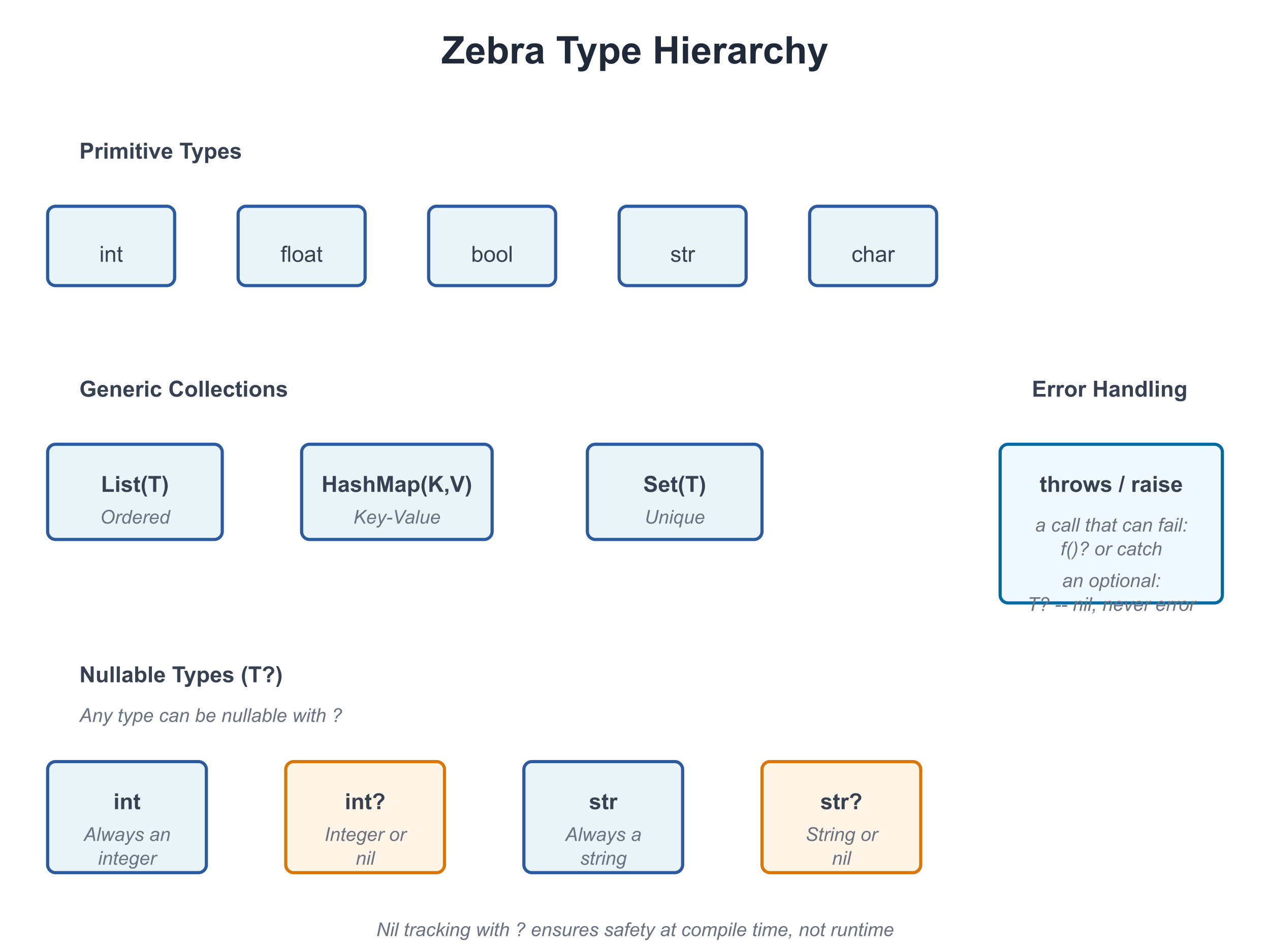
Basic Types
Integers
# file: 02_integers.zbr
# teaches: integer types, arithmetic
# chapter: 02-Values-and-Types

def main()
    var age = 25
    var population = 8_000_000_000     # Underscores for readability
    var tiny: int8 = 100               # explicit narrow type
    var huge: int64 = 9_223_372_036_854_775_807

    print(age)
    print(population)
    print(tiny)
    print(huge)
Integer types:
int— Default integer (usually 64-bit)int8,int16,int32,int64— Specific sizesuint,uint8, etc. — Unsigned (non-negative) integers
Arithmetic:
var x = 10
var y = 3
print(x + y)  # 13
print(x - y)  # 7
print(x * y)  # 30
print(x / y)  # 3 (integer division)
print(x % y)  # 1 (remainder)
When a Result Doesn't Fit: Overflow
Every integer type has a range — a byte holds 0 to 255, an int8 holds -128 to 127, an
int holds about ±9.2 × 10¹⁸. If +, - or * produces a value outside the range, the
program stops rather than carry on with a wrong number:
# file: 02_overflow_trap.zbr
# teaches: integer overflow stops the program
# chapter: 02-Values-and-Types

def add_ten(b: byte): byte
    return b + 10

def main()
    print(add_ten(100))    # 110
    print(add_ten(250))    # 260 does not fit in a byte: the program stops here
    print("not reached")
110
thread 20484 panic: integer overflow
This holds in every build, including zebra --release — an optimised program does not
quietly wrap. When wrapping or clamping is what you want (hashes, checksums, colour
channels, counters that roll over), say so with an operator:
# file: 02_wrap_saturate.zbr
# teaches: wrapping (+% -% *%) and saturating (+| -| *|) arithmetic
# chapter: 02-Values-and-Types

def main()
    var b: byte = 250
    print(b +% 10)     # 4    -- wraps around past 255
    print(b +| 10)     # 255  -- saturates: clamps at the top
    var s: int8 = -128
    print(s -| 1)      # -128 -- clamps at the bottom
    print(-%s)         # -128 -- wrapping negation
| wraps around | clamps at the bounds | |
|---|---|---|
| add, subtract, multiply | +% -% *% | +| -| *| |
| negate / shift left | -%x | <<| |
| compound forms | +%= -%= *%= | +|= -|= *|= <<|= |
They are Zig's operators with Zig's spelling, and they work on integers only.
Mixing Integer Types
When two different integer types meet in arithmetic, the result is the wider type —
the same rule for + - * / %, for & | ^, and for the wrapping and saturating forms:
# file: 02_mixing_ints.zbr
# teaches: how two integer types combine
# chapter: 02-Values-and-Types

def main()
    var b: byte = 250
    var n: int = 1000
    var t: int8 = -5
    print(b + n)       # 1250 -- byte with int is an int
    print(b + t)       # 245  -- byte with int8 is an int16 (a signed type that holds both)
    print(b + 3)       # 253  -- a plain literal takes the other side's type
Three things the compiler refuses, each with a message naming the fix:
- A literal that does not fit the other side.
k + 300with abytek— 300 is not a byte. The check is by value, sok + (300 - 200)is fine andk + 100 * 3is not. - A result that would have to narrow on its own.
b = b + nwith a byteband an intnproduces an int, and an int does not fit back into a byte silently. Convert it yourself (see Narrowing below). uintbeside a signed type. No signed type holds everyuintvalue, sou + nasks you to convert one side first.
error: 300 does not fit in 'byte' (0..255), the type of the other operand of '+'
error: type mismatch: expected byte, found int -- an int does not narrow to a byte on its own; use `.toByte()` (low 8 bits)
error: cannot mix 'uint' and 'int' in arithmetic: no signed type holds every uint value -- convert one side first (`.toInt()` on the uint, checked)
Literal Suffixes
A suffix gives a literal its type, and the variable it initialises takes that type too:
# file: 02_literal_suffixes.zbr
# teaches: typed literals
# chapter: 02-Values-and-Types

def main()
    var a = 300_i16        # an int16
    var b = 5_u8           # a byte (uint8)
    var c = 7u             # a uint -- the underscore is optional
    var mask = 0xFF_u8     # hex works the same way
    var f = 1.5_f32        # a float32
    print(a)               # 300
    print(b +% 255_u8)     # 4 -- b really is a byte, so this wraps at 255
    print(c)               # 7
    print(mask)            # 255
    print(f)               # 1.5
Integer suffixes are _i and _u (the 64-bit int and uint) or either with a width —
8, 16, 32, 64 or 128. The literal must fit its type: 300_u8 and 128_i8 are refused
(-128_i8, int8's minimum, is fine). Two spellings look alike and are not: in a decimal
number a bare _16 is a digit separator (300_16 is 30016), while in hex a bare size
is the signed type (0xFF_32 is 255 as an int32).
Floating Point
# file: 02_floats.zbr
# teaches: float types, precision
# chapter: 02-Values-and-Types

def main()
    var pi = 3.14159
    var precise: float64 = 3.141592653589793

    print(pi)
    print(precise)

    # Arithmetic
    var result = pi * 2.0
    print(result)
Float types:
float— Default floating point (usually 64-bit)float32,float64— Specific precision
Booleans
# file: 02_bools.zbr
# teaches: boolean values, logic
# chapter: 02-Values-and-Types

def main()
    var is_ready = true
    var is_finished = false

    print(is_ready)
    print(is_finished)

    # Logic
    print(true and false)  # false
    print(true or false)  # true
    print(not true)  # false
Strings
# file: 02_strings.zbr
# teaches: string type, string operations
# chapter: 02-Values-and-Types

def main()
    var greeting = "Hello"
    var name = "World"

    print(greeting)
    print(greeting.len)  # 5
    print(greeting.upper())  # HELLO
    print(name.lower())  # world

    # Concatenation
    var message = greeting.concat(" ").concat(name)
    print(message)  # Hello World
String methods (we'll cover these fully in Chapter 06):
.len— Length.upper()— Uppercase.lower()— Lowercase.concat()— Concatenate.contains()— Check for substring.split()— Split by delimiter
Tuples — Multi-Value Bundles
A tuple holds two or more values of possibly different types, packed together. Useful for returning multiple results from a function or pairing values without writing a struct.
# file: 02_tuples.zbr
# teaches: tuple types, literals, destructuring, and indexing
# chapter: 02-Values-and-Types

def minmax(a: int, b: int): (int, int)
    if a < b
        return (a, b)
    return (b, a)

def main()
    # Positional destructure into named locals
    var (lo, hi) = minmax(7, 3)
    print(lo)  # 3
    print(hi)  # 7

    # Hold as a tuple value, index into it
    var t = minmax(1, 9)
    print(t.0)  # 1
    print(t.1)  # 9

    # Mixed types work — (str, int), (float, bool), etc.
    var pair: (str, int) = ("alice", 42)
    print(pair.0)  # alice
    print(pair.1)  # 42
Rules:
- A tuple type uses parens with commas:
(int, int),(str, int),(float, bool, bool). - A tuple literal uses the same syntax:
(7, 3),("alice", 42). - Destructure with
var (x, y) = expr— binds names positionally. - Index with
.0,.1,.2(integer literal after., zero-based). - For lists of tuples (
List((str, int))), the for-loopfor k, v in listdestructures automatically — see Chapter 03.
Tuples are the right tool when the pair is transient (returning
two values from one function) or structural (a coordinate pair).
For values you'll pass through many functions or attach methods to,
a struct (Chapter 07b) reads better.
Declaring Variables
Type Inference (the default)
Zebra infers the type from the right-hand side. Most variables don't need an annotation:
var age = 25          # Inferred as int
var name = "Alice"    # Inferred as str
var active = true     # Inferred as bool
var pi = 3.14         # Inferred as float
Explicit Types (when they aid the reader)
You can always pin the type explicitly. Reach for this when:
- the right-hand side is a function call whose return type isn't obvious to a reader
- you want a different concrete width (
int8,float32) than inference would pick - the variable starts as
nilorundefinedand inference can't narrow it
var age: int = 25                          # redundant; inference would do
var payment_amount: float = compute_total()  # earns its keep — return type isn't visible
var counter: int8 = 0                      # narrower than the default int
var maybeUser: User? = nil                 # required: nil alone has no type
The book uses inference by default and adds annotations only where they earn their keep.
Naming Conventions
Use snake_case for variables:
var user_id = 42           # ✅ Good
var UserID = 42            # ❌ Avoid (that's for classes)
var user_id_number = 42    # ✅ Clear but verbose
var uid = 42               # ❌ Too abbreviated
Comparison and Equality
# file: 02_comparisons.zbr
# teaches: comparison operators
# chapter: 02-Values-and-Types

def main()
    var x = 10
    var y = 20

    print(x == y)  # false (equal)
    print(x != y)  # true (not equal)
    print(x < y)  # true (less than)
    print(x > y)  # false (greater than)
    print(x <= y)  # true (less or equal)
    print(x >= y)  # false (greater or equal)

    var name = "Alice"
    print(name == "Alice")  # true
    print(name == "Bob")  # false
Type Conversions
Implicit Conversion (When Safe)
var small: int8 = 100
var big: int = small  # ✅ Fine: int8 → int is always safe
Narrowing: Choosing What Happens to Values That Don't Fit
Going from a wider integer to a narrower one is always explicit, and there are two ways to do it — decide which one you mean:
# file: 02_narrowing.zbr
# teaches: checked vs truncating narrowing
# chapter: 02-Values-and-Types

def main()
    var n = 300
    print(n.toByte())      # 44  -- toByte() keeps the low 8 bits
    var small = 200
    print(small.toUint8()) # 200 -- fits, so the checked form returns it
    print(n.toUint8())     # 300 does not fit: the program stops here
44
200
thread 24072 panic: integer conversion out of range: 300 does not fit in byte
toInt8(), toInt16(), toInt32(), toInt64(), toUint8() … toUint64() are
checked: they return the value when it fits and stop the program when it does not.
toByte() is the one that deliberately keeps the low bits.
Explicit Conversion
# file: 02_conversions.zbr
# teaches: type conversion
# chapter: 02-Values-and-Types

def main()
    var x = 42
    var s = x.toString()      # int → str
    print(s)

    var pi = 3.14
    var i = pi.toInt()        # float → int (loses decimal)
    print(i)  # 3

    var flag = true
    var b = flag.toString()   # bool → str
    print(b)  # true
Nullable Types (Introduction)
Sometimes a value might not exist. Zebra uses ? to mark this:
# file: 02_nullables.zbr
# teaches: nullable types introduction
# chapter: 02-Values-and-Types

def main()
    var name: str? = "Alice"    # Can hold str or nil
    var empty: str? = nil       # Explicitly nil

    # You must check before using
    if name != nil
        print(name)  # Safe to use

    if empty != nil
        print(empty)
    else
        print("Name is empty")
Key point: str? means "string or nil". We'll explore nil tracking fully in Chapter 11.
If you're new to programming
A nullable type is like an optional value. Sometimes you have it, sometimes you don't. Instead of errors when it's missing, Zebra lets you check first.
Type Mismatch Errors
Zebra prevents mixing types unsafely:
var x: int = "hello"  # ❌ Error: can't assign str to int
var y: str = 42       # ❌ Error: can't assign int to str
var z: int = 3.14     # ❌ Error: can't assign float to int
Why? Type safety catches bugs before they happen. You can't accidentally treat a string as a number.
Real World: Processing User Data
# file: 02_user_data.zbr
# teaches: realistic variable use
# chapter: 02-Values-and-Types

class User
    var id: int
    var name: str
    var email: str
    var age: int
    var is_active: bool

def main()
    # Create a user
    var user = User()
    user.id = 1
    user.name = "Alice"
    user.email = "alice@example.com"
    user.age = 30
    user.is_active = true

    # Display
    print("User: ${user.name}")
    print("Email: ${user.email}")
    print("Age: ${user.age}")
    print("Active: ${user.is_active}")
Common Mistakes
❌ Mistake: Skipping a type annotation when the right-hand side is opaque
var result = compute() # What's the type?💡 Why it matters: Inference is fine when the literal makes the type obvious (
var x = 25). When the RHS is a function call whose return type isn't visible at the call site, an annotation pays for itself in readability.✅ Better:
var result: int = compute() # Clear: it's an int
❌ Mistake: Mixing types in arithmetic
var x = 10
var y = 3.14
print(x + y)  # ❌ Can't add int + float
💡 Why: Different types might need different handling.
✅ Better:
var x = 10.0
var y = 3.14
print(x + y)  # ✅ Both float
❌ Mistake: Using a nullable type without checking
var name: str? = nil
print(name.upper())  # ❌ Error: nil doesn't have .upper()
✅ Better:
var name: str? = nil
if name != nil
    print(name.upper())  # Safe
Exercises
Exercise 1: Type Conversion
Write a program that:
- Creates an integer variable
- Creates a float variable
- Converts both to strings
- Prints them
Solution
def main()
    var count = 42
    var price = 19.99

    var count_str = count.toString()
    var price_str = price.toString()

    print("Count: ${count_str}")
    print("Price: ${price_str}")
Output:
Count: 42
Price: 19.99
Exercise 2: Comparisons
Write a program that compares two numbers and prints which is larger:
Solution
def main()
    var x = 100
    var y = 75

    if x > y
        print("${x} is larger than ${y}")
    else
        print("${y} is larger than ${x}")
Output:
100 is larger than 75
Exercise 3: User Profile
Create a data structure to hold user information (name, age, email) and print a profile:
Solution
class Person
    var name: str
    var age: int
    var email: str

def main()
    var person = Person()
    person.name = "Carol"
    person.age = 28
    person.email = "carol@example.com"

    print("Name: ${person.name}")
    print("Age: ${person.age}")
    print("Email: ${person.email}")
Next Steps
- → 03-Collections — Lists and HashMaps
- → 04-Functions — Write reusable code
- → 11-Nil-Tracking — Deep dive into nullable types
Key Takeaways
- Every value has a type — Integers, floats, booleans, strings, and more
- Types are checked at compile time — Catches bugs early
- Use type inference when obvious, explicit types when clarity matters
- Conversions are explicit — No silent type changes
- Nullable types use
?—str?can be string or nil - Always check nil before using —
if value != nil { ... }
Next: Head to 03-Collections to learn Lists and HashMaps.