03: Collections
Audience: All
Time: 120 minutes
Prerequisites: 01-Getting-Started, 02-Values-and-Types
You'll learn: Lists, HashMaps, Sets, iteration, indexing, collection methods
The Big Picture
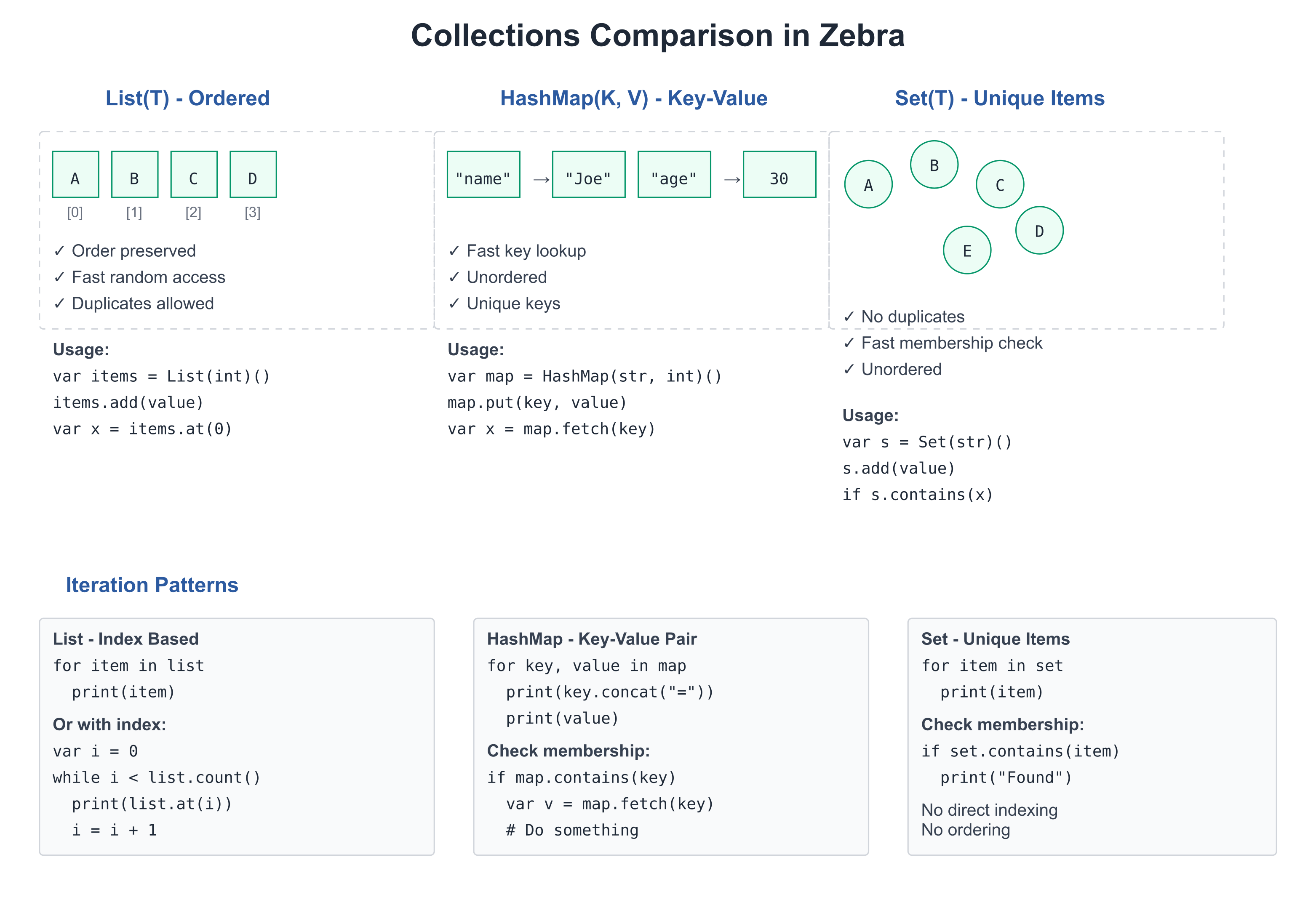
Collections let you group values. Instead of declaring 100 separate variables for 100 names, you use one List(str) that holds all 100.
Zebra provides:
- List(T) — Ordered, resizable sequences (like Python's list)
- HashMap(K, V) — Key-value pairs (like Python's dict)
- Set(T) — Unique elements of any hashable type (
Set(str)(),Set(int)())
Lists
A List holds multiple values of the same type in order.
Creating Lists
# file: 03_lists.zbr
# teaches: list creation and access
# chapter: 03-Collections

def main()
    # List literal — the cleanest way to make a populated list.
    # The element type is inferred from the first element.
    var fruits = ["apple", "banana", "cherry"]

    # An empty list with an explicit annotation — and `.add()` to grow:
    var empty: List(str) = []
    empty.add("date")
    print(empty.count())  # 1

    # Access by index
    var first = fruits.at(0)
    var second = fruits.at(1)
    print(first)  # apple
    print(second)  # banana

    # Check size
    print(fruits.count())  # 3

    # Iterate
    for fruit in fruits
        print(fruit)
The constructor form
var fruits = List(str)()is still valid — useful when you want an empty list to grow without specifying an element type up front (the element type is inferred from the first.add()). For populated lists,[…]is shorter and reads better.
List Operations
# file: 03_list_ops.zbr
# teaches: list manipulation
# chapter: 03-Collections

def main()
    var nums = [10, 20, 30]             # list literal — type inferred

    # Check existence
    print(nums.contains(20))  # true

    # Find the first matching element (there's no indexOf — search with a predicate;
    # .find() returns an Optional, nil if nothing matches)
    print(nums.find(def(x) = x == 20))  # 20

    # Remove by index (List.remove takes an index, not a value)
    nums.remove(1)
    print(nums.count())  # 2

    # Clear
    nums.clear()
    print(nums.count())  # 0
Sorting
# file: 03_sorting.zbr
# teaches: sort, sort with a comparator, sortBy, reverse
# chapter: 03-Collections

def main()
    var nums = [42, 7, 19, 3]
    nums.sort()                            # ascending, in place
    print(nums.at(0))
    print(nums.at(3))

    nums.sort(def(a: int, b: int) = a > b) # comparator: true when a goes first
    print(nums.at(0))

    var names = ["mallory", "bob", "alice"]
    names.sort()                           # strings: lexicographic
    print(names.at(0))
    names.sortBy(def(s: str) = s.len)      # one-argument key: shortest first
    print(names.at(0))
    names.reverse()
    print(names.at(0))
Output:
3
42
42
alice
bob
mallory
All four reorder the list in place. Numbers and strings know
their own order. A list of your own class sorts with plain sort() once
the class declares cue compare, the method sort() and < call to
order two values, together with the cue equals it requires (Chapter 07,
"Cues"). Until then, pass a comparator or
a key.
Iteration Patterns
# file: 03_iteration.zbr
# teaches: different iteration styles
# chapter: 03-Collections

def main()
    var items = List(str)()
    items.add("first")
    items.add("second")
    items.add("third")

    # Simple iteration (typed local works around print's {s} fallback)
    for item in items
        var s: str = item
        print(s)

    # Iteration with index — interpolation into a string handles the type fine
    var i = 0
    while i < items.count()
        print("${i}: ${items.at(i)}")
        i = i + 1
If you're new to programming
A List is like a numbered shelf. You can:
- Add items:
list.add(item)- Take items:
list.remove(item)- Check what's there:
list.at(0)gets the first item- Count items:
list.count()
If you know Python
# Python
fruits = ["apple", "banana"]
fruits.append("cherry")
for fruit in fruits:
    print(fruit)

# Zebra
var fruits = List(str)()
fruits.add("apple")
fruits.add("banana")
fruits.add("cherry")
for fruit in fruits
    print(fruit)
The main difference: Zebra requires the element type (List(str)) at the construction site; once declared, the type flows through inference.
HashMaps
A HashMap stores key-value pairs. Fast lookup by key.
Creating and Using HashMaps
# file: 03_hashmaps.zbr
# teaches: hashmap creation and access
# chapter: 03-Collections

def main()
    # Create empty HashMap
    var ages = HashMap(str, int)()

    # Add key-value pairs
    ages.put("Alice", 30)
    ages.put("Bob", 25)
    ages.put("Carol", 28)

    # Retrieve by key — get returns int? (nil if missing)
    if ages.get("Alice") as a
        print(a)  # 30

    # Check if key exists
    print(ages.contains("Alice"))  # true

    # Iterate over key/value pairs
    for name, age in ages
        print("${name}: ${age}")
A note on the API:
.put()/.fetch()are older HashMap method names that still work;.set()/.get()are the canonical forms used by QUICKSTART..fetch()returns the value directly and panics on missing keys;.get()returns an optional — the safer pattern.
Your own types as keys.
str,intand the other built-ins work asHashMapkeys andSetelements out of the box. A class of your own can be one too, and it is then compared by identity: two separate objects with the same contents are two different keys. To key by contents, give the classcue hashandcue equals(Chapter 07, "Cues"); a struct can get both from@derive(Eq, Hash)(Chapter 07b).
HashMap Operations
# file: 03_hashmap_ops.zbr
# teaches: hashmap manipulation
# chapter: 03-Collections

def main()
    var config = HashMap(str, str)()
    config.put("host", "localhost")
    config.put("port", "8080")
    config.put("debug", "true")

    # Count entries
    print(config.count())  # 3

    # Remove entry
    config.remove("debug")
    print(config.count())  # 2

    # Look up safely — get returns str? (nil if missing)
    if config.get("host") as host
        print(host)  # localhost

    # Iterate over keys and values
    for key, value in config
        print("${key} = ${value}")
If you know Python
# Python
ages = {"Alice": 30, "Bob": 25}
print(ages["Alice"])
for name, age in ages.items():
    print(name, age)

# Zebra
var ages = HashMap(str, int)()
ages.put("Alice", 30)
ages.put("Bob", 25)
if ages.get("Alice") as a
    print(a)
for name, age in ages
    print("${name} ${age}")
Deduplication with HashMap
Need unique values? Use a HashMap where keys track membership:
# file: 03_dedup.zbr
# teaches: using HashMap for uniqueness
# chapter: 03-Collections

def main()
    var seen = HashMap(int, bool)()
    var unique = List(int)()

    var ids = [1, 2, 3, 2]              # last element is a duplicate

    for id in ids
        if not seen.contains(id)
            seen.put(id, true)
            unique.add(id)

    print(unique.count())  # 3

    # Check membership
    print(seen.contains(2))  # true
Real World: Data Processing
# file: 03_real_world.zbr
# teaches: collections in realistic scenarios
# chapter: 03-Collections

class Student
    var name: str
    var gpa: float

def main()
    # List of students
    var students = List(Student)()

    var alice = Student()
    alice.name = "Alice"
    alice.gpa = 3.9
    students.add(alice)

    var bob = Student()
    bob.name = "Bob"
    bob.gpa = 3.5
    students.add(bob)

    # Calculate average GPA
    var total = 0.0
    for student in students
        total = total + student.gpa
    var average = total / students.count()
    print("Average GPA: ${average}")

    # Find student by name
    var target_name = "Alice"
    for student in students
        if student.name == target_name
            print("Found: ${student.name} (${student.gpa})")
Common Patterns
Filter and Transform
# file: 03_patterns.zbr
# teaches: collection patterns
# chapter: 03-Collections

def main()
    var numbers = [1, 2, 3, 4, 5]

    # Filter: keep only even numbers
    var evens: List(int) = []
    for num in numbers
        if num % 2 == 0
            evens.add(num)

    print("Evens: ")
    for e in evens
        print(e)

    # Count matching items
    var count_gt_3 = 0
    for num in numbers
        if num > 3
            count_gt_3 = count_gt_3 + 1
    print("Numbers > 3: ${count_gt_3}")
Common Mistakes
❌ Mistake: Forgetting type parameters
var items = List() # What type? List(what)?✅ Better:
var items = List(str)() # Clear: list of strings
❌ Mistake: Iterating and modifying
for item in items
    items.remove(item)  # ❌ Unsafe: modifying while iterating
✅ Better:
var to_remove = List(str)()
for item in items
    if should_remove(item)
        to_remove.add(item)
for item in to_remove
    for i in 0..items.count()
        if items.at(i) == item
            items.remove(i)
            break
❌ Mistake: Using wrong key type for HashMap
var map = HashMap(str, int)()
map.put(1, 100)  # ❌ Key should be str, not int
✅ Better:
var map = HashMap(str, int)()
map.put("count", 100)  # ✅ Key is str
Exercises
Exercise 1: List Operations
Create a list of numbers and find the sum:
Solution
def main()
    var nums = [10, 20, 30, 40]

    var sum = 0
    for num in nums
        sum = sum + num

    print("Sum: ${sum}")  # 100
Exercise 2: HashMap Lookup
Create a phone book and look up a number:
Solution
def main()
    var phone_book = HashMap(str, str)()
    phone_book.put("Alice", "555-1234")
    phone_book.put("Bob", "555-5678")
    phone_book.put("Carol", "555-9999")

    var name = "Bob"
    if phone_book.get(name) as number
        print("${name}'s number: ${number}")
Exercise 3: Unique Words
Count unique words in a sentence (using HashMap for deduplication):
Solution
def main()
    var text = "the quick brown fox jumps over the lazy dog"
    var words: List(str) = text.split(" ")  # typed annotation auto-collects the iterator

    var seen = HashMap(str, bool)()
    for word in words
        seen.put(word, true)

    print("Total words: ${words.count()}")
    print("Unique words: ${seen.count()}")
Next Steps
- → 04-Functions — Reuse collection-processing code
- → 05-Control-Flow — Pattern matching on collections
- 🏋 Project-3-Data-Analysis — Real collection processing
Key Takeaways
- List(T) holds ordered items, access by index
- HashMap(K,V) holds key-value pairs, fast lookup
- Deduplication — use HashMap keys for unique-value tracking
- Iteration with
for item in collectionis the main pattern - Type parameters are required:
List(str)not justList - Modifying while iterating is unsafe; collect changes first
Next: Head to 04-Functions to write reusable code.