04: Functions and Scope
Audience: All
Time: 120 minutes
Prerequisites: 01-02-03
You'll learn: Define functions, parameters, return values, scope, closures, capture blocks
The Big Picture
Functions let you:
- Reuse code — Write once, call many times
- Organize logic — Group related operations
- Name ideas —
process_payment()is clearer than inline logic - Test parts — Functions are easier to test in isolation
Basic Functions
Defining Functions
# file: 04_functions.zbr
# teaches: function definition and calling
# chapter: 04-Functions-and-Scope

def add(a: int, b: int): int
    return a + b

def multiply(x: int, y: int): int
    return x * y

def main()
    var result1 = add(5, 3)
    print(result1)  # 8

    var result2 = multiply(4, 7)
    print(result2)  # 28
Breakdown:
def add(...)— Define a function namedaddat the module top level. No surrounding class is needed when the function is just a reusable operation.(a: int, b: int)— Parameters:aandb, both integers.: int(after the closing paren) — Return type is integer.return a + b— The value to return.
When you do want to group related functions on a class — for namespacing, or because they share class state — use
static def name(...)insideclass Name. We'll show that pattern when it earns its keep (Chapter 07).
Functions With Multiple Parameters
# file: 04_multi_params.zbr
# teaches: multiple parameters
# chapter: 04-Functions-and-Scope

def pad(text: str, width: int, fill: str): str
    # (Implementation would go here)
    return text

def main()
    var padded = pad("hi", 10, "*")
    print(padded)
Optional Logic (No Return Value)
# file: 04_void.zbr
# teaches: functions that don't return values
# chapter: 04-Functions-and-Scope

def log(message: str)
    print("[LOG] ${message}")

def main()
    log("Application started")
    log("Processing data")
    log("Done")
When a function doesn't return a value, omit the : <type> after the parameter list.
Scope
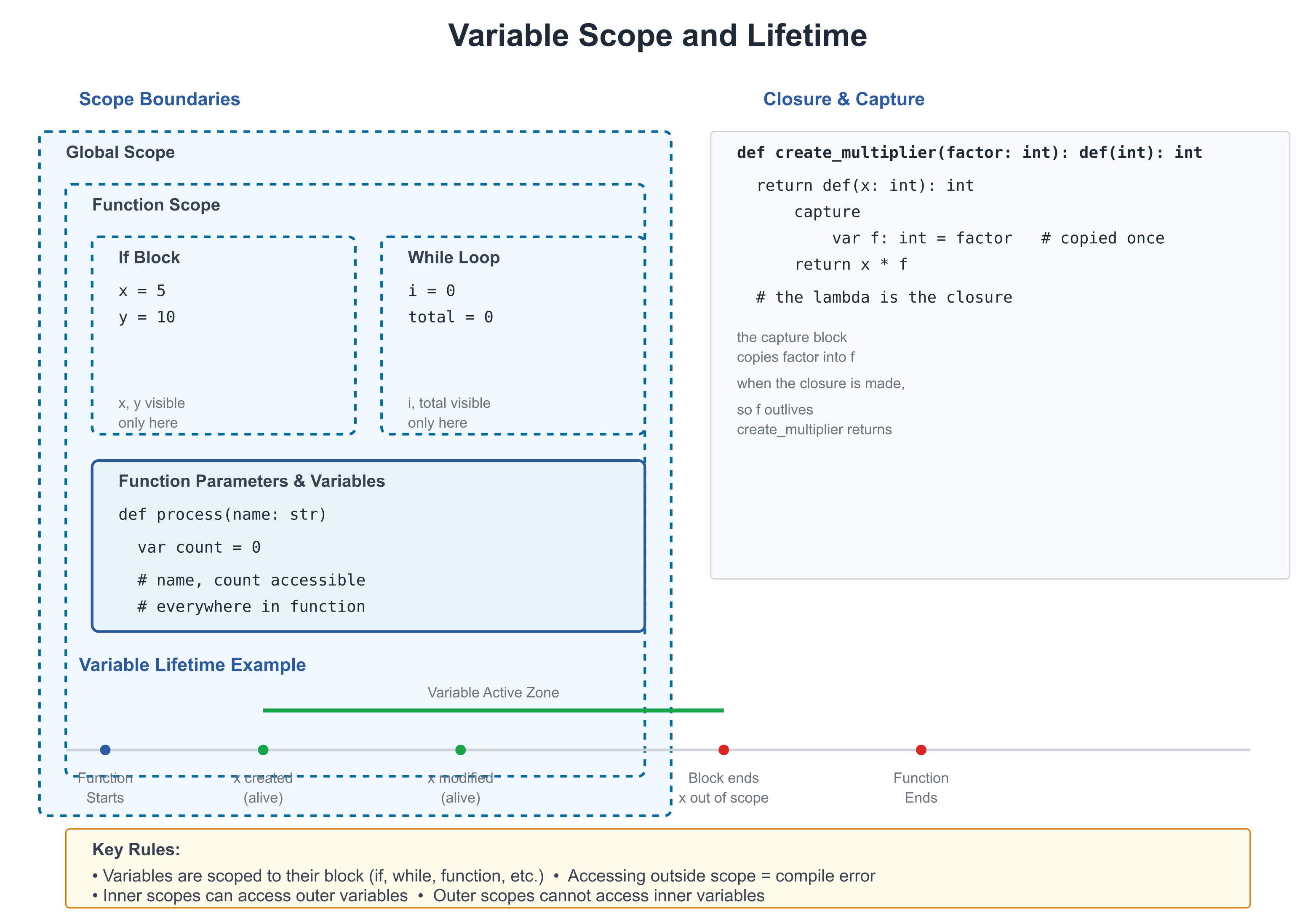
Scope is where a variable can be accessed.
Local Scope
Variables declared inside a function are local (only accessible there):
# file: 04_scope.zbr
# teaches: variable scope
# chapter: 04-Functions-and-Scope

class Calculator
    static
        var global_val: int = 100  # Shared (class-level)

        def compute()
            var local_val = 50      # Local to this function
            print(local_val)  # ✅ Can access
            print(global_val)  # ✅ Can access class-level

        def other()
            # print local_val       # ❌ Can't access, it's not here
            pass

def main()
    Calculator.compute()
Shadowing (Careful!)
class Example
    static
        var count: int = 10        # Class-level

        def show()
            var count = 5           # Local (shadows class variable)
            print(count)  # 5 (local shadows class)

        def another()
            print(count)  # 10 (uses class-level)
Shadowing can be confusing. Rename to clarify intent.
If you're new to programming
Scope determines where you can use a variable.
- Local: Only inside the function where it's declared
- Class-level: Accessible from all functions in the class
Closures and Capture
Functions can create inner functions that capture outer variables:
# file: 04_closures.zbr
# teaches: closures and variable capture
# chapter: 04-Functions-and-Scope

def make_multiplier(factor: int): def(int)
    return def(x: int)
        capture
            var factor: int = factor
        return x * factor

def main()
    var double = make_multiplier(2)
    var triple = make_multiplier(3)

    print(double(5))  # 10
    print(triple(5))  # 15
What's happening:
make_multiplier(2)creates a function that multiplies by 2double = ...stores that function in a variabledouble(5)calls it: 5 * 2 = 10
A lambda can read its enclosing function's parameters and locals directly. The capture
block does something more specific: it gives each closure its own private copy of
factor, kept for as long as the closure lives — per-closure state, shown next.
Closures Share, They Don't Copy
A var local that a lambda writes is shared with the function that declared it, as in
C#: a write through the closure is seen outside, and every closure naming the variable sees
the same one.
# file: 04_shared_capture.zbr
# teaches: closures share the variables they write
# chapter: 04-Functions-and-Scope

def main()
    var count = 0
    var bump = def()
        count += 1
    bump()
    bump()
    print(count)    # 2 -- the closure and main share `count`
Parameters, loop variables and as bindings are read as a copy made when the closure is
created, so a closure made in a loop sees that iteration's value; changing one of them
after a closure has read it is refused, with the fix (copy it into a var first). And a
closure value is a reference, like a C# delegate: pass it to a function or store it in a
field, and every holder calls the same closure, with the same capture state.
Capture Syntax
# file: 04_capture.zbr
# teaches: capture blocks
# chapter: 04-Functions-and-Scope

def make_counter(): def(): int
    var count: int = 0
    return def(): int
        capture
            var count: int = count
        count = count + 1
        return count

def main()
    var counter = make_counter()
    print(counter())  # 1
    print(counter())  # 2
    print(counter())  # 3
Real World: Reusable Utilities
# file: 04_utilities.zbr
# teaches: practical function use
# chapter: 04-Functions-and-Scope

def repeat_str(text: str, times: int): str
    var result = ""
    var i = 0
    while i < times
        result = result.concat(text)
        i = i + 1
    return result

def pad_left(text: str, width: int): str
    var padding_needed = width - @as(int, text.len)
    if padding_needed <= 0
        return text
    var padding = repeat_str(" ", padding_needed)
    return padding.concat(text)

def main()
    var padded = pad_left("hello", 10)
    print("[${padded}]")  # [     hello]
Aside: the
@as(int, text.len)cast works around BUG-093 (s.lenisusize, notint, so it can't be subtracted from anintliteral directly). Once that bug is fixed the cast becomes optional.
Common Patterns
Early Return
# file: 04_patterns.zbr
# teaches: early return pattern
# chapter: 04-Functions-and-Scope

def validate_email(email: str): bool
    if email.len == 0
        return false
    if not email.contains("@")
        return false
    if not email.contains(".")
        return false
    return true
Default Arguments
Zebra supports parameter defaults directly — you don't need an overload:
def log(message: str, prefix: str = "[INFO]")
    print("${prefix} ${message}")

def main()
    log("Application started")              # [INFO] Application started
    log("Disk failing", "[WARN]")           # [WARN] Disk failing
You can also pass arguments by name when that aids the reader:
log(prefix: "[ERROR]", message: "Out of memory")
Passing Functions As Arguments
# file: 04_higher_order.zbr
# teaches: functions as arguments
# chapter: 04-Functions-and-Scope

def map_int(items: List(int), transform: def(int): int): List(int)
    var result = List(int)()
    for item in items
        result.add(transform(item))
    return result

def main()
    var nums = List(int)()
    nums.add(1)
    nums.add(2)
    nums.add(3)

    var double_it = def(x: int): int = x * 2
    var doubled = map_int(nums, double_it)

    for d in doubled
        print(d)  # 2, 4, 6
sig — Named Function Types
When you pass functions around frequently, name the function type with
sig for cleaner code and reusable signatures:
# file: 04_sig.zbr
# teaches: named function types with sig
# chapter: 04-Functions-and-Scope

sig Transformer(x: int): int      # "a function int → int"
sig Predicate(s: str): bool       # "a function str → bool"

def apply_all(nums: List(int), fn: Transformer): List(int)
    var result = List(int)()
    for n in nums
        result.add(fn(n))
    return result

static def double(x: int): int
    return x * 2

static def square(x: int): int
    return x * x

def main()
    var nums = List(int)()
    nums.add(1)
    nums.add(2)
    nums.add(3)

    var doubled = apply_all(nums, double)
    var squared = apply_all(nums, square)

    for d in doubled
        print(d)  # 2, 4, 6
    for s in squared
        print(s)  # 1, 4, 9
sig Transformer(x: int): int is a type alias — "a function that takes
one int and returns an int". Any function or lambda with that shape is
compatible (structural typing — no implements required).
sig as a class field — the idiomatic event-callback pattern:
sig OnClick()

class Button
    var onClick: OnClick? = nil

    def click()
        if .onClick as cb
            cb()
Cross-module: sig types are exported and importable across modules:
# callbacks.zbr
sig OnReady()
sig OnError(msg: str)

# main.zbr
use callbacks exposing OnReady, OnError

def run(cb: OnReady)
    cb()
Lambda Passed Directly as an Argument
Instead of assigning a lambda to a variable first, pass it directly:
# file: 04_lambda_arg.zbr
# teaches: lambda as call argument (statement-body form)
# chapter: 04-Functions-and-Scope

sig IntFn(x: int): int      # name the function type first

def apply(n: int, transform: IntFn): int
    return transform(n)

def main()
    # Statement-body lambda as a call argument:
    var result = apply(5, def(x: int): int
        var doubled = x * 2
        return doubled
    )
    print(result)  # 10
Indentation rule: the lambda body indents under def(...). The closing
) of the enclosing call returns to the call-site indent level — one
level out from the lambda body. Nesting works too:
# file: 04_nested_lambda.zbr
# teaches: nested lambda as argument
# chapter: 04-Functions-and-Scope

sig VoidFn()        # function type: no params, no return

def run_twice(action: VoidFn)
    action()
    action()

def with_logging(label: str, action: VoidFn)
    print("start: ${label}")
    action()
    print("end: ${label}")

def main()
    with_logging("outer", def()
        run_twice(def()
            print("  inner")
        )
    )
    # Prints:
    # start: outer
    #   inner
    #   inner
    # end: outer
Common Mistakes
❌ Mistake: Returning wrong type
def get_age(): int
    return "25"  # ❌ Returning str, not int
✅ Better:
def get_age(): int
    return 25    # ✅ Returning int
❌ Mistake: Using variable outside its scope
def process()
    var data = fetch_data()

def use()
    print(data)  # ❌ data doesn't exist here
✅ Better:
def process(): str
    var data = fetch_data()
    return data

def use()
    var data = process()
    print(data)  # ✅ data is here
❌ Mistake: Forgetting to return
def compute(): int
    var result = 5 + 3
    # Forgot return!
✅ Better:
def compute(): int
    var result = 5 + 3
    return result
Exercises
Exercise 1: Simple Function
Write a function that calculates the factorial of a number:
Solution
def factorial(n: int): int
    if n <= 1
        return 1
    return n * factorial(n - 1)

def main()
    print(factorial(5))  # 120
Exercise 2: Closure
Create a function that returns an "adder" function:
Solution
def make_adder(base: int): def(int): int
    return def(x: int): int
        capture
            var base: int = base
        return x + base

def main()
    var add_10 = make_adder(10)
    print(add_10(5))  # 15
    print(add_10(20))  # 30
Exercise 3: Filtering
Write a function that filters a list:
Solution
def even_numbers(nums: List(int)): List(int)
    var evens = List(int)()
    for num in nums
        if num % 2 == 0
            evens.add(num)
    return evens

def main()
    var nums = List(int)()
    nums.add(1)
    nums.add(2)
    nums.add(3)
    nums.add(4)
    nums.add(5)

    var result = even_numbers(nums)
    for r in result
        print(r)
Next Steps
- → 05-Control-Flow — if/else, loops, pattern matching
- → 15-Pipelines — Function composition
- 🏋 Project-1-CLI-Tool — Use functions extensively
Key Takeaways
- Functions are reusable blocks of code with clear inputs and outputs
- Scope determines where variables can be accessed
- Closures capture outer variables for use in inner functions
- Early return makes logic clearer
- Functions as arguments enable powerful abstractions
signames a function type — required for parameters that accept lambdas (inlinedef(T): Ris not a valid parameter type);sigis also importable across modules- Lambda-in-call — pass a statement-body
def(...)directly as an argument; closing)returns to the call-site indent level - Name functions well —
process_payment()is better thando_thing()
Next: Head to 05-Control-Flow to learn if/else, loops, and pattern matching.