07: Classes and Instances
Audience: All (with beginner sidebar)
Time: 120 minutes
Prerequisites: 01-06
You'll learn: Define classes, instantiate objects, instance methods, fields, initialization, cues (the methods the compiler calls for printing, ==, hashing, ordering and for)
The Big Picture
Classes are blueprints for objects. Instead of a loose collection of variables, a class groups related data and behavior together.
Real world: A car has properties (color, speed) and behaviors (accelerate, brake)
Code: A Car class has fields (color, speed) and methods (accelerate, brake)
Defining Classes
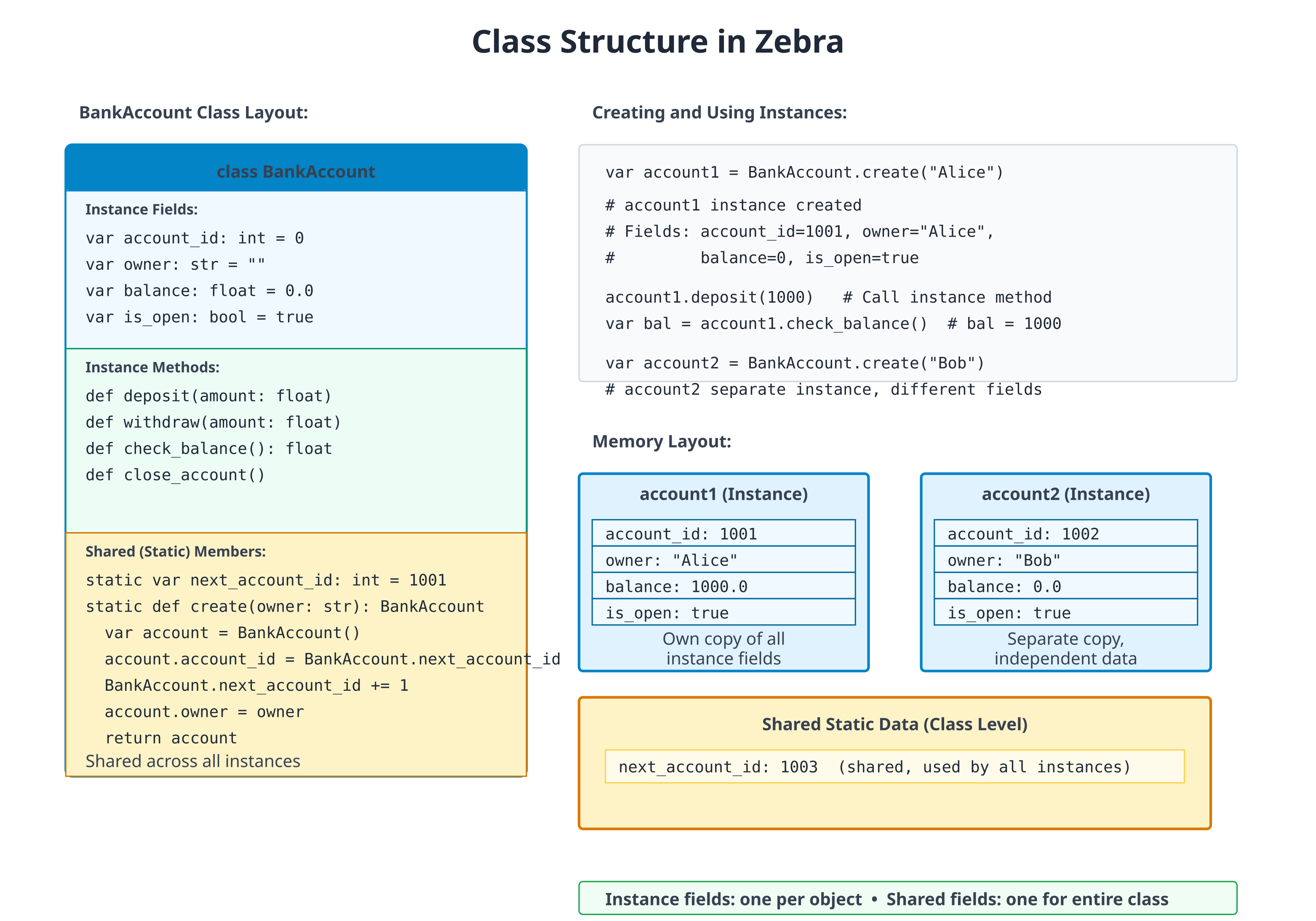
Simple Class
# file: 07_class_basic.zbr
# teaches: class definition, cue init
# chapter: 07-Classes-and-Instances

class Person
    var name: str
    var age: int

    cue init(name: str, age: int)
        this.name = name
        this.age = age

    def greet()
        print("Hi, I'm ${this.name}")

def main()
    var person = Person("Alice", 30)
    person.greet()  # Hi, I'm Alice
Breakdown:
class Person— Define a class named Person.var name: str— Field (property) of the class.cue init(name, age)— Constructor.this.name = nameinitialises the field from the argument of the same name (usingthis.to disambiguate).def greet()— Method of the class.Person("Alice", 30)— Create an instance, passing constructor args.
The class fields don't need defaults when
cue initalways sets them. The "field default" form (var name: str = "") shines when you want to allow construction without specifying every field — see "Fields and Initialization" below.
Fields and Initialization
# file: 07_init.zbr
# teaches: field defaults vs. explicit init
# chapter: 07-Classes-and-Instances

class Rectangle
    var width: int = 0      # Defaults — class is constructible with `Rectangle()`
    var height: int = 0

    def area(): int
        return this.width * this.height

def main()
    var rect = Rectangle()
    rect.width = 10
    rect.height = 5
    print(rect.area())  # 50
Field defaults make a class bare-constructible (
Rectangle()works) and let callers fill in only the fields they care about. Addingcue init(width: int, height: int)would make construction strict and let you drop the defaults — both styles compose.
Instance Methods
# file: 07_methods.zbr
# teaches: instance methods
# chapter: 07-Classes-and-Instances

class Counter
    var count: int = 0

    def increment()
        this.count = this.count + 1

    def decrement()
        this.count = this.count - 1

    def reset()
        this.count = 0

    def get_count(): int
        return this.count

def main()
    var counter = Counter()
    counter.increment()
    counter.increment()
    counter.increment()
    print(counter.get_count())  # 3
    counter.reset()
    print(counter.get_count())  # 0
Static Methods (Class Methods)
# file: 07_static.zbr
# teaches: static (class-level) methods
# chapter: 07-Classes-and-Instances

class MathUtil
    static
        def abs(x: int): int
            if x < 0
                return 0 - x
            return x

        def max_of(a: int, b: int): int
            if a > b
                return a
            return b

def main()
    print(MathUtil.abs(-5))  # 5
    print(MathUtil.max_of(10, 20))  # 20
When the methods are pure and don't share state, you have a choice: group them on a class for namespacing (as above) or write them as plain top-level
defs in a module. Pick the form that reads better at the call site. Top-leveldefkeeps the call asabs(-5); the class form makesMathUtil.abs(-5)self-documenting at a distance.
If you're new to programming
A class is like a template. When you create an instance (with
Person()), you're making a specific copy from that template.Fields are the properties (like
name,age)Methods are the behaviors (like
greet())Instance methods work on a specific object (
person.greet())Static methods belong to the class itself (
MathUtil.abs())
Method Modifiers and Attributes
Three method-level attributes alter the generated code without changing the method's signature:
class Config
    @once
    def load(): str                  # body runs once; result cached on the instance
        return File.read("config.json")

    @profile
    def heavy_work()                 # body wrapped with Profile.start/end automatically
        # ...

    static
        @tag("unit", "fast")
        def test_defaults()          # tagged for filtered test runs
            assert Config().load() == "{}"
| Attribute | Effect |
|---|---|
@once | First call runs the body and stores the result on the instance; subsequent calls return the cached value without re-running |
@profile | Wraps the body with Profile.start("Class.method") / defer Profile.end(...); requires the Profile stdlib module |
@tag("label", ...) | Attaches one or more string tags to a test_* method for use with zebra test --tag <label> — see Chapter 22c |
@once is the most common — handy for expensive lazy initialisation
(loading a config file, building a lookup table) where you want the
caching to be invisible at the call site.
with — Contextual Self
with obj makes obj the implicit receiver for bare-name method
calls and field assignments inside the block. It's a compile-time
textual rewrite — no runtime cost:
with g
    text("Status: ready")        # → g.text("Status: ready")
    button("OK", .ok)            # → g.button("OK", .ok)
    x = 5                        # → g.x = 5
What's rewritten:
| Source | After rewrite |
|---|---|
method(args) (statement position) | obj.method(args) |
field = value | obj.field = value |
What's not rewritten:
- Statements nested inside
if,for,while,branchinside the block — those still need the fullobj.method(...)form. - Expression positions — only top-level statements in the block are rewritten.
with is most useful for GUI-style code where you'd otherwise type
the same g. prefix on every line. It pairs naturally with using for
layout containers (Chapter 14b).
Cues — Methods the Compiler Calls
You have already written one cue: cue init, the constructor. The word
cue marks a method that the compiler calls for you, at a place the
language defines. A def is a method that your code calls.
The set of cues is closed. There are exactly nine, and each one has a call site:
| Cue | Shape | The compiler calls it for |
|---|---|---|
cue init(...) | any parameters, no return type | T(...) (construction) |
cue toString(): str | no parameters | print(x) and "${x}" |
cue equals(other: T): bool | one parameter | x == y, x != y |
cue hash(): int | no parameters; needs cue equals | x as a HashMap(T, V) key or a Set(T) element |
cue compare(other: T): int | negative, zero, or positive; needs cue equals | < <= > >=, and list.sort() |
cue iter(): I | I is a type that declares cue next | for x in obj |
cue next(): E? | returns nil when there is nothing left | for x in obj, on obj itself or on what iter() returned |
cue begin() / cue end() | no parameters, no return value | using obj: begin on entry to the block, end on the way out (Chapter 14b) |
T in equals and compare is the declaring type: == and < hand
the cue another value of the same type, so cue equals(other: int) is
refused where you write it.
A cue is still a method, so you can call it yourself (a.equals(b),
x.toString(), it.next()). The cue keyword adds two things: the
compiler promises to call it at that site, and it checks the signature
against the shape in the table when you declare it, not later.
If you know Python
Cues are Python's dunder methods without the underscores:
__init__,__str__,__eq__,__hash__,__lt__and friends,__iter__,__next__, and__enter__/__exit__, which Python'swithstatement calls (Zebra'susing, not itswith). Two differences. The set is closed, so you cannot invent a cue the way you can invent__frobnicate__. And onecomparereturning negative/zero/positive stands in for all four ordering operators.
Printing, equality, hashing, ordering
# file: 07_cues_money.zbr
# teaches: the toString, equals, hash and compare cues, and where the compiler calls them
# chapter: 07-Classes-and-Instances

class Money
    var cents: int

    cue init(cents: int)
        .cents = cents

    cue toString(): str
        var c = .cents % 100
        var pad = if(c < 10, "0", "")
        return "${.cents / 100}.${pad}${c}"

    cue equals(other: Money): bool
        return .cents == other.cents

    cue hash(): int
        return .cents

    cue compare(other: Money): int
        return .cents - other.cents

def main()
    var price = Money(1505)
    print(price)                       # toString
    print("Total: ${price}")           # toString again, inside ${}

    var same = Money(1505)
    print(price == same)               # equals: same value, two objects
    print(price != Money(99))

    print(price < Money(2000))         # compare
    var prices = List(Money)()
    prices.add(Money(2000))
    prices.add(price)
    prices.add(Money(5))
    prices.sort()                      # compare, once per comparison
    print(prices.at(0))

    var notes: HashMap(Money, str) = HashMap()
    notes.put(price, "lunch")
    print(notes.get(same)!)            # hash finds the slot, equals confirms it
    var seen: Set(Money) = Set()
    seen.add(price)
    seen.add(same)
    print(seen.count())
Output:
15.05
Total: 15.05
true
true
true
0.05
lunch
1
What happened here:
print(price)and"Total: ${price}"both calledtoString.price == samecalledequals.priceandsameare two separate objects, and they compare equal because their values match.<andsort()calledcompare. A negative result means "this one comes first", sosort()puts the smallest amount at index 0.- The
HashMapcalledhashto find the slot andequalsto confirm the key. That is whynotes.get(same)finds the entry stored underprice, and why theSetends up holding one element, not two.
Without cues, a class has identity
A class is a reference type: a variable holds a reference to an object,
and var c = a gives the same object a second name. With no
cue equals, == asks whether two names refer to the same object.
With no cue hash, a HashMap keys a class by identity too.
# file: 07_cues_identity.zbr
# teaches: what == and HashMap keys mean for a class with no cues
# chapter: 07-Classes-and-Instances

class Ticket
    var seat: int

    cue init(seat: int)
        .seat = seat

def main()
    var a = Ticket(12)
    var b = Ticket(12)
    var c = a
    print(a == b)                      # two objects
    print(a == c)                      # one object, two names
    var holders: HashMap(Ticket, str) = HashMap()
    holders.put(a, "Ann")
    holders.put(b, "Bob")
    print(holders.count())             # keyed by identity
Output:
false
true
2
Identity is often what you want for an object that is something: a
connection, a service, a game entity. Add equals (and hash, if it will
be a key) when two separate objects with the same contents should count
as the same value, as Money does. Ordering has no default at all: <
and sort() on a class without cue compare do not build.
Keep the cues consistent
The compiler checks each cue's shape, and it checks that the cues which
depend on each other come together: cue hash without cue equals is
refused, and so is cue compare without cue equals. What it cannot
check is that your cues agree with each other, so that part is up to
you:
- Equal values must hash equally. If
a == b, thena.hash()must equalb.hash(), or aHashMapwill look in the wrong slot and miss a key it holds. The safe rule: hash only fields thatequalscompares. comparereturns 0 exactly whenequalsis true. Otherwise the operators disagree. Hereequalslooks at the student and the score, whilecomparelooks only at the score:
# file: 07_cues_consistency.zbr
# teaches: compare and equals must agree -- the compiler checks that both exist, not that they agree
# chapter: 07-Classes-and-Instances

class Grade
    var student: str
    var score: int

    cue init(student: str, score: int)
        .student = student
        .score = score

    cue equals(other: Grade): bool
        return .student == other.student and .score == other.score

    cue compare(other: Grade): int
        return .score - other.score

def main()
    var a = Grade("Ann", 90)
    var b = Grade("Bob", 90)
    print(a <= b)
    print(a >= b)
    print(a == b)
Output:
true
true
false
a <= b and a >= b both hold, yet a == b is false: compare says
the two grades tie, and equals says they differ. Make them tell the
same story. Either have compare break a tie on the student's name, or
have equals compare only score.
Iteration: cue iter and cue next
for x in obj works on lists, ranges and maps (Chapters 03 and 05), and
on any type that declares these cues:
cue next(): E?hands out the next element, ornilwhen there are no more. A type withcue nextis its own iterator.cue iter(): Ireturns a separate iterator object, whose typeIdeclarescue next. Eachforloop callsiter()again and gets a fresh one.
# file: 07_cues_iter.zbr
# teaches: cue iter and cue next -- making a type work in `for x in obj`
# chapter: 07-Classes-and-Instances

class Countdown
    var start: int

    cue init(start: int)
        .start = start

    cue iter(): CountdownIter          # a fresh iterator for each `for`
        return CountdownIter(.start)

class CountdownIter
    var n: int

    cue init(n: int)
        .n = n

    cue next(): int?                   # nil means "no more"
        if .n <= 0
            return nil
        .n = .n - 1
        return .n + 1

class Ticker                           # its own iterator: `cue next`, no `cue iter`
    var left: int

    cue init(left: int)
        .left = left

    cue next(): int?
        if .left <= 0
            return nil
        .left = .left - 1
        return .left + 1

def main()
    var launch = Countdown(3)
    for n in launch
        print("launch ${n}")
    for n in launch                    # iter() runs again: a fresh countdown
        print("again ${n}")

    var t = Ticker(2)
    for n in t
        print("tick ${n}")
    for n in t                         # t is used up: the body never runs
        print("never ${n}")
    else
        print("ticker exhausted")

    var manual = Ticker(1)
    print(manual.next()!)              # next() is callable by hand, too
    print(manual.next() == nil)
Output:
launch 3
launch 2
launch 1
again 3
again 2
again 1
tick 2
tick 1
ticker exhausted
1
true
The two shapes behave differently the second time round. Countdown
can be walked any number of times, because each loop asks it for a new
iterator. Ticker is used up after one pass, because the loop consumes
the object itself. Use cue iter for something that holds its
elements (a collection), and a lone cue next for something that
produces them once (a stream of tokens, lines from a reader).
Only the cue spelling makes a type iterable: a def next() or
def iter() is an ordinary method that for does not look at. (A
debugger client's next() is a command, not an iterator, which is why
the two spellings are kept apart.)
For most lazy sequences you will not write the iterator class at all. A
generator (Chapter 05), a def that returns Iter(T) and produces
values with yield, is compiled into a class with cue next for you.
What is not a cue
allocatecalls ordinarydefs.allocateuses an allocator source'sdef allocator()anddef deinit()(Chapter 14b). Those are spelleddef, andcue deinitis refused as an unknown cue. (usingis different: itsbeginandendare cues, in the table above.)- A
def begin()nousingreaches is just a method. Likedef next(), adef begin()ordef end()is an ordinary method until ausingblock meets it. Older code that spells ausingresource's hooksdef begin()/def end()still compiles in this release, with a deprecation warning at eachusing; a later release will refuse it. - There is no destructor. Zebra 1.0 has no
cue deinit; the compiler refuses it. Memory is reclaimed by the arena that owns it (Chapter 14b), and anything with a release step (a file, a lock, a layout group) goes in ausingblock. lenandcontainsare not cues. Adef len(): inton your type is an ordinary method; nothing in the language calls it for you.- There is no operator overloading.
equalsgives you==, andcomparegives you<<=>>=; nothing gives you+,*, or indexing withobj[i]on your own types. Write a named method (a.plus(b),bag.at(i)).
@derive — Auto-Generated Methods
For struct declarations, @derive(Debug, Eq, Hash) instructs the
compiler to auto-generate the toString, equals, and hash cues based
on the struct's fields:
@derive(Debug, Eq, Hash)
struct Point
    var x: int
    var y: int

def main()
    var p = Point(x: 1, y: 2)
    var q = Point(x: 1, y: 2)
    print(p.toString())  # Point(x=1, y=2)
    print(p.equals(q))  # true (and p == q routes through it)
    print(p.hash() == q.hash())  # true
What each trait generates:
| Trait | Cue | Behaviour |
|---|---|---|
Debug | cue toString(): str | "TypeName(field=value, field=value, ...)" |
Eq | cue equals(other: TypeName): bool | Field-wise equality; == / != route through it |
Hash | cue hash(): int | Combines per-field hashes; consistent with equals. Every field must be hashable — a float field is not |
The traits are independent — derive any subset. Without @derive, you'd
write the cues by hand; with it, the compiler keeps them in sync as
you add or remove fields. A hand-written cue wins over the derived one.
These three are the toString, equals and hash cues from the
previous section, written for you. @derive does not write compare,
iter or next; write those by hand.
@derive is struct-only. For a class, write the cues explicitly, as
Money does above. A class has identity, and the field-by-field
default is rarely what its equality should mean.
Real World: User Management
# file: 07_user_system.zbr
# teaches: realistic class design
# chapter: 07-Classes-and-Instances

class User
    var username: str = ""
    var email: str = ""
    var created_at: str = ""
    var is_active: bool = true

    def is_valid(): bool
        return this.username.len > 0 and this.email.contains("@")

    def deactivate()
        this.is_active = false

    def display_profile()
        print("User: ${this.username}")
        print("Email: ${this.email}")
        print("Active: ${this.is_active}")

class UserManager
    static
        var users: List(User) = List(User)()

        def add_user(user: User): bool
            if not user.is_valid()
                return false
            UserManager.users.add(user)
            return true

        def find_user(username: str): User?
            for user in UserManager.users
                if user.username == username
                    return user
            return nil

        def user_count(): int
            return UserManager.users.count()

def main()
    var user1 = User()
    user1.username = "alice"
    user1.email = "alice@example.com"

    if UserManager.add_user(user1)
        print("User added")

    if UserManager.find_user("alice") as found
        found.display_profile()
Common Patterns
Value Object
class Point
    var x: int = 0
    var y: int = 0

    def distance_from_origin(): float
        return 0.0  # sqrt(x*x + y*y) once you have a sqrt to call
Service Class
class EmailService
    static
        def send(to: str, subject: str, body: str): bool
            # Implementation
            return true
Builder Pattern
class UserBuilder
    var username: str = ""
    var email: str = ""
    var age: int = 0

    def with_username(name: str)
        this.username = name

    def with_email(addr: str)
        this.email = addr

    def build(): User
        var user = User()
        user.username = this.username
        user.email = this.email
        return user
Common Mistakes
❌ Mistake: Forgetting to initialize fields
class Person
    var name: str  # No default value
var p = Person()
print(p.name)  # ❌ Uninitialized!
✅ Better:
class Person
    var name: str = ""  # Has default
❌ Mistake: Modifying shared fields unintentionally
class Counter
    static var count: int = 0

    def reset
        count = 0  # Affects ALL instances!
✅ Better:
class Counter
    var count: int = 0  # Instance field

    def reset
        count = 0  # Only this instance
❌ Mistake: Writing a cue as a
defclass Widget var n: int cue init(n: int) .n = n def toString(): str return "Widget(${.n})"💡 Why it's wrong:
toString,equals,hashandcompareare found by name, so there is one spelling for each. The compiler refuses thedefand names the fix:error: `toString` is a cue -- the compiler calls it for print and string interpolation -- so it is written `cue toString(): str`, not `def`The constructor is the same:
def init(...)is refused with "the constructor is writtencue init(...), notdef init".✅ Better:
cue toString(): str
❌ Mistake: A
hashwith noequalsclass Key var id: int cue init(id: int) .id = id cue hash(): int return .id💡 Why it's wrong: a key is found by its hash and confirmed by
equals. On its own, the hash would quietly leave the key compared by identity:error: `cue hash` needs `cue equals` on the same type (a HashMap key is looked up by hash, then confirmed by equals)✅ Better: add
cue equals(other: Key): boolcomparing the same fields the hash uses.
❌ Mistake: A cue with the wrong shape
class Ver
    var n: int
    cue init(n: int)
        .n = n
    cue equals(other: Ver): bool
        return .n == other.n
    cue compare(other: Ver): bool    # "is this less?" -- the wrong question
        return .n < other.n
💡 Why it's wrong:
compareanswers "before, same, or after" with one int, so one cue can drive all four operators andsort(). The shape is checked where you declare it:error: `cue compare` takes the other value and returns int (negative, zero, positive): `cue compare(other: Ver): int`✅ Better:
return .n - other.nfrom acue compare(other: Ver): int.
❌ Mistake: A
comparewith noequalsclass Score var n: int cue init(n: int) .n = n cue compare(other: Score): int return .n - other.n💡 Why it's wrong: with no
equals,==would still mean "the same object", so two scores could be neither less nor greater than each other and still not equal. The compiler refuses the pair at the declaration:error: `cue compare` needs `cue equals` on the same type (otherwise `a <= b` and `a >= b` can both hold while `a == b` is false)✅ Better: add
cue equals(other: Score): boolcomparing the same fields ascompare(on a struct,@derive(Eq)counts).
❌ Mistake: Inventing a cue (or looking for a destructor)
class Connection
    var open: bool = true
    cue deinit()
        .open = false
💡 Why it's wrong: the nine cues are the whole set. Anything else is refused,
deinitincluded:error: unknown cue 'deinit': the cues are init, toString, equals, hash, compare, iter, next, begin, end (a method the compiler calls for you; anything else is a `def`)✅ Better: for a release step, give the class
cue begin()/cue end()and use it in ausingblock (Chapter 14b). For any other method, writedef.
❌ Mistake:
usinghooks written asdefclass Section def begin() print("start") def end() print("stop") def main() using Section() print("work")💡 Why it's wrong:
usingcallsbeginandendfor you, so they are cues. Code written before they were still builds and runs, but everyusingthat reaches thedefpair prints a warning, and a later release will refuse it:warning: type 'Section' used in 'using' declares begin/end with `def`; they are cues now -- write `cue begin()` and `cue end()` (`def` is deprecated here and will be refused)✅ Better:
cue begin()andcue end().
Exercises
Exercise 1: Bank Account
Create a BankAccount class with deposit and withdraw methods:
Solution
class BankAccount
    var balance: float = 0.0
    var account_number: str = ""

    def deposit(amount: float)
        this.balance = this.balance + amount

    def withdraw(amount: float): bool
        if amount > this.balance
            return false
        this.balance = this.balance - amount
        return true

    def get_balance(): float
        return this.balance

def main()
    var account = BankAccount()
    account.account_number = "1234567890"
    account.deposit(1000.0)
    print("Balance: ${account.get_balance()}")
    account.withdraw(100.0)
    print("Balance: ${account.get_balance()}")
Exercise 2: Product Catalog
Create a Product class and a simple store:
Solution
class Product
    var name: str = ""
    var price: float = 0.0
    var quantity: int = 0

    def total_value(): float
        return this.price * @as(f64, @floatFromInt(this.quantity))

class Store
    var products: List(Product) = List(Product)()

    def add_product(product: Product)
        this.products.add(product)

    def total_inventory_value(): float
        var total = 0.0
        for product in this.products
            total = total + product.total_value()
        return total

def main()
    var store = Store()

    var apple = Product()
    apple.name = "Apple"
    apple.price = 0.50
    apple.quantity = 100
    store.add_product(apple)

    var orange = Product()
    orange.name = "Orange"
    orange.price = 0.75
    orange.quantity = 80
    store.add_product(orange)

    print("Total value: ${store.total_inventory_value()}")
The
@as(f64, @floatFromInt(this.quantity))is a temporary float-from-int cast — Zebra'sint * floatdoesn't auto-promote (mixed-type arithmetic is rejected, by design). Once a typedfloat(int)builtin lands, that escape hatch becomes a clean conversion.
Next Steps
- → 08-Interfaces — Contracts for classes
- → 09-Inheritance — Class hierarchies
- 🏋 Project-2-HTTP-Server — Use classes extensively
Key Takeaways
- Classes group data and behavior — Fields + methods
- Instances are references — Each
Person()is a new object, butvar b = agives the same object a second name - Cues are the methods the compiler calls —
init,toString,equals,hash,compare,iter,next, andbegin/endforusing; the set is closed, and there is nocue deinit ==on a class is identity unless the class hascue equals; aHashMapkey needscue hashandcue equals, ordering needscue compareandcue equals, and they must agree- Instance methods work on specific objects
- Shared methods belong to the class, not instances
- Initialize fields — Don't leave them undefined
- Methods should have clear names —
deposit()notd()
Next: Head to 08-Interfaces to define contracts between classes.