15: Pipelines and Function Composition
Audience: Experienced programmers
Time: 90 minutes
Prerequisites: 04-Functions-and-Scope, 06-Strings-and-Unicode
You'll learn: Pipeline operator, function composition, readable chains, real-world data flow
The Big Picture
Imagine you have a string and want to:
- Convert to lowercase
- Split into words
- Get the first word
- Get its length
Without pipelines:
var text = "HELLO WORLD"
var words = text.lower().split(" ")
var first_word = words.at(0)
var length = first_word.len
With the pipeline operator ->, this reads left-to-right:
var text = "HELLO WORLD"
var first_word = (text
    -> .lower()
    -> .split(" ")
    -> .at(0))
var length = first_word.len   # .len is a field, not a call — pipelines need calls
Pipelines make data transformations flow naturally, like reading prose.
Note on multi-line pipelines: Zebra's tokenizer ends an expression at a bare end-of-line, so a multi-line pipeline must be wrapped in parentheses. Single-line pipelines (
var r = 5 -> add(10) -> double()) don't need parens.
Basic Pipeline Syntax
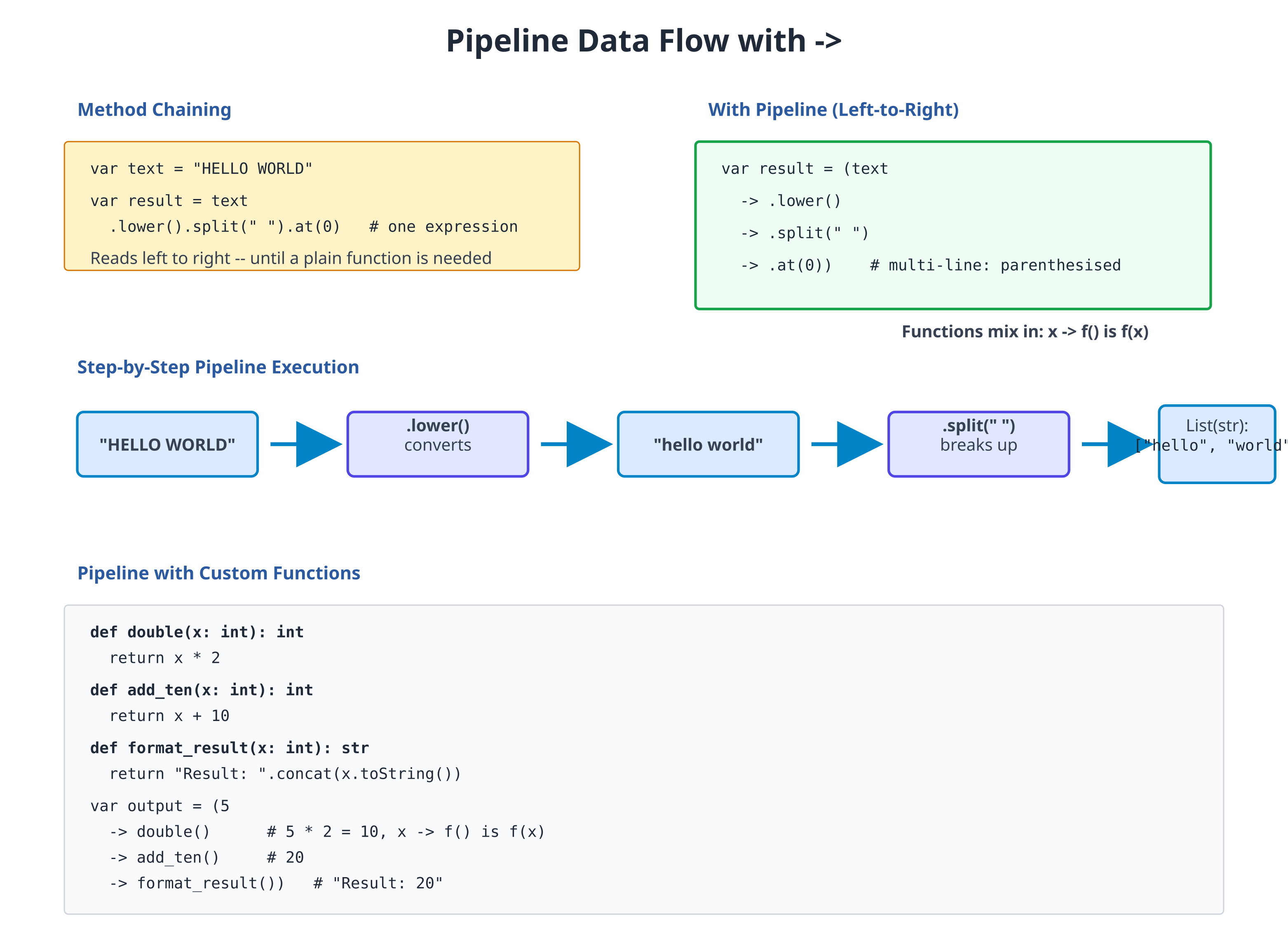
The -> operator passes the left-hand value to the right-hand expression:
# file: 15_pipeline_basics.zbr
# teaches: pipeline operator
# chapter: 15-Pipelines-and-Function-Composition

def main()
    var text = "HELLO WORLD"

    # Without pipeline (nested calls)
    var result1 = text.lower().split(" ")

    # With pipeline (left-to-right) — multi-line needs parens
    var result2 = (text
        -> .lower()
        -> .split(" "))

    # Both are equivalent
    for word in result2
        print(word)
Notice how pipeline reads more naturally: "take text, lowercase it, split it". Each -> says "pass the result of the previous expression to this one".
Chaining Multiple Operations
Pipelines shine when you have many sequential transformations:
# file: 15_pipeline_chain.zbr
# teaches: chaining operations
# chapter: 15-Pipelines-and-Function-Composition

class StringProcessor
    static
        def process(text: str): str
            return (text
                -> .lower()
                -> .trim()
                -> .replace("  ", " "))

def main()
    var input = "  HELLO   WORLD  "
    var output = StringProcessor.process(input)
    print(output)  # Output: hello world
Each line applies one transformation. This is much clearer than deeply nested method calls.
Pipelines with Collections
Pipelines work great with lists and maps:
# file: 15_pipeline_collections.zbr
# teaches: piping through collections
# chapter: 15-Pipelines-and-Function-Composition

class DataProcessor
    static
        def count_words(text: str): int
            return (text
                -> .lower()
                -> .split(" ")
                -> .count())

def main()
    var input = "The Quick Brown Fox"
    var words = (input
        -> .lower()
        -> .split(" "))

    var count = words.count()
    print("Word count: ${count}")
Here, the pipeline takes a string, lowercases it, splits into a list, and we can call .count() on the result.
Custom Functions in Pipelines
You can pipe to any function that takes one argument:
# file: 15_pipeline_custom.zbr
# teaches: custom functions in pipelines
# chapter: 15-Pipelines-and-Function-Composition

class Utils
    static
        def double(x: int): int
            return x * 2

        def add_ten(x: int): int
            return x + 10

        def format_result(x: int): str
            return "Result: ${x}"

def main()
    var result = (5
        -> Utils.double()
        -> Utils.add_ten()
        -> Utils.format_result())

    print(result)  # Output: Result: 20
The pipeline auto-prepends the left-hand value as the first argument to the
right-hand call. 5 -> Utils.double() becomes Utils.double(5). If the
function takes more arguments, supply them in the parens: 5 -> Utils.add(10)
becomes Utils.add(5, 10).
Real World: Data Transformation Pipeline
A practical example: process a CSV-like dataset:
# file: 15_pipeline_real_world.zbr
# teaches: realistic pipeline
# chapter: 15-Pipelines-and-Function-Composition

class DataAnalysis
    static
        def parse_numbers(line: str): List(int)
            var numbers: List(int) = List()
            var parts = line.split(",")
            for part in parts
                # Simplified: real parsing more complex
                var num = part.trim().toInt()
                numbers.add(num)
            return numbers

        def sum_list(items: List(int)): int
            var total = 0
            for item in items
                total = total + item
            return total

        def average(total: int, count: int): float
            if count == 0
                return 0.0
            return total / count

def main()
    var csv_line = "10, 20, 30, 40"

    var avg = (csv_line
        -> DataAnalysis.parse_numbers()
        -> DataAnalysis.sum_list()
        -> DataAnalysis.average(4))         # auto-prepends sum as first arg

    print("Average: ${avg}")
This reads as: "Parse CSV, sum values, calculate average." Much clearer than nested calls!
Function Composition Pattern
You can create composed functions that combine multiple operations:
# file: 15_function_composition.zbr
# teaches: composing functions
# chapter: 15-Pipelines-and-Function-Composition

class Transform
    static
        def lowercase(text: str): str
            return text.lower()

        def remove_spaces(text: str): str
            return text.replace(" ", "")

        def reverse_it(text: str): str
            return text.reverse()

        def compose_all(text: str): str
            return (text
                -> Transform.lowercase()
                -> Transform.remove_spaces()
                -> Transform.reverse_it())

def main()
    var input = "HELLO WORLD"
    var output = Transform.compose_all(input)
    print(output)  # Output: dlrowolleh
Each step is a self-contained function. Composition lets you reuse them in different orders.
Pipelines with Error Handling
Pipelines propagate errors naturally — if any step's throws function raises,
the whole pipeline aborts and the error surfaces at the function boundary.
Use a method-level catch clause to handle it:
# file: 15_pipeline_results.zbr
# teaches: pipelines with error handling
# chapter: 15-Pipelines-and-Function-Composition

class SafeParser
    static
        def parse_int(text: str): int throws
            if text.len == 0
                raise "Empty string"
            # NOTE: Hardcoded for demonstration. A real implementation would parse
            # the string into an integer. See Chapter 06 (Strings) for actual parsing.
            if text == "42"
                return 42
            raise "Not a number"

        def double_it(x: int): int
            return x * 2

def run(input: str)
    var doubled = (input
        -> SafeParser.parse_int()
        -> SafeParser.double_it())
    print(doubled)
catch |e|
    print("error: ${e}")

def main()
    run("42")               # prints 84
    run("not a number")     # prints "error: Not a number"
When an error occurs, the pipeline aborts and the method-level catch clause
runs. The catch |e| block sits at the same indent level as def — that's
the Zebra error-handling idiom (see Chapter 12).
Common Mistakes
Mistake 1: Piping to a Field, Not a Call
# WRONG — pipeline RHS must be a call expression
var result = (text
    -> .lower()
    -> .len)        # Error: .len is a field access, not a call

# CORRECT — finish the pipeline, then read the field
var lowered = text -> .lower()
var result = lowered.len
Mistake 2: Forgetting the Parens on a Multi-Line Pipeline
# WRONG — the expression ends at the first newline
var result = text
    -> .lower()             # parse error: unexpected token
    -> .split(" ")

# CORRECT — wrap the whole pipeline in parens
var result = (text
    -> .lower()
    -> .split(" "))

# Or write it on a single line (no parens needed):
var result = text -> .lower() -> .split(" ")
Mistake 3: Forgetting That the Pipe Becomes the First Argument
# Pipeline auto-prepends the left-hand value as the FIRST argument.
# So `10 -> Utils.add(5)` calls `Utils.add(10, 5)`, not `Utils.add(5, 10)`.

# Want 10 as the SECOND argument? Don't use a pipeline:
var result = Utils.add(5, 10)
Mistake 4: Over-Piping (Readability)
# TOO MUCH — hard to follow after many steps
var result = ("data"
    -> .lower()
    -> .trim()
    -> .replace("a", "b")
    -> .reverse()
    -> .split("")
    -> Filter.remove_blanks()
    -> Sorter.sort()
    -> Formatter.join_with_commas())

# BETTER — break into logical chunks with intermediate variables
var cleaned = ("data"
    -> .lower()
    -> .trim()
    -> .replace("a", "b"))

var processed = (cleaned
    -> .reverse()
    -> .split(""))
Exercises
Exercise 1: Text Processing Pipeline
Create a pipeline that takes user input and: converts to lowercase, removes leading/trailing spaces, and counts words:
Solution
class TextStats
    static
        def count_words(text: str): int
            if text.len == 0
                return 0
            var words = text.split(" ")
            return words.count()

def main()
    var user_input = "  HELLO WORLD FOO  "

    var word_count = (user_input
        -> .lower()
        -> .trim()
        -> TextStats.count_words())

    print("Words: ${word_count}")
Exercise 2: Number Transformation Pipeline
Build a pipeline that: parses an integer, doubles it, adds 10, and formats as a string:
Solution
class NumUtils
    static
        def parse_safe(text: str): int throws
            if text == "5"
                return 5
            raise "Invalid number"

        def double_it(x: int): int
            return x * 2

        def add_ten(x: int): int
            return x + 10

        def to_message(x: int): str
            return "Final result: ${x}"

def run(input: str)
    var final = (input
        -> NumUtils.parse_safe()
        -> NumUtils.double_it()
        -> NumUtils.add_ten()
        -> NumUtils.to_message())
    print(final)
catch |e|
    print("error: ${e}")

def main()
    run("5")               # prints "Final result: 20"
    run("not a number")    # prints "error: Invalid number"
Exercise 3: List Filtering Pipeline
Create a pipeline that filters a list of numbers to keep only even values and sums them:
Solution
class ListOps
    static
        def filter_even(items: List(int)): List(int)
            var result: List(int) = List()
            for item in items
                if item % 2 == 0
                    result.add(item)
            return result

        def sum_all(items: List(int)): int
            var total = 0
            for item in items
                total = total + item
            return total

def main()
    var numbers: List(int) = List()
    numbers.add(1)
    numbers.add(2)
    numbers.add(3)
    numbers.add(4)
    numbers.add(5)
    numbers.add(6)

    var sum = (numbers
        -> ListOps.filter_even()
        -> ListOps.sum_all())

    print("Sum of evens: ${sum}")
Key Takeaways
- Pipelines make data transformations read naturally — Left-to-right flow matches human thinking
- The
->operator passes results forward — The left value auto-prepends as the first argument of the right-hand call - Pipelines work with methods and functions — Mix
.method()calls withFunction()calls - Multi-line pipelines must be wrapped in
(...)— Zebra ends an expression at a bare EOL; parens keep the chain together - Break long pipelines into logical chunks — Maintain readability for complex transformations
- Pipelines +
throws= clean error handling — A method-levelcatchclause handles errors anywhere in the chain
Next Steps
- → 16-Project-1 — Build a tool that uses pipelines extensively
- → 21-Regular-Expressions — Pipelines + pattern matching = powerful text processing
Pipelines let your code flow like your thoughts. Master them, and complex transformations become natural.