Project 1: Command-Line Text Processing Tool
Time: 3-4 hours
Prereq: 01-12
Build: A file processor that counts words, finds patterns, and analyzes text
Project Overview
Create a CLI tool that:
- Reads files from command line arguments
- Counts lines, words, characters (like Unix
wccommand) - Searches for patterns (like grep-lite functionality)
- Outputs statistics
- Handles multiple files
- Reports errors gracefully
Learning Outcomes:
- Command-line argument parsing and validation
- File I/O with proper error handling
- Collections (List/HashMap) for data aggregation
- Algorithms for text analysis
- Error handling with
throws,?andcatch - Code organization in reusable modules
- Testing strategies for CLI tools
Difficulty: Intermediate | Skills Required: 1-12 chapters | Team Size: Solo
Step 1: Command-Line Argument Parsing
First, create a module to handle CLI arguments:
# file: cli_args.zbr
# teaches: argument parsing
# project: Project-1-CLI-Tool

class CliArgs
    var command: str
    var filename: str
    var pattern: str?

    cue init(command: str, filename: str)
        this.command = command
        this.filename = filename
        pattern = nil

class CommandParser
    static
        def parse(args: List(str)): CliArgs throws
            # Precondition: program name + command + filename
            if args.count() < 3
                raise "Usage: textool [command] [file]"

            var command = args.at(1)
            var filename = args.at(2)

            # Validate command
            if not valid_command(command)
                raise "Unknown command: ${command}"

            # Create args object
            var cli_args = CliArgs(command, filename)

            # Add pattern if provided
            if args.count() >= 4
                cli_args.pattern = args.at(3)

            return cli_args

        def valid_command(cmd: str): bool
            return cmd == "count" or cmd == "search" or cmd == "stats"
Step 2: File Reading and Basic Counting
Build the core file I/O and counting functionality. Every operation that can fail is marked throws; a caller writes ? after the call to pass the error up, so count_lines needs no error-handling code of its own:
# file: file_processor.zbr
# teaches: file I/O and text processing
# project: Project-1-CLI-Tool

class Stats
    var filename: str
    var lines: int
    var words: int
    var chars: int

    cue init(filename: str, lines: int, words: int, chars: int)
        this.filename = filename
        this.lines = lines
        this.words = words
        this.chars = chars

    def display(): str
        return "${lines} lines, ${words} words, ${chars} chars: ${filename}"

class FileProcessor
    static
        def read_file(filename: str): str throws
            # Check if file exists first
            if not File.exists(filename)
                raise "File not found: ${filename}"

            # Read the entire file
            var content = File.read(filename)

            if content.len == 0
                raise "File is empty: ${filename}"

            return content

        def count_lines(filename: str): int throws
            var content = read_file(filename)?
            var lines = content.split("\n")

            # Count non-empty lines (common behavior)
            var count = 0
            for line in lines
                if line.trim().len > 0
                    count = count + 1

            return count

        def count_words(filename: str): int throws
            var content = read_file(filename)?
            var words = content.split(" ")

            var count = 0
            for word in words
                if word.trim().len > 0
                    count = count + 1

            return count

        def count_chars(filename: str): int throws
            var content = read_file(filename)?
            return content.len

        def get_stats(filename: str): Stats throws
            var content = read_file(filename)?

            var lines = content.split("\n")
            var line_count = lines.count()
            var word_count = 0
            var char_count = content.len

            for line in lines
                var words = line.split(" ")
                for word in words
                    if word.len > 0
                        word_count = word_count + 1

            return Stats(filename, line_count, word_count, char_count)
Step 3: Pattern Matching
Add grep-like pattern search functionality. use file_processor exposing FileProcessor brings the class from Step 2 into scope by name:
# file: pattern_search.zbr
# teaches: pattern matching and filtering
# project: Project-1-CLI-Tool

use file_processor exposing FileProcessor, Stats

class PatternMatcher
    static
        def search_lines(filename: str, pattern: str): List(str) throws
            var content = FileProcessor.read_file(filename)?
            var lines = content.split("\n")

            var matches = List(str)()
            var line_num = 0

            for line in lines
                line_num = line_num + 1
                if line.contains(pattern)
                    # Format: "line_number: content"
                    matches.add("${line_num}: ${line}")

            if matches.count() == 0
                raise "No matches found for pattern: ${pattern}"

            return matches

        def search_with_context(filename: str, pattern: str, context_lines: int): List(str) throws
            var content = FileProcessor.read_file(filename)?
            var lines = content.split("\n")

            var results = List(str)()
            var line_num = 0

            for line in lines
                line_num = line_num + 1
                if line.contains(pattern)
                    # Add context lines before
                    var start = line_num - context_lines - 1
                    if start < 0
                        start = 0

                    var i = start
                    while i < line_num - 1
                        results.add(lines.at(i))
                        i = i + 1

                    # Add the matching line (with marker)
                    results.add("> ${line_num}: ${line}")

                    # Add context lines after
                    var end = line_num + context_lines
                    if end > lines.count()
                        end = lines.count()

                    i = line_num
                    while i < end
                        results.add(lines.at(i))
                        i = i + 1

            return results
Step 4: Main Application Logic
Tie everything together in the main entry point. main is where errors stop: its method-level catch clause (after the body, at the same indent as def) turns any error raised anywhere below into one printed line. Note if args.pattern as pattern — the optional is unwrapped and bound in one step:
# file: project1_main.zbr
# teaches: orchestrating modules
# project: Project-1-CLI-Tool

use cli_args exposing CliArgs, CommandParser
use file_processor exposing FileProcessor
use pattern_search exposing PatternMatcher

class Application
    var args: CliArgs

    cue init(parsed_args: CliArgs)
        args = parsed_args

    def run(): bool throws
        if args.command == "count"
            return handle_count()?
        else if args.command == "search"
            return handle_search()?
        else if args.command == "stats"
            return handle_stats()?

        raise "Unknown command: ${args.command}"

    def handle_count(): bool throws
        var lines = FileProcessor.count_lines(args.filename)?
        var words = FileProcessor.count_words(args.filename)?
        var chars = FileProcessor.count_chars(args.filename)?

        print("${lines} lines")
        print("${words} words")
        print("${chars} chars")

        return true

    def handle_search(): bool throws
        if args.pattern as pattern
            var matches = PatternMatcher.search_lines(args.filename, pattern)?
            print("Found ${matches.count()} matches:")

            for match in matches
                print(match)

            return true

        raise "Search requires a pattern"

    def handle_stats(): bool throws
        var stats = FileProcessor.get_stats(args.filename)?
        print(stats.display())
        return true

def main()
    var parsed = CommandParser.parse(sys.args())?
    var app = Application(parsed)
    app.run()?
catch |e|
    print("Error: ${e.message}")
Part 2: Adding Features
A throws method composes other throws methods with ?; the first failure ends the method and hands the error to the caller. At the top, an inline postfix catch supplies a fallback value instead of propagating:
use file_processor exposing FileProcessor

class FileAnalyzer
    static
        def analyze(filename: str): str throws
            var lines = FileProcessor.count_lines(filename)?
            var words = FileProcessor.count_words(filename)?
            return "Lines: ${lines}, Words: ${words}"

def main()
    print(FileAnalyzer.analyze("test.txt") catch "could not analyze test.txt")
Part 3: Full Implementation
Add these features:
- Read command-line arguments
- Support multiple files
- Pattern matching (grep-like)
- Output formatting
- Error handling
Expected functionality:
# Word count
tool -c file.txt          # Count lines
tool -w file.txt          # Count words
tool -l file.txt          # Get line length

# Search
tool -s "pattern" file.txt  # Search lines matching pattern

# Multiple files
tool -c file1.txt file2.txt # Count lines in multiple files
Testing Your Project
Create a test file to verify your implementation:
# Create sample file
echo "The quick brown fox" > sample.txt
echo "jumps over the lazy dog" >> sample.txt

# Test commands (with compile-and-run, the program's own arguments go after `--`)
zebra project1_main.zbr -- count sample.txt         # Count lines, words, chars
zebra project1_main.zbr -- search sample.txt quick  # Find pattern
zebra project1_main.zbr -- stats sample.txt         # Show statistics
zebra project1_main.zbr -- search sample.txt zzz    # Error: No matches found for pattern: zzz
Exercises & Extensions
Exercise 1: Add Line Numbering Output
Modify the search function to always show line numbers with output:
def search_with_numbers(filename: str, pattern: str): List(str) throws
    # Results already carry line numbers from PatternMatcher; `?` passes
    # any error straight through to our caller
    return PatternMatcher.search_lines(filename, pattern)?
Exercise 2: Find Longest Line
Add a new longest command that finds and displays the longest line:
class FileProcessor
    static
        def find_longest_line(filename: str): str throws
            var content: str = read_file(filename)?
            var lines = content.split("\n")
            var longest = ""
            var max_len = 0

            for line in lines
                if line.len > max_len
                    max_len = line.len
                    longest = line

            return "Longest (${max_len} chars): ${longest}"
Exercise 3: Statistics Summary
Extend stats to show min/max/average line length:
class Stats
    var filename: str
    var lines: int
    var words: int
    var chars: int
    var min_line_len: int
    var max_line_len: int
    var avg_line_len: float

    def display(): str
        var summary = "${lines} lines, ${words} words, ${chars} chars\n"
        return summary + "Line lengths: min=${min_line_len}, max=${max_line_len}, avg=${avg_line_len}"
Exercise 4: Case-Insensitive Search
Add support for a -i flag to search case-insensitively:
class PatternMatcher
    static
        def search_case_insensitive(filename: str, pattern: str): List(str) throws
            var content = FileProcessor.read_file(filename)?
            var lines = content.split("\n")
            var pattern_lower = pattern.lower()

            var matches = List(str)()
            var line_num = 0

            for line in lines
                line_num = line_num + 1
                if line.lower().contains(pattern_lower)
                    matches.add("${line_num}: ${line}")

            return matches
Challenge: Support Multiple Files
Modify the application to process multiple files at once. A file that cannot be read should be skipped rather than abort the whole run — catch nil turns the error into an optional, and if ... as keeps only the successes:
class Application
    var files: List(str)

    def aggregate_stats(filenames: List(str)): str
        var total_lines = 0
        var total_words = 0
        var total_chars = 0

        for filename in filenames
            var s = FileProcessor.get_stats(filename) catch nil
            if s as stats
                total_lines = total_lines + stats.lines
                total_words = total_words + stats.words
                total_chars = total_chars + stats.chars

        return "Total: ${total_lines} lines, ${total_words} words, ${total_chars} chars"
Key Concepts Reinforced
- File I/O — Reading files with error handling
- Collections — Using List to accumulate results
- Control flow — Iterating and filtering text
- Nil handling — Optional pattern argument
- Error handling —
throwsmethods,?propagation,catchat the boundary - Classes — Organizing functionality into modules
- Strings — Splitting, searching, formatting
- Optionals —
catch nilandif ... asto skip failures without aborting
Architecture Decisions
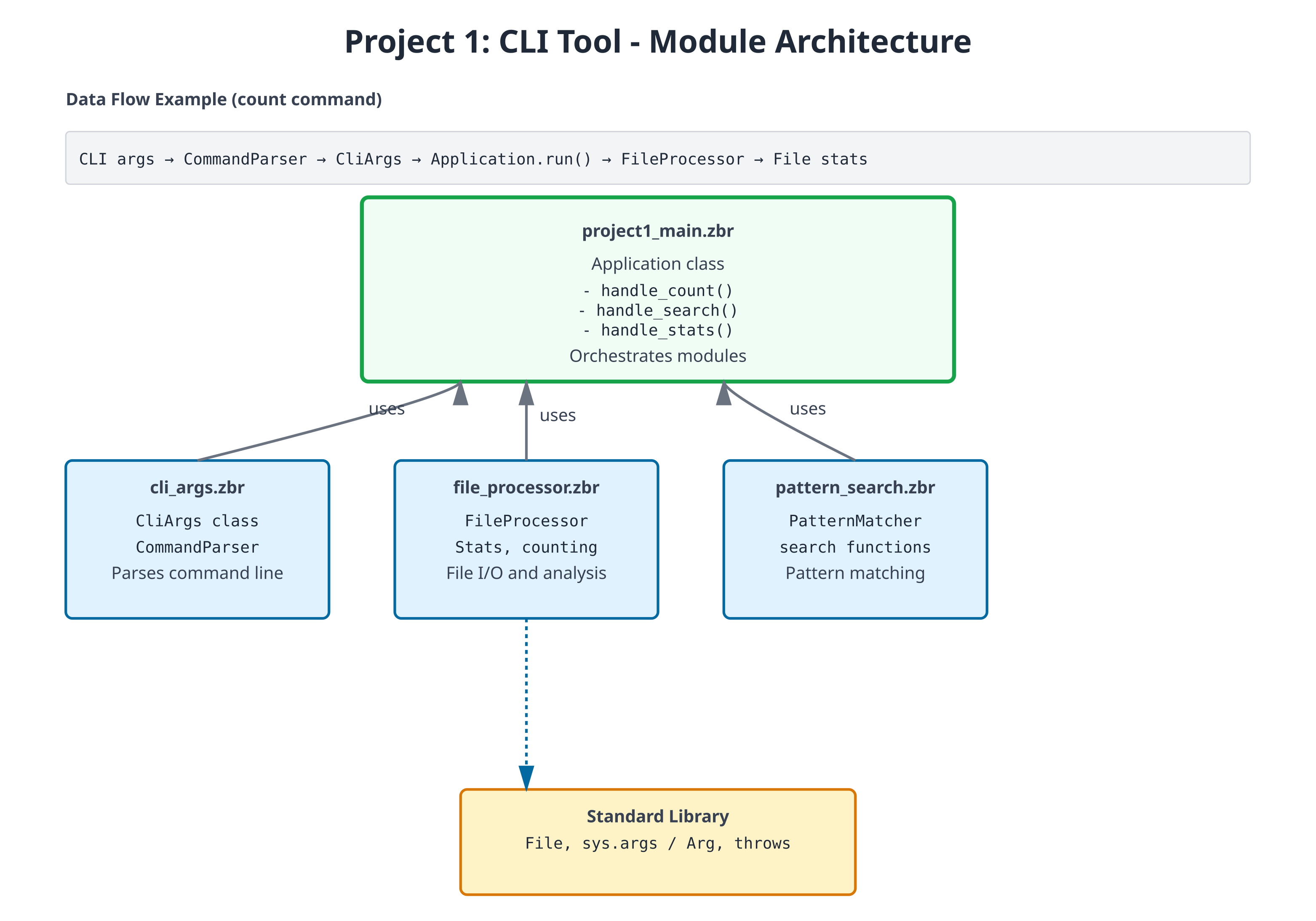
Module Organization:
cli_args.zbr— Argument parsing (thin responsibility)file_processor.zbr— Core file I/O (stable, well-tested)pattern_search.zbr— Search logic (isolated from I/O)project1_main.zbr— Orchestration and CLI (thin coordinator)
Why this structure? Each module has a clear, testable responsibility. You can test file reading separately from pattern matching, and both separately from CLI handling.
Error Handling Strategy: Every I/O operation is throws, and every caller writes ?. Errors bubble up naturally—if file reading fails, search fails; if search fails, main's catch clause reports it. No hidden failures, and no error-checking code anywhere except the one place errors are actually handled.
Expected code size: 300-400 lines total with all exercises
What You've Built
✅ Real-world program structure with modules
✅ Complete file and stream processing
✅ Command-line interface with argument parsing
✅ Robust error handling with throws, ? and catch
✅ Pattern matching and text analysis
✅ Extensible design for new features
Performance Notes
For large files (>10MB), consider:
- Reading line-by-line instead of entire file into memory
- Early exit from search (stop after first N matches)
- Streaming pattern matching instead of loading whole file
Example streaming read:
# Read and process line-by-line instead of all at once
def count_lines_streaming(filename: str): int throws
    # (Pseudocode - requires file iteration API)
    var count = 0
    # for line in File.read_lines(filename)
    #     count = count + 1
    return count
Next: Project 2 adds networking and concurrency concepts to build an HTTP server.