Projects 2 & 3: HTTP Server and Data Analysis
Project 2: HTTP Server (16-18 hours)
Build: A small REST API server that answers real HTTP requests with JSON
Learning Outcomes:
- Serving HTTP with the built-in
Http.serve - Routing on method and path, including a path parameter
- Producing and parsing JSON with
Json - Choosing status codes (200, 201, 400, 404, 405)
- Module-level state shared by a server's handlers
- What "one thread per connection" means for that state
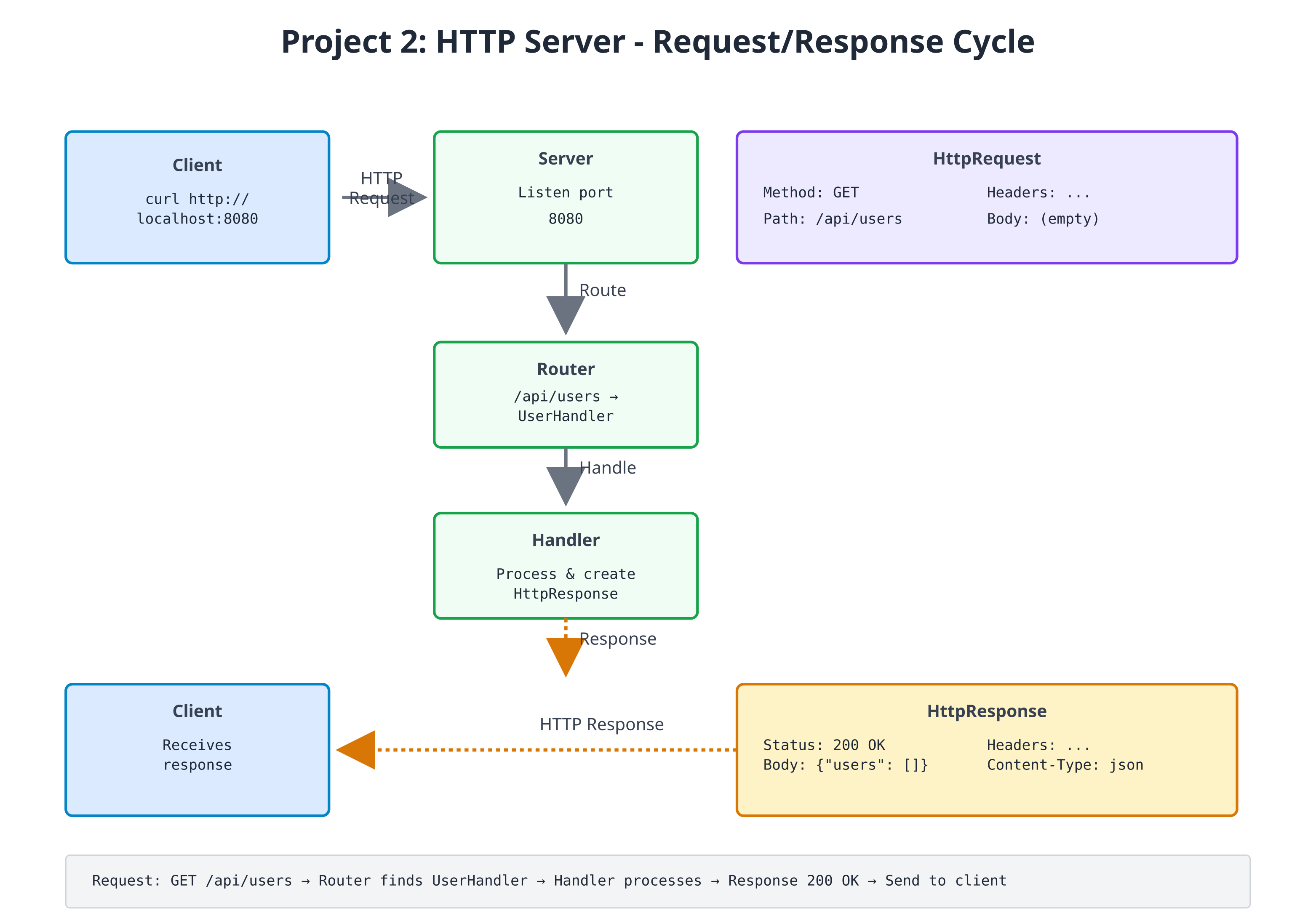
Zebra's standard library already knows how to speak HTTP. Http.serve(port, handler)
listens on a port, parses each request into an HttpRequest (method, path,
content, and the raw query string), calls your handler, and writes the
HttpResponse it returns back to the client. Your job is the part that is actually
about your application: the data, and deciding which response each request gets.
The project is three files in one directory:
| File | Role |
|---|---|
user_store.zbr | The data: a User class and the list of users |
router.zbr | route(req) — turns one request into one response |
http_server.zbr | main() — starts the server |
Step 1: The Data Model
# file: user_store.zbr
# teaches: module-level state, a small data model, JSON output
# project: Project-2-HTTP-Server

class User
    var id: int
    var name: str

    cue init(id: int, name: str)
        this.id = id
        this.name = name

    def toJson(): str
        var obj = Json.object()
        obj.putInt("id", this.id)
        obj.put("name", this.name)
        return Json.stringify(obj)

# One list shared by every function in this file (QUICKSTART §2.1).
var users = List(User)()
var next_id = 1

def addUser(name: str): User
    var user = User(next_id, name)
    users.add(user)
    next_id = next_id + 1
    return user

def findUser(id: int): User?
    for user in users
        if user.id == id
            return user
    return nil

def allUsersJson(): str
    var parts = List(str)()
    for user in users
        parts.add(user.toJson())
    return "[" + parts.join(",") + "]"
users and next_id are module-level variables: one value shared by every
function in the file, so a user added by one request is visible to the next.
Json.object() builds the JSON text for us, so a name containing a quote is
escaped correctly without any hand-written string gymnastics.
Step 2: Request Routing
The router is a single function from HttpRequest to HttpResponse. The
built-in HttpResponse has factories for the common cases — HttpResponse.ok(body)
and HttpResponse.notFound(body) — and HttpResponse.new(status, body) for any
other status code.
# file: router.zbr
# teaches: routing on method and path, path parameters, status codes
# project: Project-2-HTTP-Server

use user_store exposing addUser, findUser, allUsersJson

def route(req: HttpRequest): HttpResponse
    if req.path == "/health"
        return HttpResponse.ok("{\"status\": \"healthy\"}")

    if req.path == "/api/users"
        if req.method == "GET"
            return HttpResponse.ok(allUsersJson())
        if req.method == "POST"
            return createUser(req.content)
        return HttpResponse.new(405, "method not allowed")

    # /api/users/<id> -- a path parameter
    if req.path.startsWith("/api/users/") and req.method == "GET"
        # "/api/users/2".split("/") is ["", "api", "users", "2"].
        # Keep the ": str" -- without it, today's compiler mistypes the element.
        var idText: str = req.path.split("/").at(3)
        if findUser(idText.toInt()) as user
            return HttpResponse.ok(user.toJson())
        return HttpResponse.notFound("no user ${idText}")

    return HttpResponse.notFound("no route for ${req.method} ${req.path}")

def createUser(body: str): HttpResponse
    # Expect a JSON body like {"name": "Ada"}
    if Json.parse(body) as json
        var name = json.tryStr("name") orelse ""
        if name.len > 0
            return HttpResponse.new(201, addUser(name).toJson())
    return HttpResponse.new(400, "expected a JSON body like {\"name\": \"Ada\"}")
Every route is an if you can read top to bottom. Adding a route is adding a
branch; there is no registration table to keep in sync.
Step 3: Starting the Server
# file: http_server.zbr
# teaches: starting a real server with Http.serve
# project: Project-2-HTTP-Server

use router exposing route

def main()
    print("Listening on http://localhost:8080  (Ctrl+C to stop)")
    Http.serve(8080, route)
Http.serve takes the port and the handler function, and never returns: it
accepts connections until you stop the process.
Concurrency note.
Http.servehandles each connection on its own thread, so requests can run at the same time. Theuserslist has no lock around it, so two simultaneousPOSTs could race. That is fine for trying the server out with one client at a time, as below; a production server would need to guard shared state.
Exercises
- Add query parameter parsing:
req.queryholds the raw text after?(e.g.name=Ada&limit=5); split it into key/value pairs and supportGET /api/users?name=Ada - Complete the resource: add
PUT /api/users/<id>(rename) andDELETE /api/users/<id>, returning 404 for an unknown id - Request logging: log each request (timestamp, method, path, response code)
- Middleware: wrap
routein a function that runs code before and after every request - Validation: reject names that are empty after
.trim()or longer than 50 characters with a 400 - Guard the shared state: make concurrent
POSTs safe (see Chapter 14c)
Testing the Server
Run the three files from the same directory. The first build takes a little while; then the server prints its banner and waits:
$ zebra http_server.zbr
Listening on http://localhost:8080  (Ctrl+C to stop)
From a second terminal:
$ curl http://localhost:8080/health
{"status": "healthy"}

$ curl http://localhost:8080/api/users
[]

$ curl -X POST -d '{"name": "Ada"}' http://localhost:8080/api/users
{"id":1,"name":"Ada"}

$ curl -X POST -d '{"name": "Grace"}' http://localhost:8080/api/users
{"id":2,"name":"Grace"}

$ curl http://localhost:8080/api/users
[{"id":1,"name":"Ada"},{"id":2,"name":"Grace"}]

$ curl http://localhost:8080/api/users/2
{"id":2,"name":"Grace"}

$ curl -i http://localhost:8080/api/users/9
HTTP/1.1 404 Not Found
...
no user 9

$ curl -i -X DELETE http://localhost:8080/api/users
HTTP/1.1 405 Method Not Allowed
...
method not allowed
Use curl -i to see the status line and headers. (The runtime labels every
response Content-Type: text/html; charset=utf-8, even when the body is JSON.)
Stop the server with Ctrl+C.
Project 3: Text Data Analysis (12-15 hours)
Build: Analyze text data (n-grams, frequencies, similarity) for linguistic patterns
Learning Outcomes:
- Advanced data structures (HashMap, nested structures)
- Algorithms (n-gram extraction, frequency analysis, similarity scoring)
- File batch processing
- Statistical analysis
- Performance optimization with data structures
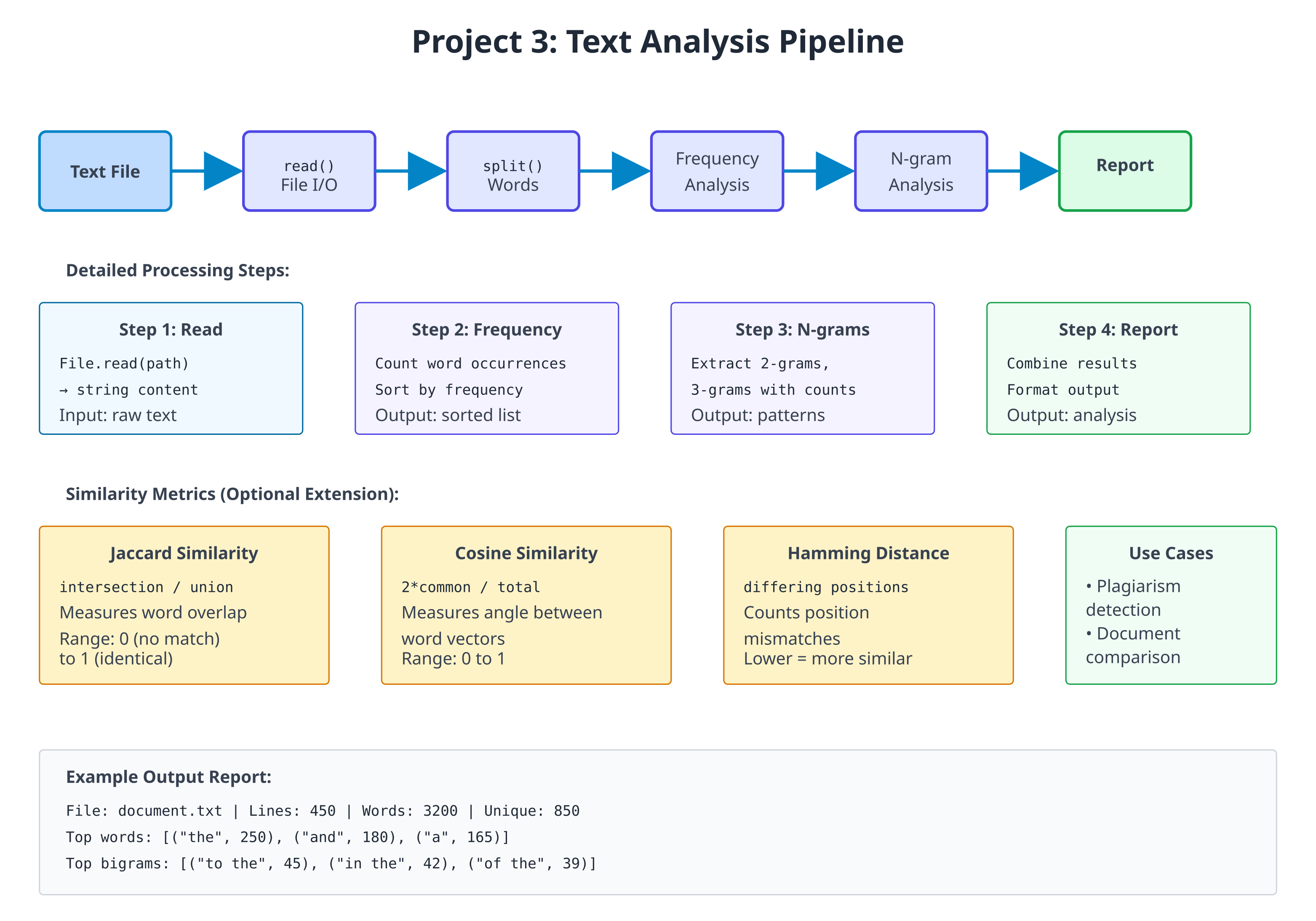
Step 1: Frequency Analysis
Start with counting word frequencies:
# file: frequency_analysis.zbr
# teaches: frequency counting and sorting
# project: Project-3-Data-Analysis

class WordFrequency
    var word: str
    var count: int

    cue init(word: str, count: int)
        this.word = word
        this.count = count

    def to_string(): str
        return "${word}: ${count}"

class FrequencyAnalyzer
    static
        def analyze_text(text: str): List(WordFrequency)
            var words = text.lower().split(" ")
            var freq: HashMap(str, int) = HashMap()

            # Count occurrences
            for word in words
                var cleaned = word.trim()
                if cleaned.len > 0
                    if freq.contains(cleaned)
                        freq.put(cleaned, freq.fetch(cleaned) + 1)
                    else
                        freq.put(cleaned, 1)

            # Convert to list and sort by frequency
            var results: List(WordFrequency) = List()
            for word, count in freq
                var wf = WordFrequency(word, count)
                results.add(wf)

            # Simple bubble sort (in-place)
            var i = 0
            while i < results.count()
                var j = 0
                while j < results.count() - 1
                    var current = results.at(j)
                    var next = results.at(j + 1)
                    if current.count < next.count
                        # Swap (simplified)
                        var temp = current
                        results[j] = next
                        results[j + 1] = temp
                    j = j + 1
                i = i + 1

            return results

        def top_words(text: str, limit: int): List(WordFrequency)
            var all_freqs = analyze_text(text)
            var results: List(WordFrequency) = List()

            var i = 0
            while i < limit and i < all_freqs.count()
                results.add(all_freqs.at(i))
                i = i + 1

            return results
Step 2: N-gram Extraction
Extract contiguous sequences of N words:
# file: ngram_analysis.zbr
# teaches: n-gram extraction and pattern detection
# project: Project-3-Data-Analysis

class NGram
    var gram: str
    var count: int
    var positions: List(int)  # Track where it appears

    cue init(gram: str)
        this.gram = gram
        count = 1
        positions = List()

class NGramAnalyzer
    static
        def extract_ngrams(text: str, n: int): HashMap(str, NGram)
            var words = text.lower().split(" ")
            var ngrams: HashMap(str, NGram) = HashMap()

            var i = 0
            while i < words.count() - (n - 1)
                var gram = ""
                var j = 0
                while j < n
                    var word = words.at(i + j).trim()
                    if j > 0
                        gram = gram.concat(" ")
                    gram = gram.concat(word)
                    j = j + 1

                if ngrams.contains(gram)
                    var ng = ngrams.fetch(gram)
                    ng.count = ng.count + 1
                    ng.positions.add(i)
                else
                    var ng = NGram(gram)
                    ng.positions.add(i)
                    ngrams.put(gram, ng)

                i = i + 1

            return ngrams

        def top_ngrams(text: str, n: int, limit: int): List(NGram)
            var all_grams = extract_ngrams(text, n)
            var results: List(NGram) = List()

            # Simple sorting
            for gram, ng in all_grams
                results.add(ng)

            # Bubble sort by count
            var i = 0
            while i < results.count()
                var j = 0
                while j < results.count() - 1
                    var current = results.at(j)
                    var next = results.at(j + 1)
                    if current.count < next.count
                        var temp = current
                        results[j] = next
                        results[j + 1] = temp
                    j = j + 1
                i = i + 1

            # Return top N
            var top: List(NGram) = List()
            i = 0
            while i < limit and i < results.count()
                top.add(results.at(i))
                i = i + 1

            return top
Step 3: Similarity Analysis
Compare texts using Jaccard and other similarity metrics:
# file: similarity_analysis.zbr
# teaches: similarity metrics and comparison
# project: Project-3-Data-Analysis

class SimilarityMetrics
    static
        def jaccard_similarity(text1: str, text2: str): float
            var words1 = text1.lower().split(" ")
            var words2 = text2.lower().split(" ")

            # Find intersection
            var intersection = 0
            for word1 in words1
                for word2 in words2
                    if word1 == word2
                        intersection = intersection + 1
                        break

            # Size of the union (crude approximation)
            var total = words1.count() + words2.count() - intersection

            if total == 0
                return 0.0

            return intersection.toFloat() / total.toFloat()

        def cosine_similarity(text1: str, text2: str): float
            # Simplified cosine similarity (not true cosine, but similar)
            var words1 = text1.lower().split(" ")
            var words2 = text2.lower().split(" ")

            var common = 0
            for word1 in words1
                for word2 in words2
                    if word1 == word2
                        common = common + 1

            var len1 = words1.count()
            var len2 = words2.count()

            if len1 == 0 or len2 == 0
                return 0.0

            var denominator = len1 + len2
            return (2.0 * common.toFloat()) / denominator.toFloat()

        def hamming_distance(text1: str, text2: str): int
            var words1 = text1.lower().split(" ")
            var words2 = text2.lower().split(" ")

            var max_len = words1.count()
            if words2.count() > max_len
                max_len = words2.count()

            var distance = 0
            var i = 0
            while i < max_len
                var w1 = if(i < words1.count(), words1.at(i), "")
                var w2 = if(i < words2.count(), words2.at(i), "")

                if w1 != w2
                    distance = distance + 1

                i = i + 1

            return distance
Step 4: Main Analysis Application
Tie together all analysis tools:
# file: analysis_main.zbr
# teaches: combining analysis modules
# project: Project-3-Data-Analysis

use frequency_analysis exposing WordFrequency, FrequencyAnalyzer
use ngram_analysis exposing NGram, NGramAnalyzer

class TextAnalysisReport
    var source_file: str = ""
    var word_count: int = 0
    var unique_words: int = 0
    var top_words: List(WordFrequency) = List(WordFrequency)()
    var bigrams: List(NGram) = List(NGram)()
    var trigrams: List(NGram) = List(NGram)()

class AnalysisApplication
    static
        def analyze_file(filename: str): TextAnalysisReport throws
            # File.read is not `throws` -- a missing file stops the program --
            # so check first and raise an error the caller can catch.
            if not File.exists(filename)
                raise "File not found: ${filename}"

            var content = File.read(filename)
            if content.len == 0
                raise "File is empty: ${filename}"

            var words = content.split(" ")
            var unique_words_set: HashMap(str, int) = HashMap()

            for word in words
                var cleaned = word.lower().trim()
                if cleaned.len > 0
                    unique_words_set.put(cleaned, 1)

            var report = TextAnalysisReport()
            report.source_file = filename
            report.word_count = words.count()
            report.unique_words = unique_words_set.count()
            report.top_words = FrequencyAnalyzer.top_words(content, 10)
            report.bigrams = NGramAnalyzer.top_ngrams(content, 2, 5)
            report.trigrams = NGramAnalyzer.top_ngrams(content, 3, 5)

            return report

        def print_report(report: TextAnalysisReport)
            print("==== Text Analysis Report ====")
            print("File: ${report.source_file}")
            print("Total words: ${report.word_count}")
            print("Unique words: ${report.unique_words}")
            print("")

            print("Top 10 Words:")
            for wf in report.top_words
                print("  ${wf.to_string()}")
            print("")

            print("Top 5 Bigrams:")
            for bigram in report.bigrams
                print("  ${bigram.gram} (${bigram.count})")
            print("")

            print("Top 5 Trigrams:")
            for trigram in report.trigrams
                print("  ${trigram.gram} (${trigram.count})")

def main()
    var report = AnalysisApplication.analyze_file("sample.txt")
    AnalysisApplication.print_report(report)
catch |err|
    print("Error: ${err.message}")
Exercises
- Find most common bigrams and trigrams — Already implemented in Step 2
- Detect language patterns — Compare bigram distributions across texts
- Compare two documents — Use similarity metrics from Step 3
- Find suspicious passages — Identify sections with high similarity to other documents (plagiarism detection)
- Build a frequency graph — Output word frequency distribution
- Implement TF-IDF — Weight words by frequency and document uniqueness
Testing
Put the four files in one directory with a sample.txt next to them, then:
$ zebra analysis_main.zbr
==== Text Analysis Report ====
File: sample.txt
Total words: 15
Unique words: 11

Top 10 Words:
  the: 3
  quick: 2
  fox: 2
...
(That is the report for a sample.txt containing the quick brown fox jumps
over the lazy dog and the quick red fox runs. Words with equal counts may come
out in a different order.) Without a sample.txt the program prints
Error: File not found: sample.txt.
Exercise 3 is where a compare_files.zbr comes from: write it yourself, using
SimilarityMetrics from Step 3.
Project Comparison Summary
| Feature | Project 1 | Project 2 | Project 3 |
|---|---|---|---|
| Focus | File I/O + CLI | Networking + Routing | Algorithms + Data Structures |
| Core Skill | Argument parsing, basic text processing | Network protocols, request handling | Complex algorithms, statistics |
| Complexity | Beginner-Intermediate | Intermediate | Intermediate-Advanced |
| Code Size | 300-400 lines | 400-600 lines | 350-500 lines |
| Key Learning | Modules, error handling | Servers, routing, state management | Data structures, sorting, metrics |
| Time Estimate | 3-4 hours | 5-7 hours | 4-5 hours |
| Real-World Use | Log analysis, text processing | API servers, web services | Data science, plagiarism detection |
Capstone Challenge: Integrated System
After completing all three projects, combine them:
class IntegratedSystem
    static
        def run_analysis_via_http(port: int, analysis_dir: str)
            # Start HTTP server (Project 2)
            # Serve text analysis results (Project 3)
            # Process files via CLI (Project 1)

            # GET /health — Health check
            # POST /analyze — Upload and analyze file
            # GET /results — Retrieve analysis results
            # GET /compare — Compare two documents
This demonstrates:
- ✅ Networking and servers
- ✅ Complex data processing
- ✅ CLI integration
- ✅ Professional system design
Each project is a portfolio piece. Together, they demonstrate mastery of Zebra and modern programming fundamentals.
Project Comparison
| Feature | CLI Tool | HTTP Server | Data Analysis |
|---|---|---|---|
| Lines of code | 200-300 | 300-500 | 250-400 |
| Main focus | File I/O | Networking | Algorithms |
| Difficulty | Beginner | Intermediate | Intermediate |
| Key learning | CLI, modules | Servers, protocols | Data structures |
| Time to complete | 3-4 hours | 5-7 hours | 4-5 hours |
Progressive Difficulty
- CLI Tool: Learn file I/O and basic structure
- HTTP Server: Add networking and concurrency concepts
- Data Analysis: Deep dive into algorithms and data structures
Each project reuses concepts from previous ones while introducing new challenges.
Capstone Challenges
After completing all three:
- Integrate CLI tool with HTTP server (serve file statistics)
- Use data analysis in HTTP endpoints
- Build a combined system processing files via HTTP
Expected Outcomes
✅ Real-world program architecture
✅ Network programming fundamentals
✅ Advanced data structure manipulation
✅ Practical error handling
✅ Performance considerations
✅ Testing strategies
Each project is a portfolio piece demonstrating Zebra mastery.